mirror of
https://github.com/gromlab-ru/svg-sprites.git
synced 2026-07-22 20:50:19 +03:00
Compare commits
23 Commits
fix/releas
...
chore/rele
| Author | SHA1 | Date | |
|---|---|---|---|
| c47fbdad8c | |||

|
06fef6bd96 | ||
| 00fa6cea28 | |||
|
|
b9451c8ff3 | ||
| 1b6a5cb90c | |||
|
|
cb40d4eb04 | ||
| 873704abd6 | |||
| 3f6b186a5b | |||

|
c7e6a27236 | ||
| b4869deb97 | |||
|
|
07d57e3838 | ||
| 1b5b446d8f | |||
|
|
b3a3a8347a | ||
| b72a113955 | |||
|
|
838cb7cfff | ||
| 4833b31516 | |||
|
|
38068d7c9f | ||
| 82bc9e7d77 | |||
|
|
b6c4561c28 | ||
| 03858aa1f4 | |||
|
|
9439682235 | ||
| df096126a7 | |||
|
|
4b47df9898 |

9
.github/workflows/release.yml
vendored
9
.github/workflows/release.yml
vendored
@@ -28,15 +28,16 @@ jobs:
|
|||||||
|
|
||||||
steps:
|
steps:
|
||||||
- name: Checkout release tag
|
- name: Checkout release tag
|
||||||
uses: actions/checkout@v4
|
uses: actions/checkout@v6
|
||||||
with:
|
with:
|
||||||
ref: ${{ github.event.release.tag_name || inputs.tag }}
|
ref: ${{ github.event.release.tag_name || inputs.tag }}
|
||||||
|
|
||||||
- name: Setup Node.js
|
- name: Setup Node.js
|
||||||
uses: actions/setup-node@v4
|
uses: actions/setup-node@v6
|
||||||
with:
|
with:
|
||||||
node-version: 24
|
node-version: 24
|
||||||
cache: npm
|
registry-url: https://registry.npmjs.org
|
||||||
|
package-manager-cache: false
|
||||||
|
|
||||||
- name: Update npm
|
- name: Update npm
|
||||||
run: npm install --global npm@latest
|
run: npm install --global npm@latest
|
||||||
@@ -111,4 +112,4 @@ jobs:
|
|||||||
DIST_TAG=next
|
DIST_TAG=next
|
||||||
fi
|
fi
|
||||||
|
|
||||||
npm publish ./release/*.tgz --access public --provenance --tag "$DIST_TAG"
|
npm publish --ignore-scripts --access public --tag "$DIST_TAG"
|
||||||
|
|||||||
1
.gitignore
vendored
1
.gitignore
vendored
@@ -3,6 +3,7 @@ dist/
|
|||||||
public/
|
public/
|
||||||
test/public/
|
test/public/
|
||||||
.tmp/
|
.tmp/
|
||||||
|
skills/artifacts/
|
||||||
*.generated.ts
|
*.generated.ts
|
||||||
*.tgz
|
*.tgz
|
||||||
.DS_Store
|
.DS_Store
|
||||||
|
|||||||
55
FEATURES.md
Normal file
55
FEATURES.md
Normal file
@@ -0,0 +1,55 @@
|
|||||||
|
# Иконки без лишней цены для приложения
|
||||||
|
|
||||||
|
`@gromlab/svg-sprites` превращает SVG проекта в кешируемую, типизированную систему иконок для React и Next.js. В коде остаются простые компоненты, а приложение получает преимущества спрайтов без сложной инфраструктуры.
|
||||||
|
|
||||||
|
1. **AI-friendly из коробки**
|
||||||
|
|
||||||
|
`@gromlab/svg-sprites` сразу рассчитан на работу с AI-агентами. Подключите готовый skill и поручите агенту настройку, миграцию или диагностику без длинных инструкций и ручного изучения документации.
|
||||||
|
|
||||||
|
2. **Типизированный React-компонент с автокомплитом**
|
||||||
|
|
||||||
|
Каждый спрайт получает собственный готовый компонент. Prop `icon` формируется из реальных имён SVG, поэтому редактор показывает точный список доступных иконок, а TypeScript сразу обнаруживает опечатки. Не нужно вручную поддерживать компоненты, union-типы или реестр имён.
|
||||||
|
|
||||||
|
3. **Next.js App Router и SSR из коробки**
|
||||||
|
|
||||||
|
Generated-компоненты работают в Server Components, SSR и SSG без `'use client'`. Подключение иконки не переносит страницу на клиент и не требует provider или дополнительной гидратации.
|
||||||
|
|
||||||
|
4. **Множественные спрайты вместо одного глобального**
|
||||||
|
|
||||||
|
Проект не ограничен одним набором иконок. Создавайте независимые спрайты для общих элементов, отдельных страниц и крупных UI-модулей. Каждый набор получает собственный типизированный компонент и SVG asset, поэтому разделы приложения не несут иконки, которые им не нужны.
|
||||||
|
|
||||||
|
5. **Каждая иконка хранится в одном экземпляре**
|
||||||
|
|
||||||
|
Одна SVG-иконка может входить в любое количество спрайтов. Общие иконки не приходится копировать между страницами и модулями: они хранятся в одном месте и обновляются сразу для всех наборов.
|
||||||
|
|
||||||
|
6. **Браузерное кэширование**
|
||||||
|
|
||||||
|
Каждый спрайт выпускается отдельным версионированным SVG-файлом. Пока его набор иконок не меняется, браузер может использовать сохранённую копию независимо от обновлений JavaScript приложения.
|
||||||
|
|
||||||
|
7. **JavaScript без SVG-балласта**
|
||||||
|
|
||||||
|
Контуры иконок остаются во внешних SVG assets и не увеличивают chunks приложения. JavaScript отвечает за интерфейс и поведение, а графика загружается и кешируется отдельно.
|
||||||
|
|
||||||
|
8. **Трансформации SVG из коробки**
|
||||||
|
|
||||||
|
Во время генерации пакет автоматически подготавливает исходные SVG для интерфейса: удаляет фиксированные `width` и `height` с сохранением `viewBox`, преобразует `fill` и `stroke` в CSS-переменные и добавляет плавные transitions непосредственно в цветные элементы иконки. Каждую трансформацию можно настроить или отключить независимо.
|
||||||
|
|
||||||
|
9. **Каждый цвет под контролем CSS**
|
||||||
|
|
||||||
|
При генерации цвета `fill` и `stroke` автоматически преобразуются в CSS-переменные `--icon-color-N`. Монохромная иконка наследует `currentColor`, а в многоцветной каждый цвет можно менять отдельно. Темы, состояния и hover-эффекты создаются без редактирования SVG и дополнительных копий иконки.
|
||||||
|
|
||||||
|
10. **SpriteViewer: все спрайты на одной debug-странице**
|
||||||
|
|
||||||
|
`SpriteViewer` рендерит все спрайты проекта в одном месте и показывает, какие иконки вошли в каждый набор и как они выглядят. Для каждой иконки видны созданные CSS-переменные и их fallback-цвета. Значения можно менять прямо в Viewer и сразу наблюдать результат. Здесь же доступны готовые примеры подключения через React, `<svg><use>`, `<img>` и CSS.
|
||||||
|
|
||||||
|
11. **От нативного HTML до Next.js**
|
||||||
|
|
||||||
|
В основе остаётся обычный SVG-спрайт, который можно использовать даже без фреймворка и сборщика. Для React и Next.js пакет генерирует типизированные компоненты и поддерживает Vite, Webpack 5 и Turbopack. Список готовых интеграций будет расширяться новыми фреймворками.
|
||||||
|
|
||||||
|
12. **Чистый Git**
|
||||||
|
|
||||||
|
Generated-файлы автоматически исключаются из Git и не засоряют историю, pull requests и код проекта. В репозитории остаются только исходные SVG и конфигурация, а локально и в CI спрайты, компоненты и типы заново создаются через `prebuild`.
|
||||||
|
|
||||||
|
13. **В production только иконки**
|
||||||
|
|
||||||
|
`@gromlab/svg-sprites` выполняет всю работу на этапе генерации и остаётся в `devDependencies`. Compiler и CLI не попадают в клиентское приложение: после сборки остаются только локальный типизированный компонент и внешний SVG-файл.
|
||||||
519
README.md
519
README.md
@@ -4,394 +4,261 @@
|
|||||||
|
|
||||||
 
|
 
|
||||||
|
|
||||||
A CLI for generating SVG sprites and typed icon components for React and Next.js.
|
`@gromlab/svg-sprites` is an SVG sprite generator for modern web applications. It combines selected SVG icons into one or more external, cacheable sprites and prepares them for use in the UI.
|
||||||
|
|
||||||
|
For React and Next.js, the package generates typed components and supports Vite, Webpack 5, and Turbopack. At its core is a standard SVG sprite that can be used without a framework, including in native HTML.
|
||||||
|
|
||||||
## Navigation
|
## An SVG sprite as simple as a regular SVG icon
|
||||||
|
|
||||||
- [Features](#features)
|
One typed React component is generated for the entire sprite. Choose an icon with the `icon` prop, and your editor will autocomplete every available name.
|
||||||
- [Support matrix](#support-matrix)
|
|
||||||
- [Requirements](#requirements)
|
|
||||||
- [Quick start](#quick-start)
|
|
||||||
- [React + Vite](docs/en/react-vite.md)
|
|
||||||
- [React + Webpack 5](docs/en/react-webpack.md)
|
|
||||||
- [Next.js App Router](docs/en/next-app.md)
|
|
||||||
- [Next.js Pages Router](docs/en/next-pages.md)
|
|
||||||
- [Configuration](#configuration)
|
|
||||||
- [React](#react)
|
|
||||||
- [Next.js](#nextjs)
|
|
||||||
- [Multiple sprites](#multiple-sprites)
|
|
||||||
- [TypeScript](#typescript)
|
|
||||||
- [Sprite formats](#sprite-formats)
|
|
||||||
- [Rendering methods](#rendering-methods)
|
|
||||||
- [Transformations](#transformations)
|
|
||||||
- [Icon color management](#icon-color-management)
|
|
||||||
- [Caching](#caching)
|
|
||||||
- [SpriteViewer](#spriteviewer)
|
|
||||||
- [Migrating from 0.1.x](docs/en/migration-1.md)
|
|
||||||
- [Documentation](#documentation)
|
|
||||||
|
|
||||||
## Features
|
```tsx
|
||||||
|
<AppIcon icon="search" width={24} height={24} />
|
||||||
- **AI-agent friendly** - the repository includes a ready-to-use skill with up-to-date documentation for configuring, migrating, and troubleshooting `@gromlab/svg-sprites`.
|
|
||||||
- **TypeScript-friendly** - typed React components, union types, and runtime lists of available icons.
|
|
||||||
- **Clean generation** - generated files are automatically excluded from Git, the sprite does not need to be placed in `public` manually, and the generator updates only files it owns.
|
|
||||||
- **Shared icons without copying** - SVGs from the local folder and `inputFiles` are merged into a single sprite; one file can be used in multiple sprites.
|
|
||||||
- **Built-in interactive preview** - `<SpriteViewer>` is integrated as an application page and displays the provided React and Next.js sprites with search, color controls, and usage examples.
|
|
||||||
- **Configurable SVG transformations** - remove `width` and `height` while preserving `viewBox`, replace source colors with CSS variables, and add transitions for `fill` and `stroke`.
|
|
||||||
- **Separate cacheable SVG asset** - SVG path data does not end up in JavaScript chunks, and the bundler emits a file with a content hash.
|
|
||||||
- **Multiple sprites** - independent React and Next.js modules with their own components, types, and SVG assets.
|
|
||||||
- **Server-first Next.js** - generated components work in Server Components, SSR, and SSG without the `'use client'` directive.
|
|
||||||
- **Formats for different use cases** - React and Next.js use `stack`; legacy mode also supports `symbol` for existing integrations.
|
|
||||||
|
|
||||||
## Support matrix
|
|
||||||
|
|
||||||
| Environment | API mode key | Status |
|
|
||||||
|---|---|---|
|
|
||||||
| React + Vite | `react@vite` | Ready |
|
|
||||||
| React + Webpack 5 | `react@webpack` | Ready |
|
|
||||||
| Next.js 16.2+ App Router + Turbopack | `next@app/turbopack` | Ready |
|
|
||||||
| Next.js 13.4+ App Router + Webpack 5 | `next@app/webpack` | Ready |
|
|
||||||
| Next.js 16.2+ Pages Router + Turbopack | `next@pages/turbopack` | Ready |
|
|
||||||
| Next.js 12.2+ Pages Router + Webpack 5 | `next@pages/webpack` | Ready |
|
|
||||||
| Vue | - | Coming soon |
|
|
||||||
| Standalone | - | Coming soon |
|
|
||||||
|
|
||||||
## Requirements
|
|
||||||
|
|
||||||
- Node.js 18 or newer;
|
|
||||||
- the package is distributed as ESM only and is loaded via `import`;
|
|
||||||
- React 18 or 19 is required only for generated components and the `@gromlab/svg-sprites/react` entry point;
|
|
||||||
- for subpath export typings, use TypeScript 5+ with `moduleResolution: "bundler"`, `"node16"`, or `"nodenext"`.
|
|
||||||
|
|
||||||
## Quick start
|
|
||||||
|
|
||||||
For a quick start, follow the guide for your stack:
|
|
||||||
|
|
||||||
- [React + Vite](docs/en/react-vite.md)
|
|
||||||
- [React + Webpack 5](docs/en/react-webpack.md)
|
|
||||||
- [Next.js App Router](docs/en/next-app.md)
|
|
||||||
- [Next.js Pages Router](docs/en/next-pages.md)
|
|
||||||
|
|
||||||
## Configuration
|
|
||||||
|
|
||||||
### React
|
|
||||||
|
|
||||||
```ts
|
|
||||||
import { defineReactSpriteConfig } from '@gromlab/svg-sprites'
|
|
||||||
|
|
||||||
export default defineReactSpriteConfig({
|
|
||||||
name: 'file-manager',
|
|
||||||
description: 'File manager icons',
|
|
||||||
inputFolder: './icons',
|
|
||||||
inputFiles: [
|
|
||||||
'../../shared/icons/check.svg',
|
|
||||||
],
|
|
||||||
transform: {
|
|
||||||
removeSize: true,
|
|
||||||
replaceColors: true,
|
|
||||||
addTransition: true,
|
|
||||||
},
|
|
||||||
generatedNotice: true,
|
|
||||||
})
|
|
||||||
```
|
```
|
||||||
|
|
||||||
| Option | Type | Default | Purpose |
|
The component accepts familiar SVG attributes: dimensions, `color`, `className`, `style`, `aria-*`, and event handlers. If you need an outer container, add `wrapped`.
|
||||||
|---|---|---|---|
|
|
||||||
| `name` | `string` | Folder name | Name of the sprite, component, and public types |
|
|
||||||
| `description` | `string` | None | Description for types and the debug manifest |
|
|
||||||
| `inputFolder` | `string` | `./icons` | Folder containing source SVGs, relative to the config |
|
|
||||||
| `inputFiles` | `string[]` | `[]` | Additional SVG files, relative to the config |
|
|
||||||
| `transform` | `TransformOptions` | All enabled | [Transformation settings](#transformations) for source SVGs |
|
|
||||||
| `generatedNotice` | `boolean` | `true` | Full or short warning in generated files |
|
|
||||||
|
|
||||||
`inputFolder` and `inputFiles` are merged into a single sprite, so one SVG file can be used in multiple sprites without copying. If the implicit `./icons` folder does not exist but `inputFiles` is populated, generation continues using only the list. An explicitly specified missing folder is an error. Duplicate paths are deduplicated, while different files with the same icon name are treated as an error.
|
```tsx
|
||||||
|
<AppIcon icon="search" wrapped className="iconWrapper" />
|
||||||
|
```
|
||||||
|
|
||||||
`name` is stored in kebab-case and must start with a Latin letter. The React and Next.js presets produce the `stack` format.
|
You do not have to work with the sprite directly in your application. Use it like a regular SVG icon while benefiting from a single component, autocomplete, and TypeScript validation for every name.
|
||||||
|
|
||||||
### Next.js
|
## AI-friendly out of the box
|
||||||
|
|
||||||
Next.js uses the same `svg-sprite.config.ts` and set of options. For type checking, you can use a dedicated helper:
|
`@gromlab/svg-sprites` is designed to work with AI agents from the start. Add the ready-made skill and ask an agent to configure, migrate, or troubleshoot the package without lengthy instructions or manual documentation research.
|
||||||
|
|
||||||
|
[🇬🇧 Download AI skill (English)](https://github.com/gromlab-ru/svg-sprites/releases/latest/download/svg-sprites.zip)
|
||||||
|
|
||||||
|
[🇷🇺 Download AI skill (Russian)](https://github.com/gromlab-ru/svg-sprites/releases/latest/download/svg-sprites-ru.zip)
|
||||||
|
|
||||||
|
## From SVG to component in four steps
|
||||||
|
|
||||||
|
The main example uses the Next.js App Router and Turbopack.
|
||||||
|
|
||||||
|
### 1. Install the package
|
||||||
|
|
||||||
|
```bash
|
||||||
|
npm install --save-dev @gromlab/svg-sprites
|
||||||
|
```
|
||||||
|
|
||||||
|
### 2. Specify the icons you need
|
||||||
|
|
||||||
|
SVG files can remain in your project's existing structure:
|
||||||
|
|
||||||
|
```text
|
||||||
|
src/
|
||||||
|
├── assets/icons/
|
||||||
|
│ ├── search.svg
|
||||||
|
│ └── settings.svg
|
||||||
|
├── features/profile/
|
||||||
|
│ └── user.svg
|
||||||
|
└── ui/app-icons/
|
||||||
|
└── svg-sprite.config.ts
|
||||||
|
```
|
||||||
|
|
||||||
|
Create the sprite configuration:
|
||||||
|
|
||||||
```ts
|
```ts
|
||||||
|
// src/ui/app-icons/svg-sprite.config.ts
|
||||||
import { defineNextSpriteConfig } from '@gromlab/svg-sprites'
|
import { defineNextSpriteConfig } from '@gromlab/svg-sprites'
|
||||||
|
|
||||||
export default defineNextSpriteConfig({
|
export default defineNextSpriteConfig({
|
||||||
name: 'file-manager',
|
name: 'app',
|
||||||
description: 'File manager icons',
|
inputFiles: [
|
||||||
inputFolder: './icons',
|
'../../assets/icons/search.svg',
|
||||||
|
'../../assets/icons/settings.svg',
|
||||||
|
'../../features/profile/user.svg',
|
||||||
|
],
|
||||||
})
|
})
|
||||||
```
|
```
|
||||||
|
|
||||||
The router and bundler are selected through the mode key, so switching between Turbopack and Webpack is always explicitly reflected in the generation command.
|
### 3. Add generation
|
||||||
|
|
||||||
## Multiple sprites
|
```json
|
||||||
|
{
|
||||||
An application can contain several independent sprites for different scopes:
|
"scripts": {
|
||||||
|
"sprites": "svg-sprites --mode next@app/turbopack src/ui/app-icons",
|
||||||
**Problem:** one global sprite loads icons that the current screen does not need.
|
"predev": "npm run sprites",
|
||||||
|
"prebuild": "npm run sprites"
|
||||||
**Solution:** keep shared icons globally, and place icon sets for pages and large components in separate sprites that load alongside them.
|
}
|
||||||
|
|
||||||
```text
|
|
||||||
global -> GlobalIcon -> shared application icons
|
|
||||||
analytics-page -> AnalyticsPageIcon -> icons for a specific page
|
|
||||||
file-manager -> FileManagerIcon -> icons for a large component
|
|
||||||
```
|
|
||||||
|
|
||||||
- **Global sprite** contains a small set of shared icons used in different parts of the application: navigation, states, and basic actions.
|
|
||||||
- **Page sprite** loads with a specific section and does not increase the shared sprite with icons that are not needed anywhere else.
|
|
||||||
- **Large component sprite** encapsulates the icon set of a complex UI module, such as a file manager or editor.
|
|
||||||
|
|
||||||
Each group gets:
|
|
||||||
|
|
||||||
- its own SVG asset;
|
|
||||||
- its own typed component;
|
|
||||||
- a separate list of icon names;
|
|
||||||
- a separate debug manifest;
|
|
||||||
- an independent cache lifecycle.
|
|
||||||
|
|
||||||
|
|
||||||
## TypeScript
|
|
||||||
|
|
||||||
The main feature of the TypeScript API is icon name autocomplete directly in the `icon` prop:
|
|
||||||
|
|
||||||
```tsx
|
|
||||||
<FileManagerIcon icon="folder" />
|
|
||||||
// ^ the editor suggests every icon in the sprite
|
|
||||||
```
|
|
||||||
|
|
||||||
SVG file names become valid `icon` values. A typo or unknown name immediately becomes a TypeScript error:
|
|
||||||
|
|
||||||
```tsx
|
|
||||||
<FileManagerIcon icon="unknown" /> // TypeScript error
|
|
||||||
```
|
|
||||||
|
|
||||||
For programmatic access, the generated module exports a readonly array of all icons available in a specific sprite:
|
|
||||||
|
|
||||||
```ts
|
|
||||||
import { fileManagerIconNames } from './svg-sprite'
|
|
||||||
|
|
||||||
// readonly ['check', 'folder', ...]
|
|
||||||
```
|
|
||||||
|
|
||||||
You can use this list in custom catalogs, select components, tests, and other runtime scenarios. The `FileManagerIconName` union type is also derived from it.
|
|
||||||
|
|
||||||
File names containing spaces and other characters unsafe for SVG IDs remain part of the public TypeScript API. For the internal `<symbol id>`, the generator creates a stable hash ID.
|
|
||||||
|
|
||||||
```text
|
|
||||||
folder open.svg -> icon="folder open" -> id="icon-<stable-hash>"
|
|
||||||
```
|
|
||||||
|
|
||||||
For such names, use the generated component or the `id` from the debug manifest. The manual examples below using `#<name>` are suitable only for names that are already safe SVG IDs.
|
|
||||||
|
|
||||||
## Sprite formats
|
|
||||||
|
|
||||||
`stack` is the more modern format, so it is used by default. Icons can be rendered through `<svg><use>`, `<img>`, and CSS `background-image`.
|
|
||||||
|
|
||||||
`symbol` is retained for compatibility with existing integrations and supports rendering only through `<svg><use>`.
|
|
||||||
|
|
||||||
## Rendering methods
|
|
||||||
|
|
||||||
### React component - recommended
|
|
||||||
|
|
||||||
The generated component provides type safety and icon name autocomplete, and constructs the SVG asset URL itself.
|
|
||||||
|
|
||||||
```tsx
|
|
||||||
<FileManagerIcon icon="check" width={24} height={24} />
|
|
||||||
```
|
|
||||||
|
|
||||||
Monochrome and multicolor icons are supported through `color` and `--icon-color-N`.
|
|
||||||
|
|
||||||
### Manually with `<svg><use>`
|
|
||||||
|
|
||||||
A good low-level method that provides full control over dimensions and colors. This is exactly what the React component uses under the hood.
|
|
||||||
|
|
||||||
How you obtain `spriteUrl` depends on the bundler.
|
|
||||||
|
|
||||||
**Vite:**
|
|
||||||
|
|
||||||
```tsx
|
|
||||||
import spriteUrl from './svg-sprite/generated/sprite.svg?no-inline'
|
|
||||||
```
|
|
||||||
|
|
||||||
**Webpack 5:**
|
|
||||||
|
|
||||||
```tsx
|
|
||||||
const spriteUrl = new URL(
|
|
||||||
'./svg-sprite/generated/sprite.svg',
|
|
||||||
import.meta.url,
|
|
||||||
).href
|
|
||||||
```
|
|
||||||
|
|
||||||
**Next.js with Webpack 5 or Turbopack:**
|
|
||||||
|
|
||||||
```tsx
|
|
||||||
const spriteUrl = new URL(
|
|
||||||
'./svg-sprite/generated/sprite.svg',
|
|
||||||
import.meta.url,
|
|
||||||
).href
|
|
||||||
```
|
|
||||||
|
|
||||||
After obtaining the URL, the icon is rendered the same way:
|
|
||||||
|
|
||||||
```tsx
|
|
||||||
<svg width={24} height={24}>
|
|
||||||
<use href={`${spriteUrl}#check`} />
|
|
||||||
</svg>
|
|
||||||
```
|
|
||||||
|
|
||||||
Vite, Webpack 5, and Next.js replace the source path with the final hashed asset URL automatically.
|
|
||||||
|
|
||||||
### With `<img>` - less efficient
|
|
||||||
|
|
||||||
```tsx
|
|
||||||
<img src={`${spriteUrl}#check`} width={24} height={24} alt="Done" />
|
|
||||||
```
|
|
||||||
|
|
||||||
The SVG loads as an isolated image: its colors cannot be changed through `color` or `--icon-color-N`.
|
|
||||||
|
|
||||||
### With CSS `background-image` - less efficient
|
|
||||||
|
|
||||||
```css
|
|
||||||
.icon {
|
|
||||||
background: url('./svg-sprite/generated/sprite.svg#check') center / contain no-repeat;
|
|
||||||
}
|
}
|
||||||
```
|
```
|
||||||
|
|
||||||
Like `<img>`, this method does not allow you to control internal SVG colors. The path is specified relative to the CSS file, and Vite/Webpack replaces it with the final hashed URL during the build.
|
Run it for the first time:
|
||||||
|
|
||||||
### With CSS mask - less efficient
|
```bash
|
||||||
|
npm run sprites
|
||||||
|
```
|
||||||
|
|
||||||
```css
|
The package will generate `AppIcon`, TypeScript types, and a separate SVG sprite.
|
||||||
.icon {
|
|
||||||
background-color: currentColor;
|
### 4. Use it like a regular icon
|
||||||
mask: url('./svg-sprite/generated/sprite.svg#check') center / contain no-repeat;
|
|
||||||
|
```tsx
|
||||||
|
import { AppIcon } from '@/ui/app-icons'
|
||||||
|
|
||||||
|
export default function SearchButton() {
|
||||||
|
return (
|
||||||
|
<button type="button">
|
||||||
|
<AppIcon icon="search" width={20} height={20} />
|
||||||
|
Search
|
||||||
|
</button>
|
||||||
|
)
|
||||||
}
|
}
|
||||||
```
|
```
|
||||||
|
|
||||||
A mask retains only the silhouette and colors it with a single color. The original colors, gradients, and distinctions between `fill` and `stroke` are lost.
|
This is a Server Component. The icon does not require a provider, `'use client'`, or manual URL construction.
|
||||||
|
|
||||||
## Transformations
|
## Typed React component with autocomplete
|
||||||
|
|
||||||
All transformations are enabled by default and configured independently through `transform`.
|
Each sprite gets its own ready-to-use component. The `icon` prop is derived from the actual SVG names, so your editor shows the exact list of available icons and TypeScript catches typos immediately.
|
||||||
|
|
||||||
| Option | Default | What it does |
|
```tsx
|
||||||
|---|---|---|
|
<AppIcon icon="search" /> // available icon
|
||||||
| `removeSize` | `true` | Removes `width` and `height` from the root `<svg>` while preserving the existing `viewBox`. The icon size is then set externally. |
|
<AppIcon icon="serach" /> // TypeScript error
|
||||||
| `replaceColors` | `true` | Replaces `fill` and `stroke` colors with `--icon-color-N`. For a monochrome icon, the fallback becomes `currentColor`; for a multicolor icon, the original colors are preserved. |
|
|
||||||
| `addTransition` | `true` | Adds `style="transition:fill 0.3s,stroke 0.3s;"` directly to colored SVG elements. An existing `transition` is not overwritten. |
|
|
||||||
|
|
||||||
To disable a transformation, pass `false` for the corresponding option. For more details about the result of `replaceColors`, see [Icon color management](#icon-color-management).
|
|
||||||
|
|
||||||
## Icon color management
|
|
||||||
|
|
||||||
When color replacement is enabled, the generator analyzes `fill` and `stroke` and converts them to CSS custom properties.
|
|
||||||
|
|
||||||
### Monochrome icons
|
|
||||||
|
|
||||||
If one color is found, the fallback is replaced with `currentColor`:
|
|
||||||
|
|
||||||
```svg
|
|
||||||
stroke="var(--icon-color-1, currentColor)"
|
|
||||||
```
|
```
|
||||||
|
|
||||||
The color is controlled by the CSS `color` property of the outer `<svg>` or its parent.
|
After you add a new SVG icon and run generation again, its name automatically appears in the types and autocomplete. There is no need to maintain components, union types, or a name registry manually.
|
||||||
|
|
||||||
### Multicolor icons
|
## Next.js App Router and SSR out of the box
|
||||||
|
|
||||||
Each unique color gets a separate variable with the original fallback:
|
Generated components work in Server Components, SSR, and SSG without `'use client'`.
|
||||||
|
|
||||||
```svg
|
Using an icon does not turn the page into a Client Component, require a provider, or create an additional hydration boundary.
|
||||||
fill="var(--icon-color-1, #798198)"
|
|
||||||
fill="var(--icon-color-2, #ffffff)"
|
The same component can be used in `page.tsx`, `layout.tsx`, and both server and client components.
|
||||||
fill="var(--icon-color-3, #129d9d)"
|
|
||||||
|
## Multiple sprites instead of one global sprite
|
||||||
|
|
||||||
|
Your project is not limited to a single icon set. Create independent sprites for shared elements, individual pages, and large UI modules.
|
||||||
|
|
||||||
|
```tsx
|
||||||
|
<AppIcon icon="search" />
|
||||||
|
<AnalyticsIcon icon="chart" />
|
||||||
|
<EditorIcon icon="bold" />
|
||||||
```
|
```
|
||||||
|
|
||||||
The page can override only the required colors:
|
Each set gets its own typed component and SVG asset, so application sections do not load icons they do not need.
|
||||||
|
|
||||||
```css
|
## Store each icon only once
|
||||||
.icon {
|
|
||||||
--icon-color-1: #4b5563;
|
|
||||||
--icon-color-3: #14b8a6;
|
|
||||||
}
|
|
||||||
```
|
|
||||||
|
|
||||||
### Color limitations
|
Each SVG icon is stored once in the source library and can be included in any number of sprites. Shared icons do not need to be copied between pages and modules: a single source updates every set.
|
||||||
|
|
||||||
- `none`, `transparent`, `inherit`, `unset`, and `initial` are not replaced;
|
|
||||||
- colors in `fill`, `stroke`, and inline `style` attributes are handled most reliably;
|
|
||||||
- CSS classes and external stylesheets inside the source SVG are not the primary transformation use case;
|
|
||||||
- gradients, patterns, filters, and `url(#...)` values require separate verification and may be incompatible with automatic color replacement;
|
|
||||||
- page CSS variables are available with `<svg><use>`, but are not available inside `<img>` and `background-image`.
|
|
||||||
|
|
||||||
## Caching
|
|
||||||
|
|
||||||
The Vite, Webpack, and Next.js targets emit the sprite as a separate asset with a content hash:
|
|
||||||
|
|
||||||
```text
|
```text
|
||||||
/assets/sprite-<hash>.svg
|
search.svg ─┬─→ AppIcon
|
||||||
|
├─→ AnalyticsIcon
|
||||||
|
└─→ EditorIcon
|
||||||
```
|
```
|
||||||
|
|
||||||
This provides the following properties:
|
Sprites are split for performance, while the source icon library remains unified.
|
||||||
|
|
||||||
- the SVG is cached independently of JavaScript;
|
## Browser caching
|
||||||
- changes to React code do not alter the sprite contents;
|
|
||||||
- icon changes produce a new hashed asset;
|
|
||||||
- one file is used by every instance of the generated component;
|
|
||||||
- SVG path data is absent from JavaScript chunks.
|
|
||||||
|
|
||||||
The Vite target prevents inlining through `?no-inline`. The Webpack 5 target uses Asset Modules through `new URL(..., import.meta.url)`.
|
With a standard Vite, Webpack, or Next.js configuration, each sprite is emitted as a separate versioned SVG file.
|
||||||
|
|
||||||
## SpriteViewer
|
As long as the icon set does not change, the browser can reuse its cached copy independently of JavaScript application updates.
|
||||||
|
|
||||||
`SpriteViewer` is a React component for viewing generated sprites inside an application's debug route.
|
Changes to React components do not require downloading the geometry of every icon again.
|
||||||
|
|
||||||
It uses separate manifests and displays:
|
## JavaScript without SVG bloat
|
||||||
|
|
||||||
- sprite groups;
|
Icon paths remain in external SVG assets and do not add to application chunks.
|
||||||
- the icon list and count;
|
|
||||||
- search and the system light/dark theme;
|
|
||||||
- a preview modal with the `viewBox` and color variable controls;
|
|
||||||
- React, SVG, IMG, and CSS examples with code copying.
|
|
||||||
|
|
||||||
Production components do not import debug manifests. How you integrate the Viewer depends on the bundler:
|
```text
|
||||||
|
React code → JavaScript chunks
|
||||||
- [React + Vite: automatic `import.meta.glob`](docs/en/react-vite.md#6-add-a-debug-page);
|
SVG icons → separate SVG assets
|
||||||
- [React + Webpack 5: static `import()`](docs/en/react-webpack.md#6-add-a-debug-page);
|
|
||||||
- [Next.js App Router](docs/en/next-app.md#5-add-spriteviewer);
|
|
||||||
- [Next.js Pages Router](docs/en/next-pages.md#5-add-spriteviewer).
|
|
||||||
|
|
||||||
The Viewer is imported from the separate `@gromlab/svg-sprites/react` client entry point and is not included in production icon components.
|
|
||||||
|
|
||||||
### Viewer theme
|
|
||||||
|
|
||||||
By default, `colorTheme="auto"`: the Viewer follows `prefers-color-scheme` and responds to system theme changes. The application theme can be passed explicitly:
|
|
||||||
|
|
||||||
```tsx
|
|
||||||
<SpriteViewer sources={sources} colorTheme="dark" />
|
|
||||||
```
|
```
|
||||||
|
|
||||||
Valid `colorTheme` values are `auto`, `light`, and `dark`. When the theme is controlled externally, the built-in switch is hidden. To keep it and update the application theme through the Viewer, pass a callback:
|
JavaScript handles the interface and behavior, while graphics are loaded and cached separately.
|
||||||
|
|
||||||
|
## Built-in SVG transformations
|
||||||
|
|
||||||
|
During generation, the package automatically prepares source SVG files for use in the UI:
|
||||||
|
|
||||||
|
- removes fixed `width` and `height` attributes;
|
||||||
|
- preserves the existing `viewBox`;
|
||||||
|
- converts `fill` and `stroke` values to CSS variables;
|
||||||
|
- adds smooth transitions directly to colored icon elements.
|
||||||
|
|
||||||
|
Each transformation can be configured or disabled independently.
|
||||||
|
|
||||||
|
## Control every color with CSS
|
||||||
|
|
||||||
|
During generation, `fill` and `stroke` colors are automatically converted to `--icon-color-N` CSS variables.
|
||||||
|
|
||||||
|
A monochrome icon inherits `currentColor`:
|
||||||
|
|
||||||
```tsx
|
```tsx
|
||||||
<SpriteViewer
|
<AppIcon icon="search" color="rebeccapurple" />
|
||||||
sources={sources}
|
```
|
||||||
colorTheme={appTheme}
|
|
||||||
onColorThemeChange={setAppTheme}
|
For a multicolor icon, each color can be changed independently:
|
||||||
|
|
||||||
|
```tsx
|
||||||
|
<AppIcon
|
||||||
|
icon="user"
|
||||||
|
style={{
|
||||||
|
'--icon-color-1': '#2563eb',
|
||||||
|
'--icon-color-2': '#dbeafe',
|
||||||
|
}}
|
||||||
/>
|
/>
|
||||||
```
|
```
|
||||||
|
|
||||||
|
Create themes, states, and hover effects without editing the SVG or making additional copies of the icon.
|
||||||
|
|
||||||
|
## SpriteViewer: every sprite on one debug page
|
||||||
|
|
||||||
|
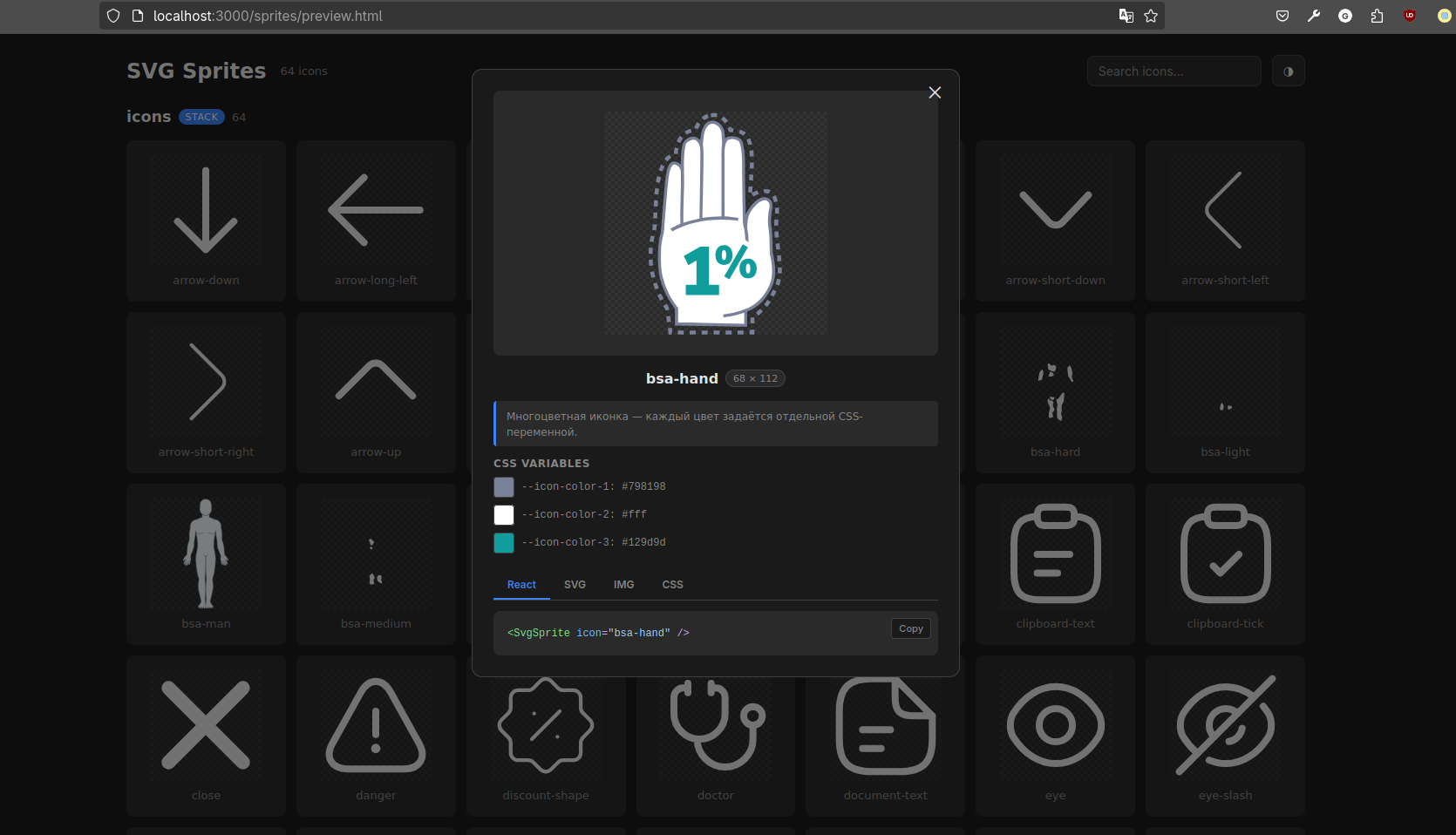
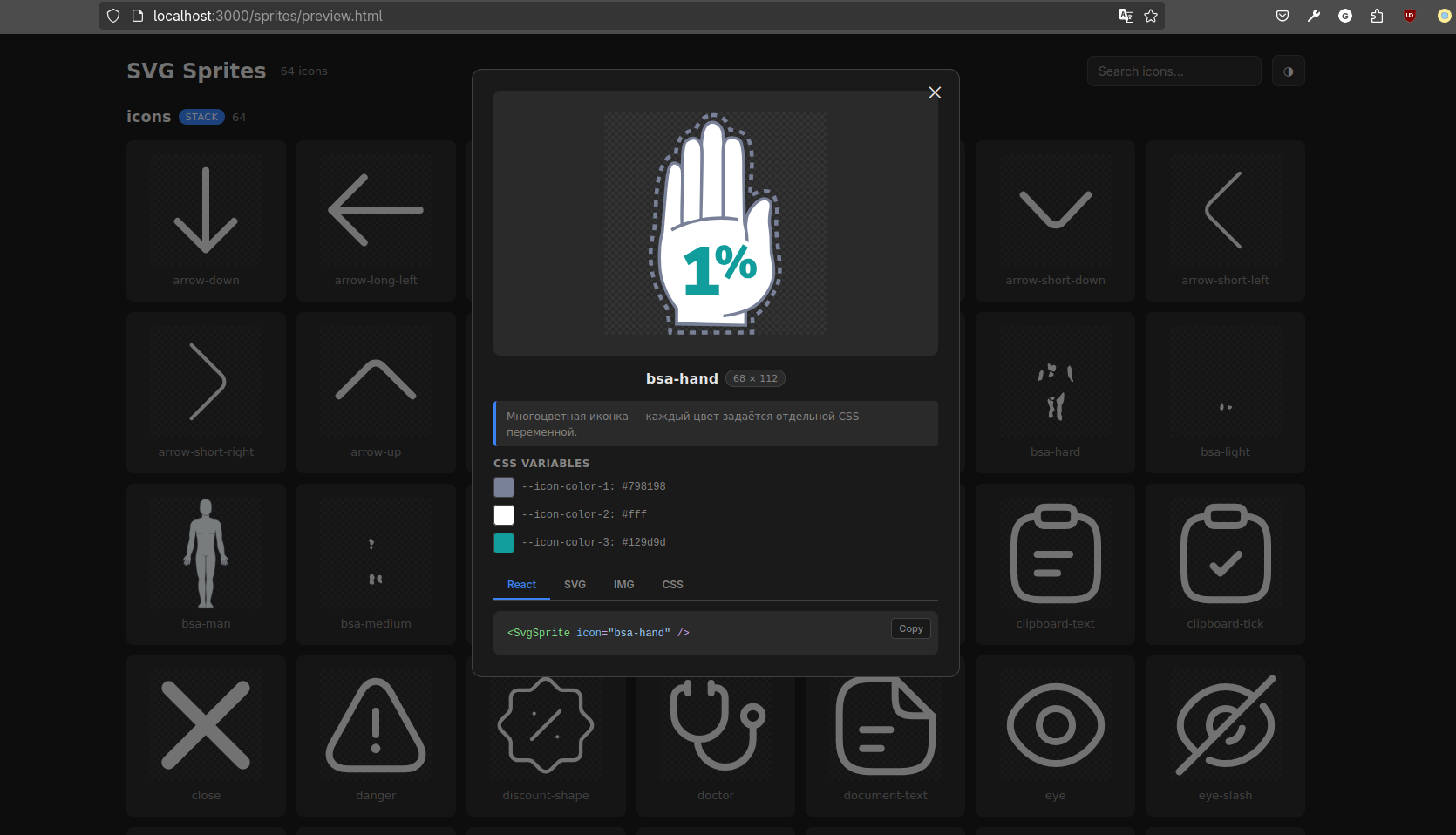
`SpriteViewer` renders all project sprites in one place and shows which icons are included in each set and how they look.
|
||||||
|
|
||||||
|
For each icon, you can see the generated CSS variables and their fallback colors. Change the values directly in the Viewer and see the result immediately.
|
||||||
|
|
||||||
|
It also provides ready-to-use integration examples for:
|
||||||
|
|
||||||
|
- React;
|
||||||
|
- `<svg><use>`;
|
||||||
|
- `<img>`;
|
||||||
|
- CSS.
|
||||||
|
|
||||||
|
|
||||||
|
|
||||||
|
The Viewer is added only to an internal debug page and does not become part of the generated icon components.
|
||||||
|
|
||||||
|
## From native HTML to Next.js
|
||||||
|
|
||||||
|
At its core is a standard SVG sprite that can be used even without a framework or bundler.
|
||||||
|
|
||||||
|
For React and Next.js, the package generates typed components and supports Vite, Webpack 5, and Turbopack. The list of ready-made integrations will expand to include new frameworks.
|
||||||
|
|
||||||
|
## Clean Git history
|
||||||
|
|
||||||
|
The generator creates a local `.gitignore` that excludes generated files and keeps them from cluttering project history, pull requests, and the codebase.
|
||||||
|
|
||||||
|
The repository contains the source SVG files, configuration, and `.gitignore` rule, while sprites, components, and types are regenerated locally and in CI through `prebuild`.
|
||||||
|
|
||||||
|
## Only icons in production
|
||||||
|
|
||||||
|
`@gromlab/svg-sprites` does its main work during generation and remains in `devDependencies`.
|
||||||
|
|
||||||
|
Production components use only local generated code, styles, and the external SVG file. The compiler and CLI are not bundled into the client application, while `SpriteViewer` is imported separately only where a debug page is needed.
|
||||||
|
|
||||||
## Documentation
|
## Documentation
|
||||||
|
|
||||||
- [React + Vite](docs/en/react-vite.md)
|
This README introduces the project's capabilities and demonstrates the primary use case. For setup, choose the guide for your stack.
|
||||||
- [React + Webpack 5](docs/en/react-webpack.md)
|
|
||||||
|
### Quick start
|
||||||
|
|
||||||
- [Next.js App Router](docs/en/next-app.md)
|
- [Next.js App Router](docs/en/next-app.md)
|
||||||
- [Next.js Pages Router](docs/en/next-pages.md)
|
- [Next.js Pages Router](docs/en/next-pages.md)
|
||||||
- [Legacy mode](docs/en/legacy.md)
|
- [React + Vite](docs/en/react-vite.md)
|
||||||
- [Migrating from 0.1.x](docs/en/migration-1.md)
|
- [React + Webpack 5](docs/en/react-webpack.md)
|
||||||
|
- [Native HTML and classic SVG sprites](docs/en/legacy.md)
|
||||||
|
|
||||||
|
### Technical resources
|
||||||
|
|
||||||
|
- [Technical reference](docs/en/reference.md)
|
||||||
- [Programmatic API](docs/en/programmatic-api.md)
|
- [Programmatic API](docs/en/programmatic-api.md)
|
||||||
|
- [Migrating from 0.1.x](docs/en/migration-1.md)
|
||||||
|
|
||||||
## License
|
## License
|
||||||
|
|
||||||
|
|||||||
519
README_RU.md
519
README_RU.md
@@ -4,394 +4,261 @@
|
|||||||
|
|
||||||
 
|
 
|
||||||
|
|
||||||
CLI для генерации SVG-спрайтов и типизированных компонентов иконок для React и Next.js.
|
`@gromlab/svg-sprites` — генератор SVG-спрайтов для современных веб-приложений. Он собирает выбранные SVG-иконки в один или несколько внешних кешируемых спрайтов и подготавливает их для использования в интерфейсе.
|
||||||
|
|
||||||

|
Для React и Next.js пакет создаёт типизированные компоненты и поддерживает Vite, Webpack 5 и Turbopack. В основе при этом остаётся обычный SVG-спрайт, который можно использовать без фреймворка, в том числе в нативном HTML.
|
||||||
|
|
||||||
## Навигация
|
## SVG-спрайт так же прост, как обычная SVG-иконка
|
||||||
|
|
||||||
- [Возможности](#возможности)
|
Для всего спрайта генерируется один типизированный React-компонент. Выберите иконку через `icon`, а редактор покажет автокомплит всех доступных имён.
|
||||||
- [Таблица поддержки](#таблица-поддержки)
|
|
||||||
- [Требования](#требования)
|
|
||||||
- [Быстрый старт](#быстрый-старт)
|
|
||||||
- [React + Vite](docs/ru/react-vite.md)
|
|
||||||
- [React + Webpack 5](docs/ru/react-webpack.md)
|
|
||||||
- [Next.js App Router](docs/ru/next-app.md)
|
|
||||||
- [Next.js Pages Router](docs/ru/next-pages.md)
|
|
||||||
- [Конфигурация](#конфигурация)
|
|
||||||
- [React](#react)
|
|
||||||
- [Next.js](#nextjs)
|
|
||||||
- [Множественные спрайты](#множественные-спрайты)
|
|
||||||
- [TypeScript](#typescript)
|
|
||||||
- [Форматы спрайтов](#форматы-спрайтов)
|
|
||||||
- [Способы отображения](#способы-отображения)
|
|
||||||
- [Трансформации](#трансформации)
|
|
||||||
- [Управление цветом иконок](#управление-цветом-иконок)
|
|
||||||
- [Кеширование](#кеширование)
|
|
||||||
- [SpriteViewer](#spriteviewer)
|
|
||||||
- [Миграция с 0.1.x](docs/ru/migration-1.md)
|
|
||||||
- [Документация](#документация)
|
|
||||||
|
|
||||||
## Возможности
|
```tsx
|
||||||
|
<AppIcon icon="search" width={24} height={24} />
|
||||||
- **AI-agent friendly** — репозиторий содержит готовый skill с актуальной документацией для настройки, миграции и диагностики `@gromlab/svg-sprites`.
|
|
||||||
- **TypeScript-friendly** — типизированные React-компоненты, union-типы и runtime-списки доступных иконок.
|
|
||||||
- **Чистая генерация** — generated-файлы автоматически исключаются из Git, спрайт не нужно вручную размещать в `public`, а генератор обновляет только принадлежащие ему файлы.
|
|
||||||
- **Общие иконки без копирования** — SVG из локальной папки и `inputFiles` объединяются в один спрайт; один файл можно использовать в нескольких спрайтах.
|
|
||||||
- **Встроенное интерактивное превью** — `<SpriteViewer>` подключается как страница приложения и показывает переданные React- и Next.js-спрайты с поиском, настройкой цветов и примерами использования.
|
|
||||||
- **Настраиваемые трансформации SVG** — удаление `width` и `height` с сохранением `viewBox`, замена исходных цветов на CSS-переменные и transitions для `fill` и `stroke`.
|
|
||||||
- **Отдельный кешируемый SVG asset** — SVG path-данные не попадают в JavaScript chunks, а сборщик выпускает файл с content hash.
|
|
||||||
- **Множественные спрайты** — независимые React- и Next.js-модули со своими компонентами, типами и SVG assets.
|
|
||||||
- **Server-first Next.js** — generated-компоненты работают в Server Components, SSR и SSG без директивы `'use client'`.
|
|
||||||
- **Форматы под разные сценарии** — React и Next.js используют `stack`, legacy-режим также поддерживает `symbol` для существующих интеграций.
|
|
||||||
|
|
||||||
## Таблица поддержки
|
|
||||||
|
|
||||||
| Среда | Ключ мода API | Статус |
|
|
||||||
|---|---|---|
|
|
||||||
| React + Vite | `react@vite` | Готово |
|
|
||||||
| React + Webpack 5 | `react@webpack` | Готово |
|
|
||||||
| Next.js 16.2+ App Router + Turbopack | `next@app/turbopack` | Готово |
|
|
||||||
| Next.js 13.4+ App Router + Webpack 5 | `next@app/webpack` | Готово |
|
|
||||||
| Next.js 16.2+ Pages Router + Turbopack | `next@pages/turbopack` | Готово |
|
|
||||||
| Next.js 12.2+ Pages Router + Webpack 5 | `next@pages/webpack` | Готово |
|
|
||||||
| Vue | — | Скоро |
|
|
||||||
| Standalone | — | Скоро |
|
|
||||||
|
|
||||||
## Требования
|
|
||||||
|
|
||||||
- Node.js 18 или новее;
|
|
||||||
- пакет распространяется только как ESM и подключается через `import`;
|
|
||||||
- React 18 или 19 требуется только для generated-компонентов и точки входа `@gromlab/svg-sprites/react`;
|
|
||||||
- для типизации subpath exports используйте TypeScript 5+ с `moduleResolution: "bundler"`, `"node16"` или `"nodenext"`.
|
|
||||||
|
|
||||||
## Быстрый старт
|
|
||||||
|
|
||||||
Для быстрого старта воспользуйтесь инструкцией для вашего стека:
|
|
||||||
|
|
||||||
- [React + Vite](docs/ru/react-vite.md)
|
|
||||||
- [React + Webpack 5](docs/ru/react-webpack.md)
|
|
||||||
- [Next.js App Router](docs/ru/next-app.md)
|
|
||||||
- [Next.js Pages Router](docs/ru/next-pages.md)
|
|
||||||
|
|
||||||
## Конфигурация
|
|
||||||
|
|
||||||
### React
|
|
||||||
|
|
||||||
```ts
|
|
||||||
import { defineReactSpriteConfig } from '@gromlab/svg-sprites'
|
|
||||||
|
|
||||||
export default defineReactSpriteConfig({
|
|
||||||
name: 'file-manager',
|
|
||||||
description: 'Иконки файлового менеджера',
|
|
||||||
inputFolder: './icons',
|
|
||||||
inputFiles: [
|
|
||||||
'../../shared/icons/check.svg',
|
|
||||||
],
|
|
||||||
transform: {
|
|
||||||
removeSize: true,
|
|
||||||
replaceColors: true,
|
|
||||||
addTransition: true,
|
|
||||||
},
|
|
||||||
generatedNotice: true,
|
|
||||||
})
|
|
||||||
```
|
```
|
||||||
|
|
||||||
| Опция | Тип | По умолчанию | Назначение |
|
Компонент принимает привычные SVG-атрибуты: размеры, `color`, `className`, `style`, `aria-*` и обработчики событий. Если нужен внешний контейнер, добавьте `wrapped`.
|
||||||
|---|---|---|---|
|
|
||||||
| `name` | `string` | Имя папки | Имя спрайта, компонента и публичных типов |
|
|
||||||
| `description` | `string` | Нет | Описание для типов и debug-манифеста |
|
|
||||||
| `inputFolder` | `string` | `./icons` | Папка с исходными SVG относительно конфига |
|
|
||||||
| `inputFiles` | `string[]` | `[]` | Дополнительные SVG-файлы относительно конфига |
|
|
||||||
| `transform` | `TransformOptions` | Все включены | [Настройки трансформации](#трансформации) исходных SVG |
|
|
||||||
| `generatedNotice` | `boolean` | `true` | Полное либо короткое предупреждение в generated-файлах |
|
|
||||||
|
|
||||||
`inputFolder` и `inputFiles` объединяются в один спрайт, поэтому один SVG-файл можно использовать в нескольких спрайтах без копирования. Если неявной папки `./icons` нет, но `inputFiles` заполнен, генерация продолжается только по списку. Явно указанная отсутствующая папка считается ошибкой. Одинаковые пути дедуплицируются, а разные файлы с одинаковым именем иконки считаются ошибкой.
|
```tsx
|
||||||
|
<AppIcon icon="search" wrapped className="iconWrapper" />
|
||||||
|
```
|
||||||
|
|
||||||
`name` записывается в kebab-case и должно начинаться с латинской буквы. React и Next.js presets создают формат `stack`.
|
В приложении не приходится работать со спрайтом напрямую. Вы используете его так же, как обычную SVG-иконку, но получаете один компонент, автокомплит и TypeScript-проверку всех имён.
|
||||||
|
|
||||||
### Next.js
|
## AI-friendly из коробки
|
||||||
|
|
||||||
Next.js использует тот же `svg-sprite.config.ts` и набор опций. Для типизации можно использовать отдельный хелпер:
|
`@gromlab/svg-sprites` сразу рассчитан на работу с AI-агентами. Подключите готовый skill и поручите агенту настройку, миграцию или диагностику без длинных инструкций и ручного изучения документации.
|
||||||
|
|
||||||
|
[🇷🇺 Скачать AI skill (на русском)](https://github.com/gromlab-ru/svg-sprites/releases/latest/download/svg-sprites-ru.zip)
|
||||||
|
|
||||||
|
[🇬🇧 Скачать AI skill (на английском)](https://github.com/gromlab-ru/svg-sprites/releases/latest/download/svg-sprites.zip)
|
||||||
|
|
||||||
|
## От SVG до компонента за четыре шага
|
||||||
|
|
||||||
|
Основной пример использует Next.js App Router и Turbopack.
|
||||||
|
|
||||||
|
### 1. Установите пакет
|
||||||
|
|
||||||
|
```bash
|
||||||
|
npm install --save-dev @gromlab/svg-sprites
|
||||||
|
```
|
||||||
|
|
||||||
|
### 2. Укажите нужные иконки
|
||||||
|
|
||||||
|
SVG могут оставаться в существующей структуре проекта:
|
||||||
|
|
||||||
|
```text
|
||||||
|
src/
|
||||||
|
├── assets/icons/
|
||||||
|
│ ├── search.svg
|
||||||
|
│ └── settings.svg
|
||||||
|
├── features/profile/
|
||||||
|
│ └── user.svg
|
||||||
|
└── ui/app-icons/
|
||||||
|
└── svg-sprite.config.ts
|
||||||
|
```
|
||||||
|
|
||||||
|
Создайте конфигурацию спрайта:
|
||||||
|
|
||||||
```ts
|
```ts
|
||||||
|
// src/ui/app-icons/svg-sprite.config.ts
|
||||||
import { defineNextSpriteConfig } from '@gromlab/svg-sprites'
|
import { defineNextSpriteConfig } from '@gromlab/svg-sprites'
|
||||||
|
|
||||||
export default defineNextSpriteConfig({
|
export default defineNextSpriteConfig({
|
||||||
name: 'file-manager',
|
name: 'app',
|
||||||
description: 'Иконки файлового менеджера',
|
inputFiles: [
|
||||||
inputFolder: './icons',
|
'../../assets/icons/search.svg',
|
||||||
|
'../../assets/icons/settings.svg',
|
||||||
|
'../../features/profile/user.svg',
|
||||||
|
],
|
||||||
})
|
})
|
||||||
```
|
```
|
||||||
|
|
||||||
Роутер и сборщик выбираются через mode key, поэтому переключение между Turbopack и Webpack всегда явно отражено в команде генерации.
|
### 3. Добавьте генерацию
|
||||||
|
|
||||||
## Множественные спрайты
|
```json
|
||||||
|
{
|
||||||
Приложение может содержать несколько независимых спрайтов с разной областью использования:
|
"scripts": {
|
||||||
|
"sprites": "svg-sprites --mode next@app/turbopack src/ui/app-icons",
|
||||||
**Проблема:** один глобальный спрайт загружает иконки, которые текущему экрану не нужны.
|
"predev": "npm run sprites",
|
||||||
|
"prebuild": "npm run sprites"
|
||||||
**Решение:** общие иконки хранить глобально, а наборы страниц и крупных компонентов — в отдельных спрайтах, загружаемых вместе с ними.
|
}
|
||||||
|
|
||||||
```text
|
|
||||||
global → GlobalIcon → общие иконки приложения
|
|
||||||
analytics-page → AnalyticsPageIcon → иконки отдельной страницы
|
|
||||||
file-manager → FileManagerIcon → иконки крупного компонента
|
|
||||||
```
|
|
||||||
|
|
||||||
- **Глобальный спрайт** содержит небольшие общие иконки, используемые в разных частях приложения: навигацию, состояния и базовые действия.
|
|
||||||
- **Спрайт страницы** загружается вместе с конкретным разделом и не увеличивает общий спрайт иконками, которые больше нигде не нужны.
|
|
||||||
- **Спрайт крупного компонента** инкапсулирует собственный набор иконок сложного UI-модуля, например файлового менеджера или редактора.
|
|
||||||
|
|
||||||
Каждая группа получает:
|
|
||||||
|
|
||||||
- собственный SVG asset;
|
|
||||||
- собственный типизированный компонент;
|
|
||||||
- отдельный список имён иконок;
|
|
||||||
- отдельный debug-манифест;
|
|
||||||
- независимый cache lifecycle.
|
|
||||||
|
|
||||||
|
|
||||||
## TypeScript
|
|
||||||
|
|
||||||
Главная возможность TypeScript API — автодополнение имён иконок непосредственно в prop `icon`:
|
|
||||||
|
|
||||||
```tsx
|
|
||||||
<FileManagerIcon icon="folder" />
|
|
||||||
// ↑ редактор предлагает все иконки спрайта
|
|
||||||
```
|
|
||||||
|
|
||||||
Имена SVG-файлов становятся допустимыми значениями `icon`. Опечатка или неизвестное имя сразу становятся ошибкой TypeScript:
|
|
||||||
|
|
||||||
```tsx
|
|
||||||
<FileManagerIcon icon="unknown" /> // ошибка TypeScript
|
|
||||||
```
|
|
||||||
|
|
||||||
Для программного доступа generated-модуль экспортирует readonly-массив всех доступных иконок конкретного спрайта:
|
|
||||||
|
|
||||||
```ts
|
|
||||||
import { fileManagerIconNames } from './svg-sprite'
|
|
||||||
|
|
||||||
// readonly ['check', 'folder', ...]
|
|
||||||
```
|
|
||||||
|
|
||||||
Этот список можно использовать в собственных каталогах, select-компонентах, тестах и других runtime-сценариях. Из него также выводится union-тип `FileManagerIconName`.
|
|
||||||
|
|
||||||
Имена файлов с пробелами и другими небезопасными для SVG ID символами остаются частью публичного TypeScript API. Для внутреннего `<symbol id>` генератор создаёт стабильный hash ID.
|
|
||||||
|
|
||||||
```text
|
|
||||||
folder open.svg → icon="folder open" → id="icon-<stable-hash>"
|
|
||||||
```
|
|
||||||
|
|
||||||
Для таких имён используйте generated-компонент или `id` из debug-манифеста. Ручные примеры ниже с `#<имя>` подходят только для имён, которые уже являются безопасными SVG ID.
|
|
||||||
|
|
||||||
## Форматы спрайтов
|
|
||||||
|
|
||||||
`stack` — более современный формат, поэтому он используется по умолчанию. Иконки можно отображать через `<svg><use>`, `<img>` и CSS `background-image`.
|
|
||||||
|
|
||||||
`symbol` сохраняется для совместимости с существующими интеграциями и поддерживает отображение только через `<svg><use>`.
|
|
||||||
|
|
||||||
## Способы отображения
|
|
||||||
|
|
||||||
### React-компонент — рекомендуется
|
|
||||||
|
|
||||||
Generated-компонент предоставляет типизацию, автодополнение имён иконок и сам формирует URL SVG asset.
|
|
||||||
|
|
||||||
```tsx
|
|
||||||
<FileManagerIcon icon="check" width={24} height={24} />
|
|
||||||
```
|
|
||||||
|
|
||||||
Через `color` и `--icon-color-N` доступны одноцветные и многоцветные иконки.
|
|
||||||
|
|
||||||
### Самостоятельно через `<svg><use>`
|
|
||||||
|
|
||||||
Хороший низкоуровневый способ с полным управлением размерами и цветами. React-компонент под капотом использует именно его.
|
|
||||||
|
|
||||||
Способ получения `spriteUrl` зависит от сборщика.
|
|
||||||
|
|
||||||
**Vite:**
|
|
||||||
|
|
||||||
```tsx
|
|
||||||
import spriteUrl from './svg-sprite/generated/sprite.svg?no-inline'
|
|
||||||
```
|
|
||||||
|
|
||||||
**Webpack 5:**
|
|
||||||
|
|
||||||
```tsx
|
|
||||||
const spriteUrl = new URL(
|
|
||||||
'./svg-sprite/generated/sprite.svg',
|
|
||||||
import.meta.url,
|
|
||||||
).href
|
|
||||||
```
|
|
||||||
|
|
||||||
**Next.js с Webpack 5 или Turbopack:**
|
|
||||||
|
|
||||||
```tsx
|
|
||||||
const spriteUrl = new URL(
|
|
||||||
'./svg-sprite/generated/sprite.svg',
|
|
||||||
import.meta.url,
|
|
||||||
).href
|
|
||||||
```
|
|
||||||
|
|
||||||
После получения URL иконка отображается одинаково:
|
|
||||||
|
|
||||||
```tsx
|
|
||||||
<svg width={24} height={24}>
|
|
||||||
<use href={`${spriteUrl}#check`} />
|
|
||||||
</svg>
|
|
||||||
```
|
|
||||||
|
|
||||||
Vite, Webpack 5 и Next.js сами заменяют исходный путь на итоговый URL asset с hash.
|
|
||||||
|
|
||||||
### Через `<img>` — менее эффективно
|
|
||||||
|
|
||||||
```tsx
|
|
||||||
<img src={`${spriteUrl}#check`} width={24} height={24} alt="Готово" />
|
|
||||||
```
|
|
||||||
|
|
||||||
SVG загружается как изолированное изображение: изменить его цвета через `color` или `--icon-color-N` нельзя.
|
|
||||||
|
|
||||||
### Через CSS `background-image` — менее эффективно
|
|
||||||
|
|
||||||
```css
|
|
||||||
.icon {
|
|
||||||
background: url('./svg-sprite/generated/sprite.svg#check') center / contain no-repeat;
|
|
||||||
}
|
}
|
||||||
```
|
```
|
||||||
|
|
||||||
Как и `<img>`, этот способ не позволяет управлять внутренними цветами SVG. Путь указывается относительно CSS-файла, а Vite/Webpack заменяет его на итоговый URL с hash при сборке.
|
Первый запуск:
|
||||||
|
|
||||||
### Через CSS mask — менее эффективно
|
```bash
|
||||||
|
npm run sprites
|
||||||
|
```
|
||||||
|
|
||||||
```css
|
Пакет создаст `AppIcon`, TypeScript-типы и отдельный SVG-спрайт.
|
||||||
.icon {
|
|
||||||
background-color: currentColor;
|
### 4. Используйте как обычную иконку
|
||||||
mask: url('./svg-sprite/generated/sprite.svg#check') center / contain no-repeat;
|
|
||||||
|
```tsx
|
||||||
|
import { AppIcon } from '@/ui/app-icons'
|
||||||
|
|
||||||
|
export default function SearchButton() {
|
||||||
|
return (
|
||||||
|
<button type="button">
|
||||||
|
<AppIcon icon="search" width={20} height={20} />
|
||||||
|
Найти
|
||||||
|
</button>
|
||||||
|
)
|
||||||
}
|
}
|
||||||
```
|
```
|
||||||
|
|
||||||
Mask оставляет только силуэт и окрашивает его одним цветом. Исходные цвета, gradients и различия между `fill` и `stroke` теряются.
|
Это Server Component. Для иконки не нужны provider, `'use client'` или ручная сборка URL.
|
||||||
|
|
||||||
## Трансформации
|
## Типизированный React-компонент с автокомплитом
|
||||||
|
|
||||||
Все трансформации включены по умолчанию и настраиваются независимо через `transform`.
|
Каждый спрайт получает собственный готовый компонент. Свойство `icon` формируется из реальных имён SVG, поэтому редактор показывает точный список доступных иконок, а TypeScript сразу обнаруживает опечатки.
|
||||||
|
|
||||||
| Опция | По умолчанию | Что делает |
|
```tsx
|
||||||
|---|---|---|
|
<AppIcon icon="search" /> // доступная иконка
|
||||||
| `removeSize` | `true` | Удаляет `width` и `height` с корневого `<svg>`, сохраняя существующий `viewBox`. Размер иконки после этого задаётся снаружи. |
|
<AppIcon icon="serach" /> // ошибка TypeScript
|
||||||
| `replaceColors` | `true` | Заменяет цвета `fill` и `stroke` на `--icon-color-N`. Для одноцветной иконки fallback становится `currentColor`, для многоцветной сохраняются исходные цвета. |
|
|
||||||
| `addTransition` | `true` | Добавляет `style="transition:fill 0.3s,stroke 0.3s;"` непосредственно цветным элементам SVG. Существующий `transition` не перезаписывается. |
|
|
||||||
|
|
||||||
Чтобы отключить преобразование, передайте для соответствующей опции `false`. Подробнее о результате `replaceColors` — в разделе [«Управление цветом иконок»](#управление-цветом-иконок).
|
|
||||||
|
|
||||||
## Управление цветом иконок
|
|
||||||
|
|
||||||
При включённой замене цветов генератор анализирует `fill` и `stroke` и преобразует их в CSS custom properties.
|
|
||||||
|
|
||||||
### Монохромные иконки
|
|
||||||
|
|
||||||
Если найден один цвет, fallback заменяется на `currentColor`:
|
|
||||||
|
|
||||||
```svg
|
|
||||||
stroke="var(--icon-color-1, currentColor)"
|
|
||||||
```
|
```
|
||||||
|
|
||||||
Цветом управляет CSS-свойство `color` внешнего `<svg>` или его родителя.
|
После добавления новой SVG-иконки и повторной генерации её имя автоматически появляется в типах и автокомплите. Не нужно вручную поддерживать компоненты, union-типы или реестр имён.
|
||||||
|
|
||||||
### Многоцветные иконки
|
## Next.js App Router и SSR из коробки
|
||||||
|
|
||||||
Каждый уникальный цвет получает отдельную переменную с исходным fallback:
|
Generated-компоненты работают в Server Components, SSR и SSG без `'use client'`.
|
||||||
|
|
||||||
```svg
|
Подключение иконки не переносит страницу на клиент, не требует provider и не создаёт дополнительную границу гидратации.
|
||||||
fill="var(--icon-color-1, #798198)"
|
|
||||||
fill="var(--icon-color-2, #ffffff)"
|
Один и тот же компонент можно использовать в `page.tsx`, `layout.tsx`, серверных и клиентских компонентах.
|
||||||
fill="var(--icon-color-3, #129d9d)"
|
|
||||||
|
## Множественные спрайты вместо одного глобального
|
||||||
|
|
||||||
|
Проект не ограничен одним набором иконок. Создавайте независимые спрайты для общих элементов, отдельных страниц и крупных UI-модулей.
|
||||||
|
|
||||||
|
```tsx
|
||||||
|
<AppIcon icon="search" />
|
||||||
|
<AnalyticsIcon icon="chart" />
|
||||||
|
<EditorIcon icon="bold" />
|
||||||
```
|
```
|
||||||
|
|
||||||
Страница может заменить только необходимые цвета:
|
Каждый набор получает собственный типизированный компонент и SVG asset, поэтому разделы приложения не несут иконки, которые им не нужны.
|
||||||
|
|
||||||
```css
|
## Каждая иконка хранится в одном экземпляре
|
||||||
.icon {
|
|
||||||
--icon-color-1: #4b5563;
|
|
||||||
--icon-color-3: #14b8a6;
|
|
||||||
}
|
|
||||||
```
|
|
||||||
|
|
||||||
### Ограничения цветов
|
В библиотеке исходников каждая SVG-иконка хранится в одном экземпляре и может входить в любое количество спрайтов. Общие иконки не приходится копировать между страницами и модулями: они обновляются для всех наборов из одного места.
|
||||||
|
|
||||||
- `none`, `transparent`, `inherit`, `unset` и `initial` не заменяются;
|
|
||||||
- цвета в атрибутах `fill`, `stroke` и inline `style` обрабатываются надёжнее всего;
|
|
||||||
- CSS-классы и внешние stylesheets внутри исходного SVG не являются основным сценарием трансформации;
|
|
||||||
- gradients, patterns, filters и значения `url(#...)` требуют отдельной проверки и могут быть несовместимы с автоматической заменой цветов;
|
|
||||||
- CSS-переменные страницы доступны при `<svg><use>`, но недоступны внутри `<img>` и `background-image`.
|
|
||||||
|
|
||||||
## Кеширование
|
|
||||||
|
|
||||||
Vite, Webpack и Next.js target выпускают спрайт отдельным asset с content hash:
|
|
||||||
|
|
||||||
```text
|
```text
|
||||||
/assets/sprite-<hash>.svg
|
search.svg ─┬─→ AppIcon
|
||||||
|
├─→ AnalyticsIcon
|
||||||
|
└─→ EditorIcon
|
||||||
```
|
```
|
||||||
|
|
||||||
Это даёт следующие свойства:
|
Спрайты разделяются ради производительности, но библиотека исходных иконок остаётся единой.
|
||||||
|
|
||||||
- SVG кешируется независимо от JavaScript;
|
## Браузерное кеширование
|
||||||
- изменение React-кода не меняет содержимое спрайта;
|
|
||||||
- изменение иконок создаёт новый hash asset;
|
|
||||||
- один файл используется всеми экземплярами generated-компонента;
|
|
||||||
- SVG path-данные отсутствуют в JavaScript chunks.
|
|
||||||
|
|
||||||
Vite target запрещает inline через `?no-inline`. Webpack 5 target использует Asset Modules через `new URL(..., import.meta.url)`.
|
При стандартной конфигурации Vite, Webpack или Next.js каждый спрайт выпускается отдельным версионированным SVG-файлом.
|
||||||
|
|
||||||
## SpriteViewer
|
Пока набор иконок не меняется, браузер может использовать сохранённую копию независимо от обновлений JavaScript приложения.
|
||||||
|
|
||||||
`SpriteViewer` — React-компонент для просмотра generated-спрайтов внутри debug-маршрута приложения.
|
Изменение React-компонентов не требует повторно загружать геометрию всех иконок.
|
||||||
|
|
||||||
Он использует отдельные манифесты и показывает:
|
## JavaScript без SVG-балласта
|
||||||
|
|
||||||
- группы спрайтов;
|
Контуры иконок остаются во внешних SVG assets и не увеличивают chunks приложения.
|
||||||
- список и количество иконок;
|
|
||||||
- поиск и системную светлую/тёмную тему;
|
|
||||||
- модальное превью с `viewBox` и настройкой цветовых переменных;
|
|
||||||
- примеры React, SVG, IMG и CSS с копированием кода.
|
|
||||||
|
|
||||||
Production-компоненты не импортируют debug-манифесты. Способ подключения Viewer зависит от сборщика:
|
```text
|
||||||
|
React-код → JavaScript chunks
|
||||||
- [React + Vite: автоматический `import.meta.glob`](docs/ru/react-vite.md#6-добавьте-debug-страницу);
|
SVG-иконки → отдельные SVG assets
|
||||||
- [React + Webpack 5: статические `import()`](docs/ru/react-webpack.md#6-добавьте-debug-страницу);
|
|
||||||
- [Next.js App Router](docs/ru/next-app.md#5-добавьте-spriteviewer);
|
|
||||||
- [Next.js Pages Router](docs/ru/next-pages.md#5-добавьте-spriteviewer).
|
|
||||||
|
|
||||||
Viewer подключается из отдельной клиентской точки входа `@gromlab/svg-sprites/react` и не попадает в production-компоненты иконок.
|
|
||||||
|
|
||||||
### Тема Viewer
|
|
||||||
|
|
||||||
По умолчанию `colorTheme="auto"`: Viewer следует `prefers-color-scheme` и реагирует на смену системной темы. Тему приложения можно передать явно:
|
|
||||||
|
|
||||||
```tsx
|
|
||||||
<SpriteViewer sources={sources} colorTheme="dark" />
|
|
||||||
```
|
```
|
||||||
|
|
||||||
Допустимые значения `colorTheme`: `auto`, `light`, `dark`. При управлении темой извне встроенный переключатель скрывается. Чтобы оставить его и обновлять тему приложения через Viewer, передайте callback:
|
JavaScript отвечает за интерфейс и поведение, а графика загружается и кешируется отдельно.
|
||||||
|
|
||||||
|
## Трансформации SVG из коробки
|
||||||
|
|
||||||
|
Во время генерации пакет автоматически подготавливает исходные SVG для интерфейса:
|
||||||
|
|
||||||
|
- удаляет фиксированные `width` и `height`;
|
||||||
|
- сохраняет существующий `viewBox`;
|
||||||
|
- преобразует `fill` и `stroke` в CSS-переменные;
|
||||||
|
- добавляет плавные transitions непосредственно в цветные элементы иконки.
|
||||||
|
|
||||||
|
Каждую трансформацию можно настроить или отключить независимо.
|
||||||
|
|
||||||
|
## Каждый цвет под контролем CSS
|
||||||
|
|
||||||
|
При генерации цвета `fill` и `stroke` автоматически преобразуются в CSS-переменные `--icon-color-N`.
|
||||||
|
|
||||||
|
Монохромная иконка наследует `currentColor`:
|
||||||
|
|
||||||
```tsx
|
```tsx
|
||||||
<SpriteViewer
|
<AppIcon icon="search" color="rebeccapurple" />
|
||||||
sources={sources}
|
```
|
||||||
colorTheme={appTheme}
|
|
||||||
onColorThemeChange={setAppTheme}
|
В многоцветной иконке каждый цвет можно менять отдельно:
|
||||||
|
|
||||||
|
```tsx
|
||||||
|
<AppIcon
|
||||||
|
icon="user"
|
||||||
|
style={{
|
||||||
|
'--icon-color-1': '#2563eb',
|
||||||
|
'--icon-color-2': '#dbeafe',
|
||||||
|
}}
|
||||||
/>
|
/>
|
||||||
```
|
```
|
||||||
|
|
||||||
|
Темы, состояния и hover-эффекты создаются без редактирования SVG и дополнительных копий иконки.
|
||||||
|
|
||||||
|
## SpriteViewer: все спрайты на одной debug-странице
|
||||||
|
|
||||||
|
`SpriteViewer` рендерит все спрайты проекта в одном месте и показывает, какие иконки вошли в каждый набор и как они выглядят.
|
||||||
|
|
||||||
|
Для каждой иконки видны созданные CSS-переменные и их fallback-цвета. Значения можно менять прямо в Viewer и сразу наблюдать результат.
|
||||||
|
|
||||||
|
Здесь же доступны готовые примеры подключения через:
|
||||||
|
|
||||||
|
- React;
|
||||||
|
- `<svg><use>`;
|
||||||
|
- `<img>`;
|
||||||
|
- CSS.
|
||||||
|
|
||||||
|

|
||||||
|
|
||||||
|
Viewer подключается только к внутренней debug-странице и не становится частью generated-компонентов иконок.
|
||||||
|
|
||||||
|
## От нативного HTML до Next.js
|
||||||
|
|
||||||
|
В основе остаётся обычный SVG-спрайт, который можно использовать даже без фреймворка и сборщика.
|
||||||
|
|
||||||
|
Для React и Next.js пакет генерирует типизированные компоненты и поддерживает Vite, Webpack 5 и Turbopack. Список готовых интеграций будет расширяться новыми фреймворками.
|
||||||
|
|
||||||
|
## Чистый Git
|
||||||
|
|
||||||
|
Генератор создаёт локальный `.gitignore`, который исключает generated-файлы и не позволяет им засорять историю, pull requests и код проекта.
|
||||||
|
|
||||||
|
В репозитории остаются исходные SVG, конфигурация и правило `.gitignore`, а локально и в CI спрайты, компоненты и типы заново создаются через `prebuild`.
|
||||||
|
|
||||||
|
## В production только иконки
|
||||||
|
|
||||||
|
`@gromlab/svg-sprites` выполняет основную работу на этапе генерации и остаётся в `devDependencies`.
|
||||||
|
|
||||||
|
Production-компоненты используют только локальный generated-код, стили и внешний SVG-файл. Compiler и CLI не попадают в клиентское приложение, а `SpriteViewer` подключается отдельно только там, где нужна debug-страница.
|
||||||
|
|
||||||
## Документация
|
## Документация
|
||||||
|
|
||||||
- [React + Vite](docs/ru/react-vite.md)
|
README знакомит с возможностями проекта и показывает основной сценарий использования. Для настройки выберите руководство под свой стек.
|
||||||
- [React + Webpack 5](docs/ru/react-webpack.md)
|
|
||||||
|
### Быстрый старт
|
||||||
|
|
||||||
- [Next.js App Router](docs/ru/next-app.md)
|
- [Next.js App Router](docs/ru/next-app.md)
|
||||||
- [Next.js Pages Router](docs/ru/next-pages.md)
|
- [Next.js Pages Router](docs/ru/next-pages.md)
|
||||||
- [Legacy mode](docs/ru/legacy.md)
|
- [React + Vite](docs/ru/react-vite.md)
|
||||||
- [Миграция с 0.1.x](docs/ru/migration-1.md)
|
- [React + Webpack 5](docs/ru/react-webpack.md)
|
||||||
|
- [Нативный HTML и классические SVG-спрайты](docs/ru/legacy.md)
|
||||||
|
|
||||||
|
### Технические материалы
|
||||||
|
|
||||||
|
- [Технический справочник](docs/ru/reference.md)
|
||||||
- [Программный API](docs/ru/programmatic-api.md)
|
- [Программный API](docs/ru/programmatic-api.md)
|
||||||
|
- [Миграция с 0.1.x](docs/ru/migration-1.md)
|
||||||
|
|
||||||
## Лицензия
|
## Лицензия
|
||||||
|
|
||||||
|
|||||||
@@ -7,7 +7,7 @@ A quick guide to generating centralized SVG sprites in `symbol` and `stack` form
|
|||||||
## 1. Install the package
|
## 1. Install the package
|
||||||
|
|
||||||
```bash
|
```bash
|
||||||
npm install @gromlab/svg-sprites
|
npm install --save-dev @gromlab/svg-sprites
|
||||||
```
|
```
|
||||||
|
|
||||||
## 2. Prepare the icons and config
|
## 2. Prepare the icons and config
|
||||||
@@ -37,10 +37,21 @@ export default defineLegacyConfig({
|
|||||||
})
|
})
|
||||||
```
|
```
|
||||||
|
|
||||||
## 3. Run generation
|
## 3. Add generation
|
||||||
|
|
||||||
|
```json
|
||||||
|
{
|
||||||
|
"scripts": {
|
||||||
|
"sprites": "svg-sprites --mode legacy .",
|
||||||
|
"prebuild": "npm run sprites"
|
||||||
|
}
|
||||||
|
}
|
||||||
|
```
|
||||||
|
|
||||||
|
Run the local package through the script:
|
||||||
|
|
||||||
```bash
|
```bash
|
||||||
npx svg-sprites --mode legacy .
|
npm run sprites
|
||||||
```
|
```
|
||||||
|
|
||||||
Result:
|
Result:
|
||||||
@@ -61,17 +72,6 @@ With `preview: false`, the HTML file is not created. For the `stack` format, spe
|
|||||||
</svg>
|
</svg>
|
||||||
```
|
```
|
||||||
|
|
||||||
## 5. Add a package script
|
|
||||||
|
|
||||||
```json
|
|
||||||
{
|
|
||||||
"scripts": {
|
|
||||||
"sprites": "svg-sprites --mode legacy .",
|
|
||||||
"prebuild": "npm run sprites"
|
|
||||||
}
|
|
||||||
}
|
|
||||||
```
|
|
||||||
|
|
||||||
## Multiple sprites
|
## Multiple sprites
|
||||||
|
|
||||||
Add multiple entries to `sprites`:
|
Add multiple entries to `sprites`:
|
||||||
|
|||||||
@@ -4,13 +4,21 @@
|
|||||||
|
|
||||||
Version 1.0 separates local generation for React and Next.js from the centralized legacy mode. The old config cannot be mixed with the new API in a single CLI invocation.
|
Version 1.0 separates local generation for React and Next.js from the centralized legacy mode. The old config cannot be mixed with the new API in a single CLI invocation.
|
||||||
|
|
||||||
|
## Installation
|
||||||
|
|
||||||
|
Install the package as a development dependency so the migration uses the version recorded in the project lockfile:
|
||||||
|
|
||||||
|
```bash
|
||||||
|
npm install --save-dev @gromlab/svg-sprites
|
||||||
|
```
|
||||||
|
|
||||||
## CLI
|
## CLI
|
||||||
|
|
||||||
The CLI now always requires an explicit `--mode` and a path to the configuration directory:
|
The CLI now always requires an explicit `--mode` and a path to the configuration directory:
|
||||||
|
|
||||||
```text
|
```text
|
||||||
svg-sprites
|
"sprites": "svg-sprites"
|
||||||
→ svg-sprites --mode <mode> <path>
|
→ "sprites": "svg-sprites --mode <mode> <path>"
|
||||||
```
|
```
|
||||||
|
|
||||||
Choose a mode based on your environment:
|
Choose a mode based on your environment:
|
||||||
@@ -40,6 +48,18 @@ export default defineNextSpriteConfig({
|
|||||||
|
|
||||||
For regular React, use `defineReactSpriteConfig`. A folder and an explicit list of shared SVG files can be combined using `inputFolder` and `inputFiles`.
|
For regular React, use `defineReactSpriteConfig`. A folder and an explicit list of shared SVG files can be combined using `inputFolder` and `inputFiles`.
|
||||||
|
|
||||||
|
Add the local CLI with the selected mode to `package.json`, for example:
|
||||||
|
|
||||||
|
```json
|
||||||
|
{
|
||||||
|
"scripts": {
|
||||||
|
"sprite:global": "svg-sprites --mode next@app/turbopack src/ui/global/svg-sprite"
|
||||||
|
}
|
||||||
|
}
|
||||||
|
```
|
||||||
|
|
||||||
|
Run it with `npm run sprite:global` before importing the generated component.
|
||||||
|
|
||||||
The old `publicPath` and `react` options are no longer needed. The generated module is created next to the config and adds its own `.gitignore`, while Vite, Webpack, or Next.js emits the SVG as a separate asset with a content hash.
|
The old `publicPath` and `react` options are no longer needed. The generated module is created next to the config and adds its own `.gitignore`, while Vite, Webpack, or Next.js emits the SVG as a separate asset with a content hash.
|
||||||
|
|
||||||
The `<SvgSprite icon="..." />` component is replaced by a component whose name is derived from `name`:
|
The `<SvgSprite icon="..." />` component is replaced by a component whose name is derived from `name`:
|
||||||
@@ -76,12 +96,18 @@ export default defineLegacyConfig({
|
|||||||
- `loadConfig` has been replaced with `loadLegacyConfig`;
|
- `loadConfig` has been replaced with `loadLegacyConfig`;
|
||||||
- `publicPath` and generation of the old shared React component have been removed.
|
- `publicPath` and generation of the old shared React component have been removed.
|
||||||
|
|
||||||
Run:
|
Add the local CLI to `package.json`:
|
||||||
|
|
||||||
```bash
|
```json
|
||||||
svg-sprites --mode legacy .
|
{
|
||||||
|
"scripts": {
|
||||||
|
"sprites": "svg-sprites --mode legacy ."
|
||||||
|
}
|
||||||
|
}
|
||||||
```
|
```
|
||||||
|
|
||||||
|
Run it with `npm run sprites`.
|
||||||
|
|
||||||
## Programmatic API
|
## Programmatic API
|
||||||
|
|
||||||
The package is distributed as ESM only. Replace `require()` with `import`.
|
The package is distributed as ESM only. Replace `require()` with `import`.
|
||||||
@@ -90,7 +116,7 @@ The package is distributed as ESM only. Replace `require()` with `import`.
|
|||||||
|
|
||||||
## After migration
|
## After migration
|
||||||
|
|
||||||
1. Remove the old generated files and rules that ignored the entire directory containing the source icons.
|
1. Add an explicit generation command before `dev`, `build`, and `typecheck`.
|
||||||
2. Add an explicit generation command before `dev`, `build`, and `typecheck`.
|
2. Generate the new output and run type checking while the old artifacts are still available.
|
||||||
3. Run generation and type checking.
|
3. Replace imports and verify the icons and color variables using `SpriteViewer` or the legacy `preview.html`.
|
||||||
4. Check all icons and color variables using `SpriteViewer` or the legacy `preview.html`.
|
4. Only then remove confirmed old generated files and obsolete ignore rules without deleting source SVGs.
|
||||||
|
|||||||
@@ -4,15 +4,15 @@
|
|||||||
|
|
||||||
Two explicit modes are supported:
|
Two explicit modes are supported:
|
||||||
|
|
||||||
| Bundler | Mode key | Next.js version |
|
| Bundler | Mode key |
|
||||||
|---|---|---|
|
|---|---|
|
||||||
| Turbopack | `next@app/turbopack` | 16.2+ |
|
| Turbopack | `next@app/turbopack` |
|
||||||
| Webpack 5 | `next@app/webpack` | 13.4+ |
|
| Webpack 5 | `next@app/webpack` |
|
||||||
|
|
||||||
## 1. Install the package
|
## 1. Install the package
|
||||||
|
|
||||||
```bash
|
```bash
|
||||||
npm install @gromlab/svg-sprites
|
npm install --save-dev @gromlab/svg-sprites
|
||||||
```
|
```
|
||||||
|
|
||||||
## 2. Create a sprite module
|
## 2. Create a sprite module
|
||||||
@@ -49,7 +49,13 @@ For Turbopack:
|
|||||||
}
|
}
|
||||||
```
|
```
|
||||||
|
|
||||||
For Webpack, replace the mode key with `next@app/webpack`. In Next 13–15, Webpack is used with the regular `next build` command; in Next 16, use `next build --webpack`.
|
For Webpack, replace the mode key with `next@app/webpack`.
|
||||||
|
|
||||||
|
Run the first generation before importing the generated module:
|
||||||
|
|
||||||
|
```bash
|
||||||
|
npm run sprite:file-manager
|
||||||
|
```
|
||||||
|
|
||||||
## 4. Use it in a Server Component
|
## 4. Use it in a Server Component
|
||||||
|
|
||||||
@@ -89,14 +95,10 @@ export default function SpritesPage() {
|
|||||||
|
|
||||||
## Verify the bundler
|
## Verify the bundler
|
||||||
|
|
||||||
```bash
|
Run the project's build script configured for the selected bundler:
|
||||||
# Turbopack
|
|
||||||
npx next build --turbopack
|
|
||||||
|
|
||||||
# Webpack 5
|
```bash
|
||||||
npx next build --webpack
|
npm run build
|
||||||
```
|
```
|
||||||
|
|
||||||
For Next 13–15 with Webpack, use `npx next build` without the flag.
|
The build script and the generator mode key must target the same bundler.
|
||||||
|
|
||||||
The Next.js command and the generator mode key must target the same bundler.
|
|
||||||
|
|||||||
@@ -4,17 +4,15 @@
|
|||||||
|
|
||||||
Two explicit modes are supported:
|
Two explicit modes are supported:
|
||||||
|
|
||||||
| Bundler | Mode key | Next.js version |
|
| Bundler | Mode key |
|
||||||
|---|---|---|
|
|---|---|
|
||||||
| Turbopack | `next@pages/turbopack` | 16.2+ |
|
| Turbopack | `next@pages/turbopack` |
|
||||||
| Webpack 5 | `next@pages/webpack` | 12.2+ |
|
| Webpack 5 | `next@pages/webpack` |
|
||||||
|
|
||||||
Next.js 12.2 requires React 18.
|
|
||||||
|
|
||||||
## 1. Install the package
|
## 1. Install the package
|
||||||
|
|
||||||
```bash
|
```bash
|
||||||
npm install @gromlab/svg-sprites
|
npm install --save-dev @gromlab/svg-sprites
|
||||||
```
|
```
|
||||||
|
|
||||||
## 2. Create a sprite module
|
## 2. Create a sprite module
|
||||||
@@ -49,7 +47,13 @@ export default defineNextSpriteConfig({
|
|||||||
}
|
}
|
||||||
```
|
```
|
||||||
|
|
||||||
For Next.js 16.2 with Turbopack, replace the mode key with `next@pages/turbopack`.
|
For Turbopack, replace the mode key with `next@pages/turbopack`.
|
||||||
|
|
||||||
|
Run the first generation before importing the generated module:
|
||||||
|
|
||||||
|
```bash
|
||||||
|
npm run sprite:file-manager
|
||||||
|
```
|
||||||
|
|
||||||
## 4. Use it on a page
|
## 4. Use it on a page
|
||||||
|
|
||||||
@@ -83,14 +87,10 @@ export default function SpritesPage() {
|
|||||||
|
|
||||||
## Verify the bundler
|
## Verify the bundler
|
||||||
|
|
||||||
```bash
|
Run the project's build script configured for the selected bundler:
|
||||||
# Turbopack
|
|
||||||
npx next build --turbopack
|
|
||||||
|
|
||||||
# Webpack 5
|
```bash
|
||||||
npx next build --webpack
|
npm run build
|
||||||
```
|
```
|
||||||
|
|
||||||
For Next 12–15 with Webpack, use `npx next build` without the flag.
|
The build script and the generator mode key must target the same bundler.
|
||||||
|
|
||||||
The Next.js command and the generator mode key must target the same bundler.
|
|
||||||
|
|||||||
@@ -9,7 +9,7 @@ The result is a typed React component and a separate cacheable SVG asset.
|
|||||||
## 1. Install the package
|
## 1. Install the package
|
||||||
|
|
||||||
```bash
|
```bash
|
||||||
npm install @gromlab/svg-sprites
|
npm install --save-dev @gromlab/svg-sprites
|
||||||
```
|
```
|
||||||
|
|
||||||
## 2. Create the sprite directory
|
## 2. Create the sprite directory
|
||||||
@@ -38,7 +38,7 @@ export default defineReactSpriteConfig({
|
|||||||
|
|
||||||
By default, SVG files are loaded from `./icons`. You can add shared icons from other directories through `inputFiles`: the directory and file list are combined into a single sprite.
|
By default, SVG files are loaded from `./icons`. You can add shared icons from other directories through `inputFiles`: the directory and file list are combined into a single sprite.
|
||||||
|
|
||||||
The complete list of options is available under [Configuration → React](../../README.md#react).
|
The complete list of options is available under [React and Next.js configuration](reference.md#react-and-nextjs-configuration).
|
||||||
|
|
||||||
## 4. Add generation to package.json
|
## 4. Add generation to package.json
|
||||||
|
|
||||||
@@ -83,7 +83,7 @@ TypeScript checks the `icon` value against the file names:
|
|||||||
<FileManagerIcon icon="unknown" /> // TypeScript error
|
<FileManagerIcon icon="unknown" /> // TypeScript error
|
||||||
```
|
```
|
||||||
|
|
||||||
Types, display methods, and color controls are described in the [main documentation](../../README.md#display-methods).
|
Types, rendering methods, and color controls are described in the [technical reference](reference.md#react-component-and-typescript).
|
||||||
|
|
||||||
Vite emits the sprite as a separate file named like `assets/sprite-<hash>.svg`. SVG path data is not included in JavaScript.
|
Vite emits the sprite as a separate file named like `assets/sprite-<hash>.svg`. SVG path data is not included in JavaScript.
|
||||||
|
|
||||||
|
|||||||
@@ -9,7 +9,7 @@ The result is a typed React component and a separate SVG asset emitted through W
|
|||||||
## 1. Install the package
|
## 1. Install the package
|
||||||
|
|
||||||
```bash
|
```bash
|
||||||
npm install @gromlab/svg-sprites
|
npm install --save-dev @gromlab/svg-sprites
|
||||||
```
|
```
|
||||||
|
|
||||||
## 2. Create the sprite directory
|
## 2. Create the sprite directory
|
||||||
@@ -38,7 +38,7 @@ export default defineReactSpriteConfig({
|
|||||||
|
|
||||||
By default, SVG files are loaded from `./icons`. You can add shared icons from other directories through `inputFiles`: the directory and file list are combined into a single sprite.
|
By default, SVG files are loaded from `./icons`. You can add shared icons from other directories through `inputFiles`: the directory and file list are combined into a single sprite.
|
||||||
|
|
||||||
The complete list of options is available under [Configuration → React](../../README.md#react).
|
The complete list of options is available under [React and Next.js configuration](reference.md#react-and-nextjs-configuration).
|
||||||
|
|
||||||
## 4. Add generation to package.json
|
## 4. Add generation to package.json
|
||||||
|
|
||||||
@@ -81,12 +81,14 @@ TypeScript checks the `icon` value against the file names:
|
|||||||
<FileManagerIcon icon="missing" /> // TypeScript error
|
<FileManagerIcon icon="missing" /> // TypeScript error
|
||||||
```
|
```
|
||||||
|
|
||||||
Types, display methods, and color controls are described in the [main documentation](../../README.md#display-methods).
|
Types, rendering methods, and color controls are described in the [technical reference](reference.md#react-component-and-typescript).
|
||||||
|
|
||||||
Webpack processes the generated `new URL('./sprite.svg', import.meta.url)` through Asset Modules and emits a separate SVG asset.
|
Webpack processes the generated `new URL('./sprite.svg', import.meta.url)` through Asset Modules and emits a separate SVG asset.
|
||||||
|
|
||||||
If the project already uses a custom SVG loader, make sure it does not intercept the generated `sprite.svg` instead of Asset Modules.
|
If the project already uses a custom SVG loader, make sure it does not intercept the generated `sprite.svg` instead of Asset Modules.
|
||||||
|
|
||||||
|
The generated component imports `styles.module.css`, so Webpack must process CSS Modules through `css-loader` and `style-loader` or `MiniCssExtractPlugin`. If the TypeScript project does not include a declaration for CSS Modules, add one separately.
|
||||||
|
|
||||||
## 6. Add a debug page
|
## 6. Add a debug page
|
||||||
|
|
||||||
Webpack does not support Vite's `import.meta.glob` API, so provide static loaders:
|
Webpack does not support Vite's `import.meta.glob` API, so provide static loaders:
|
||||||
|
|||||||
484
docs/en/reference.md
Normal file
484
docs/en/reference.md
Normal file
@@ -0,0 +1,484 @@
|
|||||||
|
# Technical reference
|
||||||
|
|
||||||
|
[← Back to home](../../README.md)
|
||||||
|
|
||||||
|
Reference for the configuration, generated API, and behavior of `@gromlab/svg-sprites`. For step-by-step setup instructions, see the guide for your stack:
|
||||||
|
|
||||||
|
- [Next.js App Router](next-app.md)
|
||||||
|
- [Next.js Pages Router](next-pages.md)
|
||||||
|
- [React + Vite](react-vite.md)
|
||||||
|
- [React + Webpack 5](react-webpack.md)
|
||||||
|
- [Native HTML and classic SVG sprites](legacy.md)
|
||||||
|
|
||||||
|
## Requirements
|
||||||
|
|
||||||
|
- Node.js 18 or newer;
|
||||||
|
- the package is distributed as ESM and is loaded with `import`;
|
||||||
|
- React 18 or 19 is required for generated components and `@gromlab/svg-sprites/react`;
|
||||||
|
- for typed package exports, use TypeScript 5+ with `moduleResolution: "bundler"`, `"node16"`, or `"nodenext"`.
|
||||||
|
|
||||||
|
Install the package as a development dependency:
|
||||||
|
|
||||||
|
```bash
|
||||||
|
npm install --save-dev @gromlab/svg-sprites
|
||||||
|
```
|
||||||
|
|
||||||
|
## CLI and generation modes
|
||||||
|
|
||||||
|
The CLI accepts one mode and a path to the configuration directory:
|
||||||
|
|
||||||
|
```text
|
||||||
|
svg-sprites --mode <mode> <path>
|
||||||
|
```
|
||||||
|
|
||||||
|
| Environment | Mode |
|
||||||
|
|---|---|
|
||||||
|
| React + Vite | `react@vite` |
|
||||||
|
| React + Webpack 5 | `react@webpack` |
|
||||||
|
| Next.js App Router + Turbopack | `next@app/turbopack` |
|
||||||
|
| Next.js App Router + Webpack 5 | `next@app/webpack` |
|
||||||
|
| Next.js Pages Router + Turbopack | `next@pages/turbopack` |
|
||||||
|
| Next.js Pages Router + Webpack 5 | `next@pages/webpack` |
|
||||||
|
| Classic `stack` and `symbol` sprites | `legacy` |
|
||||||
|
|
||||||
|
Modern React and Next.js modes use a local `svg-sprite.config.ts`. Legacy mode uses a separate `svg-sprites.config.ts` and is covered in [its own guide](legacy.md).
|
||||||
|
|
||||||
|
The mode must match the application's bundler. The generator creates different SVG asset integration code for Vite and for bundlers compatible with Webpack Asset Modules.
|
||||||
|
|
||||||
|
## React and Next.js configuration
|
||||||
|
|
||||||
|
Each directory containing `svg-sprite.config.ts` defines one independent sprite.
|
||||||
|
|
||||||
|
```ts
|
||||||
|
import { defineNextSpriteConfig } from '@gromlab/svg-sprites'
|
||||||
|
|
||||||
|
export default defineNextSpriteConfig({
|
||||||
|
name: 'app',
|
||||||
|
description: 'Shared application icons',
|
||||||
|
inputFolder: './local-icons',
|
||||||
|
inputFiles: [
|
||||||
|
'../../assets/icons/search.svg',
|
||||||
|
'../../assets/icons/settings.svg',
|
||||||
|
],
|
||||||
|
transform: {
|
||||||
|
removeSize: true,
|
||||||
|
replaceColors: true,
|
||||||
|
addTransition: true,
|
||||||
|
},
|
||||||
|
generatedNotice: true,
|
||||||
|
})
|
||||||
|
```
|
||||||
|
|
||||||
|
For React, use `defineReactSpriteConfig`. The configuration contract is the same:
|
||||||
|
|
||||||
|
```ts
|
||||||
|
import { defineReactSpriteConfig } from '@gromlab/svg-sprites'
|
||||||
|
```
|
||||||
|
|
||||||
|
| Option | Type | Default | Purpose |
|
||||||
|
|---|---|---|---|
|
||||||
|
| `name` | `string` | Derived from the directory | Name of the sprite, component, and public types |
|
||||||
|
| `description` | `string` | None | Description for types and the debug manifest |
|
||||||
|
| `inputFolder` | `string` | `./icons` | SVG directory relative to the configuration file |
|
||||||
|
| `inputFiles` | `string[]` | `[]` | Paths to individual SVG files relative to the configuration file |
|
||||||
|
| `transform` | `TransformOptions` | All enabled | SVG preparation settings |
|
||||||
|
| `generatedNotice` | `boolean` | `true` | Full or abbreviated warning in generated files |
|
||||||
|
|
||||||
|
### Sprite name
|
||||||
|
|
||||||
|
`name` is written in kebab-case and must start with an ASCII letter:
|
||||||
|
|
||||||
|
```text
|
||||||
|
app → AppIcon
|
||||||
|
file-manager → FileManagerIcon
|
||||||
|
```
|
||||||
|
|
||||||
|
If `name` is omitted, the generator derives it from the directory. For a directory named `svg-sprite` or `svg-sprites`, the parent directory's name is used.
|
||||||
|
|
||||||
|
### Icon sources
|
||||||
|
|
||||||
|
`inputFolder` and `inputFiles` are combined into one set. This lets you keep local SVG files next to a module and add shared icons from other parts of the project without copying them.
|
||||||
|
|
||||||
|
If `inputFiles` is populated and the implicit `./icons` directory does not exist, generation uses only the file list. An explicitly configured `inputFolder` that does not exist is an error.
|
||||||
|
|
||||||
|
Only the top level of the directory is scanned. Nested directories are not traversed recursively. For a nested structure, list the exact paths through `inputFiles`.
|
||||||
|
|
||||||
|
Identical absolute paths are deduplicated. Different SVG files with the same file name are treated as a conflict because the public icon name is derived from the basename.
|
||||||
|
|
||||||
|
## Generated module
|
||||||
|
|
||||||
|
After generation, the sprite directory looks like this:
|
||||||
|
|
||||||
|
```text
|
||||||
|
app-icons/
|
||||||
|
├── .gitignore
|
||||||
|
├── index.ts
|
||||||
|
├── manifest.ts
|
||||||
|
├── svg-sprite.config.ts
|
||||||
|
└── generated/
|
||||||
|
├── .svg-sprites.manifest.json
|
||||||
|
├── react-component.tsx
|
||||||
|
├── sprite.svg
|
||||||
|
├── styles.module.css
|
||||||
|
└── types.ts
|
||||||
|
```
|
||||||
|
|
||||||
|
| File | Purpose |
|
||||||
|
|---|---|
|
||||||
|
| `index.ts` | Production exports for the component, props, styles, and icon names |
|
||||||
|
| `manifest.ts` | Debug metadata and the asset URL for `SpriteViewer` |
|
||||||
|
| `generated/sprite.svg` | Compiled SVG sprite |
|
||||||
|
| `generated/react-component.tsx` | Typed React component |
|
||||||
|
| `generated/styles.module.css` | Base styles and transitions |
|
||||||
|
| `generated/types.ts` | Runtime list and union type of icon names |
|
||||||
|
| `generated/.svg-sprites.manifest.json` | List of files managed by the generator |
|
||||||
|
|
||||||
|
The generator overwrites and deletes only files that contain its marker. If a user file occupies a managed path, generation fails.
|
||||||
|
|
||||||
|
## React component and TypeScript
|
||||||
|
|
||||||
|
A sprite with `name: 'app'` exports:
|
||||||
|
|
||||||
|
```ts
|
||||||
|
export { AppIcon, appIconNames }
|
||||||
|
export type { AppIconName, AppIconProps, AppIconStyle }
|
||||||
|
```
|
||||||
|
|
||||||
|
### Icon names
|
||||||
|
|
||||||
|
SVG file names become valid `icon` values:
|
||||||
|
|
||||||
|
```tsx
|
||||||
|
<AppIcon icon="search" />
|
||||||
|
<AppIcon icon="unknown" /> // TypeScript error
|
||||||
|
```
|
||||||
|
|
||||||
|
The runtime list contains the same values:
|
||||||
|
|
||||||
|
```ts
|
||||||
|
import { appIconNames } from '@/ui/app-icons'
|
||||||
|
|
||||||
|
// readonly ['search', 'settings', 'user']
|
||||||
|
```
|
||||||
|
|
||||||
|
Names containing spaces or other characters that are unsafe in SVG IDs remain part of the public API. For the internal fragment ID, the generator creates a stable, safe hash:
|
||||||
|
|
||||||
|
```text
|
||||||
|
folder open.svg → icon="folder open" → id="icon-<stable-hash>"
|
||||||
|
```
|
||||||
|
|
||||||
|
For these names, use the generated component or the `id` from the debug manifest instead of constructing the fragment ID manually.
|
||||||
|
|
||||||
|
### SVG attributes
|
||||||
|
|
||||||
|
By default, the component renders an `<svg>` and accepts standard SVG attributes:
|
||||||
|
|
||||||
|
```tsx
|
||||||
|
<AppIcon
|
||||||
|
icon="search"
|
||||||
|
width={24}
|
||||||
|
height={24}
|
||||||
|
color="rebeccapurple"
|
||||||
|
className="searchIcon"
|
||||||
|
aria-label="Search"
|
||||||
|
/>
|
||||||
|
```
|
||||||
|
|
||||||
|
The component does not add accessibility semantics automatically. Pass appropriate `aria-*` attributes, a `role`, or a label based on the icon's purpose.
|
||||||
|
|
||||||
|
### Wrapper
|
||||||
|
|
||||||
|
`wrapped` renders a `<span>` containing the SVG. In this mode, the remaining props apply to the `<span>`:
|
||||||
|
|
||||||
|
```tsx
|
||||||
|
<AppIcon icon="search" wrapped className="iconWrapper" />
|
||||||
|
```
|
||||||
|
|
||||||
|
### Typed CSS custom properties
|
||||||
|
|
||||||
|
`AppIconStyle` extends `CSSProperties` and supports properties in the form `--icon-color-N`:
|
||||||
|
|
||||||
|
```tsx
|
||||||
|
<AppIcon
|
||||||
|
icon="user"
|
||||||
|
style={{
|
||||||
|
'--icon-color-1': '#2563eb',
|
||||||
|
'--icon-color-2': '#dbeafe',
|
||||||
|
}}
|
||||||
|
/>
|
||||||
|
```
|
||||||
|
|
||||||
|
## Multiple sprites
|
||||||
|
|
||||||
|
Each directory with a configuration creates an independent component, types, manifest, and SVG asset:
|
||||||
|
|
||||||
|
```text
|
||||||
|
app-icons → AppIcon → shared icons
|
||||||
|
analytics-icons → AnalyticsIcon → analytics page icons
|
||||||
|
editor-icons → EditorIcon → editor icons
|
||||||
|
```
|
||||||
|
|
||||||
|
The same source SVG can be added to multiple configurations through `inputFiles`. You do not need to copy the file into each sprite directory.
|
||||||
|
|
||||||
|
For multiple sprites, add a separate CLI command for each directory or combine the commands in a shared npm script.
|
||||||
|
|
||||||
|
## Formats and rendering methods
|
||||||
|
|
||||||
|
Modern React and Next.js modes generate the `stack` format. Legacy mode supports both `stack` and `symbol`.
|
||||||
|
|
||||||
|
| Format | `<svg><use>` | `<img>` | CSS background |
|
||||||
|
|---|---:|---:|---:|
|
||||||
|
| `stack` | Yes | Yes | Yes |
|
||||||
|
| `symbol` | Yes | No | No |
|
||||||
|
|
||||||
|
### Generated component
|
||||||
|
|
||||||
|
For React and Next.js, use the generated component. It knows the internal IDs, constructs the URL, and provides a TypeScript API:
|
||||||
|
|
||||||
|
```tsx
|
||||||
|
<AppIcon icon="search" width={24} height={24} />
|
||||||
|
```
|
||||||
|
|
||||||
|
### Manually with `<svg><use>`
|
||||||
|
|
||||||
|
How you obtain `spriteUrl` depends on the bundler.
|
||||||
|
|
||||||
|
Vite:
|
||||||
|
|
||||||
|
```ts
|
||||||
|
import spriteUrl from './generated/sprite.svg?no-inline'
|
||||||
|
```
|
||||||
|
|
||||||
|
Webpack 5, Turbopack, and Next.js:
|
||||||
|
|
||||||
|
```ts
|
||||||
|
const spriteUrl = new URL('./generated/sprite.svg', import.meta.url).href
|
||||||
|
```
|
||||||
|
|
||||||
|
After obtaining the URL, use it in JSX:
|
||||||
|
|
||||||
|
```tsx
|
||||||
|
<svg width="24" height="24" aria-label="Search">
|
||||||
|
<use href={`${spriteUrl}#search`} />
|
||||||
|
</svg>
|
||||||
|
```
|
||||||
|
|
||||||
|
For names that are unsafe as SVG IDs, use the internal `id` from the manifest.
|
||||||
|
|
||||||
|
### With `<img>`
|
||||||
|
|
||||||
|
```tsx
|
||||||
|
<img src={`${spriteUrl}#search`} width={24} height={24} alt="Search" />
|
||||||
|
```
|
||||||
|
|
||||||
|
An SVG inside `<img>` is isolated from the page's CSS. Setting `color` or `--icon-color-N` on the outer element does not change its internal colors.
|
||||||
|
|
||||||
|
### With CSS
|
||||||
|
|
||||||
|
```css
|
||||||
|
.icon {
|
||||||
|
background: url('./generated/sprite.svg#search') center / contain no-repeat;
|
||||||
|
}
|
||||||
|
```
|
||||||
|
|
||||||
|
For a single-color silhouette, you can use a mask:
|
||||||
|
|
||||||
|
```css
|
||||||
|
.icon {
|
||||||
|
background-color: currentColor;
|
||||||
|
mask: url('./generated/sprite.svg#search') center / contain no-repeat;
|
||||||
|
}
|
||||||
|
```
|
||||||
|
|
||||||
|
A mask does not preserve original colors, gradients, or differences between `fill` and `stroke`.
|
||||||
|
|
||||||
|
The path in CSS is resolved relative to the CSS file itself. In these examples, the CSS file is next to `svg-sprite.config.ts`.
|
||||||
|
|
||||||
|
## Assets and caching
|
||||||
|
|
||||||
|
The generated component passes the SVG to the bundler as a separate asset:
|
||||||
|
|
||||||
|
- Vite uses a static import with `?no-inline`;
|
||||||
|
- Webpack 5, Turbopack, and Next.js use `new URL(..., import.meta.url)`;
|
||||||
|
- SVG path data is not serialized into the generated TSX.
|
||||||
|
|
||||||
|
With standard asset naming, the bundler adds a content hash:
|
||||||
|
|
||||||
|
```text
|
||||||
|
/assets/sprite-<hash>.svg
|
||||||
|
```
|
||||||
|
|
||||||
|
This allows the SVG to be cached separately from JavaScript. Changing React code does not change the sprite contents, while changing icons creates a new asset version.
|
||||||
|
|
||||||
|
HTTP cache headers, CDN behavior, and `Cache-Control` are configured by the application or hosting platform. With Webpack, the final file name depends on the project's `assetModuleFilename`.
|
||||||
|
|
||||||
|
## SVG transformations
|
||||||
|
|
||||||
|
All transformations are enabled by default and can be configured independently:
|
||||||
|
|
||||||
|
| Option | Behavior |
|
||||||
|
|---|---|
|
||||||
|
| `removeSize` | Removes `width` and `height` from the root `<svg>` while preserving an existing `viewBox` |
|
||||||
|
| `replaceColors` | Replaces detected `fill` and `stroke` values with `--icon-color-N` |
|
||||||
|
| `addTransition` | Adds transitions for `fill` and `stroke` to colored elements and generated styles |
|
||||||
|
|
||||||
|
To disable an individual operation:
|
||||||
|
|
||||||
|
```ts
|
||||||
|
export default defineNextSpriteConfig({
|
||||||
|
transform: {
|
||||||
|
removeSize: false,
|
||||||
|
replaceColors: false,
|
||||||
|
addTransition: false,
|
||||||
|
},
|
||||||
|
})
|
||||||
|
```
|
||||||
|
|
||||||
|
Source SVG files are not modified. Transformations apply only to the generated sprite contents.
|
||||||
|
|
||||||
|
## Color management
|
||||||
|
|
||||||
|
### Monochrome icons
|
||||||
|
|
||||||
|
If one color is detected, its fallback becomes `currentColor`:
|
||||||
|
|
||||||
|
```svg
|
||||||
|
stroke="var(--icon-color-1, currentColor)"
|
||||||
|
```
|
||||||
|
|
||||||
|
Set the color through a prop or CSS:
|
||||||
|
|
||||||
|
```tsx
|
||||||
|
<AppIcon icon="search" color="rebeccapurple" />
|
||||||
|
```
|
||||||
|
|
||||||
|
### Multicolor icons
|
||||||
|
|
||||||
|
Each unique color gets its own custom property with the original color as its fallback:
|
||||||
|
|
||||||
|
```svg
|
||||||
|
fill="var(--icon-color-1, #798198)"
|
||||||
|
fill="var(--icon-color-2, #ffffff)"
|
||||||
|
fill="var(--icon-color-3, #129d9d)"
|
||||||
|
```
|
||||||
|
|
||||||
|
You can override only the values you need:
|
||||||
|
|
||||||
|
```css
|
||||||
|
.icon {
|
||||||
|
--icon-color-1: #4b5563;
|
||||||
|
--icon-color-3: #14b8a6;
|
||||||
|
}
|
||||||
|
```
|
||||||
|
|
||||||
|
### Limitations
|
||||||
|
|
||||||
|
- `none`, `transparent`, `inherit`, `unset`, and `initial` are not replaced;
|
||||||
|
- colors in `fill`, `stroke`, and inline `style` attributes are handled most reliably;
|
||||||
|
- CSS classes and external stylesheets inside the SVG are not the primary transformation use case;
|
||||||
|
- `url(#...)` values may be replaced along with colors, so gradients and patterns require a separate sprite with `replaceColors: false`;
|
||||||
|
- masks, filters, and complex internal CSS rules require visual verification;
|
||||||
|
- page CSS custom properties are available through `<svg><use>`, but not inside `<img>` or a CSS background.
|
||||||
|
|
||||||
|
For a complex icon, you can disable `replaceColors` in a separate sprite configuration.
|
||||||
|
|
||||||
|
## SpriteViewer
|
||||||
|
|
||||||
|
`SpriteViewer` is imported from a separate client entry point:
|
||||||
|
|
||||||
|
```tsx
|
||||||
|
import { SpriteViewer } from '@gromlab/svg-sprites/react'
|
||||||
|
```
|
||||||
|
|
||||||
|
It accepts ready-made manifests, an array of lazy loaders, or a record in the format returned by `import.meta.glob`.
|
||||||
|
|
||||||
|
Vite:
|
||||||
|
|
||||||
|
```tsx
|
||||||
|
import { SpriteViewer } from '@gromlab/svg-sprites/react'
|
||||||
|
import type { SpriteManifestModule } from '@gromlab/svg-sprites/react'
|
||||||
|
|
||||||
|
const sources = import.meta.glob<SpriteManifestModule>(
|
||||||
|
'/src/**/svg-sprite/manifest.ts',
|
||||||
|
)
|
||||||
|
|
||||||
|
export const IconsDebugPage = () => (
|
||||||
|
<SpriteViewer sources={sources} title="Project icons" />
|
||||||
|
)
|
||||||
|
```
|
||||||
|
|
||||||
|
Webpack and Next.js:
|
||||||
|
|
||||||
|
```tsx
|
||||||
|
const sources = [
|
||||||
|
() => import('@/ui/app-icons/manifest'),
|
||||||
|
() => import('@/features/analytics/icons/manifest'),
|
||||||
|
]
|
||||||
|
|
||||||
|
export const IconsDebugPage = () => (
|
||||||
|
<SpriteViewer sources={sources} />
|
||||||
|
)
|
||||||
|
```
|
||||||
|
|
||||||
|
The Viewer displays groups, search, `viewBox`, CSS custom properties, fallback colors, and React, SVG, IMG, and CSS examples. You can change color values in the interface and immediately inspect the result.
|
||||||
|
|
||||||
|
### Viewer theme
|
||||||
|
|
||||||
|
By default, `colorTheme="auto"` follows `prefers-color-scheme`. You can explicitly pass `light` or `dark`:
|
||||||
|
|
||||||
|
```tsx
|
||||||
|
<SpriteViewer sources={sources} colorTheme="dark" />
|
||||||
|
```
|
||||||
|
|
||||||
|
To synchronize it with the application theme:
|
||||||
|
|
||||||
|
```tsx
|
||||||
|
<SpriteViewer
|
||||||
|
sources={sources}
|
||||||
|
colorTheme={appTheme}
|
||||||
|
onColorThemeChange={setAppTheme}
|
||||||
|
/>
|
||||||
|
```
|
||||||
|
|
||||||
|
`@gromlab/svg-sprites/react` contains `'use client'`. In the Next.js App Router, place the Viewer inside a separate Client Component boundary and use it only on a debug route or in an internal tool.
|
||||||
|
|
||||||
|
## Generated files, Git, and CI
|
||||||
|
|
||||||
|
A modern sprite module creates a local `.gitignore` for:
|
||||||
|
|
||||||
|
```text
|
||||||
|
/generated/
|
||||||
|
/index.ts
|
||||||
|
/manifest.ts
|
||||||
|
```
|
||||||
|
|
||||||
|
Commit the local `.gitignore` to the repository once. It excludes the other generated files, so generation must run before commands that import the sprite module:
|
||||||
|
|
||||||
|
```json
|
||||||
|
{
|
||||||
|
"scripts": {
|
||||||
|
"sprites": "svg-sprites --mode next@app/turbopack src/ui/app-icons",
|
||||||
|
"predev": "npm run sprites",
|
||||||
|
"prebuild": "npm run sprites",
|
||||||
|
"pretypecheck": "npm run sprites"
|
||||||
|
}
|
||||||
|
}
|
||||||
|
```
|
||||||
|
|
||||||
|
CI must install development dependencies and run the generation script before building or type-checking.
|
||||||
|
|
||||||
|
If the sprite directory already contains a user-created `.gitignore`, `index.ts`, or `manifest.ts`, the generator will not overwrite it. Move the user file or choose a separate sprite directory.
|
||||||
|
|
||||||
|
## Troubleshooting
|
||||||
|
|
||||||
|
- Missing `index.ts`: run the generation script before importing the module.
|
||||||
|
- Configuration not found: check the CLI path and the `svg-sprite.config.ts` file name.
|
||||||
|
- Icon missing from the type: check `inputFiles`, the `.svg` extension, and the nesting level under `inputFolder`.
|
||||||
|
- Name conflict: two different SVG files have the same basename; rename one of them.
|
||||||
|
- `Refusing to overwrite a user file`: a file without the generated marker occupies a managed path.
|
||||||
|
- The icon does not change color: use `<svg><use>` or the generated component and check `replaceColors`.
|
||||||
|
- Webpack emits an incorrect URL: check Asset Modules, `output.publicPath`, and SVG loaders.
|
||||||
|
- The Viewer cannot find the sprite: check the path to `manifest.ts` and run generation before starting the application.
|
||||||
|
- Build and mode do not match: use the target that corresponds to the actual bundler.
|
||||||
|
|
||||||
|
For custom orchestration and low-level compilation, see the [Programmatic API](programmatic-api.md).
|
||||||
@@ -7,7 +7,7 @@
|
|||||||
## 1. Установите пакет
|
## 1. Установите пакет
|
||||||
|
|
||||||
```bash
|
```bash
|
||||||
npm install @gromlab/svg-sprites
|
npm install --save-dev @gromlab/svg-sprites
|
||||||
```
|
```
|
||||||
|
|
||||||
## 2. Подготовьте иконки и конфиг
|
## 2. Подготовьте иконки и конфиг
|
||||||
@@ -37,10 +37,21 @@ export default defineLegacyConfig({
|
|||||||
})
|
})
|
||||||
```
|
```
|
||||||
|
|
||||||
## 3. Запустите генерацию
|
## 3. Добавьте генерацию
|
||||||
|
|
||||||
|
```json
|
||||||
|
{
|
||||||
|
"scripts": {
|
||||||
|
"sprites": "svg-sprites --mode legacy .",
|
||||||
|
"prebuild": "npm run sprites"
|
||||||
|
}
|
||||||
|
}
|
||||||
|
```
|
||||||
|
|
||||||
|
Запустите локально установленный пакет через script:
|
||||||
|
|
||||||
```bash
|
```bash
|
||||||
npx svg-sprites --mode legacy .
|
npm run sprites
|
||||||
```
|
```
|
||||||
|
|
||||||
Результат:
|
Результат:
|
||||||
@@ -61,17 +72,6 @@ public/sprites/
|
|||||||
</svg>
|
</svg>
|
||||||
```
|
```
|
||||||
|
|
||||||
## 5. Добавьте package script
|
|
||||||
|
|
||||||
```json
|
|
||||||
{
|
|
||||||
"scripts": {
|
|
||||||
"sprites": "svg-sprites --mode legacy .",
|
|
||||||
"prebuild": "npm run sprites"
|
|
||||||
}
|
|
||||||
}
|
|
||||||
```
|
|
||||||
|
|
||||||
## Несколько спрайтов
|
## Несколько спрайтов
|
||||||
|
|
||||||
Добавьте несколько записей в `sprites`:
|
Добавьте несколько записей в `sprites`:
|
||||||
|
|||||||
@@ -4,13 +4,21 @@
|
|||||||
|
|
||||||
Версия 1.0 разделяет локальную генерацию для React и Next.js и централизованный legacy-режим. Старый config нельзя смешивать с новым API в одном вызове CLI.
|
Версия 1.0 разделяет локальную генерацию для React и Next.js и централизованный legacy-режим. Старый config нельзя смешивать с новым API в одном вызове CLI.
|
||||||
|
|
||||||
|
## Установка
|
||||||
|
|
||||||
|
Установите пакет как development dependency, чтобы миграция использовала версию из lockfile проекта:
|
||||||
|
|
||||||
|
```bash
|
||||||
|
npm install --save-dev @gromlab/svg-sprites
|
||||||
|
```
|
||||||
|
|
||||||
## CLI
|
## CLI
|
||||||
|
|
||||||
CLI теперь всегда требует явный `--mode` и путь к каталогу конфигурации:
|
CLI теперь всегда требует явный `--mode` и путь к каталогу конфигурации:
|
||||||
|
|
||||||
```text
|
```text
|
||||||
svg-sprites
|
"sprites": "svg-sprites"
|
||||||
→ svg-sprites --mode <mode> <path>
|
→ "sprites": "svg-sprites --mode <mode> <path>"
|
||||||
```
|
```
|
||||||
|
|
||||||
Выберите mode по окружению:
|
Выберите mode по окружению:
|
||||||
@@ -40,6 +48,18 @@ export default defineNextSpriteConfig({
|
|||||||
|
|
||||||
Для обычного React используйте `defineReactSpriteConfig`. Папку и явный список общих SVG можно объединить через `inputFolder` и `inputFiles`.
|
Для обычного React используйте `defineReactSpriteConfig`. Папку и явный список общих SVG можно объединить через `inputFolder` и `inputFiles`.
|
||||||
|
|
||||||
|
Добавьте локальный CLI с выбранным mode в `package.json`, например:
|
||||||
|
|
||||||
|
```json
|
||||||
|
{
|
||||||
|
"scripts": {
|
||||||
|
"sprite:global": "svg-sprites --mode next@app/turbopack src/ui/global/svg-sprite"
|
||||||
|
}
|
||||||
|
}
|
||||||
|
```
|
||||||
|
|
||||||
|
Запустите его командой `npm run sprite:global` до импорта generated-компонента.
|
||||||
|
|
||||||
Старые `publicPath` и `react` больше не нужны. Generated-модуль создаётся рядом с конфигом, сам добавляет `.gitignore`, а Vite, Webpack или Next.js выпускает SVG как отдельный asset с content hash.
|
Старые `publicPath` и `react` больше не нужны. Generated-модуль создаётся рядом с конфигом, сам добавляет `.gitignore`, а Vite, Webpack или Next.js выпускает SVG как отдельный asset с content hash.
|
||||||
|
|
||||||
Компонент `<SvgSprite icon="..." />` заменяется компонентом, имя которого выводится из `name`:
|
Компонент `<SvgSprite icon="..." />` заменяется компонентом, имя которого выводится из `name`:
|
||||||
@@ -76,12 +96,18 @@ export default defineLegacyConfig({
|
|||||||
- `loadConfig` заменён на `loadLegacyConfig`;
|
- `loadConfig` заменён на `loadLegacyConfig`;
|
||||||
- `publicPath` и генерация старого общего React-компонента удалены.
|
- `publicPath` и генерация старого общего React-компонента удалены.
|
||||||
|
|
||||||
Запуск:
|
Добавьте локальный CLI в `package.json`:
|
||||||
|
|
||||||
```bash
|
```json
|
||||||
svg-sprites --mode legacy .
|
{
|
||||||
|
"scripts": {
|
||||||
|
"sprites": "svg-sprites --mode legacy ."
|
||||||
|
}
|
||||||
|
}
|
||||||
```
|
```
|
||||||
|
|
||||||
|
Запустите его командой `npm run sprites`.
|
||||||
|
|
||||||
## Программный API
|
## Программный API
|
||||||
|
|
||||||
Пакет распространяется только как ESM. Замените `require()` на `import`.
|
Пакет распространяется только как ESM. Замените `require()` на `import`.
|
||||||
@@ -90,7 +116,7 @@ svg-sprites --mode legacy .
|
|||||||
|
|
||||||
## После миграции
|
## После миграции
|
||||||
|
|
||||||
1. Удалите старые generated-файлы и правила, которые игнорировали целиком каталог с исходными иконками.
|
1. Добавьте явную команду генерации перед `dev`, `build` и `typecheck`.
|
||||||
2. Добавьте явную команду генерации перед `dev`, `build` и `typecheck`.
|
2. Создайте новый output и запустите проверку типов, пока старые artifacts остаются доступны.
|
||||||
3. Запустите генерацию и проверку типов.
|
3. Замените imports и проверьте иконки и цветовые переменные через `SpriteViewer` или legacy `preview.html`.
|
||||||
4. Проверьте все иконки и цветовые переменные через `SpriteViewer` или legacy `preview.html`.
|
4. Только после этого удалите подтверждённые старые generated-файлы и устаревшие ignore rules, не затрагивая исходные SVG.
|
||||||
|
|||||||
@@ -4,15 +4,15 @@
|
|||||||
|
|
||||||
Поддерживаются два явных режима:
|
Поддерживаются два явных режима:
|
||||||
|
|
||||||
| Сборщик | Mode key | Версия Next.js |
|
| Сборщик | Mode key |
|
||||||
|---|---|---|
|
|---|---|
|
||||||
| Turbopack | `next@app/turbopack` | 16.2+ |
|
| Turbopack | `next@app/turbopack` |
|
||||||
| Webpack 5 | `next@app/webpack` | 13.4+ |
|
| Webpack 5 | `next@app/webpack` |
|
||||||
|
|
||||||
## 1. Установите пакет
|
## 1. Установите пакет
|
||||||
|
|
||||||
```bash
|
```bash
|
||||||
npm install @gromlab/svg-sprites
|
npm install --save-dev @gromlab/svg-sprites
|
||||||
```
|
```
|
||||||
|
|
||||||
## 2. Создайте sprite-модуль
|
## 2. Создайте sprite-модуль
|
||||||
@@ -49,7 +49,13 @@ export default defineNextSpriteConfig({
|
|||||||
}
|
}
|
||||||
```
|
```
|
||||||
|
|
||||||
Для Webpack замените mode key на `next@app/webpack`. В Next 13–15 Webpack используется обычной командой `next build`, в Next 16 — командой `next build --webpack`.
|
Для Webpack замените mode key на `next@app/webpack`.
|
||||||
|
|
||||||
|
До импорта generated-модуля выполните первую генерацию:
|
||||||
|
|
||||||
|
```bash
|
||||||
|
npm run sprite:file-manager
|
||||||
|
```
|
||||||
|
|
||||||
## 4. Используйте в Server Component
|
## 4. Используйте в Server Component
|
||||||
|
|
||||||
@@ -89,14 +95,10 @@ export default function SpritesPage() {
|
|||||||
|
|
||||||
## Проверка сборщика
|
## Проверка сборщика
|
||||||
|
|
||||||
```bash
|
Запустите build script проекта, настроенный на выбранный сборщик:
|
||||||
# Turbopack
|
|
||||||
npx next build --turbopack
|
|
||||||
|
|
||||||
# Webpack 5
|
```bash
|
||||||
npx next build --webpack
|
npm run build
|
||||||
```
|
```
|
||||||
|
|
||||||
Для Next 13–15 с Webpack используйте `npx next build` без флага.
|
Build script и mode key генератора должны указывать один и тот же сборщик.
|
||||||
|
|
||||||
Команда Next.js и mode key генератора должны указывать один и тот же сборщик.
|
|
||||||
|
|||||||
@@ -4,17 +4,15 @@
|
|||||||
|
|
||||||
Поддерживаются два явных режима:
|
Поддерживаются два явных режима:
|
||||||
|
|
||||||
| Сборщик | Mode key | Версия Next.js |
|
| Сборщик | Mode key |
|
||||||
|---|---|---|
|
|---|---|
|
||||||
| Turbopack | `next@pages/turbopack` | 16.2+ |
|
| Turbopack | `next@pages/turbopack` |
|
||||||
| Webpack 5 | `next@pages/webpack` | 12.2+ |
|
| Webpack 5 | `next@pages/webpack` |
|
||||||
|
|
||||||
Для Next.js 12.2 требуется React 18.
|
|
||||||
|
|
||||||
## 1. Установите пакет
|
## 1. Установите пакет
|
||||||
|
|
||||||
```bash
|
```bash
|
||||||
npm install @gromlab/svg-sprites
|
npm install --save-dev @gromlab/svg-sprites
|
||||||
```
|
```
|
||||||
|
|
||||||
## 2. Создайте sprite-модуль
|
## 2. Создайте sprite-модуль
|
||||||
@@ -49,7 +47,13 @@ export default defineNextSpriteConfig({
|
|||||||
}
|
}
|
||||||
```
|
```
|
||||||
|
|
||||||
Для Next.js 16.2 с Turbopack замените mode key на `next@pages/turbopack`.
|
Для Turbopack замените mode key на `next@pages/turbopack`.
|
||||||
|
|
||||||
|
До импорта generated-модуля выполните первую генерацию:
|
||||||
|
|
||||||
|
```bash
|
||||||
|
npm run sprite:file-manager
|
||||||
|
```
|
||||||
|
|
||||||
## 4. Используйте на странице
|
## 4. Используйте на странице
|
||||||
|
|
||||||
@@ -83,14 +87,10 @@ export default function SpritesPage() {
|
|||||||
|
|
||||||
## Проверка сборщика
|
## Проверка сборщика
|
||||||
|
|
||||||
```bash
|
Запустите build script проекта, настроенный на выбранный сборщик:
|
||||||
# Turbopack
|
|
||||||
npx next build --turbopack
|
|
||||||
|
|
||||||
# Webpack 5
|
```bash
|
||||||
npx next build --webpack
|
npm run build
|
||||||
```
|
```
|
||||||
|
|
||||||
Для Next 12–15 с Webpack используйте `npx next build` без флага.
|
Build script и mode key генератора должны указывать один и тот же сборщик.
|
||||||
|
|
||||||
Команда Next.js и mode key генератора должны указывать один и тот же сборщик.
|
|
||||||
|
|||||||
@@ -9,7 +9,7 @@
|
|||||||
## 1. Установите пакет
|
## 1. Установите пакет
|
||||||
|
|
||||||
```bash
|
```bash
|
||||||
npm install @gromlab/svg-sprites
|
npm install --save-dev @gromlab/svg-sprites
|
||||||
```
|
```
|
||||||
|
|
||||||
## 2. Создайте папку спрайта
|
## 2. Создайте папку спрайта
|
||||||
@@ -38,7 +38,7 @@ export default defineReactSpriteConfig({
|
|||||||
|
|
||||||
По умолчанию SVG берутся из `./icons`. Общие иконки из других папок можно добавить через `inputFiles`: папка и список объединяются в один спрайт.
|
По умолчанию SVG берутся из `./icons`. Общие иконки из других папок можно добавить через `inputFiles`: папка и список объединяются в один спрайт.
|
||||||
|
|
||||||
Полный список опций находится в разделе [Конфигурация → React](../../README_RU.md#react).
|
Полный список опций находится в разделе [«Конфигурация React и Next.js»](reference.md#конфигурация-react-и-nextjs).
|
||||||
|
|
||||||
## 4. Добавьте генерацию в package.json
|
## 4. Добавьте генерацию в package.json
|
||||||
|
|
||||||
@@ -83,7 +83,7 @@ export const OpenFolderButton = () => (
|
|||||||
<FileManagerIcon icon="unknown" /> // ошибка TypeScript
|
<FileManagerIcon icon="unknown" /> // ошибка TypeScript
|
||||||
```
|
```
|
||||||
|
|
||||||
Типы, способы отображения и управление цветами описаны в [основной документации](../../README_RU.md#способы-отображения).
|
Типы, способы отображения и управление цветами описаны в [техническом справочнике](reference.md#react-компонент-и-typescript).
|
||||||
|
|
||||||
Vite выпустит спрайт отдельным файлом вида `assets/sprite-<hash>.svg`. SVG path-данные не попадут в JavaScript.
|
Vite выпустит спрайт отдельным файлом вида `assets/sprite-<hash>.svg`. SVG path-данные не попадут в JavaScript.
|
||||||
|
|
||||||
|
|||||||
@@ -9,7 +9,7 @@
|
|||||||
## 1. Установите пакет
|
## 1. Установите пакет
|
||||||
|
|
||||||
```bash
|
```bash
|
||||||
npm install @gromlab/svg-sprites
|
npm install --save-dev @gromlab/svg-sprites
|
||||||
```
|
```
|
||||||
|
|
||||||
## 2. Создайте папку спрайта
|
## 2. Создайте папку спрайта
|
||||||
@@ -38,7 +38,7 @@ export default defineReactSpriteConfig({
|
|||||||
|
|
||||||
По умолчанию SVG берутся из `./icons`. Общие иконки из других папок можно добавить через `inputFiles`: папка и список объединяются в один спрайт.
|
По умолчанию SVG берутся из `./icons`. Общие иконки из других папок можно добавить через `inputFiles`: папка и список объединяются в один спрайт.
|
||||||
|
|
||||||
Полный список опций находится в разделе [Конфигурация → React](../../README_RU.md#react).
|
Полный список опций находится в разделе [«Конфигурация React и Next.js»](reference.md#конфигурация-react-и-nextjs).
|
||||||
|
|
||||||
## 4. Добавьте генерацию в package.json
|
## 4. Добавьте генерацию в package.json
|
||||||
|
|
||||||
@@ -81,12 +81,14 @@ export const OpenFolderButton = () => (
|
|||||||
<FileManagerIcon icon="missing" /> // ошибка TypeScript
|
<FileManagerIcon icon="missing" /> // ошибка TypeScript
|
||||||
```
|
```
|
||||||
|
|
||||||
Типы, способы отображения и управление цветами описаны в [основной документации](../../README_RU.md#способы-отображения).
|
Типы, способы отображения и управление цветами описаны в [техническом справочнике](reference.md#react-компонент-и-typescript).
|
||||||
|
|
||||||
Webpack обработает generated `new URL('./sprite.svg', import.meta.url)` через Asset Modules и выпустит отдельный SVG asset.
|
Webpack обработает generated `new URL('./sprite.svg', import.meta.url)` через Asset Modules и выпустит отдельный SVG asset.
|
||||||
|
|
||||||
Если проект уже использует собственный SVG loader, убедитесь, что он не перехватывает generated `sprite.svg` вместо Asset Modules.
|
Если проект уже использует собственный SVG loader, убедитесь, что он не перехватывает generated `sprite.svg` вместо Asset Modules.
|
||||||
|
|
||||||
|
Generated-компонент импортирует `styles.module.css`, поэтому Webpack должен обрабатывать CSS Modules через `css-loader` и `style-loader` либо `MiniCssExtractPlugin`. Если TypeScript-проект не содержит декларации для CSS Modules, добавьте её отдельно.
|
||||||
|
|
||||||
## 6. Добавьте debug-страницу
|
## 6. Добавьте debug-страницу
|
||||||
|
|
||||||
Webpack не поддерживает Vite API `import.meta.glob`, поэтому передайте статические loaders:
|
Webpack не поддерживает Vite API `import.meta.glob`, поэтому передайте статические loaders:
|
||||||
|
|||||||
484
docs/ru/reference.md
Normal file
484
docs/ru/reference.md
Normal file
@@ -0,0 +1,484 @@
|
|||||||
|
# Технический справочник
|
||||||
|
|
||||||
|
[← Главная](../../README_RU.md)
|
||||||
|
|
||||||
|
Справочник по конфигурации, generated API и поведению `@gromlab/svg-sprites`. Пошаговую установку смотрите в руководстве для вашего стека:
|
||||||
|
|
||||||
|
- [Next.js App Router](next-app.md)
|
||||||
|
- [Next.js Pages Router](next-pages.md)
|
||||||
|
- [React + Vite](react-vite.md)
|
||||||
|
- [React + Webpack 5](react-webpack.md)
|
||||||
|
- [Нативный HTML и классические SVG-спрайты](legacy.md)
|
||||||
|
|
||||||
|
## Требования
|
||||||
|
|
||||||
|
- Node.js 18 или новее;
|
||||||
|
- пакет распространяется как ESM и подключается через `import`;
|
||||||
|
- React 18 или 19 требуется для generated-компонентов и `@gromlab/svg-sprites/react`;
|
||||||
|
- для типизации package exports используйте TypeScript 5+ с `moduleResolution: "bundler"`, `"node16"` или `"nodenext"`.
|
||||||
|
|
||||||
|
Пакет устанавливается как development dependency:
|
||||||
|
|
||||||
|
```bash
|
||||||
|
npm install --save-dev @gromlab/svg-sprites
|
||||||
|
```
|
||||||
|
|
||||||
|
## CLI и режимы генерации
|
||||||
|
|
||||||
|
CLI принимает один режим и путь к каталогу конфигурации:
|
||||||
|
|
||||||
|
```text
|
||||||
|
svg-sprites --mode <mode> <path>
|
||||||
|
```
|
||||||
|
|
||||||
|
| Среда | Mode |
|
||||||
|
|---|---|
|
||||||
|
| React + Vite | `react@vite` |
|
||||||
|
| React + Webpack 5 | `react@webpack` |
|
||||||
|
| Next.js App Router + Turbopack | `next@app/turbopack` |
|
||||||
|
| Next.js App Router + Webpack 5 | `next@app/webpack` |
|
||||||
|
| Next.js Pages Router + Turbopack | `next@pages/turbopack` |
|
||||||
|
| Next.js Pages Router + Webpack 5 | `next@pages/webpack` |
|
||||||
|
| Классические `stack`- и `symbol`-спрайты | `legacy` |
|
||||||
|
|
||||||
|
Современные React- и Next.js-режимы используют локальный `svg-sprite.config.ts`. Legacy-режим использует отдельный `svg-sprites.config.ts` и описан в [собственном руководстве](legacy.md).
|
||||||
|
|
||||||
|
Mode должен соответствовать сборщику приложения. Генератор создаёт разный способ подключения SVG asset для Vite и сборщиков, совместимых с Webpack Asset Modules.
|
||||||
|
|
||||||
|
## Конфигурация React и Next.js
|
||||||
|
|
||||||
|
Каждый каталог с `svg-sprite.config.ts` описывает один независимый спрайт.
|
||||||
|
|
||||||
|
```ts
|
||||||
|
import { defineNextSpriteConfig } from '@gromlab/svg-sprites'
|
||||||
|
|
||||||
|
export default defineNextSpriteConfig({
|
||||||
|
name: 'app',
|
||||||
|
description: 'Общие иконки приложения',
|
||||||
|
inputFolder: './local-icons',
|
||||||
|
inputFiles: [
|
||||||
|
'../../assets/icons/search.svg',
|
||||||
|
'../../assets/icons/settings.svg',
|
||||||
|
],
|
||||||
|
transform: {
|
||||||
|
removeSize: true,
|
||||||
|
replaceColors: true,
|
||||||
|
addTransition: true,
|
||||||
|
},
|
||||||
|
generatedNotice: true,
|
||||||
|
})
|
||||||
|
```
|
||||||
|
|
||||||
|
Для React используйте `defineReactSpriteConfig`. Контракт конфигурации одинаковый:
|
||||||
|
|
||||||
|
```ts
|
||||||
|
import { defineReactSpriteConfig } from '@gromlab/svg-sprites'
|
||||||
|
```
|
||||||
|
|
||||||
|
| Опция | Тип | По умолчанию | Назначение |
|
||||||
|
|---|---|---|---|
|
||||||
|
| `name` | `string` | Выводится из каталога | Имя спрайта, компонента и публичных типов |
|
||||||
|
| `description` | `string` | Нет | Описание для типов и debug manifest |
|
||||||
|
| `inputFolder` | `string` | `./icons` | Каталог с SVG относительно конфига |
|
||||||
|
| `inputFiles` | `string[]` | `[]` | Пути к отдельным SVG относительно конфига |
|
||||||
|
| `transform` | `TransformOptions` | Все включены | Настройки подготовки SVG |
|
||||||
|
| `generatedNotice` | `boolean` | `true` | Полное или короткое предупреждение в generated-файлах |
|
||||||
|
|
||||||
|
### Имя спрайта
|
||||||
|
|
||||||
|
`name` записывается в kebab-case и должно начинаться с латинской буквы:
|
||||||
|
|
||||||
|
```text
|
||||||
|
app → AppIcon
|
||||||
|
file-manager → FileManagerIcon
|
||||||
|
```
|
||||||
|
|
||||||
|
Если `name` не задано, генератор выводит его из каталога. Для каталога с именем `svg-sprite` или `svg-sprites` используется имя родительского каталога.
|
||||||
|
|
||||||
|
### Источники иконок
|
||||||
|
|
||||||
|
`inputFolder` и `inputFiles` объединяются в один набор. Это позволяет хранить локальные SVG рядом с модулем и добавлять общие иконки из других частей проекта без копирования.
|
||||||
|
|
||||||
|
Если `inputFiles` заполнен, а неявного каталога `./icons` нет, генерация работает только по списку файлов. Явно указанная отсутствующая `inputFolder` считается ошибкой.
|
||||||
|
|
||||||
|
Каталог сканируется только на первом уровне. Вложенные каталоги рекурсивно не обходятся. Для вложенной структуры перечислите точные пути через `inputFiles`.
|
||||||
|
|
||||||
|
Одинаковые абсолютные пути дедуплицируются. Разные SVG с одинаковым именем файла считаются конфликтом, потому что публичное имя иконки выводится из basename.
|
||||||
|
|
||||||
|
## Generated-модуль
|
||||||
|
|
||||||
|
После генерации каталог спрайта выглядит так:
|
||||||
|
|
||||||
|
```text
|
||||||
|
app-icons/
|
||||||
|
├── .gitignore
|
||||||
|
├── index.ts
|
||||||
|
├── manifest.ts
|
||||||
|
├── svg-sprite.config.ts
|
||||||
|
└── generated/
|
||||||
|
├── .svg-sprites.manifest.json
|
||||||
|
├── react-component.tsx
|
||||||
|
├── sprite.svg
|
||||||
|
├── styles.module.css
|
||||||
|
└── types.ts
|
||||||
|
```
|
||||||
|
|
||||||
|
| Файл | Назначение |
|
||||||
|
|---|---|
|
||||||
|
| `index.ts` | Production exports компонента, props, стилей и имён иконок |
|
||||||
|
| `manifest.ts` | Debug metadata и URL asset для `SpriteViewer` |
|
||||||
|
| `generated/sprite.svg` | Собранный SVG-спрайт |
|
||||||
|
| `generated/react-component.tsx` | Типизированный React-компонент |
|
||||||
|
| `generated/styles.module.css` | Базовые стили и transitions |
|
||||||
|
| `generated/types.ts` | Runtime-список и union-тип имён |
|
||||||
|
| `generated/.svg-sprites.manifest.json` | Список файлов, которыми управляет генератор |
|
||||||
|
|
||||||
|
Генератор перезаписывает и удаляет только файлы со своим marker. Если в managed-пути находится пользовательский файл, генерация завершается ошибкой.
|
||||||
|
|
||||||
|
## React-компонент и TypeScript
|
||||||
|
|
||||||
|
Спрайт с `name: 'app'` экспортирует:
|
||||||
|
|
||||||
|
```ts
|
||||||
|
export { AppIcon, appIconNames }
|
||||||
|
export type { AppIconName, AppIconProps, AppIconStyle }
|
||||||
|
```
|
||||||
|
|
||||||
|
### Имена иконок
|
||||||
|
|
||||||
|
Имена SVG-файлов становятся допустимыми значениями `icon`:
|
||||||
|
|
||||||
|
```tsx
|
||||||
|
<AppIcon icon="search" />
|
||||||
|
<AppIcon icon="unknown" /> // ошибка TypeScript
|
||||||
|
```
|
||||||
|
|
||||||
|
Runtime-список содержит те же значения:
|
||||||
|
|
||||||
|
```ts
|
||||||
|
import { appIconNames } from '@/ui/app-icons'
|
||||||
|
|
||||||
|
// readonly ['search', 'settings', 'user']
|
||||||
|
```
|
||||||
|
|
||||||
|
Имена с пробелами и другими небезопасными для SVG ID символами остаются частью публичного API. Для внутреннего fragment ID генератор создаёт стабильный безопасный hash:
|
||||||
|
|
||||||
|
```text
|
||||||
|
folder open.svg → icon="folder open" → id="icon-<stable-hash>"
|
||||||
|
```
|
||||||
|
|
||||||
|
Для таких имён используйте generated-компонент или `id` из debug manifest, а не формируйте fragment ID вручную.
|
||||||
|
|
||||||
|
### SVG-атрибуты
|
||||||
|
|
||||||
|
По умолчанию компонент рендерит `<svg>` и принимает стандартные SVG-атрибуты:
|
||||||
|
|
||||||
|
```tsx
|
||||||
|
<AppIcon
|
||||||
|
icon="search"
|
||||||
|
width={24}
|
||||||
|
height={24}
|
||||||
|
color="rebeccapurple"
|
||||||
|
className="searchIcon"
|
||||||
|
aria-label="Поиск"
|
||||||
|
/>
|
||||||
|
```
|
||||||
|
|
||||||
|
Компонент не добавляет accessibility-семантику автоматически. Передавайте подходящие `aria-*`, `role` или подпись в зависимости от назначения иконки.
|
||||||
|
|
||||||
|
### Обёртка
|
||||||
|
|
||||||
|
`wrapped` рендерит `<span>` с внутренним SVG. Остальные props в этом режиме относятся к `<span>`:
|
||||||
|
|
||||||
|
```tsx
|
||||||
|
<AppIcon icon="search" wrapped className="iconWrapper" />
|
||||||
|
```
|
||||||
|
|
||||||
|
### Типизированные CSS-переменные
|
||||||
|
|
||||||
|
`AppIconStyle` расширяет `CSSProperties` и поддерживает свойства вида `--icon-color-N`:
|
||||||
|
|
||||||
|
```tsx
|
||||||
|
<AppIcon
|
||||||
|
icon="user"
|
||||||
|
style={{
|
||||||
|
'--icon-color-1': '#2563eb',
|
||||||
|
'--icon-color-2': '#dbeafe',
|
||||||
|
}}
|
||||||
|
/>
|
||||||
|
```
|
||||||
|
|
||||||
|
## Множественные спрайты
|
||||||
|
|
||||||
|
Каждый каталог с конфигом создаёт независимый компонент, типы, manifest и SVG asset:
|
||||||
|
|
||||||
|
```text
|
||||||
|
app-icons → AppIcon → общие иконки
|
||||||
|
analytics-icons → AnalyticsIcon → иконки страницы аналитики
|
||||||
|
editor-icons → EditorIcon → иконки редактора
|
||||||
|
```
|
||||||
|
|
||||||
|
Один исходный SVG можно добавить через `inputFiles` в несколько конфигураций. Копировать файл в каталоги каждого спрайта не требуется.
|
||||||
|
|
||||||
|
Для нескольких спрайтов добавьте отдельную CLI-команду для каждого каталога или объедините команды в общем npm script.
|
||||||
|
|
||||||
|
## Форматы и способы отображения
|
||||||
|
|
||||||
|
Современные React- и Next.js-режимы создают формат `stack`. Legacy-режим поддерживает `stack` и `symbol`.
|
||||||
|
|
||||||
|
| Формат | `<svg><use>` | `<img>` | CSS background |
|
||||||
|
|---|---:|---:|---:|
|
||||||
|
| `stack` | Да | Да | Да |
|
||||||
|
| `symbol` | Да | Нет | Нет |
|
||||||
|
|
||||||
|
### Generated-компонент
|
||||||
|
|
||||||
|
Для React и Next.js используйте generated-компонент. Он знает внутренние ID, формирует URL и предоставляет TypeScript API:
|
||||||
|
|
||||||
|
```tsx
|
||||||
|
<AppIcon icon="search" width={24} height={24} />
|
||||||
|
```
|
||||||
|
|
||||||
|
### Вручную через `<svg><use>`
|
||||||
|
|
||||||
|
Способ получения `spriteUrl` зависит от сборщика.
|
||||||
|
|
||||||
|
Vite:
|
||||||
|
|
||||||
|
```ts
|
||||||
|
import spriteUrl from './generated/sprite.svg?no-inline'
|
||||||
|
```
|
||||||
|
|
||||||
|
Webpack 5, Turbopack и Next.js:
|
||||||
|
|
||||||
|
```ts
|
||||||
|
const spriteUrl = new URL('./generated/sprite.svg', import.meta.url).href
|
||||||
|
```
|
||||||
|
|
||||||
|
После получения URL используйте его в JSX:
|
||||||
|
|
||||||
|
```tsx
|
||||||
|
<svg width="24" height="24" aria-label="Поиск">
|
||||||
|
<use href={`${spriteUrl}#search`} />
|
||||||
|
</svg>
|
||||||
|
```
|
||||||
|
|
||||||
|
Для имён, небезопасных как SVG ID, используйте внутренний `id` из manifest.
|
||||||
|
|
||||||
|
### Через `<img>`
|
||||||
|
|
||||||
|
```tsx
|
||||||
|
<img src={`${spriteUrl}#search`} width={24} height={24} alt="Поиск" />
|
||||||
|
```
|
||||||
|
|
||||||
|
SVG внутри `<img>` изолирован от CSS страницы. `color` и `--icon-color-N` на внешнем элементе не изменяют его внутренние цвета.
|
||||||
|
|
||||||
|
### Через CSS
|
||||||
|
|
||||||
|
```css
|
||||||
|
.icon {
|
||||||
|
background: url('./generated/sprite.svg#search') center / contain no-repeat;
|
||||||
|
}
|
||||||
|
```
|
||||||
|
|
||||||
|
Для одноцветного силуэта можно использовать mask:
|
||||||
|
|
||||||
|
```css
|
||||||
|
.icon {
|
||||||
|
background-color: currentColor;
|
||||||
|
mask: url('./generated/sprite.svg#search') center / contain no-repeat;
|
||||||
|
}
|
||||||
|
```
|
||||||
|
|
||||||
|
Mask не сохраняет исходные цвета, gradients и различия между `fill` и `stroke`.
|
||||||
|
|
||||||
|
Путь в CSS разрешается относительно самого CSS-файла. В примерах CSS-файл находится рядом с `svg-sprite.config.ts`.
|
||||||
|
|
||||||
|
## Assets и кеширование
|
||||||
|
|
||||||
|
Generated-компонент передаёт SVG сборщику как отдельный asset:
|
||||||
|
|
||||||
|
- Vite использует статический импорт с `?no-inline`;
|
||||||
|
- Webpack 5, Turbopack и Next.js используют `new URL(..., import.meta.url)`;
|
||||||
|
- SVG path-данные не сериализуются в generated TSX.
|
||||||
|
|
||||||
|
При стандартном именовании assets сборщик добавляет content hash:
|
||||||
|
|
||||||
|
```text
|
||||||
|
/assets/sprite-<hash>.svg
|
||||||
|
```
|
||||||
|
|
||||||
|
Это позволяет кешировать SVG отдельно от JavaScript. Изменение React-кода не меняет содержимое спрайта, а изменение иконок создаёт новую версию asset.
|
||||||
|
|
||||||
|
HTTP cache headers, CDN и `Cache-Control` настраиваются приложением или платформой размещения. Для Webpack имя итогового файла зависит от `assetModuleFilename` проекта.
|
||||||
|
|
||||||
|
## Трансформации SVG
|
||||||
|
|
||||||
|
Все трансформации включены по умолчанию и настраиваются независимо:
|
||||||
|
|
||||||
|
| Опция | Что делает |
|
||||||
|
|---|---|
|
||||||
|
| `removeSize` | Удаляет `width` и `height` с корневого `<svg>`, сохраняя существующий `viewBox` |
|
||||||
|
| `replaceColors` | Заменяет найденные `fill` и `stroke` на `--icon-color-N` |
|
||||||
|
| `addTransition` | Добавляет transitions для `fill` и `stroke` в цветные элементы и generated styles |
|
||||||
|
|
||||||
|
Чтобы отключить отдельную операцию:
|
||||||
|
|
||||||
|
```ts
|
||||||
|
export default defineNextSpriteConfig({
|
||||||
|
transform: {
|
||||||
|
removeSize: false,
|
||||||
|
replaceColors: false,
|
||||||
|
addTransition: false,
|
||||||
|
},
|
||||||
|
})
|
||||||
|
```
|
||||||
|
|
||||||
|
Исходные SVG не изменяются. Трансформации применяются только к содержимому generated-спрайта.
|
||||||
|
|
||||||
|
## Управление цветами
|
||||||
|
|
||||||
|
### Монохромные иконки
|
||||||
|
|
||||||
|
Если найден один цвет, fallback становится `currentColor`:
|
||||||
|
|
||||||
|
```svg
|
||||||
|
stroke="var(--icon-color-1, currentColor)"
|
||||||
|
```
|
||||||
|
|
||||||
|
Цвет задаётся через prop или CSS:
|
||||||
|
|
||||||
|
```tsx
|
||||||
|
<AppIcon icon="search" color="rebeccapurple" />
|
||||||
|
```
|
||||||
|
|
||||||
|
### Многоцветные иконки
|
||||||
|
|
||||||
|
Каждый уникальный цвет получает отдельную переменную с исходным fallback:
|
||||||
|
|
||||||
|
```svg
|
||||||
|
fill="var(--icon-color-1, #798198)"
|
||||||
|
fill="var(--icon-color-2, #ffffff)"
|
||||||
|
fill="var(--icon-color-3, #129d9d)"
|
||||||
|
```
|
||||||
|
|
||||||
|
Можно заменить только необходимые значения:
|
||||||
|
|
||||||
|
```css
|
||||||
|
.icon {
|
||||||
|
--icon-color-1: #4b5563;
|
||||||
|
--icon-color-3: #14b8a6;
|
||||||
|
}
|
||||||
|
```
|
||||||
|
|
||||||
|
### Ограничения
|
||||||
|
|
||||||
|
- `none`, `transparent`, `inherit`, `unset` и `initial` не заменяются;
|
||||||
|
- надёжнее всего обрабатываются цвета в атрибутах `fill`, `stroke` и inline `style`;
|
||||||
|
- CSS-классы и внешние stylesheets внутри SVG не являются основным сценарием трансформации;
|
||||||
|
- значения `url(#...)` могут быть заменены вместе с цветами, поэтому gradients и patterns требуют отдельного спрайта с `replaceColors: false`;
|
||||||
|
- masks, filters и сложные внутренние CSS-правила требуют визуальной проверки;
|
||||||
|
- CSS-переменные страницы доступны через `<svg><use>`, но не внутри `<img>` и CSS background.
|
||||||
|
|
||||||
|
Для сложной иконки можно отключить `replaceColors` в конфигурации отдельного спрайта.
|
||||||
|
|
||||||
|
## SpriteViewer
|
||||||
|
|
||||||
|
`SpriteViewer` подключается из отдельной клиентской точки входа:
|
||||||
|
|
||||||
|
```tsx
|
||||||
|
import { SpriteViewer } from '@gromlab/svg-sprites/react'
|
||||||
|
```
|
||||||
|
|
||||||
|
Он принимает готовые manifests, массив lazy loaders или record формата `import.meta.glob`.
|
||||||
|
|
||||||
|
Vite:
|
||||||
|
|
||||||
|
```tsx
|
||||||
|
import { SpriteViewer } from '@gromlab/svg-sprites/react'
|
||||||
|
import type { SpriteManifestModule } from '@gromlab/svg-sprites/react'
|
||||||
|
|
||||||
|
const sources = import.meta.glob<SpriteManifestModule>(
|
||||||
|
'/src/**/svg-sprite/manifest.ts',
|
||||||
|
)
|
||||||
|
|
||||||
|
export const IconsDebugPage = () => (
|
||||||
|
<SpriteViewer sources={sources} title="Иконки проекта" />
|
||||||
|
)
|
||||||
|
```
|
||||||
|
|
||||||
|
Webpack и Next.js:
|
||||||
|
|
||||||
|
```tsx
|
||||||
|
const sources = [
|
||||||
|
() => import('@/ui/app-icons/manifest'),
|
||||||
|
() => import('@/features/analytics/icons/manifest'),
|
||||||
|
]
|
||||||
|
|
||||||
|
export const IconsDebugPage = () => (
|
||||||
|
<SpriteViewer sources={sources} />
|
||||||
|
)
|
||||||
|
```
|
||||||
|
|
||||||
|
Viewer показывает группы, поиск, `viewBox`, CSS-переменные, fallback-цвета и примеры React, SVG, IMG и CSS. Цветовые значения можно менять в интерфейсе и сразу проверять результат.
|
||||||
|
|
||||||
|
### Тема Viewer
|
||||||
|
|
||||||
|
По умолчанию `colorTheme="auto"` следует `prefers-color-scheme`. Можно передать `light` или `dark` явно:
|
||||||
|
|
||||||
|
```tsx
|
||||||
|
<SpriteViewer sources={sources} colorTheme="dark" />
|
||||||
|
```
|
||||||
|
|
||||||
|
Для синхронизации с темой приложения:
|
||||||
|
|
||||||
|
```tsx
|
||||||
|
<SpriteViewer
|
||||||
|
sources={sources}
|
||||||
|
colorTheme={appTheme}
|
||||||
|
onColorThemeChange={setAppTheme}
|
||||||
|
/>
|
||||||
|
```
|
||||||
|
|
||||||
|
`@gromlab/svg-sprites/react` содержит `'use client'`. В Next.js App Router размещайте Viewer внутри отдельной Client Component boundary и используйте только на debug-маршруте или во внутреннем инструменте.
|
||||||
|
|
||||||
|
## Generated-файлы, Git и CI
|
||||||
|
|
||||||
|
Современный sprite-модуль создаёт локальный `.gitignore` для:
|
||||||
|
|
||||||
|
```text
|
||||||
|
/generated/
|
||||||
|
/index.ts
|
||||||
|
/manifest.ts
|
||||||
|
```
|
||||||
|
|
||||||
|
Локальный `.gitignore` следует один раз добавить в репозиторий. Он исключает остальные generated-файлы, поэтому генерацию нужно запускать перед командами, которые импортируют sprite-модуль:
|
||||||
|
|
||||||
|
```json
|
||||||
|
{
|
||||||
|
"scripts": {
|
||||||
|
"sprites": "svg-sprites --mode next@app/turbopack src/ui/app-icons",
|
||||||
|
"predev": "npm run sprites",
|
||||||
|
"prebuild": "npm run sprites",
|
||||||
|
"pretypecheck": "npm run sprites"
|
||||||
|
}
|
||||||
|
}
|
||||||
|
```
|
||||||
|
|
||||||
|
CI должен устанавливать development dependencies и выполнять generation script до сборки или проверки типов.
|
||||||
|
|
||||||
|
Если в каталоге спрайта уже находится пользовательский `.gitignore`, `index.ts` или `manifest.ts`, генератор не перезапишет его. Переместите пользовательский файл или выберите отдельный каталог спрайта.
|
||||||
|
|
||||||
|
## Диагностика
|
||||||
|
|
||||||
|
- Нет `index.ts`: запустите generation script до импорта модуля.
|
||||||
|
- Не найдена конфигурация: проверьте путь CLI и имя `svg-sprite.config.ts`.
|
||||||
|
- Иконка отсутствует в типе: проверьте `inputFiles`, расширение `.svg` и уровень вложенности `inputFolder`.
|
||||||
|
- Конфликт имени: два разных SVG имеют одинаковый basename; переименуйте один файл.
|
||||||
|
- `Refusing to overwrite a user file`: в managed-пути находится файл без generated marker.
|
||||||
|
- Иконка не меняет цвет: используйте `<svg><use>` или generated-компонент и проверьте `replaceColors`.
|
||||||
|
- Webpack выдаёт неверный URL: проверьте Asset Modules, `output.publicPath` и SVG loaders.
|
||||||
|
- Viewer не видит спрайт: проверьте путь к `manifest.ts` и выполните генерацию до запуска приложения.
|
||||||
|
- Build и mode не совпадают: используйте target, соответствующий фактическому сборщику.
|
||||||
|
|
||||||
|
Для собственного orchestration и низкоуровневой компиляции смотрите [Программный API](programmatic-api.md).
|
||||||
4
package-lock.json
generated
4
package-lock.json
generated
@@ -1,12 +1,12 @@
|
|||||||
{
|
{
|
||||||
"name": "@gromlab/svg-sprites",
|
"name": "@gromlab/svg-sprites",
|
||||||
"version": "1.1.0",
|
"version": "1.1.5",
|
||||||
"lockfileVersion": 3,
|
"lockfileVersion": 3,
|
||||||
"requires": true,
|
"requires": true,
|
||||||
"packages": {
|
"packages": {
|
||||||
"": {
|
"": {
|
||||||
"name": "@gromlab/svg-sprites",
|
"name": "@gromlab/svg-sprites",
|
||||||
"version": "1.1.0",
|
"version": "1.1.5",
|
||||||
"license": "MIT",
|
"license": "MIT",
|
||||||
"dependencies": {
|
"dependencies": {
|
||||||
"colorette": "^2.0.20",
|
"colorette": "^2.0.20",
|
||||||
|
|||||||
@@ -1,6 +1,6 @@
|
|||||||
{
|
{
|
||||||
"name": "@gromlab/svg-sprites",
|
"name": "@gromlab/svg-sprites",
|
||||||
"version": "1.1.0",
|
"version": "1.1.5",
|
||||||
"description": "Generate SVG sprites and typed icon components for React and Next.js",
|
"description": "Generate SVG sprites and typed icon components for React and Next.js",
|
||||||
"type": "module",
|
"type": "module",
|
||||||
"main": "./dist/index.js",
|
"main": "./dist/index.js",
|
||||||
@@ -65,11 +65,11 @@
|
|||||||
},
|
},
|
||||||
"repository": {
|
"repository": {
|
||||||
"type": "git",
|
"type": "git",
|
||||||
"url": "https://github.com/gromov-sergei/svg-sprites"
|
"url": "https://github.com/gromlab-ru/svg-sprites"
|
||||||
},
|
},
|
||||||
"homepage": "https://github.com/gromov-sergei/svg-sprites",
|
"homepage": "https://github.com/gromlab-ru/svg-sprites",
|
||||||
"bugs": {
|
"bugs": {
|
||||||
"url": "https://github.com/gromov-sergei/svg-sprites/issues"
|
"url": "https://github.com/gromlab-ru/svg-sprites/issues"
|
||||||
},
|
},
|
||||||
"engines": {
|
"engines": {
|
||||||
"node": ">=18"
|
"node": ">=18"
|
||||||
|
|||||||
@@ -96,7 +96,7 @@ export const App = () => {
|
|||||||
<span className={styles.footerText}>@gromlab/svg-sprites</span>
|
<span className={styles.footerText}>@gromlab/svg-sprites</span>
|
||||||
<a
|
<a
|
||||||
className={styles.footerLink}
|
className={styles.footerLink}
|
||||||
href="https://github.com/gromov-sergei/svg-sprites"
|
href="https://github.com/gromlab-ru/svg-sprites"
|
||||||
target="_blank"
|
target="_blank"
|
||||||
rel="noreferrer"
|
rel="noreferrer"
|
||||||
>
|
>
|
||||||
|
|||||||
@@ -1,12 +1,48 @@
|
|||||||
# AI skills
|
# AI skills
|
||||||
|
|
||||||
Исходники скилов `svg-sprites` и `svg-sprites-ru` находятся в `skills/svg-sprites/`. Готовые самодостаточные артефакты записываются в `skills/artifacts/svg-sprites/` и `skills/artifacts/svg-sprites-ru/` и коммитятся в Git.
|
Исходники английского и русского скиллов находятся в `skills/svg-sprites/src/{en,ru}/`. Готовые переносимые артефакты генерируются в `skills/artifacts/`, игнорируются Git и упаковываются в ZIP во время release workflow.
|
||||||
|
|
||||||
Основные `README.md`, `README_RU.md` и файлы `docs/{en,ru}/*.md` являются источником истины. Сборка копирует их в `references/` готового скила, поэтому вручную редактировать файлы внутри `skills/artifacts/` нельзя.
|
Обе языковые версии имеют одинаковую структуру:
|
||||||
|
|
||||||
|
```text
|
||||||
|
src/<language>/
|
||||||
|
├── SKILL.md
|
||||||
|
├── core/
|
||||||
|
│ ├── 00-package-overview.md
|
||||||
|
│ ├── 10-mode-selection.md
|
||||||
|
│ ├── 20-project-inspection.md
|
||||||
|
│ ├── 30-react-next-setup.md
|
||||||
|
│ ├── 40-generated-contract.md
|
||||||
|
│ ├── 50-usage-and-colors.md
|
||||||
|
│ ├── 60-verification.md
|
||||||
|
│ └── 70-diagnostics.md
|
||||||
|
└── references/
|
||||||
|
├── react-vite.md
|
||||||
|
├── react-webpack.md
|
||||||
|
├── next-app.md
|
||||||
|
├── next-pages.md
|
||||||
|
├── legacy.md
|
||||||
|
├── migration-1.md
|
||||||
|
├── programmatic-api.md
|
||||||
|
└── complex-svg.md
|
||||||
|
```
|
||||||
|
|
||||||
|
`core/` содержит обязательные знания, раскрываемые прямо в итоговый `SKILL.md`. `references/` содержит самостоятельные инструкции для агента по конкретным стекам и редким сценариям. Пользовательские `README*.md` и `docs/{en,ru}/*.md` дополнительно копируются в `references/upstream/` как вторичный источник полного публичного API.
|
||||||
|
|
||||||
|
## Композиция Markdown
|
||||||
|
|
||||||
|
В любой собираемый документ можно включать фрагменты:
|
||||||
|
|
||||||
|
```md
|
||||||
|
<!-- include: ./core/10-mode-selection.md -->
|
||||||
|
```
|
||||||
|
|
||||||
|
Include раскрываются рекурсивно, путь считается относительно включающего файла. Циклы, отсутствующие файлы, выход за `skills/svg-sprites/`, frontmatter во фрагментах и нераскрытые include завершают сборку ошибкой. Заголовки не сдвигаются автоматически: entry содержит единственный `# H1`, inline-фрагменты начинаются с `##`.
|
||||||
|
|
||||||
|
## Локальная сборка
|
||||||
|
|
||||||
```bash
|
```bash
|
||||||
npm run build:skill
|
npm run build:skill
|
||||||
npm run check:skill
|
|
||||||
```
|
```
|
||||||
|
|
||||||
`build:skill` обновляет оба артефакта, а `check:skill` без изменения файлов проверяет их содержимое и синхронность с документацией. Версия без суффикса использует английский язык, версия с суффиксом `-ru` — русский.
|
Команда собирает и валидирует обе языковые версии, затем записывает их в игнорируемый каталог `skills/artifacts/`. Сборщик проверяет точный список файлов, безопасные пути, symlink, Markdown fences, локальные ссылки и anchors, единственный H1, frontmatter, размер основного документа и отсутствие `TODO`.
|
||||||
|
|||||||
@@ -1,64 +0,0 @@
|
|||||||
---
|
|
||||||
name: svg-sprites-ru
|
|
||||||
description: "Используй при настройке, генерации, миграции или диагностике SVG-спрайтов через @gromlab/svg-sprites. Триггеры: SVG sprite, SVG-спрайт, svg-sprites, svg-sprite.config.ts, svg-sprites.config.ts, defineReactSpriteConfig, defineNextSpriteConfig, react@vite, react@webpack, next@app, next@pages, inputFiles, SpriteViewer, icon=\"...\", --icon-color-N, generated-компонент или иконка не появилась в превью и автодополнении. НЕ используй для favicon, растровых изображений, icon fonts, выбора набора иконок или inline SVG без спрайтов."
|
|
||||||
---
|
|
||||||
|
|
||||||
<!-- Generated from skills/svg-sprites/src/SKILL_RU.md. Do not edit manually. -->
|
|
||||||
|
|
||||||
# SVG Sprites
|
|
||||||
|
|
||||||
## Назначение
|
|
||||||
|
|
||||||
Используй этот скил для работы с `@gromlab/svg-sprites`: первичной настройки, добавления и переиспользования иконок, генерации React-компонентов, подключения `SpriteViewer`, миграции legacy-конфигурации и диагностики ошибок.
|
|
||||||
|
|
||||||
Не навязывай проекту конкретную архитектуру каталогов. Сначала изучи существующие `package.json`, конфигурацию спрайта, используемый фреймворк, роутер и сборщик.
|
|
||||||
|
|
||||||
## Рабочий алгоритм
|
|
||||||
|
|
||||||
1. Определи существующий режим и не смешивай его API с другим режимом.
|
|
||||||
2. Для React выбери `react@vite` или `react@webpack` и открой соответствующий reference.
|
|
||||||
3. Для Next.js определи App Router или Pages Router, затем Turbopack или Webpack, и открой соответствующий reference.
|
|
||||||
4. Для существующего `svg-sprites.config.ts` с несколькими спрайтами используй legacy-документацию. Не мигрируй такой проект без явного запроса.
|
|
||||||
5. Изучи локальные scripts и добавляй генерацию перед `dev`, `build` и `typecheck`, если generated-файлы не хранятся в Git.
|
|
||||||
6. После изменения конфигурации или SVG запусти генерацию, затем доступную проверку типов или сборку проекта.
|
|
||||||
|
|
||||||
## Правила React и Next.js
|
|
||||||
|
|
||||||
- Используй локальный `svg-sprite.config.ts` и подходящий config helper: `defineReactSpriteConfig` или `defineNextSpriteConfig`.
|
|
||||||
- Не редактируй `generated/`, `index.ts`, `manifest.ts` и созданный генератором `.gitignore` вручную.
|
|
||||||
- Имена исходных SVG становятся допустимыми значениями prop `icon`; используй generated-компонент и его публичные типы вместо deep imports.
|
|
||||||
- Объединяй локальную папку и `inputFiles`, когда общая иконка нужна нескольким спрайтам. Не создавай копии одного SVG без необходимости.
|
|
||||||
- В Next.js generated-компонент можно использовать в Server Components, SSR и SSG. Не добавляй `'use client'` только ради иконки.
|
|
||||||
- Спрайт должен оставаться внешним asset сборщика: не переносить SVG path-данные в JavaScript и не класть generated-файл вручную в `public`.
|
|
||||||
|
|
||||||
## Цвета и трансформации
|
|
||||||
|
|
||||||
- По умолчанию генератор удаляет `width` и `height`, заменяет поддерживаемые `fill` и `stroke` на CSS-переменные и добавляет transitions.
|
|
||||||
- Для монохромной иконки сначала управляй `color`; для многоцветной используй `--icon-color-N`.
|
|
||||||
- Не обещай автоматическую замену цветов внутри внешних stylesheets, gradients, patterns, filters и значений `url(#...)` без проверки результата.
|
|
||||||
- CSS-переменные страницы работают при `<svg><use>`, но не проникают внутрь `<img>` и `background-image`.
|
|
||||||
|
|
||||||
## Превью
|
|
||||||
|
|
||||||
Для React и Next.js подключай `<SpriteViewer>` отдельной debug-страницей приложения. Передай ему manifests или lazy loaders спрайтов. Viewer поддерживает поиск, светлую и тёмную темы, настройку цветов и примеры React, SVG, IMG и CSS.
|
|
||||||
|
|
||||||
`SpriteViewer` является клиентским debug-инструментом и импортируется из `@gromlab/svg-sprites/react`; production-компоненты иконок от него не зависят.
|
|
||||||
|
|
||||||
## Диагностика
|
|
||||||
|
|
||||||
- Если имя иконки отсутствует в автодополнении, проверь входную папку и `inputFiles`, затем перезапусти генерацию.
|
|
||||||
- Если два файла имеют одинаковое имя иконки, устрани конфликт вместо выбора одного файла неявно.
|
|
||||||
- Если генератор отказывается перезаписывать файл, не удаляй защитный marker и не обходи writer: перенеси пользовательский файл или выбери другой каталог спрайта.
|
|
||||||
- Если asset не загружается, сначала проверь соответствие CLI mode реальному сборщику проекта и обработку generated SVG его asset pipeline.
|
|
||||||
- Если проект использует старый API, сверь установленную версию пакета и legacy reference перед изменениями.
|
|
||||||
|
|
||||||
## References
|
|
||||||
|
|
||||||
- [Основная документация и API](./references/README_RU.md)
|
|
||||||
- [React + Vite](./references/docs/ru/react-vite.md)
|
|
||||||
- [React + Webpack 5](./references/docs/ru/react-webpack.md)
|
|
||||||
- [Next.js App Router](./references/docs/ru/next-app.md)
|
|
||||||
- [Next.js Pages Router](./references/docs/ru/next-pages.md)
|
|
||||||
- [Legacy mode](./references/docs/ru/legacy.md)
|
|
||||||
- [Миграция с 0.1.x](./references/docs/ru/migration-1.md)
|
|
||||||
- [Программный API](./references/docs/ru/programmatic-api.md)
|
|
||||||
@@ -1,398 +0,0 @@
|
|||||||
# @gromlab/svg-sprites
|
|
||||||
|
|
||||||
🇬🇧 English | [🇷🇺 Русский](README_RU.md)
|
|
||||||
|
|
||||||
 
|
|
||||||
|
|
||||||
A CLI for generating SVG sprites and typed icon components for React and Next.js.
|
|
||||||
|
|
||||||

|
|
||||||
|
|
||||||
## Navigation
|
|
||||||
|
|
||||||
- [Features](#features)
|
|
||||||
- [Support matrix](#support-matrix)
|
|
||||||
- [Requirements](#requirements)
|
|
||||||
- [Quick start](#quick-start)
|
|
||||||
- [React + Vite](docs/en/react-vite.md)
|
|
||||||
- [React + Webpack 5](docs/en/react-webpack.md)
|
|
||||||
- [Next.js App Router](docs/en/next-app.md)
|
|
||||||
- [Next.js Pages Router](docs/en/next-pages.md)
|
|
||||||
- [Configuration](#configuration)
|
|
||||||
- [React](#react)
|
|
||||||
- [Next.js](#nextjs)
|
|
||||||
- [Multiple sprites](#multiple-sprites)
|
|
||||||
- [TypeScript](#typescript)
|
|
||||||
- [Sprite formats](#sprite-formats)
|
|
||||||
- [Rendering methods](#rendering-methods)
|
|
||||||
- [Transformations](#transformations)
|
|
||||||
- [Icon color management](#icon-color-management)
|
|
||||||
- [Caching](#caching)
|
|
||||||
- [SpriteViewer](#spriteviewer)
|
|
||||||
- [Migrating from 0.1.x](docs/en/migration-1.md)
|
|
||||||
- [Documentation](#documentation)
|
|
||||||
|
|
||||||
## Features
|
|
||||||
|
|
||||||
- **AI-agent friendly** - the repository includes a ready-to-use skill with up-to-date documentation for configuring, migrating, and troubleshooting `@gromlab/svg-sprites`.
|
|
||||||
- **TypeScript-friendly** - typed React components, union types, and runtime lists of available icons.
|
|
||||||
- **Clean generation** - generated files are automatically excluded from Git, the sprite does not need to be placed in `public` manually, and the generator updates only files it owns.
|
|
||||||
- **Shared icons without copying** - SVGs from the local folder and `inputFiles` are merged into a single sprite; one file can be used in multiple sprites.
|
|
||||||
- **Built-in interactive preview** - `<SpriteViewer>` is integrated as an application page and displays the provided React and Next.js sprites with search, color controls, and usage examples.
|
|
||||||
- **Configurable SVG transformations** - remove `width` and `height` while preserving `viewBox`, replace source colors with CSS variables, and add transitions for `fill` and `stroke`.
|
|
||||||
- **Separate cacheable SVG asset** - SVG path data does not end up in JavaScript chunks, and the bundler emits a file with a content hash.
|
|
||||||
- **Multiple sprites** - independent React and Next.js modules with their own components, types, and SVG assets.
|
|
||||||
- **Server-first Next.js** - generated components work in Server Components, SSR, and SSG without the `'use client'` directive.
|
|
||||||
- **Formats for different use cases** - React and Next.js use `stack`; legacy mode also supports `symbol` for existing integrations.
|
|
||||||
|
|
||||||
## Support matrix
|
|
||||||
|
|
||||||
| Environment | API mode key | Status |
|
|
||||||
|---|---|---|
|
|
||||||
| React + Vite | `react@vite` | Ready |
|
|
||||||
| React + Webpack 5 | `react@webpack` | Ready |
|
|
||||||
| Next.js 16.2+ App Router + Turbopack | `next@app/turbopack` | Ready |
|
|
||||||
| Next.js 13.4+ App Router + Webpack 5 | `next@app/webpack` | Ready |
|
|
||||||
| Next.js 16.2+ Pages Router + Turbopack | `next@pages/turbopack` | Ready |
|
|
||||||
| Next.js 12.2+ Pages Router + Webpack 5 | `next@pages/webpack` | Ready |
|
|
||||||
| Vue | - | Coming soon |
|
|
||||||
| Standalone | - | Coming soon |
|
|
||||||
|
|
||||||
## Requirements
|
|
||||||
|
|
||||||
- Node.js 18 or newer;
|
|
||||||
- the package is distributed as ESM only and is loaded via `import`;
|
|
||||||
- React 18 or 19 is required only for generated components and the `@gromlab/svg-sprites/react` entry point;
|
|
||||||
- for subpath export typings, use TypeScript 5+ with `moduleResolution: "bundler"`, `"node16"`, or `"nodenext"`.
|
|
||||||
|
|
||||||
## Quick start
|
|
||||||
|
|
||||||
For a quick start, follow the guide for your stack:
|
|
||||||
|
|
||||||
- [React + Vite](docs/en/react-vite.md)
|
|
||||||
- [React + Webpack 5](docs/en/react-webpack.md)
|
|
||||||
- [Next.js App Router](docs/en/next-app.md)
|
|
||||||
- [Next.js Pages Router](docs/en/next-pages.md)
|
|
||||||
|
|
||||||
## Configuration
|
|
||||||
|
|
||||||
### React
|
|
||||||
|
|
||||||
```ts
|
|
||||||
import { defineReactSpriteConfig } from '@gromlab/svg-sprites'
|
|
||||||
|
|
||||||
export default defineReactSpriteConfig({
|
|
||||||
name: 'file-manager',
|
|
||||||
description: 'File manager icons',
|
|
||||||
inputFolder: './icons',
|
|
||||||
inputFiles: [
|
|
||||||
'../../shared/icons/check.svg',
|
|
||||||
],
|
|
||||||
transform: {
|
|
||||||
removeSize: true,
|
|
||||||
replaceColors: true,
|
|
||||||
addTransition: true,
|
|
||||||
},
|
|
||||||
generatedNotice: true,
|
|
||||||
})
|
|
||||||
```
|
|
||||||
|
|
||||||
| Option | Type | Default | Purpose |
|
|
||||||
|---|---|---|---|
|
|
||||||
| `name` | `string` | Folder name | Name of the sprite, component, and public types |
|
|
||||||
| `description` | `string` | None | Description for types and the debug manifest |
|
|
||||||
| `inputFolder` | `string` | `./icons` | Folder containing source SVGs, relative to the config |
|
|
||||||
| `inputFiles` | `string[]` | `[]` | Additional SVG files, relative to the config |
|
|
||||||
| `transform` | `TransformOptions` | All enabled | [Transformation settings](#transformations) for source SVGs |
|
|
||||||
| `generatedNotice` | `boolean` | `true` | Full or short warning in generated files |
|
|
||||||
|
|
||||||
`inputFolder` and `inputFiles` are merged into a single sprite, so one SVG file can be used in multiple sprites without copying. If the implicit `./icons` folder does not exist but `inputFiles` is populated, generation continues using only the list. An explicitly specified missing folder is an error. Duplicate paths are deduplicated, while different files with the same icon name are treated as an error.
|
|
||||||
|
|
||||||
`name` is stored in kebab-case and must start with a Latin letter. The React and Next.js presets produce the `stack` format.
|
|
||||||
|
|
||||||
### Next.js
|
|
||||||
|
|
||||||
Next.js uses the same `svg-sprite.config.ts` and set of options. For type checking, you can use a dedicated helper:
|
|
||||||
|
|
||||||
```ts
|
|
||||||
import { defineNextSpriteConfig } from '@gromlab/svg-sprites'
|
|
||||||
|
|
||||||
export default defineNextSpriteConfig({
|
|
||||||
name: 'file-manager',
|
|
||||||
description: 'File manager icons',
|
|
||||||
inputFolder: './icons',
|
|
||||||
})
|
|
||||||
```
|
|
||||||
|
|
||||||
The router and bundler are selected through the mode key, so switching between Turbopack and Webpack is always explicitly reflected in the generation command.
|
|
||||||
|
|
||||||
## Multiple sprites
|
|
||||||
|
|
||||||
An application can contain several independent sprites for different scopes:
|
|
||||||
|
|
||||||
**Problem:** one global sprite loads icons that the current screen does not need.
|
|
||||||
|
|
||||||
**Solution:** keep shared icons globally, and place icon sets for pages and large components in separate sprites that load alongside them.
|
|
||||||
|
|
||||||
```text
|
|
||||||
global -> GlobalIcon -> shared application icons
|
|
||||||
analytics-page -> AnalyticsPageIcon -> icons for a specific page
|
|
||||||
file-manager -> FileManagerIcon -> icons for a large component
|
|
||||||
```
|
|
||||||
|
|
||||||
- **Global sprite** contains a small set of shared icons used in different parts of the application: navigation, states, and basic actions.
|
|
||||||
- **Page sprite** loads with a specific section and does not increase the shared sprite with icons that are not needed anywhere else.
|
|
||||||
- **Large component sprite** encapsulates the icon set of a complex UI module, such as a file manager or editor.
|
|
||||||
|
|
||||||
Each group gets:
|
|
||||||
|
|
||||||
- its own SVG asset;
|
|
||||||
- its own typed component;
|
|
||||||
- a separate list of icon names;
|
|
||||||
- a separate debug manifest;
|
|
||||||
- an independent cache lifecycle.
|
|
||||||
|
|
||||||
|
|
||||||
## TypeScript
|
|
||||||
|
|
||||||
The main feature of the TypeScript API is icon name autocomplete directly in the `icon` prop:
|
|
||||||
|
|
||||||
```tsx
|
|
||||||
<FileManagerIcon icon="folder" />
|
|
||||||
// ^ the editor suggests every icon in the sprite
|
|
||||||
```
|
|
||||||
|
|
||||||
SVG file names become valid `icon` values. A typo or unknown name immediately becomes a TypeScript error:
|
|
||||||
|
|
||||||
```tsx
|
|
||||||
<FileManagerIcon icon="unknown" /> // TypeScript error
|
|
||||||
```
|
|
||||||
|
|
||||||
For programmatic access, the generated module exports a readonly array of all icons available in a specific sprite:
|
|
||||||
|
|
||||||
```ts
|
|
||||||
import { fileManagerIconNames } from './svg-sprite'
|
|
||||||
|
|
||||||
// readonly ['check', 'folder', ...]
|
|
||||||
```
|
|
||||||
|
|
||||||
You can use this list in custom catalogs, select components, tests, and other runtime scenarios. The `FileManagerIconName` union type is also derived from it.
|
|
||||||
|
|
||||||
File names containing spaces and other characters unsafe for SVG IDs remain part of the public TypeScript API. For the internal `<symbol id>`, the generator creates a stable hash ID.
|
|
||||||
|
|
||||||
```text
|
|
||||||
folder open.svg -> icon="folder open" -> id="icon-<stable-hash>"
|
|
||||||
```
|
|
||||||
|
|
||||||
For such names, use the generated component or the `id` from the debug manifest. The manual examples below using `#<name>` are suitable only for names that are already safe SVG IDs.
|
|
||||||
|
|
||||||
## Sprite formats
|
|
||||||
|
|
||||||
`stack` is the more modern format, so it is used by default. Icons can be rendered through `<svg><use>`, `<img>`, and CSS `background-image`.
|
|
||||||
|
|
||||||
`symbol` is retained for compatibility with existing integrations and supports rendering only through `<svg><use>`.
|
|
||||||
|
|
||||||
## Rendering methods
|
|
||||||
|
|
||||||
### React component - recommended
|
|
||||||
|
|
||||||
The generated component provides type safety and icon name autocomplete, and constructs the SVG asset URL itself.
|
|
||||||
|
|
||||||
```tsx
|
|
||||||
<FileManagerIcon icon="check" width={24} height={24} />
|
|
||||||
```
|
|
||||||
|
|
||||||
Monochrome and multicolor icons are supported through `color` and `--icon-color-N`.
|
|
||||||
|
|
||||||
### Manually with `<svg><use>`
|
|
||||||
|
|
||||||
A good low-level method that provides full control over dimensions and colors. This is exactly what the React component uses under the hood.
|
|
||||||
|
|
||||||
How you obtain `spriteUrl` depends on the bundler.
|
|
||||||
|
|
||||||
**Vite:**
|
|
||||||
|
|
||||||
```tsx
|
|
||||||
import spriteUrl from './svg-sprite/generated/sprite.svg?no-inline'
|
|
||||||
```
|
|
||||||
|
|
||||||
**Webpack 5:**
|
|
||||||
|
|
||||||
```tsx
|
|
||||||
const spriteUrl = new URL(
|
|
||||||
'./svg-sprite/generated/sprite.svg',
|
|
||||||
import.meta.url,
|
|
||||||
).href
|
|
||||||
```
|
|
||||||
|
|
||||||
**Next.js with Webpack 5 or Turbopack:**
|
|
||||||
|
|
||||||
```tsx
|
|
||||||
const spriteUrl = new URL(
|
|
||||||
'./svg-sprite/generated/sprite.svg',
|
|
||||||
import.meta.url,
|
|
||||||
).href
|
|
||||||
```
|
|
||||||
|
|
||||||
After obtaining the URL, the icon is rendered the same way:
|
|
||||||
|
|
||||||
```tsx
|
|
||||||
<svg width={24} height={24}>
|
|
||||||
<use href={`${spriteUrl}#check`} />
|
|
||||||
</svg>
|
|
||||||
```
|
|
||||||
|
|
||||||
Vite, Webpack 5, and Next.js replace the source path with the final hashed asset URL automatically.
|
|
||||||
|
|
||||||
### With `<img>` - less efficient
|
|
||||||
|
|
||||||
```tsx
|
|
||||||
<img src={`${spriteUrl}#check`} width={24} height={24} alt="Done" />
|
|
||||||
```
|
|
||||||
|
|
||||||
The SVG loads as an isolated image: its colors cannot be changed through `color` or `--icon-color-N`.
|
|
||||||
|
|
||||||
### With CSS `background-image` - less efficient
|
|
||||||
|
|
||||||
```css
|
|
||||||
.icon {
|
|
||||||
background: url('./svg-sprite/generated/sprite.svg#check') center / contain no-repeat;
|
|
||||||
}
|
|
||||||
```
|
|
||||||
|
|
||||||
Like `<img>`, this method does not allow you to control internal SVG colors. The path is specified relative to the CSS file, and Vite/Webpack replaces it with the final hashed URL during the build.
|
|
||||||
|
|
||||||
### With CSS mask - less efficient
|
|
||||||
|
|
||||||
```css
|
|
||||||
.icon {
|
|
||||||
background-color: currentColor;
|
|
||||||
mask: url('./svg-sprite/generated/sprite.svg#check') center / contain no-repeat;
|
|
||||||
}
|
|
||||||
```
|
|
||||||
|
|
||||||
A mask retains only the silhouette and colors it with a single color. The original colors, gradients, and distinctions between `fill` and `stroke` are lost.
|
|
||||||
|
|
||||||
## Transformations
|
|
||||||
|
|
||||||
All transformations are enabled by default and configured independently through `transform`.
|
|
||||||
|
|
||||||
| Option | Default | What it does |
|
|
||||||
|---|---|---|
|
|
||||||
| `removeSize` | `true` | Removes `width` and `height` from the root `<svg>` while preserving the existing `viewBox`. The icon size is then set externally. |
|
|
||||||
| `replaceColors` | `true` | Replaces `fill` and `stroke` colors with `--icon-color-N`. For a monochrome icon, the fallback becomes `currentColor`; for a multicolor icon, the original colors are preserved. |
|
|
||||||
| `addTransition` | `true` | Adds `style="transition:fill 0.3s,stroke 0.3s;"` directly to colored SVG elements. An existing `transition` is not overwritten. |
|
|
||||||
|
|
||||||
To disable a transformation, pass `false` for the corresponding option. For more details about the result of `replaceColors`, see [Icon color management](#icon-color-management).
|
|
||||||
|
|
||||||
## Icon color management
|
|
||||||
|
|
||||||
When color replacement is enabled, the generator analyzes `fill` and `stroke` and converts them to CSS custom properties.
|
|
||||||
|
|
||||||
### Monochrome icons
|
|
||||||
|
|
||||||
If one color is found, the fallback is replaced with `currentColor`:
|
|
||||||
|
|
||||||
```svg
|
|
||||||
stroke="var(--icon-color-1, currentColor)"
|
|
||||||
```
|
|
||||||
|
|
||||||
The color is controlled by the CSS `color` property of the outer `<svg>` or its parent.
|
|
||||||
|
|
||||||
### Multicolor icons
|
|
||||||
|
|
||||||
Each unique color gets a separate variable with the original fallback:
|
|
||||||
|
|
||||||
```svg
|
|
||||||
fill="var(--icon-color-1, #798198)"
|
|
||||||
fill="var(--icon-color-2, #ffffff)"
|
|
||||||
fill="var(--icon-color-3, #129d9d)"
|
|
||||||
```
|
|
||||||
|
|
||||||
The page can override only the required colors:
|
|
||||||
|
|
||||||
```css
|
|
||||||
.icon {
|
|
||||||
--icon-color-1: #4b5563;
|
|
||||||
--icon-color-3: #14b8a6;
|
|
||||||
}
|
|
||||||
```
|
|
||||||
|
|
||||||
### Color limitations
|
|
||||||
|
|
||||||
- `none`, `transparent`, `inherit`, `unset`, and `initial` are not replaced;
|
|
||||||
- colors in `fill`, `stroke`, and inline `style` attributes are handled most reliably;
|
|
||||||
- CSS classes and external stylesheets inside the source SVG are not the primary transformation use case;
|
|
||||||
- gradients, patterns, filters, and `url(#...)` values require separate verification and may be incompatible with automatic color replacement;
|
|
||||||
- page CSS variables are available with `<svg><use>`, but are not available inside `<img>` and `background-image`.
|
|
||||||
|
|
||||||
## Caching
|
|
||||||
|
|
||||||
The Vite, Webpack, and Next.js targets emit the sprite as a separate asset with a content hash:
|
|
||||||
|
|
||||||
```text
|
|
||||||
/assets/sprite-<hash>.svg
|
|
||||||
```
|
|
||||||
|
|
||||||
This provides the following properties:
|
|
||||||
|
|
||||||
- the SVG is cached independently of JavaScript;
|
|
||||||
- changes to React code do not alter the sprite contents;
|
|
||||||
- icon changes produce a new hashed asset;
|
|
||||||
- one file is used by every instance of the generated component;
|
|
||||||
- SVG path data is absent from JavaScript chunks.
|
|
||||||
|
|
||||||
The Vite target prevents inlining through `?no-inline`. The Webpack 5 target uses Asset Modules through `new URL(..., import.meta.url)`.
|
|
||||||
|
|
||||||
## SpriteViewer
|
|
||||||
|
|
||||||
`SpriteViewer` is a React component for viewing generated sprites inside an application's debug route.
|
|
||||||
|
|
||||||
It uses separate manifests and displays:
|
|
||||||
|
|
||||||
- sprite groups;
|
|
||||||
- the icon list and count;
|
|
||||||
- search and the system light/dark theme;
|
|
||||||
- a preview modal with the `viewBox` and color variable controls;
|
|
||||||
- React, SVG, IMG, and CSS examples with code copying.
|
|
||||||
|
|
||||||
Production components do not import debug manifests. How you integrate the Viewer depends on the bundler:
|
|
||||||
|
|
||||||
- [React + Vite: automatic `import.meta.glob`](docs/en/react-vite.md#6-add-a-debug-page);
|
|
||||||
- [React + Webpack 5: static `import()`](docs/en/react-webpack.md#6-add-a-debug-page);
|
|
||||||
- [Next.js App Router](docs/en/next-app.md#5-add-spriteviewer);
|
|
||||||
- [Next.js Pages Router](docs/en/next-pages.md#5-add-spriteviewer).
|
|
||||||
|
|
||||||
The Viewer is imported from the separate `@gromlab/svg-sprites/react` client entry point and is not included in production icon components.
|
|
||||||
|
|
||||||
### Viewer theme
|
|
||||||
|
|
||||||
By default, `colorTheme="auto"`: the Viewer follows `prefers-color-scheme` and responds to system theme changes. The application theme can be passed explicitly:
|
|
||||||
|
|
||||||
```tsx
|
|
||||||
<SpriteViewer sources={sources} colorTheme="dark" />
|
|
||||||
```
|
|
||||||
|
|
||||||
Valid `colorTheme` values are `auto`, `light`, and `dark`. When the theme is controlled externally, the built-in switch is hidden. To keep it and update the application theme through the Viewer, pass a callback:
|
|
||||||
|
|
||||||
```tsx
|
|
||||||
<SpriteViewer
|
|
||||||
sources={sources}
|
|
||||||
colorTheme={appTheme}
|
|
||||||
onColorThemeChange={setAppTheme}
|
|
||||||
/>
|
|
||||||
```
|
|
||||||
|
|
||||||
## Documentation
|
|
||||||
|
|
||||||
- [React + Vite](docs/en/react-vite.md)
|
|
||||||
- [React + Webpack 5](docs/en/react-webpack.md)
|
|
||||||
- [Next.js App Router](docs/en/next-app.md)
|
|
||||||
- [Next.js Pages Router](docs/en/next-pages.md)
|
|
||||||
- [Legacy mode](docs/en/legacy.md)
|
|
||||||
- [Migrating from 0.1.x](docs/en/migration-1.md)
|
|
||||||
- [Programmatic API](docs/en/programmatic-api.md)
|
|
||||||
|
|
||||||
## License
|
|
||||||
|
|
||||||
MIT
|
|
||||||
@@ -1,398 +0,0 @@
|
|||||||
# @gromlab/svg-sprites
|
|
||||||
|
|
||||||
[🇬🇧 English](README.md) | 🇷🇺 Русский
|
|
||||||
|
|
||||||
 
|
|
||||||
|
|
||||||
CLI для генерации SVG-спрайтов и типизированных компонентов иконок для React и Next.js.
|
|
||||||
|
|
||||||

|
|
||||||
|
|
||||||
## Навигация
|
|
||||||
|
|
||||||
- [Возможности](#возможности)
|
|
||||||
- [Таблица поддержки](#таблица-поддержки)
|
|
||||||
- [Требования](#требования)
|
|
||||||
- [Быстрый старт](#быстрый-старт)
|
|
||||||
- [React + Vite](docs/ru/react-vite.md)
|
|
||||||
- [React + Webpack 5](docs/ru/react-webpack.md)
|
|
||||||
- [Next.js App Router](docs/ru/next-app.md)
|
|
||||||
- [Next.js Pages Router](docs/ru/next-pages.md)
|
|
||||||
- [Конфигурация](#конфигурация)
|
|
||||||
- [React](#react)
|
|
||||||
- [Next.js](#nextjs)
|
|
||||||
- [Множественные спрайты](#множественные-спрайты)
|
|
||||||
- [TypeScript](#typescript)
|
|
||||||
- [Форматы спрайтов](#форматы-спрайтов)
|
|
||||||
- [Способы отображения](#способы-отображения)
|
|
||||||
- [Трансформации](#трансформации)
|
|
||||||
- [Управление цветом иконок](#управление-цветом-иконок)
|
|
||||||
- [Кеширование](#кеширование)
|
|
||||||
- [SpriteViewer](#spriteviewer)
|
|
||||||
- [Миграция с 0.1.x](docs/ru/migration-1.md)
|
|
||||||
- [Документация](#документация)
|
|
||||||
|
|
||||||
## Возможности
|
|
||||||
|
|
||||||
- **AI-agent friendly** — репозиторий содержит готовый skill с актуальной документацией для настройки, миграции и диагностики `@gromlab/svg-sprites`.
|
|
||||||
- **TypeScript-friendly** — типизированные React-компоненты, union-типы и runtime-списки доступных иконок.
|
|
||||||
- **Чистая генерация** — generated-файлы автоматически исключаются из Git, спрайт не нужно вручную размещать в `public`, а генератор обновляет только принадлежащие ему файлы.
|
|
||||||
- **Общие иконки без копирования** — SVG из локальной папки и `inputFiles` объединяются в один спрайт; один файл можно использовать в нескольких спрайтах.
|
|
||||||
- **Встроенное интерактивное превью** — `<SpriteViewer>` подключается как страница приложения и показывает переданные React- и Next.js-спрайты с поиском, настройкой цветов и примерами использования.
|
|
||||||
- **Настраиваемые трансформации SVG** — удаление `width` и `height` с сохранением `viewBox`, замена исходных цветов на CSS-переменные и transitions для `fill` и `stroke`.
|
|
||||||
- **Отдельный кешируемый SVG asset** — SVG path-данные не попадают в JavaScript chunks, а сборщик выпускает файл с content hash.
|
|
||||||
- **Множественные спрайты** — независимые React- и Next.js-модули со своими компонентами, типами и SVG assets.
|
|
||||||
- **Server-first Next.js** — generated-компоненты работают в Server Components, SSR и SSG без директивы `'use client'`.
|
|
||||||
- **Форматы под разные сценарии** — React и Next.js используют `stack`, legacy-режим также поддерживает `symbol` для существующих интеграций.
|
|
||||||
|
|
||||||
## Таблица поддержки
|
|
||||||
|
|
||||||
| Среда | Ключ мода API | Статус |
|
|
||||||
|---|---|---|
|
|
||||||
| React + Vite | `react@vite` | Готово |
|
|
||||||
| React + Webpack 5 | `react@webpack` | Готово |
|
|
||||||
| Next.js 16.2+ App Router + Turbopack | `next@app/turbopack` | Готово |
|
|
||||||
| Next.js 13.4+ App Router + Webpack 5 | `next@app/webpack` | Готово |
|
|
||||||
| Next.js 16.2+ Pages Router + Turbopack | `next@pages/turbopack` | Готово |
|
|
||||||
| Next.js 12.2+ Pages Router + Webpack 5 | `next@pages/webpack` | Готово |
|
|
||||||
| Vue | — | Скоро |
|
|
||||||
| Standalone | — | Скоро |
|
|
||||||
|
|
||||||
## Требования
|
|
||||||
|
|
||||||
- Node.js 18 или новее;
|
|
||||||
- пакет распространяется только как ESM и подключается через `import`;
|
|
||||||
- React 18 или 19 требуется только для generated-компонентов и точки входа `@gromlab/svg-sprites/react`;
|
|
||||||
- для типизации subpath exports используйте TypeScript 5+ с `moduleResolution: "bundler"`, `"node16"` или `"nodenext"`.
|
|
||||||
|
|
||||||
## Быстрый старт
|
|
||||||
|
|
||||||
Для быстрого старта воспользуйтесь инструкцией для вашего стека:
|
|
||||||
|
|
||||||
- [React + Vite](docs/ru/react-vite.md)
|
|
||||||
- [React + Webpack 5](docs/ru/react-webpack.md)
|
|
||||||
- [Next.js App Router](docs/ru/next-app.md)
|
|
||||||
- [Next.js Pages Router](docs/ru/next-pages.md)
|
|
||||||
|
|
||||||
## Конфигурация
|
|
||||||
|
|
||||||
### React
|
|
||||||
|
|
||||||
```ts
|
|
||||||
import { defineReactSpriteConfig } from '@gromlab/svg-sprites'
|
|
||||||
|
|
||||||
export default defineReactSpriteConfig({
|
|
||||||
name: 'file-manager',
|
|
||||||
description: 'Иконки файлового менеджера',
|
|
||||||
inputFolder: './icons',
|
|
||||||
inputFiles: [
|
|
||||||
'../../shared/icons/check.svg',
|
|
||||||
],
|
|
||||||
transform: {
|
|
||||||
removeSize: true,
|
|
||||||
replaceColors: true,
|
|
||||||
addTransition: true,
|
|
||||||
},
|
|
||||||
generatedNotice: true,
|
|
||||||
})
|
|
||||||
```
|
|
||||||
|
|
||||||
| Опция | Тип | По умолчанию | Назначение |
|
|
||||||
|---|---|---|---|
|
|
||||||
| `name` | `string` | Имя папки | Имя спрайта, компонента и публичных типов |
|
|
||||||
| `description` | `string` | Нет | Описание для типов и debug-манифеста |
|
|
||||||
| `inputFolder` | `string` | `./icons` | Папка с исходными SVG относительно конфига |
|
|
||||||
| `inputFiles` | `string[]` | `[]` | Дополнительные SVG-файлы относительно конфига |
|
|
||||||
| `transform` | `TransformOptions` | Все включены | [Настройки трансформации](#трансформации) исходных SVG |
|
|
||||||
| `generatedNotice` | `boolean` | `true` | Полное либо короткое предупреждение в generated-файлах |
|
|
||||||
|
|
||||||
`inputFolder` и `inputFiles` объединяются в один спрайт, поэтому один SVG-файл можно использовать в нескольких спрайтах без копирования. Если неявной папки `./icons` нет, но `inputFiles` заполнен, генерация продолжается только по списку. Явно указанная отсутствующая папка считается ошибкой. Одинаковые пути дедуплицируются, а разные файлы с одинаковым именем иконки считаются ошибкой.
|
|
||||||
|
|
||||||
`name` записывается в kebab-case и должно начинаться с латинской буквы. React и Next.js presets создают формат `stack`.
|
|
||||||
|
|
||||||
### Next.js
|
|
||||||
|
|
||||||
Next.js использует тот же `svg-sprite.config.ts` и набор опций. Для типизации можно использовать отдельный хелпер:
|
|
||||||
|
|
||||||
```ts
|
|
||||||
import { defineNextSpriteConfig } from '@gromlab/svg-sprites'
|
|
||||||
|
|
||||||
export default defineNextSpriteConfig({
|
|
||||||
name: 'file-manager',
|
|
||||||
description: 'Иконки файлового менеджера',
|
|
||||||
inputFolder: './icons',
|
|
||||||
})
|
|
||||||
```
|
|
||||||
|
|
||||||
Роутер и сборщик выбираются через mode key, поэтому переключение между Turbopack и Webpack всегда явно отражено в команде генерации.
|
|
||||||
|
|
||||||
## Множественные спрайты
|
|
||||||
|
|
||||||
Приложение может содержать несколько независимых спрайтов с разной областью использования:
|
|
||||||
|
|
||||||
**Проблема:** один глобальный спрайт загружает иконки, которые текущему экрану не нужны.
|
|
||||||
|
|
||||||
**Решение:** общие иконки хранить глобально, а наборы страниц и крупных компонентов — в отдельных спрайтах, загружаемых вместе с ними.
|
|
||||||
|
|
||||||
```text
|
|
||||||
global → GlobalIcon → общие иконки приложения
|
|
||||||
analytics-page → AnalyticsPageIcon → иконки отдельной страницы
|
|
||||||
file-manager → FileManagerIcon → иконки крупного компонента
|
|
||||||
```
|
|
||||||
|
|
||||||
- **Глобальный спрайт** содержит небольшие общие иконки, используемые в разных частях приложения: навигацию, состояния и базовые действия.
|
|
||||||
- **Спрайт страницы** загружается вместе с конкретным разделом и не увеличивает общий спрайт иконками, которые больше нигде не нужны.
|
|
||||||
- **Спрайт крупного компонента** инкапсулирует собственный набор иконок сложного UI-модуля, например файлового менеджера или редактора.
|
|
||||||
|
|
||||||
Каждая группа получает:
|
|
||||||
|
|
||||||
- собственный SVG asset;
|
|
||||||
- собственный типизированный компонент;
|
|
||||||
- отдельный список имён иконок;
|
|
||||||
- отдельный debug-манифест;
|
|
||||||
- независимый cache lifecycle.
|
|
||||||
|
|
||||||
|
|
||||||
## TypeScript
|
|
||||||
|
|
||||||
Главная возможность TypeScript API — автодополнение имён иконок непосредственно в prop `icon`:
|
|
||||||
|
|
||||||
```tsx
|
|
||||||
<FileManagerIcon icon="folder" />
|
|
||||||
// ↑ редактор предлагает все иконки спрайта
|
|
||||||
```
|
|
||||||
|
|
||||||
Имена SVG-файлов становятся допустимыми значениями `icon`. Опечатка или неизвестное имя сразу становятся ошибкой TypeScript:
|
|
||||||
|
|
||||||
```tsx
|
|
||||||
<FileManagerIcon icon="unknown" /> // ошибка TypeScript
|
|
||||||
```
|
|
||||||
|
|
||||||
Для программного доступа generated-модуль экспортирует readonly-массив всех доступных иконок конкретного спрайта:
|
|
||||||
|
|
||||||
```ts
|
|
||||||
import { fileManagerIconNames } from './svg-sprite'
|
|
||||||
|
|
||||||
// readonly ['check', 'folder', ...]
|
|
||||||
```
|
|
||||||
|
|
||||||
Этот список можно использовать в собственных каталогах, select-компонентах, тестах и других runtime-сценариях. Из него также выводится union-тип `FileManagerIconName`.
|
|
||||||
|
|
||||||
Имена файлов с пробелами и другими небезопасными для SVG ID символами остаются частью публичного TypeScript API. Для внутреннего `<symbol id>` генератор создаёт стабильный hash ID.
|
|
||||||
|
|
||||||
```text
|
|
||||||
folder open.svg → icon="folder open" → id="icon-<stable-hash>"
|
|
||||||
```
|
|
||||||
|
|
||||||
Для таких имён используйте generated-компонент или `id` из debug-манифеста. Ручные примеры ниже с `#<имя>` подходят только для имён, которые уже являются безопасными SVG ID.
|
|
||||||
|
|
||||||
## Форматы спрайтов
|
|
||||||
|
|
||||||
`stack` — более современный формат, поэтому он используется по умолчанию. Иконки можно отображать через `<svg><use>`, `<img>` и CSS `background-image`.
|
|
||||||
|
|
||||||
`symbol` сохраняется для совместимости с существующими интеграциями и поддерживает отображение только через `<svg><use>`.
|
|
||||||
|
|
||||||
## Способы отображения
|
|
||||||
|
|
||||||
### React-компонент — рекомендуется
|
|
||||||
|
|
||||||
Generated-компонент предоставляет типизацию, автодополнение имён иконок и сам формирует URL SVG asset.
|
|
||||||
|
|
||||||
```tsx
|
|
||||||
<FileManagerIcon icon="check" width={24} height={24} />
|
|
||||||
```
|
|
||||||
|
|
||||||
Через `color` и `--icon-color-N` доступны одноцветные и многоцветные иконки.
|
|
||||||
|
|
||||||
### Самостоятельно через `<svg><use>`
|
|
||||||
|
|
||||||
Хороший низкоуровневый способ с полным управлением размерами и цветами. React-компонент под капотом использует именно его.
|
|
||||||
|
|
||||||
Способ получения `spriteUrl` зависит от сборщика.
|
|
||||||
|
|
||||||
**Vite:**
|
|
||||||
|
|
||||||
```tsx
|
|
||||||
import spriteUrl from './svg-sprite/generated/sprite.svg?no-inline'
|
|
||||||
```
|
|
||||||
|
|
||||||
**Webpack 5:**
|
|
||||||
|
|
||||||
```tsx
|
|
||||||
const spriteUrl = new URL(
|
|
||||||
'./svg-sprite/generated/sprite.svg',
|
|
||||||
import.meta.url,
|
|
||||||
).href
|
|
||||||
```
|
|
||||||
|
|
||||||
**Next.js с Webpack 5 или Turbopack:**
|
|
||||||
|
|
||||||
```tsx
|
|
||||||
const spriteUrl = new URL(
|
|
||||||
'./svg-sprite/generated/sprite.svg',
|
|
||||||
import.meta.url,
|
|
||||||
).href
|
|
||||||
```
|
|
||||||
|
|
||||||
После получения URL иконка отображается одинаково:
|
|
||||||
|
|
||||||
```tsx
|
|
||||||
<svg width={24} height={24}>
|
|
||||||
<use href={`${spriteUrl}#check`} />
|
|
||||||
</svg>
|
|
||||||
```
|
|
||||||
|
|
||||||
Vite, Webpack 5 и Next.js сами заменяют исходный путь на итоговый URL asset с hash.
|
|
||||||
|
|
||||||
### Через `<img>` — менее эффективно
|
|
||||||
|
|
||||||
```tsx
|
|
||||||
<img src={`${spriteUrl}#check`} width={24} height={24} alt="Готово" />
|
|
||||||
```
|
|
||||||
|
|
||||||
SVG загружается как изолированное изображение: изменить его цвета через `color` или `--icon-color-N` нельзя.
|
|
||||||
|
|
||||||
### Через CSS `background-image` — менее эффективно
|
|
||||||
|
|
||||||
```css
|
|
||||||
.icon {
|
|
||||||
background: url('./svg-sprite/generated/sprite.svg#check') center / contain no-repeat;
|
|
||||||
}
|
|
||||||
```
|
|
||||||
|
|
||||||
Как и `<img>`, этот способ не позволяет управлять внутренними цветами SVG. Путь указывается относительно CSS-файла, а Vite/Webpack заменяет его на итоговый URL с hash при сборке.
|
|
||||||
|
|
||||||
### Через CSS mask — менее эффективно
|
|
||||||
|
|
||||||
```css
|
|
||||||
.icon {
|
|
||||||
background-color: currentColor;
|
|
||||||
mask: url('./svg-sprite/generated/sprite.svg#check') center / contain no-repeat;
|
|
||||||
}
|
|
||||||
```
|
|
||||||
|
|
||||||
Mask оставляет только силуэт и окрашивает его одним цветом. Исходные цвета, gradients и различия между `fill` и `stroke` теряются.
|
|
||||||
|
|
||||||
## Трансформации
|
|
||||||
|
|
||||||
Все трансформации включены по умолчанию и настраиваются независимо через `transform`.
|
|
||||||
|
|
||||||
| Опция | По умолчанию | Что делает |
|
|
||||||
|---|---|---|
|
|
||||||
| `removeSize` | `true` | Удаляет `width` и `height` с корневого `<svg>`, сохраняя существующий `viewBox`. Размер иконки после этого задаётся снаружи. |
|
|
||||||
| `replaceColors` | `true` | Заменяет цвета `fill` и `stroke` на `--icon-color-N`. Для одноцветной иконки fallback становится `currentColor`, для многоцветной сохраняются исходные цвета. |
|
|
||||||
| `addTransition` | `true` | Добавляет `style="transition:fill 0.3s,stroke 0.3s;"` непосредственно цветным элементам SVG. Существующий `transition` не перезаписывается. |
|
|
||||||
|
|
||||||
Чтобы отключить преобразование, передайте для соответствующей опции `false`. Подробнее о результате `replaceColors` — в разделе [«Управление цветом иконок»](#управление-цветом-иконок).
|
|
||||||
|
|
||||||
## Управление цветом иконок
|
|
||||||
|
|
||||||
При включённой замене цветов генератор анализирует `fill` и `stroke` и преобразует их в CSS custom properties.
|
|
||||||
|
|
||||||
### Монохромные иконки
|
|
||||||
|
|
||||||
Если найден один цвет, fallback заменяется на `currentColor`:
|
|
||||||
|
|
||||||
```svg
|
|
||||||
stroke="var(--icon-color-1, currentColor)"
|
|
||||||
```
|
|
||||||
|
|
||||||
Цветом управляет CSS-свойство `color` внешнего `<svg>` или его родителя.
|
|
||||||
|
|
||||||
### Многоцветные иконки
|
|
||||||
|
|
||||||
Каждый уникальный цвет получает отдельную переменную с исходным fallback:
|
|
||||||
|
|
||||||
```svg
|
|
||||||
fill="var(--icon-color-1, #798198)"
|
|
||||||
fill="var(--icon-color-2, #ffffff)"
|
|
||||||
fill="var(--icon-color-3, #129d9d)"
|
|
||||||
```
|
|
||||||
|
|
||||||
Страница может заменить только необходимые цвета:
|
|
||||||
|
|
||||||
```css
|
|
||||||
.icon {
|
|
||||||
--icon-color-1: #4b5563;
|
|
||||||
--icon-color-3: #14b8a6;
|
|
||||||
}
|
|
||||||
```
|
|
||||||
|
|
||||||
### Ограничения цветов
|
|
||||||
|
|
||||||
- `none`, `transparent`, `inherit`, `unset` и `initial` не заменяются;
|
|
||||||
- цвета в атрибутах `fill`, `stroke` и inline `style` обрабатываются надёжнее всего;
|
|
||||||
- CSS-классы и внешние stylesheets внутри исходного SVG не являются основным сценарием трансформации;
|
|
||||||
- gradients, patterns, filters и значения `url(#...)` требуют отдельной проверки и могут быть несовместимы с автоматической заменой цветов;
|
|
||||||
- CSS-переменные страницы доступны при `<svg><use>`, но недоступны внутри `<img>` и `background-image`.
|
|
||||||
|
|
||||||
## Кеширование
|
|
||||||
|
|
||||||
Vite, Webpack и Next.js target выпускают спрайт отдельным asset с content hash:
|
|
||||||
|
|
||||||
```text
|
|
||||||
/assets/sprite-<hash>.svg
|
|
||||||
```
|
|
||||||
|
|
||||||
Это даёт следующие свойства:
|
|
||||||
|
|
||||||
- SVG кешируется независимо от JavaScript;
|
|
||||||
- изменение React-кода не меняет содержимое спрайта;
|
|
||||||
- изменение иконок создаёт новый hash asset;
|
|
||||||
- один файл используется всеми экземплярами generated-компонента;
|
|
||||||
- SVG path-данные отсутствуют в JavaScript chunks.
|
|
||||||
|
|
||||||
Vite target запрещает inline через `?no-inline`. Webpack 5 target использует Asset Modules через `new URL(..., import.meta.url)`.
|
|
||||||
|
|
||||||
## SpriteViewer
|
|
||||||
|
|
||||||
`SpriteViewer` — React-компонент для просмотра generated-спрайтов внутри debug-маршрута приложения.
|
|
||||||
|
|
||||||
Он использует отдельные манифесты и показывает:
|
|
||||||
|
|
||||||
- группы спрайтов;
|
|
||||||
- список и количество иконок;
|
|
||||||
- поиск и системную светлую/тёмную тему;
|
|
||||||
- модальное превью с `viewBox` и настройкой цветовых переменных;
|
|
||||||
- примеры React, SVG, IMG и CSS с копированием кода.
|
|
||||||
|
|
||||||
Production-компоненты не импортируют debug-манифесты. Способ подключения Viewer зависит от сборщика:
|
|
||||||
|
|
||||||
- [React + Vite: автоматический `import.meta.glob`](docs/ru/react-vite.md#6-добавьте-debug-страницу);
|
|
||||||
- [React + Webpack 5: статические `import()`](docs/ru/react-webpack.md#6-добавьте-debug-страницу);
|
|
||||||
- [Next.js App Router](docs/ru/next-app.md#5-добавьте-spriteviewer);
|
|
||||||
- [Next.js Pages Router](docs/ru/next-pages.md#5-добавьте-spriteviewer).
|
|
||||||
|
|
||||||
Viewer подключается из отдельной клиентской точки входа `@gromlab/svg-sprites/react` и не попадает в production-компоненты иконок.
|
|
||||||
|
|
||||||
### Тема Viewer
|
|
||||||
|
|
||||||
По умолчанию `colorTheme="auto"`: Viewer следует `prefers-color-scheme` и реагирует на смену системной темы. Тему приложения можно передать явно:
|
|
||||||
|
|
||||||
```tsx
|
|
||||||
<SpriteViewer sources={sources} colorTheme="dark" />
|
|
||||||
```
|
|
||||||
|
|
||||||
Допустимые значения `colorTheme`: `auto`, `light`, `dark`. При управлении темой извне встроенный переключатель скрывается. Чтобы оставить его и обновлять тему приложения через Viewer, передайте callback:
|
|
||||||
|
|
||||||
```tsx
|
|
||||||
<SpriteViewer
|
|
||||||
sources={sources}
|
|
||||||
colorTheme={appTheme}
|
|
||||||
onColorThemeChange={setAppTheme}
|
|
||||||
/>
|
|
||||||
```
|
|
||||||
|
|
||||||
## Документация
|
|
||||||
|
|
||||||
- [React + Vite](docs/ru/react-vite.md)
|
|
||||||
- [React + Webpack 5](docs/ru/react-webpack.md)
|
|
||||||
- [Next.js App Router](docs/ru/next-app.md)
|
|
||||||
- [Next.js Pages Router](docs/ru/next-pages.md)
|
|
||||||
- [Legacy mode](docs/ru/legacy.md)
|
|
||||||
- [Миграция с 0.1.x](docs/ru/migration-1.md)
|
|
||||||
- [Программный API](docs/ru/programmatic-api.md)
|
|
||||||
|
|
||||||
## Лицензия
|
|
||||||
|
|
||||||
MIT
|
|
||||||
@@ -1,102 +0,0 @@
|
|||||||
# Legacy mode
|
|
||||||
|
|
||||||
[← Back to home](../../README.md)
|
|
||||||
|
|
||||||
A quick guide to generating centralized SVG sprites in `symbol` and `stack` formats, with an optional HTML preview.
|
|
||||||
|
|
||||||
## 1. Install the package
|
|
||||||
|
|
||||||
```bash
|
|
||||||
npm install @gromlab/svg-sprites
|
|
||||||
```
|
|
||||||
|
|
||||||
## 2. Prepare the icons and config
|
|
||||||
|
|
||||||
```text
|
|
||||||
project/
|
|
||||||
├── src/assets/icons/
|
|
||||||
│ ├── check.svg
|
|
||||||
│ └── folder.svg
|
|
||||||
└── svg-sprites.config.ts
|
|
||||||
```
|
|
||||||
|
|
||||||
```ts
|
|
||||||
// svg-sprites.config.ts
|
|
||||||
import { defineLegacyConfig } from '@gromlab/svg-sprites'
|
|
||||||
|
|
||||||
export default defineLegacyConfig({
|
|
||||||
output: 'public/sprites',
|
|
||||||
preview: true,
|
|
||||||
sprites: [
|
|
||||||
{
|
|
||||||
name: 'icons',
|
|
||||||
input: 'src/assets/icons',
|
|
||||||
format: 'symbol',
|
|
||||||
},
|
|
||||||
],
|
|
||||||
})
|
|
||||||
```
|
|
||||||
|
|
||||||
## 3. Run generation
|
|
||||||
|
|
||||||
```bash
|
|
||||||
npx svg-sprites --mode legacy .
|
|
||||||
```
|
|
||||||
|
|
||||||
Result:
|
|
||||||
|
|
||||||
```text
|
|
||||||
public/sprites/
|
|
||||||
├── icons.sprite.svg
|
|
||||||
└── preview.html
|
|
||||||
```
|
|
||||||
|
|
||||||
With `preview: false`, the HTML file is not created. For the `stack` format, specify `format: 'stack'`.
|
|
||||||
|
|
||||||
## 4. Use the symbol sprite
|
|
||||||
|
|
||||||
```html
|
|
||||||
<svg width="24" height="24" aria-label="Done">
|
|
||||||
<use href="/sprites/icons.sprite.svg#check"></use>
|
|
||||||
</svg>
|
|
||||||
```
|
|
||||||
|
|
||||||
## 5. Add a package script
|
|
||||||
|
|
||||||
```json
|
|
||||||
{
|
|
||||||
"scripts": {
|
|
||||||
"sprites": "svg-sprites --mode legacy .",
|
|
||||||
"prebuild": "npm run sprites"
|
|
||||||
}
|
|
||||||
}
|
|
||||||
```
|
|
||||||
|
|
||||||
## Multiple sprites
|
|
||||||
|
|
||||||
Add multiple entries to `sprites`:
|
|
||||||
|
|
||||||
```ts
|
|
||||||
sprites: [
|
|
||||||
{
|
|
||||||
name: 'icons',
|
|
||||||
input: 'src/assets/icons',
|
|
||||||
format: 'symbol',
|
|
||||||
},
|
|
||||||
{
|
|
||||||
name: 'logos',
|
|
||||||
input: 'src/assets/logos',
|
|
||||||
format: 'stack',
|
|
||||||
},
|
|
||||||
]
|
|
||||||
```
|
|
||||||
|
|
||||||
All output files and the shared `preview.html` will be written to `output`.
|
|
||||||
|
|
||||||
## Troubleshooting
|
|
||||||
|
|
||||||
- Config not found: make sure `svg-sprites.config.ts` is located in the specified root directory.
|
|
||||||
- No icons: check `sprites[].input` and the `.svg` extension.
|
|
||||||
- Preview not needed: set `preview: false`.
|
|
||||||
|
|
||||||
For programmatic use, see [`generateLegacy`](programmatic-api.md#generatelegacy).
|
|
||||||
@@ -1,96 +0,0 @@
|
|||||||
# Migrating from 0.1.x to 1.0
|
|
||||||
|
|
||||||
[← Back to home](../../README.md)
|
|
||||||
|
|
||||||
Version 1.0 separates local generation for React and Next.js from the centralized legacy mode. The old config cannot be mixed with the new API in a single CLI invocation.
|
|
||||||
|
|
||||||
## CLI
|
|
||||||
|
|
||||||
The CLI now always requires an explicit `--mode` and a path to the configuration directory:
|
|
||||||
|
|
||||||
```text
|
|
||||||
svg-sprites
|
|
||||||
→ svg-sprites --mode <mode> <path>
|
|
||||||
```
|
|
||||||
|
|
||||||
Choose a mode based on your environment:
|
|
||||||
|
|
||||||
| Environment | Mode |
|
|
||||||
|---|---|
|
|
||||||
| React + Vite | `react@vite` |
|
|
||||||
| React + Webpack 5 | `react@webpack` |
|
|
||||||
| Next.js App Router + Turbopack | `next@app/turbopack` |
|
|
||||||
| Next.js App Router + Webpack 5 | `next@app/webpack` |
|
|
||||||
| Next.js Pages Router + Turbopack | `next@pages/turbopack` |
|
|
||||||
| Next.js Pages Router + Webpack 5 | `next@pages/webpack` |
|
|
||||||
| Centralized legacy setup | `legacy` |
|
|
||||||
|
|
||||||
## React and Next.js
|
|
||||||
|
|
||||||
Instead of a root-level `svg-sprites.config.ts`, create a local `svg-sprite.config.ts` next to the icon set:
|
|
||||||
|
|
||||||
```ts
|
|
||||||
import { defineNextSpriteConfig } from '@gromlab/svg-sprites'
|
|
||||||
|
|
||||||
export default defineNextSpriteConfig({
|
|
||||||
name: 'global',
|
|
||||||
inputFolder: './icons',
|
|
||||||
})
|
|
||||||
```
|
|
||||||
|
|
||||||
For regular React, use `defineReactSpriteConfig`. A folder and an explicit list of shared SVG files can be combined using `inputFolder` and `inputFiles`.
|
|
||||||
|
|
||||||
The old `publicPath` and `react` options are no longer needed. The generated module is created next to the config and adds its own `.gitignore`, while Vite, Webpack, or Next.js emits the SVG as a separate asset with a content hash.
|
|
||||||
|
|
||||||
The `<SvgSprite icon="..." />` component is replaced by a component whose name is derived from `name`:
|
|
||||||
|
|
||||||
```tsx
|
|
||||||
<GlobalIcon icon="check" />
|
|
||||||
```
|
|
||||||
|
|
||||||
To browse the icons, add `<SpriteViewer>` as a debug page in the application. A separate `preview.html` is available only in legacy mode.
|
|
||||||
|
|
||||||
## Legacy mode
|
|
||||||
|
|
||||||
If you need to preserve the centralized structure, rename the helper and the format fields:
|
|
||||||
|
|
||||||
```ts
|
|
||||||
import { defineLegacyConfig } from '@gromlab/svg-sprites'
|
|
||||||
|
|
||||||
export default defineLegacyConfig({
|
|
||||||
output: 'public/sprites',
|
|
||||||
preview: true,
|
|
||||||
sprites: [
|
|
||||||
{
|
|
||||||
name: 'icons',
|
|
||||||
input: 'src/assets/icons',
|
|
||||||
format: 'stack',
|
|
||||||
},
|
|
||||||
],
|
|
||||||
})
|
|
||||||
```
|
|
||||||
|
|
||||||
- `defineConfig` has been replaced with `defineLegacyConfig`;
|
|
||||||
- `sprites[].mode` has been renamed to `sprites[].format`;
|
|
||||||
- `generate` has been replaced with `generateLegacy`;
|
|
||||||
- `loadConfig` has been replaced with `loadLegacyConfig`;
|
|
||||||
- `publicPath` and generation of the old shared React component have been removed.
|
|
||||||
|
|
||||||
Run:
|
|
||||||
|
|
||||||
```bash
|
|
||||||
svg-sprites --mode legacy .
|
|
||||||
```
|
|
||||||
|
|
||||||
## Programmatic API
|
|
||||||
|
|
||||||
The package is distributed as ESM only. Replace `require()` with `import`.
|
|
||||||
|
|
||||||
`compileSpriteContent` now returns `Promise<Uint8Array>` so that the public declarations do not require `@types/node` to be installed. In Node.js, the actual result is compatible with APIs that accept `Uint8Array`.
|
|
||||||
|
|
||||||
## After migration
|
|
||||||
|
|
||||||
1. Remove the old generated files and rules that ignored the entire directory containing the source icons.
|
|
||||||
2. Add an explicit generation command before `dev`, `build`, and `typecheck`.
|
|
||||||
3. Run generation and type checking.
|
|
||||||
4. Check all icons and color variables using `SpriteViewer` or the legacy `preview.html`.
|
|
||||||
@@ -1,102 +0,0 @@
|
|||||||
# Next.js App Router
|
|
||||||
|
|
||||||
[← Back to home](../../README.md)
|
|
||||||
|
|
||||||
Two explicit modes are supported:
|
|
||||||
|
|
||||||
| Bundler | Mode key | Next.js version |
|
|
||||||
|---|---|---|
|
|
||||||
| Turbopack | `next@app/turbopack` | 16.2+ |
|
|
||||||
| Webpack 5 | `next@app/webpack` | 13.4+ |
|
|
||||||
|
|
||||||
## 1. Install the package
|
|
||||||
|
|
||||||
```bash
|
|
||||||
npm install @gromlab/svg-sprites
|
|
||||||
```
|
|
||||||
|
|
||||||
## 2. Create a sprite module
|
|
||||||
|
|
||||||
```text
|
|
||||||
src/ui/file-manager/svg-sprite/
|
|
||||||
├── icons/
|
|
||||||
│ ├── check.svg
|
|
||||||
│ └── folder.svg
|
|
||||||
└── svg-sprite.config.ts
|
|
||||||
```
|
|
||||||
|
|
||||||
```ts
|
|
||||||
// src/ui/file-manager/svg-sprite/svg-sprite.config.ts
|
|
||||||
import { defineNextSpriteConfig } from '@gromlab/svg-sprites'
|
|
||||||
|
|
||||||
export default defineNextSpriteConfig({
|
|
||||||
name: 'file-manager',
|
|
||||||
description: 'File manager icons',
|
|
||||||
})
|
|
||||||
```
|
|
||||||
|
|
||||||
## 3. Add generation
|
|
||||||
|
|
||||||
For Turbopack:
|
|
||||||
|
|
||||||
```json
|
|
||||||
{
|
|
||||||
"scripts": {
|
|
||||||
"sprite:file-manager": "svg-sprites --mode next@app/turbopack src/ui/file-manager/svg-sprite",
|
|
||||||
"predev": "npm run sprite:file-manager",
|
|
||||||
"prebuild": "npm run sprite:file-manager"
|
|
||||||
}
|
|
||||||
}
|
|
||||||
```
|
|
||||||
|
|
||||||
For Webpack, replace the mode key with `next@app/webpack`. In Next 13–15, Webpack is used with the regular `next build` command; in Next 16, use `next build --webpack`.
|
|
||||||
|
|
||||||
## 4. Use it in a Server Component
|
|
||||||
|
|
||||||
The generated component does not contain `'use client'`, so it can be imported directly into `page.tsx` or `layout.tsx`:
|
|
||||||
|
|
||||||
```tsx
|
|
||||||
import { FileManagerIcon } from '@/ui/file-manager/svg-sprite'
|
|
||||||
|
|
||||||
export default function Page() {
|
|
||||||
return (
|
|
||||||
<main>
|
|
||||||
<FileManagerIcon icon="folder" width={24} height={24} />
|
|
||||||
</main>
|
|
||||||
)
|
|
||||||
}
|
|
||||||
```
|
|
||||||
|
|
||||||
Next.js emits a separate SVG asset with a content hash. The same generated code is used during SSR and in the browser, with no URL mismatch.
|
|
||||||
|
|
||||||
## 5. Add SpriteViewer
|
|
||||||
|
|
||||||
The viewer is interactive, so it requires a separate Client Component boundary:
|
|
||||||
|
|
||||||
```tsx
|
|
||||||
'use client'
|
|
||||||
|
|
||||||
import { SpriteViewer } from '@gromlab/svg-sprites/react'
|
|
||||||
|
|
||||||
const sources = [
|
|
||||||
() => import('@/ui/file-manager/svg-sprite/manifest'),
|
|
||||||
]
|
|
||||||
|
|
||||||
export default function SpritesPage() {
|
|
||||||
return <SpriteViewer sources={sources} />
|
|
||||||
}
|
|
||||||
```
|
|
||||||
|
|
||||||
## Verify the bundler
|
|
||||||
|
|
||||||
```bash
|
|
||||||
# Turbopack
|
|
||||||
npx next build --turbopack
|
|
||||||
|
|
||||||
# Webpack 5
|
|
||||||
npx next build --webpack
|
|
||||||
```
|
|
||||||
|
|
||||||
For Next 13–15 with Webpack, use `npx next build` without the flag.
|
|
||||||
|
|
||||||
The Next.js command and the generator mode key must target the same bundler.
|
|
||||||
@@ -1,96 +0,0 @@
|
|||||||
# Next.js Pages Router
|
|
||||||
|
|
||||||
[← Back to home](../../README.md)
|
|
||||||
|
|
||||||
Two explicit modes are supported:
|
|
||||||
|
|
||||||
| Bundler | Mode key | Next.js version |
|
|
||||||
|---|---|---|
|
|
||||||
| Turbopack | `next@pages/turbopack` | 16.2+ |
|
|
||||||
| Webpack 5 | `next@pages/webpack` | 12.2+ |
|
|
||||||
|
|
||||||
Next.js 12.2 requires React 18.
|
|
||||||
|
|
||||||
## 1. Install the package
|
|
||||||
|
|
||||||
```bash
|
|
||||||
npm install @gromlab/svg-sprites
|
|
||||||
```
|
|
||||||
|
|
||||||
## 2. Create a sprite module
|
|
||||||
|
|
||||||
```text
|
|
||||||
src/ui/file-manager/svg-sprite/
|
|
||||||
├── icons/
|
|
||||||
│ ├── check.svg
|
|
||||||
│ └── folder.svg
|
|
||||||
└── svg-sprite.config.ts
|
|
||||||
```
|
|
||||||
|
|
||||||
```ts
|
|
||||||
// src/ui/file-manager/svg-sprite/svg-sprite.config.ts
|
|
||||||
import { defineNextSpriteConfig } from '@gromlab/svg-sprites'
|
|
||||||
|
|
||||||
export default defineNextSpriteConfig({
|
|
||||||
name: 'file-manager',
|
|
||||||
description: 'File manager icons',
|
|
||||||
})
|
|
||||||
```
|
|
||||||
|
|
||||||
## 3. Add generation
|
|
||||||
|
|
||||||
```json
|
|
||||||
{
|
|
||||||
"scripts": {
|
|
||||||
"sprite:file-manager": "svg-sprites --mode next@pages/webpack src/ui/file-manager/svg-sprite",
|
|
||||||
"predev": "npm run sprite:file-manager",
|
|
||||||
"prebuild": "npm run sprite:file-manager"
|
|
||||||
}
|
|
||||||
}
|
|
||||||
```
|
|
||||||
|
|
||||||
For Next.js 16.2 with Turbopack, replace the mode key with `next@pages/turbopack`.
|
|
||||||
|
|
||||||
## 4. Use it on a page
|
|
||||||
|
|
||||||
```tsx
|
|
||||||
import { FileManagerIcon } from '@/ui/file-manager/svg-sprite'
|
|
||||||
|
|
||||||
export default function FilesPage() {
|
|
||||||
return <FileManagerIcon icon="folder" width={24} height={24} />
|
|
||||||
}
|
|
||||||
|
|
||||||
export function getServerSideProps() {
|
|
||||||
return { props: {} }
|
|
||||||
}
|
|
||||||
```
|
|
||||||
|
|
||||||
The component works the same way with SSR, SSG, and client-side navigation. Next.js emits a separate SVG asset with a content hash.
|
|
||||||
|
|
||||||
## 5. Add SpriteViewer
|
|
||||||
|
|
||||||
```tsx
|
|
||||||
import { SpriteViewer } from '@gromlab/svg-sprites/react'
|
|
||||||
|
|
||||||
const sources = [
|
|
||||||
() => import('@/ui/file-manager/svg-sprite/manifest'),
|
|
||||||
]
|
|
||||||
|
|
||||||
export default function SpritesPage() {
|
|
||||||
return <SpriteViewer sources={sources} />
|
|
||||||
}
|
|
||||||
```
|
|
||||||
|
|
||||||
## Verify the bundler
|
|
||||||
|
|
||||||
```bash
|
|
||||||
# Turbopack
|
|
||||||
npx next build --turbopack
|
|
||||||
|
|
||||||
# Webpack 5
|
|
||||||
npx next build --webpack
|
|
||||||
```
|
|
||||||
|
|
||||||
For Next 12–15 with Webpack, use `npx next build` without the flag.
|
|
||||||
|
|
||||||
The Next.js command and the generator mode key must target the same bundler.
|
|
||||||
@@ -1,203 +0,0 @@
|
|||||||
# Programmatic API
|
|
||||||
|
|
||||||
[← Back to home](../../README.md)
|
|
||||||
|
|
||||||
The package provides a main Node.js entry point and a separate React runtime entry point. Both are distributed as ESM only and must be loaded with `import`.
|
|
||||||
|
|
||||||
To resolve `@gromlab/svg-sprites/react` in TypeScript, use `moduleResolution: "bundler"`, `"node16"`, or `"nodenext"`.
|
|
||||||
|
|
||||||
## Main entry point
|
|
||||||
|
|
||||||
```ts
|
|
||||||
import {
|
|
||||||
defineNextSpriteConfig,
|
|
||||||
defineReactSpriteConfig,
|
|
||||||
generateNextSprite,
|
|
||||||
generateReactSprite,
|
|
||||||
} from '@gromlab/svg-sprites'
|
|
||||||
```
|
|
||||||
|
|
||||||
The main entry point does not import React and can be used in CLIs, build scripts, and Node.js tools.
|
|
||||||
|
|
||||||
## `generateReactSprite`
|
|
||||||
|
|
||||||
```ts
|
|
||||||
import { generateReactSprite } from '@gromlab/svg-sprites'
|
|
||||||
|
|
||||||
const result = await generateReactSprite(
|
|
||||||
'src/ui/file-manager/svg-sprite',
|
|
||||||
'vite',
|
|
||||||
)
|
|
||||||
```
|
|
||||||
|
|
||||||
The second argument is required:
|
|
||||||
|
|
||||||
```ts
|
|
||||||
type ReactAssetTarget = 'vite' | 'webpack'
|
|
||||||
```
|
|
||||||
|
|
||||||
Result:
|
|
||||||
|
|
||||||
```ts
|
|
||||||
type ReactSpriteGenerationResult = {
|
|
||||||
name: string
|
|
||||||
rootDir: string
|
|
||||||
generatedDir: string
|
|
||||||
spritePath: string
|
|
||||||
manifestPath: string
|
|
||||||
iconCount: number
|
|
||||||
target: 'vite' | 'webpack'
|
|
||||||
}
|
|
||||||
```
|
|
||||||
|
|
||||||
```ts
|
|
||||||
console.log(result.name)
|
|
||||||
console.log(result.iconCount)
|
|
||||||
console.log(result.spritePath)
|
|
||||||
console.log(result.manifestPath)
|
|
||||||
```
|
|
||||||
|
|
||||||
The function loads `svg-sprite.config.ts` from the specified root, compiles the SVG files, and safely updates managed files.
|
|
||||||
|
|
||||||
## `generateNextSprite`
|
|
||||||
|
|
||||||
```ts
|
|
||||||
import { generateNextSprite } from '@gromlab/svg-sprites'
|
|
||||||
|
|
||||||
const result = await generateNextSprite(
|
|
||||||
'src/ui/file-manager/svg-sprite',
|
|
||||||
{
|
|
||||||
router: 'app',
|
|
||||||
bundler: 'turbopack',
|
|
||||||
},
|
|
||||||
)
|
|
||||||
```
|
|
||||||
|
|
||||||
Available values:
|
|
||||||
|
|
||||||
```ts
|
|
||||||
type NextSpriteGenerationOptions = {
|
|
||||||
router: 'app' | 'pages'
|
|
||||||
bundler: 'turbopack' | 'webpack'
|
|
||||||
}
|
|
||||||
```
|
|
||||||
|
|
||||||
The result also contains the selected `router`, `bundler`, and the full target in the form `next@app/turbopack`.
|
|
||||||
|
|
||||||
## `defineReactSpriteConfig`
|
|
||||||
|
|
||||||
```ts
|
|
||||||
import { defineReactSpriteConfig } from '@gromlab/svg-sprites'
|
|
||||||
|
|
||||||
export default defineReactSpriteConfig({
|
|
||||||
name: 'file-manager',
|
|
||||||
description: 'File manager icons',
|
|
||||||
inputFolder: './icons',
|
|
||||||
inputFiles: [
|
|
||||||
'../../shared/icons/check.svg',
|
|
||||||
],
|
|
||||||
transform: {
|
|
||||||
removeSize: true,
|
|
||||||
replaceColors: true,
|
|
||||||
addTransition: true,
|
|
||||||
},
|
|
||||||
generatedNotice: true,
|
|
||||||
})
|
|
||||||
```
|
|
||||||
|
|
||||||
`inputFolder` and `inputFiles` are combined. The helper returns the configuration without runtime transformations and provides TypeScript autocomplete.
|
|
||||||
|
|
||||||
## `defineNextSpriteConfig`
|
|
||||||
|
|
||||||
```ts
|
|
||||||
import { defineNextSpriteConfig } from '@gromlab/svg-sprites'
|
|
||||||
|
|
||||||
export default defineNextSpriteConfig({
|
|
||||||
name: 'file-manager',
|
|
||||||
description: 'File manager icons',
|
|
||||||
inputFolder: './icons',
|
|
||||||
})
|
|
||||||
```
|
|
||||||
|
|
||||||
Next.js uses the same configuration contract as the React presets.
|
|
||||||
|
|
||||||
## `generateLegacy`
|
|
||||||
|
|
||||||
```ts
|
|
||||||
import { generateLegacy } from '@gromlab/svg-sprites'
|
|
||||||
|
|
||||||
const results = await generateLegacy({
|
|
||||||
output: 'public/sprites',
|
|
||||||
preview: false,
|
|
||||||
sprites: [
|
|
||||||
{
|
|
||||||
name: 'icons',
|
|
||||||
input: 'src/assets/icons',
|
|
||||||
format: 'symbol',
|
|
||||||
},
|
|
||||||
],
|
|
||||||
})
|
|
||||||
```
|
|
||||||
|
|
||||||
Returns an array:
|
|
||||||
|
|
||||||
```ts
|
|
||||||
type SpriteResult = {
|
|
||||||
name: string
|
|
||||||
format: 'symbol' | 'stack'
|
|
||||||
spritePath: string
|
|
||||||
iconCount: number
|
|
||||||
}
|
|
||||||
```
|
|
||||||
|
|
||||||
For details, see [Legacy mode](legacy.md).
|
|
||||||
|
|
||||||
## Low-level functions
|
|
||||||
|
|
||||||
The main entry point also exports:
|
|
||||||
|
|
||||||
```ts
|
|
||||||
import {
|
|
||||||
compileSprite,
|
|
||||||
compileSpriteContent,
|
|
||||||
createShapeTransform,
|
|
||||||
generatePreview,
|
|
||||||
loadLegacyConfig,
|
|
||||||
loadReactSpriteConfig,
|
|
||||||
resolveSpriteEntry,
|
|
||||||
resolveSprites,
|
|
||||||
} from '@gromlab/svg-sprites'
|
|
||||||
```
|
|
||||||
|
|
||||||
These functions are intended for custom orchestration built on top of the existing compiler and writer. For standard usage, prefer `generateReactSprite` and `generateLegacy`.
|
|
||||||
|
|
||||||
## React runtime entry point
|
|
||||||
|
|
||||||
```tsx
|
|
||||||
import { SpriteViewer } from '@gromlab/svg-sprites/react'
|
|
||||||
```
|
|
||||||
|
|
||||||
Types:
|
|
||||||
|
|
||||||
```ts
|
|
||||||
import type {
|
|
||||||
SpriteManifest,
|
|
||||||
SpriteManifestColor,
|
|
||||||
SpriteManifestIcon,
|
|
||||||
SpriteManifestLoader,
|
|
||||||
SpriteManifestModule,
|
|
||||||
SpriteViewerColorTheme,
|
|
||||||
SpriteViewerProps,
|
|
||||||
SpriteViewerSource,
|
|
||||||
SpriteViewerSources,
|
|
||||||
} from '@gromlab/svg-sprites/react'
|
|
||||||
```
|
|
||||||
|
|
||||||
The React entry point contains `'use client'` and is intended for debug tools. Generated production components are imported from the application's local sprite modules, not from the package's React entry point.
|
|
||||||
|
|
||||||
`SpriteViewerProps.colorTheme` accepts `auto | light | dark`. The default is `auto`, which follows `prefers-color-scheme`; to synchronize it with the application theme, pass the computed `light` or `dark` value.
|
|
||||||
|
|
||||||
## Related guides
|
|
||||||
|
|
||||||
- [React + Vite](react-vite.md)
|
|
||||||
- [React + Webpack 5](react-webpack.md)
|
|
||||||
@@ -1,116 +0,0 @@
|
|||||||
# React + Vite
|
|
||||||
|
|
||||||
[← Back to home](../../README.md)
|
|
||||||
|
|
||||||
A quick guide to installing and using SVG sprites in a React and Vite project.
|
|
||||||
|
|
||||||
The result is a typed React component and a separate cacheable SVG asset.
|
|
||||||
|
|
||||||
## 1. Install the package
|
|
||||||
|
|
||||||
```bash
|
|
||||||
npm install @gromlab/svg-sprites
|
|
||||||
```
|
|
||||||
|
|
||||||
## 2. Create the sprite directory
|
|
||||||
|
|
||||||
```text
|
|
||||||
src/ui/file-manager/svg-sprite/
|
|
||||||
├── icons/
|
|
||||||
│ ├── check.svg
|
|
||||||
│ └── folder.svg
|
|
||||||
└── svg-sprite.config.ts
|
|
||||||
```
|
|
||||||
|
|
||||||
Place the source SVG files in `icons/`.
|
|
||||||
|
|
||||||
## 3. Add the configuration
|
|
||||||
|
|
||||||
```ts
|
|
||||||
// src/ui/file-manager/svg-sprite/svg-sprite.config.ts
|
|
||||||
import { defineReactSpriteConfig } from '@gromlab/svg-sprites'
|
|
||||||
|
|
||||||
export default defineReactSpriteConfig({
|
|
||||||
name: 'file-manager',
|
|
||||||
description: 'File manager icons',
|
|
||||||
})
|
|
||||||
```
|
|
||||||
|
|
||||||
By default, SVG files are loaded from `./icons`. You can add shared icons from other directories through `inputFiles`: the directory and file list are combined into a single sprite.
|
|
||||||
|
|
||||||
The complete list of options is available under [Configuration → React](../../README.md#react).
|
|
||||||
|
|
||||||
## 4. Add generation to package.json
|
|
||||||
|
|
||||||
```json
|
|
||||||
{
|
|
||||||
"scripts": {
|
|
||||||
"sprite:file-manager": "svg-sprites --mode react@vite src/ui/file-manager/svg-sprite",
|
|
||||||
"predev": "npm run sprite:file-manager",
|
|
||||||
"prebuild": "npm run sprite:file-manager",
|
|
||||||
"pretypecheck": "npm run sprite:file-manager"
|
|
||||||
}
|
|
||||||
}
|
|
||||||
```
|
|
||||||
|
|
||||||
Generated files are excluded from Git, so generation must run before `dev`, `build`, and `typecheck`.
|
|
||||||
|
|
||||||
First run:
|
|
||||||
|
|
||||||
```bash
|
|
||||||
npm run sprite:file-manager
|
|
||||||
```
|
|
||||||
|
|
||||||
## 5. Use the component
|
|
||||||
|
|
||||||
The name `file-manager` is converted to `FileManagerIcon`:
|
|
||||||
|
|
||||||
```tsx
|
|
||||||
import { FileManagerIcon } from './svg-sprite'
|
|
||||||
|
|
||||||
export const OpenFolderButton = () => (
|
|
||||||
<button type="button">
|
|
||||||
<FileManagerIcon icon="folder" width={24} height={24} />
|
|
||||||
Open
|
|
||||||
</button>
|
|
||||||
)
|
|
||||||
```
|
|
||||||
|
|
||||||
TypeScript checks the `icon` value against the file names:
|
|
||||||
|
|
||||||
```tsx
|
|
||||||
<FileManagerIcon icon="check" /> // valid
|
|
||||||
<FileManagerIcon icon="unknown" /> // TypeScript error
|
|
||||||
```
|
|
||||||
|
|
||||||
Types, display methods, and color controls are described in the [main documentation](../../README.md#display-methods).
|
|
||||||
|
|
||||||
Vite emits the sprite as a separate file named like `assets/sprite-<hash>.svg`. SVG path data is not included in JavaScript.
|
|
||||||
|
|
||||||
## 6. Add a debug page
|
|
||||||
|
|
||||||
After integrating the icons, you can display all React sprites with `SpriteViewer`:
|
|
||||||
|
|
||||||
```tsx
|
|
||||||
import { SpriteViewer } from '@gromlab/svg-sprites/react'
|
|
||||||
import type { SpriteManifestModule } from '@gromlab/svg-sprites/react'
|
|
||||||
|
|
||||||
const sources = import.meta.glob<SpriteManifestModule>(
|
|
||||||
'/src/**/svg-sprite/manifest.ts',
|
|
||||||
)
|
|
||||||
|
|
||||||
export const IconsDebugPage = () => (
|
|
||||||
<SpriteViewer sources={sources} title="Project icons" />
|
|
||||||
)
|
|
||||||
```
|
|
||||||
|
|
||||||
Vite automatically finds the generated `manifest.ts` for each React sprite. The `import.meta.glob` pattern must be a string literal, and generation must run before Vite starts.
|
|
||||||
|
|
||||||
Only include the Viewer on a debug route or in an internal tool.
|
|
||||||
|
|
||||||
## Troubleshooting
|
|
||||||
|
|
||||||
- Missing `index.ts`: run `npm run sprite:file-manager`.
|
|
||||||
- The Viewer cannot find the sprite: check the glob path and make sure `manifest.ts` exists.
|
|
||||||
- `Refusing to overwrite a user file` error: there is a user file at a generated path.
|
|
||||||
- The icon does not change color: use `color` or `--icon-color-N`.
|
|
||||||
@@ -1,118 +0,0 @@
|
|||||||
# React + Webpack 5
|
|
||||||
|
|
||||||
[← Back to home](../../README.md)
|
|
||||||
|
|
||||||
A quick guide to installing and using SVG sprites in a React and Webpack 5 project.
|
|
||||||
|
|
||||||
The result is a typed React component and a separate SVG asset emitted through Webpack Asset Modules.
|
|
||||||
|
|
||||||
## 1. Install the package
|
|
||||||
|
|
||||||
```bash
|
|
||||||
npm install @gromlab/svg-sprites
|
|
||||||
```
|
|
||||||
|
|
||||||
## 2. Create the sprite directory
|
|
||||||
|
|
||||||
```text
|
|
||||||
src/ui/file-manager/svg-sprite/
|
|
||||||
├── icons/
|
|
||||||
│ ├── check.svg
|
|
||||||
│ └── folder.svg
|
|
||||||
└── svg-sprite.config.ts
|
|
||||||
```
|
|
||||||
|
|
||||||
Place the source SVG files in `icons/`.
|
|
||||||
|
|
||||||
## 3. Add the configuration
|
|
||||||
|
|
||||||
```ts
|
|
||||||
// src/ui/file-manager/svg-sprite/svg-sprite.config.ts
|
|
||||||
import { defineReactSpriteConfig } from '@gromlab/svg-sprites'
|
|
||||||
|
|
||||||
export default defineReactSpriteConfig({
|
|
||||||
name: 'file-manager',
|
|
||||||
description: 'File manager icons',
|
|
||||||
})
|
|
||||||
```
|
|
||||||
|
|
||||||
By default, SVG files are loaded from `./icons`. You can add shared icons from other directories through `inputFiles`: the directory and file list are combined into a single sprite.
|
|
||||||
|
|
||||||
The complete list of options is available under [Configuration → React](../../README.md#react).
|
|
||||||
|
|
||||||
## 4. Add generation to package.json
|
|
||||||
|
|
||||||
```json
|
|
||||||
{
|
|
||||||
"scripts": {
|
|
||||||
"sprite:file-manager": "svg-sprites --mode react@webpack src/ui/file-manager/svg-sprite",
|
|
||||||
"predev": "npm run sprite:file-manager",
|
|
||||||
"prebuild": "npm run sprite:file-manager",
|
|
||||||
"pretypecheck": "npm run sprite:file-manager"
|
|
||||||
}
|
|
||||||
}
|
|
||||||
```
|
|
||||||
|
|
||||||
Generated files are excluded from Git, so generation must run before `dev`, `build`, and `typecheck`.
|
|
||||||
|
|
||||||
First run:
|
|
||||||
|
|
||||||
```bash
|
|
||||||
npm run sprite:file-manager
|
|
||||||
```
|
|
||||||
|
|
||||||
## 5. Use the component
|
|
||||||
|
|
||||||
```tsx
|
|
||||||
import { FileManagerIcon } from './svg-sprite'
|
|
||||||
|
|
||||||
export const OpenFolderButton = () => (
|
|
||||||
<button type="button">
|
|
||||||
<FileManagerIcon icon="folder" width={24} height={24} />
|
|
||||||
Open
|
|
||||||
</button>
|
|
||||||
)
|
|
||||||
```
|
|
||||||
|
|
||||||
TypeScript checks the `icon` value against the file names:
|
|
||||||
|
|
||||||
```tsx
|
|
||||||
<FileManagerIcon icon="folder" /> // valid
|
|
||||||
<FileManagerIcon icon="missing" /> // TypeScript error
|
|
||||||
```
|
|
||||||
|
|
||||||
Types, display methods, and color controls are described in the [main documentation](../../README.md#display-methods).
|
|
||||||
|
|
||||||
Webpack processes the generated `new URL('./sprite.svg', import.meta.url)` through Asset Modules and emits a separate SVG asset.
|
|
||||||
|
|
||||||
If the project already uses a custom SVG loader, make sure it does not intercept the generated `sprite.svg` instead of Asset Modules.
|
|
||||||
|
|
||||||
## 6. Add a debug page
|
|
||||||
|
|
||||||
Webpack does not support Vite's `import.meta.glob` API, so provide static loaders:
|
|
||||||
|
|
||||||
```tsx
|
|
||||||
import { SpriteViewer } from '@gromlab/svg-sprites/react'
|
|
||||||
|
|
||||||
const sources = [
|
|
||||||
() => import('./ui/file-manager/svg-sprite/manifest'),
|
|
||||||
() => import('./ui/navigation/svg-sprite/manifest'),
|
|
||||||
]
|
|
||||||
|
|
||||||
export const IconsDebugPage = () => (
|
|
||||||
<SpriteViewer sources={sources} title="Project icons" />
|
|
||||||
)
|
|
||||||
```
|
|
||||||
|
|
||||||
The paths in `import()` must be string literals. Webpack creates chunks for the manifests and associates them with the SVG assets.
|
|
||||||
|
|
||||||
Only include the Viewer on a debug route or in an internal tool.
|
|
||||||
|
|
||||||
## Troubleshooting
|
|
||||||
|
|
||||||
- Missing `index.ts`: run `npm run sprite:file-manager`.
|
|
||||||
- The Viewer does not load the sprite: check the path in `import()` and make sure `manifest.ts` exists.
|
|
||||||
- Incorrect asset URL: check `output.publicPath`.
|
|
||||||
- Another loader intercepts the SVG: exclude the generated sprite from the incompatible rule.
|
|
||||||
|
|
||||||
For Next.js, use the separate mode keys described in the [App Router](next-app.md) and [Pages Router](next-pages.md) guides.
|
|
||||||
@@ -1,102 +0,0 @@
|
|||||||
# Legacy mode
|
|
||||||
|
|
||||||
[← Главная](../../README_RU.md)
|
|
||||||
|
|
||||||
Краткая инструкция по генерации централизованных SVG-спрайтов форматов `symbol` и `stack` с optional HTML preview.
|
|
||||||
|
|
||||||
## 1. Установите пакет
|
|
||||||
|
|
||||||
```bash
|
|
||||||
npm install @gromlab/svg-sprites
|
|
||||||
```
|
|
||||||
|
|
||||||
## 2. Подготовьте иконки и конфиг
|
|
||||||
|
|
||||||
```text
|
|
||||||
project/
|
|
||||||
├── src/assets/icons/
|
|
||||||
│ ├── check.svg
|
|
||||||
│ └── folder.svg
|
|
||||||
└── svg-sprites.config.ts
|
|
||||||
```
|
|
||||||
|
|
||||||
```ts
|
|
||||||
// svg-sprites.config.ts
|
|
||||||
import { defineLegacyConfig } from '@gromlab/svg-sprites'
|
|
||||||
|
|
||||||
export default defineLegacyConfig({
|
|
||||||
output: 'public/sprites',
|
|
||||||
preview: true,
|
|
||||||
sprites: [
|
|
||||||
{
|
|
||||||
name: 'icons',
|
|
||||||
input: 'src/assets/icons',
|
|
||||||
format: 'symbol',
|
|
||||||
},
|
|
||||||
],
|
|
||||||
})
|
|
||||||
```
|
|
||||||
|
|
||||||
## 3. Запустите генерацию
|
|
||||||
|
|
||||||
```bash
|
|
||||||
npx svg-sprites --mode legacy .
|
|
||||||
```
|
|
||||||
|
|
||||||
Результат:
|
|
||||||
|
|
||||||
```text
|
|
||||||
public/sprites/
|
|
||||||
├── icons.sprite.svg
|
|
||||||
└── preview.html
|
|
||||||
```
|
|
||||||
|
|
||||||
При `preview: false` HTML-файл не создаётся. Для формата `stack` укажите `format: 'stack'`.
|
|
||||||
|
|
||||||
## 4. Используйте symbol-спрайт
|
|
||||||
|
|
||||||
```html
|
|
||||||
<svg width="24" height="24" aria-label="Готово">
|
|
||||||
<use href="/sprites/icons.sprite.svg#check"></use>
|
|
||||||
</svg>
|
|
||||||
```
|
|
||||||
|
|
||||||
## 5. Добавьте package script
|
|
||||||
|
|
||||||
```json
|
|
||||||
{
|
|
||||||
"scripts": {
|
|
||||||
"sprites": "svg-sprites --mode legacy .",
|
|
||||||
"prebuild": "npm run sprites"
|
|
||||||
}
|
|
||||||
}
|
|
||||||
```
|
|
||||||
|
|
||||||
## Несколько спрайтов
|
|
||||||
|
|
||||||
Добавьте несколько записей в `sprites`:
|
|
||||||
|
|
||||||
```ts
|
|
||||||
sprites: [
|
|
||||||
{
|
|
||||||
name: 'icons',
|
|
||||||
input: 'src/assets/icons',
|
|
||||||
format: 'symbol',
|
|
||||||
},
|
|
||||||
{
|
|
||||||
name: 'logos',
|
|
||||||
input: 'src/assets/logos',
|
|
||||||
format: 'stack',
|
|
||||||
},
|
|
||||||
]
|
|
||||||
```
|
|
||||||
|
|
||||||
Все результаты и общий `preview.html` будут записаны в `output`.
|
|
||||||
|
|
||||||
## Если что-то не работает
|
|
||||||
|
|
||||||
- Не найден конфиг: убедитесь, что `svg-sprites.config.ts` находится в переданном корне.
|
|
||||||
- Нет иконок: проверьте `sprites[].input` и расширение `.svg`.
|
|
||||||
- Не нужен preview: установите `preview: false`.
|
|
||||||
|
|
||||||
Для программного запуска используйте [`generateLegacy`](programmatic-api.md#generatelegacy).
|
|
||||||
@@ -1,96 +0,0 @@
|
|||||||
# Миграция с 0.1.x на 1.0
|
|
||||||
|
|
||||||
[← Главная](../../README_RU.md)
|
|
||||||
|
|
||||||
Версия 1.0 разделяет локальную генерацию для React и Next.js и централизованный legacy-режим. Старый config нельзя смешивать с новым API в одном вызове CLI.
|
|
||||||
|
|
||||||
## CLI
|
|
||||||
|
|
||||||
CLI теперь всегда требует явный `--mode` и путь к каталогу конфигурации:
|
|
||||||
|
|
||||||
```text
|
|
||||||
svg-sprites
|
|
||||||
→ svg-sprites --mode <mode> <path>
|
|
||||||
```
|
|
||||||
|
|
||||||
Выберите mode по окружению:
|
|
||||||
|
|
||||||
| Окружение | Mode |
|
|
||||||
|---|---|
|
|
||||||
| React + Vite | `react@vite` |
|
|
||||||
| React + Webpack 5 | `react@webpack` |
|
|
||||||
| Next.js App Router + Turbopack | `next@app/turbopack` |
|
|
||||||
| Next.js App Router + Webpack 5 | `next@app/webpack` |
|
|
||||||
| Next.js Pages Router + Turbopack | `next@pages/turbopack` |
|
|
||||||
| Next.js Pages Router + Webpack 5 | `next@pages/webpack` |
|
|
||||||
| Централизованная старая схема | `legacy` |
|
|
||||||
|
|
||||||
## React и Next.js
|
|
||||||
|
|
||||||
Вместо корневого `svg-sprites.config.ts` создайте локальный `svg-sprite.config.ts` рядом с набором иконок:
|
|
||||||
|
|
||||||
```ts
|
|
||||||
import { defineNextSpriteConfig } from '@gromlab/svg-sprites'
|
|
||||||
|
|
||||||
export default defineNextSpriteConfig({
|
|
||||||
name: 'global',
|
|
||||||
inputFolder: './icons',
|
|
||||||
})
|
|
||||||
```
|
|
||||||
|
|
||||||
Для обычного React используйте `defineReactSpriteConfig`. Папку и явный список общих SVG можно объединить через `inputFolder` и `inputFiles`.
|
|
||||||
|
|
||||||
Старые `publicPath` и `react` больше не нужны. Generated-модуль создаётся рядом с конфигом, сам добавляет `.gitignore`, а Vite, Webpack или Next.js выпускает SVG как отдельный asset с content hash.
|
|
||||||
|
|
||||||
Компонент `<SvgSprite icon="..." />` заменяется компонентом, имя которого выводится из `name`:
|
|
||||||
|
|
||||||
```tsx
|
|
||||||
<GlobalIcon icon="check" />
|
|
||||||
```
|
|
||||||
|
|
||||||
Для просмотра иконок добавьте `<SpriteViewer>` как debug-страницу приложения. Отдельный `preview.html` остаётся только в legacy-режиме.
|
|
||||||
|
|
||||||
## Legacy-режим
|
|
||||||
|
|
||||||
Если централизованную структуру нужно сохранить, переименуйте helper и поля формата:
|
|
||||||
|
|
||||||
```ts
|
|
||||||
import { defineLegacyConfig } from '@gromlab/svg-sprites'
|
|
||||||
|
|
||||||
export default defineLegacyConfig({
|
|
||||||
output: 'public/sprites',
|
|
||||||
preview: true,
|
|
||||||
sprites: [
|
|
||||||
{
|
|
||||||
name: 'icons',
|
|
||||||
input: 'src/assets/icons',
|
|
||||||
format: 'stack',
|
|
||||||
},
|
|
||||||
],
|
|
||||||
})
|
|
||||||
```
|
|
||||||
|
|
||||||
- `defineConfig` заменён на `defineLegacyConfig`;
|
|
||||||
- `sprites[].mode` переименован в `sprites[].format`;
|
|
||||||
- `generate` заменён на `generateLegacy`;
|
|
||||||
- `loadConfig` заменён на `loadLegacyConfig`;
|
|
||||||
- `publicPath` и генерация старого общего React-компонента удалены.
|
|
||||||
|
|
||||||
Запуск:
|
|
||||||
|
|
||||||
```bash
|
|
||||||
svg-sprites --mode legacy .
|
|
||||||
```
|
|
||||||
|
|
||||||
## Программный API
|
|
||||||
|
|
||||||
Пакет распространяется только как ESM. Замените `require()` на `import`.
|
|
||||||
|
|
||||||
`compileSpriteContent` теперь возвращает `Promise<Uint8Array>`, чтобы публичные декларации не требовали установки `@types/node`. В Node.js фактический результат совместим с API, принимающими `Uint8Array`.
|
|
||||||
|
|
||||||
## После миграции
|
|
||||||
|
|
||||||
1. Удалите старые generated-файлы и правила, которые игнорировали целиком каталог с исходными иконками.
|
|
||||||
2. Добавьте явную команду генерации перед `dev`, `build` и `typecheck`.
|
|
||||||
3. Запустите генерацию и проверку типов.
|
|
||||||
4. Проверьте все иконки и цветовые переменные через `SpriteViewer` или legacy `preview.html`.
|
|
||||||
@@ -1,102 +0,0 @@
|
|||||||
# Next.js App Router
|
|
||||||
|
|
||||||
[← Главная](../../README_RU.md)
|
|
||||||
|
|
||||||
Поддерживаются два явных режима:
|
|
||||||
|
|
||||||
| Сборщик | Mode key | Версия Next.js |
|
|
||||||
|---|---|---|
|
|
||||||
| Turbopack | `next@app/turbopack` | 16.2+ |
|
|
||||||
| Webpack 5 | `next@app/webpack` | 13.4+ |
|
|
||||||
|
|
||||||
## 1. Установите пакет
|
|
||||||
|
|
||||||
```bash
|
|
||||||
npm install @gromlab/svg-sprites
|
|
||||||
```
|
|
||||||
|
|
||||||
## 2. Создайте sprite-модуль
|
|
||||||
|
|
||||||
```text
|
|
||||||
src/ui/file-manager/svg-sprite/
|
|
||||||
├── icons/
|
|
||||||
│ ├── check.svg
|
|
||||||
│ └── folder.svg
|
|
||||||
└── svg-sprite.config.ts
|
|
||||||
```
|
|
||||||
|
|
||||||
```ts
|
|
||||||
// src/ui/file-manager/svg-sprite/svg-sprite.config.ts
|
|
||||||
import { defineNextSpriteConfig } from '@gromlab/svg-sprites'
|
|
||||||
|
|
||||||
export default defineNextSpriteConfig({
|
|
||||||
name: 'file-manager',
|
|
||||||
description: 'Иконки файлового менеджера',
|
|
||||||
})
|
|
||||||
```
|
|
||||||
|
|
||||||
## 3. Добавьте генерацию
|
|
||||||
|
|
||||||
Для Turbopack:
|
|
||||||
|
|
||||||
```json
|
|
||||||
{
|
|
||||||
"scripts": {
|
|
||||||
"sprite:file-manager": "svg-sprites --mode next@app/turbopack src/ui/file-manager/svg-sprite",
|
|
||||||
"predev": "npm run sprite:file-manager",
|
|
||||||
"prebuild": "npm run sprite:file-manager"
|
|
||||||
}
|
|
||||||
}
|
|
||||||
```
|
|
||||||
|
|
||||||
Для Webpack замените mode key на `next@app/webpack`. В Next 13–15 Webpack используется обычной командой `next build`, в Next 16 — командой `next build --webpack`.
|
|
||||||
|
|
||||||
## 4. Используйте в Server Component
|
|
||||||
|
|
||||||
Generated-компонент не содержит `'use client'`, поэтому его можно импортировать непосредственно в `page.tsx` или `layout.tsx`:
|
|
||||||
|
|
||||||
```tsx
|
|
||||||
import { FileManagerIcon } from '@/ui/file-manager/svg-sprite'
|
|
||||||
|
|
||||||
export default function Page() {
|
|
||||||
return (
|
|
||||||
<main>
|
|
||||||
<FileManagerIcon icon="folder" width={24} height={24} />
|
|
||||||
</main>
|
|
||||||
)
|
|
||||||
}
|
|
||||||
```
|
|
||||||
|
|
||||||
Next.js выпустит отдельный SVG asset с content hash. Один generated-код используется при SSR и в браузере без расхождения URL.
|
|
||||||
|
|
||||||
## 5. Добавьте SpriteViewer
|
|
||||||
|
|
||||||
Viewer интерактивен, поэтому для него нужна отдельная Client Component граница:
|
|
||||||
|
|
||||||
```tsx
|
|
||||||
'use client'
|
|
||||||
|
|
||||||
import { SpriteViewer } from '@gromlab/svg-sprites/react'
|
|
||||||
|
|
||||||
const sources = [
|
|
||||||
() => import('@/ui/file-manager/svg-sprite/manifest'),
|
|
||||||
]
|
|
||||||
|
|
||||||
export default function SpritesPage() {
|
|
||||||
return <SpriteViewer sources={sources} />
|
|
||||||
}
|
|
||||||
```
|
|
||||||
|
|
||||||
## Проверка сборщика
|
|
||||||
|
|
||||||
```bash
|
|
||||||
# Turbopack
|
|
||||||
npx next build --turbopack
|
|
||||||
|
|
||||||
# Webpack 5
|
|
||||||
npx next build --webpack
|
|
||||||
```
|
|
||||||
|
|
||||||
Для Next 13–15 с Webpack используйте `npx next build` без флага.
|
|
||||||
|
|
||||||
Команда Next.js и mode key генератора должны указывать один и тот же сборщик.
|
|
||||||
@@ -1,96 +0,0 @@
|
|||||||
# Next.js Pages Router
|
|
||||||
|
|
||||||
[← Главная](../../README_RU.md)
|
|
||||||
|
|
||||||
Поддерживаются два явных режима:
|
|
||||||
|
|
||||||
| Сборщик | Mode key | Версия Next.js |
|
|
||||||
|---|---|---|
|
|
||||||
| Turbopack | `next@pages/turbopack` | 16.2+ |
|
|
||||||
| Webpack 5 | `next@pages/webpack` | 12.2+ |
|
|
||||||
|
|
||||||
Для Next.js 12.2 требуется React 18.
|
|
||||||
|
|
||||||
## 1. Установите пакет
|
|
||||||
|
|
||||||
```bash
|
|
||||||
npm install @gromlab/svg-sprites
|
|
||||||
```
|
|
||||||
|
|
||||||
## 2. Создайте sprite-модуль
|
|
||||||
|
|
||||||
```text
|
|
||||||
src/ui/file-manager/svg-sprite/
|
|
||||||
├── icons/
|
|
||||||
│ ├── check.svg
|
|
||||||
│ └── folder.svg
|
|
||||||
└── svg-sprite.config.ts
|
|
||||||
```
|
|
||||||
|
|
||||||
```ts
|
|
||||||
// src/ui/file-manager/svg-sprite/svg-sprite.config.ts
|
|
||||||
import { defineNextSpriteConfig } from '@gromlab/svg-sprites'
|
|
||||||
|
|
||||||
export default defineNextSpriteConfig({
|
|
||||||
name: 'file-manager',
|
|
||||||
description: 'Иконки файлового менеджера',
|
|
||||||
})
|
|
||||||
```
|
|
||||||
|
|
||||||
## 3. Добавьте генерацию
|
|
||||||
|
|
||||||
```json
|
|
||||||
{
|
|
||||||
"scripts": {
|
|
||||||
"sprite:file-manager": "svg-sprites --mode next@pages/webpack src/ui/file-manager/svg-sprite",
|
|
||||||
"predev": "npm run sprite:file-manager",
|
|
||||||
"prebuild": "npm run sprite:file-manager"
|
|
||||||
}
|
|
||||||
}
|
|
||||||
```
|
|
||||||
|
|
||||||
Для Next.js 16.2 с Turbopack замените mode key на `next@pages/turbopack`.
|
|
||||||
|
|
||||||
## 4. Используйте на странице
|
|
||||||
|
|
||||||
```tsx
|
|
||||||
import { FileManagerIcon } from '@/ui/file-manager/svg-sprite'
|
|
||||||
|
|
||||||
export default function FilesPage() {
|
|
||||||
return <FileManagerIcon icon="folder" width={24} height={24} />
|
|
||||||
}
|
|
||||||
|
|
||||||
export function getServerSideProps() {
|
|
||||||
return { props: {} }
|
|
||||||
}
|
|
||||||
```
|
|
||||||
|
|
||||||
Компонент одинаково работает при SSR, SSG и клиентских переходах. Next.js выпускает отдельный SVG asset с content hash.
|
|
||||||
|
|
||||||
## 5. Добавьте SpriteViewer
|
|
||||||
|
|
||||||
```tsx
|
|
||||||
import { SpriteViewer } from '@gromlab/svg-sprites/react'
|
|
||||||
|
|
||||||
const sources = [
|
|
||||||
() => import('@/ui/file-manager/svg-sprite/manifest'),
|
|
||||||
]
|
|
||||||
|
|
||||||
export default function SpritesPage() {
|
|
||||||
return <SpriteViewer sources={sources} />
|
|
||||||
}
|
|
||||||
```
|
|
||||||
|
|
||||||
## Проверка сборщика
|
|
||||||
|
|
||||||
```bash
|
|
||||||
# Turbopack
|
|
||||||
npx next build --turbopack
|
|
||||||
|
|
||||||
# Webpack 5
|
|
||||||
npx next build --webpack
|
|
||||||
```
|
|
||||||
|
|
||||||
Для Next 12–15 с Webpack используйте `npx next build` без флага.
|
|
||||||
|
|
||||||
Команда Next.js и mode key генератора должны указывать один и тот же сборщик.
|
|
||||||
@@ -1,203 +0,0 @@
|
|||||||
# Программный API
|
|
||||||
|
|
||||||
[← Главная](../../README_RU.md)
|
|
||||||
|
|
||||||
Пакет предоставляет основную Node.js точку входа и отдельный React runtime entry. Обе точки распространяются только как ESM и подключаются через `import`.
|
|
||||||
|
|
||||||
Для разрешения `@gromlab/svg-sprites/react` в TypeScript используйте `moduleResolution: "bundler"`, `"node16"` или `"nodenext"`.
|
|
||||||
|
|
||||||
## Основной entry
|
|
||||||
|
|
||||||
```ts
|
|
||||||
import {
|
|
||||||
defineNextSpriteConfig,
|
|
||||||
defineReactSpriteConfig,
|
|
||||||
generateNextSprite,
|
|
||||||
generateReactSprite,
|
|
||||||
} from '@gromlab/svg-sprites'
|
|
||||||
```
|
|
||||||
|
|
||||||
Основной entry не импортирует React и может использоваться в CLI, build scripts и Node.js инструментах.
|
|
||||||
|
|
||||||
## `generateReactSprite`
|
|
||||||
|
|
||||||
```ts
|
|
||||||
import { generateReactSprite } from '@gromlab/svg-sprites'
|
|
||||||
|
|
||||||
const result = await generateReactSprite(
|
|
||||||
'src/ui/file-manager/svg-sprite',
|
|
||||||
'vite',
|
|
||||||
)
|
|
||||||
```
|
|
||||||
|
|
||||||
Второй аргумент обязателен:
|
|
||||||
|
|
||||||
```ts
|
|
||||||
type ReactAssetTarget = 'vite' | 'webpack'
|
|
||||||
```
|
|
||||||
|
|
||||||
Результат:
|
|
||||||
|
|
||||||
```ts
|
|
||||||
type ReactSpriteGenerationResult = {
|
|
||||||
name: string
|
|
||||||
rootDir: string
|
|
||||||
generatedDir: string
|
|
||||||
spritePath: string
|
|
||||||
manifestPath: string
|
|
||||||
iconCount: number
|
|
||||||
target: 'vite' | 'webpack'
|
|
||||||
}
|
|
||||||
```
|
|
||||||
|
|
||||||
```ts
|
|
||||||
console.log(result.name)
|
|
||||||
console.log(result.iconCount)
|
|
||||||
console.log(result.spritePath)
|
|
||||||
console.log(result.manifestPath)
|
|
||||||
```
|
|
||||||
|
|
||||||
Функция загружает `svg-sprite.config.ts` из указанного корня, компилирует SVG и безопасно обновляет managed-файлы.
|
|
||||||
|
|
||||||
## `generateNextSprite`
|
|
||||||
|
|
||||||
```ts
|
|
||||||
import { generateNextSprite } from '@gromlab/svg-sprites'
|
|
||||||
|
|
||||||
const result = await generateNextSprite(
|
|
||||||
'src/ui/file-manager/svg-sprite',
|
|
||||||
{
|
|
||||||
router: 'app',
|
|
||||||
bundler: 'turbopack',
|
|
||||||
},
|
|
||||||
)
|
|
||||||
```
|
|
||||||
|
|
||||||
Доступные значения:
|
|
||||||
|
|
||||||
```ts
|
|
||||||
type NextSpriteGenerationOptions = {
|
|
||||||
router: 'app' | 'pages'
|
|
||||||
bundler: 'turbopack' | 'webpack'
|
|
||||||
}
|
|
||||||
```
|
|
||||||
|
|
||||||
Результат дополнительно содержит выбранные `router`, `bundler` и полный target вида `next@app/turbopack`.
|
|
||||||
|
|
||||||
## `defineReactSpriteConfig`
|
|
||||||
|
|
||||||
```ts
|
|
||||||
import { defineReactSpriteConfig } from '@gromlab/svg-sprites'
|
|
||||||
|
|
||||||
export default defineReactSpriteConfig({
|
|
||||||
name: 'file-manager',
|
|
||||||
description: 'Иконки файлового менеджера',
|
|
||||||
inputFolder: './icons',
|
|
||||||
inputFiles: [
|
|
||||||
'../../shared/icons/check.svg',
|
|
||||||
],
|
|
||||||
transform: {
|
|
||||||
removeSize: true,
|
|
||||||
replaceColors: true,
|
|
||||||
addTransition: true,
|
|
||||||
},
|
|
||||||
generatedNotice: true,
|
|
||||||
})
|
|
||||||
```
|
|
||||||
|
|
||||||
`inputFolder` и `inputFiles` объединяются. Хелпер возвращает конфиг без runtime-преобразований и предоставляет TypeScript autocomplete.
|
|
||||||
|
|
||||||
## `defineNextSpriteConfig`
|
|
||||||
|
|
||||||
```ts
|
|
||||||
import { defineNextSpriteConfig } from '@gromlab/svg-sprites'
|
|
||||||
|
|
||||||
export default defineNextSpriteConfig({
|
|
||||||
name: 'file-manager',
|
|
||||||
description: 'Иконки файлового менеджера',
|
|
||||||
inputFolder: './icons',
|
|
||||||
})
|
|
||||||
```
|
|
||||||
|
|
||||||
Next.js использует тот же контракт конфигурации, что и React presets.
|
|
||||||
|
|
||||||
## `generateLegacy`
|
|
||||||
|
|
||||||
```ts
|
|
||||||
import { generateLegacy } from '@gromlab/svg-sprites'
|
|
||||||
|
|
||||||
const results = await generateLegacy({
|
|
||||||
output: 'public/sprites',
|
|
||||||
preview: false,
|
|
||||||
sprites: [
|
|
||||||
{
|
|
||||||
name: 'icons',
|
|
||||||
input: 'src/assets/icons',
|
|
||||||
format: 'symbol',
|
|
||||||
},
|
|
||||||
],
|
|
||||||
})
|
|
||||||
```
|
|
||||||
|
|
||||||
Возвращается массив:
|
|
||||||
|
|
||||||
```ts
|
|
||||||
type SpriteResult = {
|
|
||||||
name: string
|
|
||||||
format: 'symbol' | 'stack'
|
|
||||||
spritePath: string
|
|
||||||
iconCount: number
|
|
||||||
}
|
|
||||||
```
|
|
||||||
|
|
||||||
Подробнее: [Legacy mode](legacy.md).
|
|
||||||
|
|
||||||
## Низкоуровневые функции
|
|
||||||
|
|
||||||
Основная точка входа также экспортирует:
|
|
||||||
|
|
||||||
```ts
|
|
||||||
import {
|
|
||||||
compileSprite,
|
|
||||||
compileSpriteContent,
|
|
||||||
createShapeTransform,
|
|
||||||
generatePreview,
|
|
||||||
loadLegacyConfig,
|
|
||||||
loadReactSpriteConfig,
|
|
||||||
resolveSpriteEntry,
|
|
||||||
resolveSprites,
|
|
||||||
} from '@gromlab/svg-sprites'
|
|
||||||
```
|
|
||||||
|
|
||||||
Эти функции предназначены для собственного orchestration поверх существующего compiler и writer. Для стандартного использования предпочтительны `generateReactSprite` и `generateLegacy`.
|
|
||||||
|
|
||||||
## React runtime entry
|
|
||||||
|
|
||||||
```tsx
|
|
||||||
import { SpriteViewer } from '@gromlab/svg-sprites/react'
|
|
||||||
```
|
|
||||||
|
|
||||||
Типы:
|
|
||||||
|
|
||||||
```ts
|
|
||||||
import type {
|
|
||||||
SpriteManifest,
|
|
||||||
SpriteManifestColor,
|
|
||||||
SpriteManifestIcon,
|
|
||||||
SpriteManifestLoader,
|
|
||||||
SpriteManifestModule,
|
|
||||||
SpriteViewerColorTheme,
|
|
||||||
SpriteViewerProps,
|
|
||||||
SpriteViewerSource,
|
|
||||||
SpriteViewerSources,
|
|
||||||
} from '@gromlab/svg-sprites/react'
|
|
||||||
```
|
|
||||||
|
|
||||||
React entry содержит `'use client'` и предназначен для debug-инструментов. Generated production-компоненты импортируются из локальных sprite-модулей приложения, а не из React entry пакета.
|
|
||||||
|
|
||||||
`SpriteViewerProps.colorTheme` принимает `auto | light | dark`. Значение `auto` используется по умолчанию и следует `prefers-color-scheme`; для синхронизации с темой приложения передавайте вычисленное `light` или `dark`.
|
|
||||||
|
|
||||||
## Связанные руководства
|
|
||||||
|
|
||||||
- [React + Vite](react-vite.md)
|
|
||||||
- [React + Webpack 5](react-webpack.md)
|
|
||||||
@@ -1,116 +0,0 @@
|
|||||||
# React + Vite
|
|
||||||
|
|
||||||
[← Главная](../../README_RU.md)
|
|
||||||
|
|
||||||
Краткая инструкция по установке и использованию SVG-спрайтов в проекте на React и Vite.
|
|
||||||
|
|
||||||
В результате вы получите типизированный React-компонент и отдельный кешируемый SVG asset.
|
|
||||||
|
|
||||||
## 1. Установите пакет
|
|
||||||
|
|
||||||
```bash
|
|
||||||
npm install @gromlab/svg-sprites
|
|
||||||
```
|
|
||||||
|
|
||||||
## 2. Создайте папку спрайта
|
|
||||||
|
|
||||||
```text
|
|
||||||
src/ui/file-manager/svg-sprite/
|
|
||||||
├── icons/
|
|
||||||
│ ├── check.svg
|
|
||||||
│ └── folder.svg
|
|
||||||
└── svg-sprite.config.ts
|
|
||||||
```
|
|
||||||
|
|
||||||
Поместите исходные SVG-файлы в `icons/`.
|
|
||||||
|
|
||||||
## 3. Добавьте конфиг
|
|
||||||
|
|
||||||
```ts
|
|
||||||
// src/ui/file-manager/svg-sprite/svg-sprite.config.ts
|
|
||||||
import { defineReactSpriteConfig } from '@gromlab/svg-sprites'
|
|
||||||
|
|
||||||
export default defineReactSpriteConfig({
|
|
||||||
name: 'file-manager',
|
|
||||||
description: 'Иконки файлового менеджера',
|
|
||||||
})
|
|
||||||
```
|
|
||||||
|
|
||||||
По умолчанию SVG берутся из `./icons`. Общие иконки из других папок можно добавить через `inputFiles`: папка и список объединяются в один спрайт.
|
|
||||||
|
|
||||||
Полный список опций находится в разделе [Конфигурация → React](../../README_RU.md#react).
|
|
||||||
|
|
||||||
## 4. Добавьте генерацию в package.json
|
|
||||||
|
|
||||||
```json
|
|
||||||
{
|
|
||||||
"scripts": {
|
|
||||||
"sprite:file-manager": "svg-sprites --mode react@vite src/ui/file-manager/svg-sprite",
|
|
||||||
"predev": "npm run sprite:file-manager",
|
|
||||||
"prebuild": "npm run sprite:file-manager",
|
|
||||||
"pretypecheck": "npm run sprite:file-manager"
|
|
||||||
}
|
|
||||||
}
|
|
||||||
```
|
|
||||||
|
|
||||||
Generated-файлы исключаются из Git, поэтому генерация должна выполняться перед `dev`, `build` и `typecheck`.
|
|
||||||
|
|
||||||
Первый запуск:
|
|
||||||
|
|
||||||
```bash
|
|
||||||
npm run sprite:file-manager
|
|
||||||
```
|
|
||||||
|
|
||||||
## 5. Используйте компонент
|
|
||||||
|
|
||||||
Имя `file-manager` преобразуется в `FileManagerIcon`:
|
|
||||||
|
|
||||||
```tsx
|
|
||||||
import { FileManagerIcon } from './svg-sprite'
|
|
||||||
|
|
||||||
export const OpenFolderButton = () => (
|
|
||||||
<button type="button">
|
|
||||||
<FileManagerIcon icon="folder" width={24} height={24} />
|
|
||||||
Открыть
|
|
||||||
</button>
|
|
||||||
)
|
|
||||||
```
|
|
||||||
|
|
||||||
Значение `icon` проверяется TypeScript по именам файлов:
|
|
||||||
|
|
||||||
```tsx
|
|
||||||
<FileManagerIcon icon="check" /> // допустимо
|
|
||||||
<FileManagerIcon icon="unknown" /> // ошибка TypeScript
|
|
||||||
```
|
|
||||||
|
|
||||||
Типы, способы отображения и управление цветами описаны в [основной документации](../../README_RU.md#способы-отображения).
|
|
||||||
|
|
||||||
Vite выпустит спрайт отдельным файлом вида `assets/sprite-<hash>.svg`. SVG path-данные не попадут в JavaScript.
|
|
||||||
|
|
||||||
## 6. Добавьте debug-страницу
|
|
||||||
|
|
||||||
После подключения иконок можно вывести все React-спрайты через `SpriteViewer`:
|
|
||||||
|
|
||||||
```tsx
|
|
||||||
import { SpriteViewer } from '@gromlab/svg-sprites/react'
|
|
||||||
import type { SpriteManifestModule } from '@gromlab/svg-sprites/react'
|
|
||||||
|
|
||||||
const sources = import.meta.glob<SpriteManifestModule>(
|
|
||||||
'/src/**/svg-sprite/manifest.ts',
|
|
||||||
)
|
|
||||||
|
|
||||||
export const IconsDebugPage = () => (
|
|
||||||
<SpriteViewer sources={sources} title="Иконки проекта" />
|
|
||||||
)
|
|
||||||
```
|
|
||||||
|
|
||||||
Vite автоматически найдёт generated `manifest.ts` каждого React-спрайта. Шаблон `import.meta.glob` должен быть строковым литералом, а генерация должна выполниться до запуска Vite.
|
|
||||||
|
|
||||||
Размещайте Viewer только на debug-маршруте или во внутреннем инструменте.
|
|
||||||
|
|
||||||
## Если что-то не работает
|
|
||||||
|
|
||||||
- Нет `index.ts`: запустите `npm run sprite:file-manager`.
|
|
||||||
- Viewer не видит спрайт: проверьте путь glob и наличие `manifest.ts`.
|
|
||||||
- Ошибка `Refusing to overwrite a user file`: в generated-пути находится пользовательский файл.
|
|
||||||
- Иконка не меняет цвет: используйте `color` или `--icon-color-N`.
|
|
||||||
@@ -1,118 +0,0 @@
|
|||||||
# React + Webpack 5
|
|
||||||
|
|
||||||
[← Главная](../../README_RU.md)
|
|
||||||
|
|
||||||
Краткая инструкция по установке и использованию SVG-спрайтов в проекте на React и Webpack 5.
|
|
||||||
|
|
||||||
В результате вы получите типизированный React-компонент и отдельный SVG asset через Webpack Asset Modules.
|
|
||||||
|
|
||||||
## 1. Установите пакет
|
|
||||||
|
|
||||||
```bash
|
|
||||||
npm install @gromlab/svg-sprites
|
|
||||||
```
|
|
||||||
|
|
||||||
## 2. Создайте папку спрайта
|
|
||||||
|
|
||||||
```text
|
|
||||||
src/ui/file-manager/svg-sprite/
|
|
||||||
├── icons/
|
|
||||||
│ ├── check.svg
|
|
||||||
│ └── folder.svg
|
|
||||||
└── svg-sprite.config.ts
|
|
||||||
```
|
|
||||||
|
|
||||||
Поместите исходные SVG-файлы в `icons/`.
|
|
||||||
|
|
||||||
## 3. Добавьте конфиг
|
|
||||||
|
|
||||||
```ts
|
|
||||||
// src/ui/file-manager/svg-sprite/svg-sprite.config.ts
|
|
||||||
import { defineReactSpriteConfig } from '@gromlab/svg-sprites'
|
|
||||||
|
|
||||||
export default defineReactSpriteConfig({
|
|
||||||
name: 'file-manager',
|
|
||||||
description: 'Иконки файлового менеджера',
|
|
||||||
})
|
|
||||||
```
|
|
||||||
|
|
||||||
По умолчанию SVG берутся из `./icons`. Общие иконки из других папок можно добавить через `inputFiles`: папка и список объединяются в один спрайт.
|
|
||||||
|
|
||||||
Полный список опций находится в разделе [Конфигурация → React](../../README_RU.md#react).
|
|
||||||
|
|
||||||
## 4. Добавьте генерацию в package.json
|
|
||||||
|
|
||||||
```json
|
|
||||||
{
|
|
||||||
"scripts": {
|
|
||||||
"sprite:file-manager": "svg-sprites --mode react@webpack src/ui/file-manager/svg-sprite",
|
|
||||||
"predev": "npm run sprite:file-manager",
|
|
||||||
"prebuild": "npm run sprite:file-manager",
|
|
||||||
"pretypecheck": "npm run sprite:file-manager"
|
|
||||||
}
|
|
||||||
}
|
|
||||||
```
|
|
||||||
|
|
||||||
Generated-файлы исключаются из Git, поэтому генерация должна выполняться перед `dev`, `build` и `typecheck`.
|
|
||||||
|
|
||||||
Первый запуск:
|
|
||||||
|
|
||||||
```bash
|
|
||||||
npm run sprite:file-manager
|
|
||||||
```
|
|
||||||
|
|
||||||
## 5. Используйте компонент
|
|
||||||
|
|
||||||
```tsx
|
|
||||||
import { FileManagerIcon } from './svg-sprite'
|
|
||||||
|
|
||||||
export const OpenFolderButton = () => (
|
|
||||||
<button type="button">
|
|
||||||
<FileManagerIcon icon="folder" width={24} height={24} />
|
|
||||||
Открыть
|
|
||||||
</button>
|
|
||||||
)
|
|
||||||
```
|
|
||||||
|
|
||||||
Значение `icon` проверяется TypeScript по именам файлов:
|
|
||||||
|
|
||||||
```tsx
|
|
||||||
<FileManagerIcon icon="folder" /> // допустимо
|
|
||||||
<FileManagerIcon icon="missing" /> // ошибка TypeScript
|
|
||||||
```
|
|
||||||
|
|
||||||
Типы, способы отображения и управление цветами описаны в [основной документации](../../README_RU.md#способы-отображения).
|
|
||||||
|
|
||||||
Webpack обработает generated `new URL('./sprite.svg', import.meta.url)` через Asset Modules и выпустит отдельный SVG asset.
|
|
||||||
|
|
||||||
Если проект уже использует собственный SVG loader, убедитесь, что он не перехватывает generated `sprite.svg` вместо Asset Modules.
|
|
||||||
|
|
||||||
## 6. Добавьте debug-страницу
|
|
||||||
|
|
||||||
Webpack не поддерживает Vite API `import.meta.glob`, поэтому передайте статические loaders:
|
|
||||||
|
|
||||||
```tsx
|
|
||||||
import { SpriteViewer } from '@gromlab/svg-sprites/react'
|
|
||||||
|
|
||||||
const sources = [
|
|
||||||
() => import('./ui/file-manager/svg-sprite/manifest'),
|
|
||||||
() => import('./ui/navigation/svg-sprite/manifest'),
|
|
||||||
]
|
|
||||||
|
|
||||||
export const IconsDebugPage = () => (
|
|
||||||
<SpriteViewer sources={sources} title="Иконки проекта" />
|
|
||||||
)
|
|
||||||
```
|
|
||||||
|
|
||||||
Пути в `import()` должны быть строковыми литералами. Webpack создаст chunks для манифестов и свяжет их с SVG assets.
|
|
||||||
|
|
||||||
Размещайте Viewer только на debug-маршруте или во внутреннем инструменте.
|
|
||||||
|
|
||||||
## Если что-то не работает
|
|
||||||
|
|
||||||
- Нет `index.ts`: запустите `npm run sprite:file-manager`.
|
|
||||||
- Viewer не загружает спрайт: проверьте путь в `import()` и наличие `manifest.ts`.
|
|
||||||
- Неверный URL asset: проверьте `output.publicPath`.
|
|
||||||
- SVG перехватывает другой loader: исключите generated sprite из несовместимого правила.
|
|
||||||
|
|
||||||
Для Next.js используйте отдельные mode key из руководств [App Router](next-app.md) и [Pages Router](next-pages.md).
|
|
||||||
@@ -1,64 +0,0 @@
|
|||||||
---
|
|
||||||
name: svg-sprites
|
|
||||||
description: "Use when configuring, generating, migrating, or troubleshooting SVG sprites with @gromlab/svg-sprites. Triggers: SVG sprite, svg-sprites, svg-sprite.config.ts, svg-sprites.config.ts, defineReactSpriteConfig, defineNextSpriteConfig, react@vite, react@webpack, next@app, next@pages, inputFiles, SpriteViewer, icon=\"...\", --icon-color-N, generated component, or an icon missing from preview or autocomplete. Do NOT use for favicons, raster images, icon fonts, choosing an icon set, or inline SVG without sprites."
|
|
||||||
---
|
|
||||||
|
|
||||||
<!-- Generated from skills/svg-sprites/src/SKILL.md. Do not edit manually. -->
|
|
||||||
|
|
||||||
# SVG Sprites
|
|
||||||
|
|
||||||
## Purpose
|
|
||||||
|
|
||||||
Use this skill when working with `@gromlab/svg-sprites`: initial setup, adding and reusing icons, generating React components, integrating `SpriteViewer`, migrating legacy configurations, and troubleshooting errors.
|
|
||||||
|
|
||||||
Do not impose a specific directory architecture on the project. First inspect the existing `package.json`, sprite configuration, framework, router, and bundler.
|
|
||||||
|
|
||||||
## Workflow
|
|
||||||
|
|
||||||
1. Identify the existing mode and do not mix its API with another mode.
|
|
||||||
2. For React, choose `react@vite` or `react@webpack` and open the corresponding reference.
|
|
||||||
3. For Next.js, identify the App Router or Pages Router, then Turbopack or Webpack, and open the corresponding reference.
|
|
||||||
4. For an existing `svg-sprites.config.ts` with multiple sprites, use the legacy documentation. Do not migrate such a project unless explicitly requested.
|
|
||||||
5. Inspect local scripts and run generation before `dev`, `build`, and `typecheck` when generated files are not committed to Git.
|
|
||||||
6. After changing a configuration or SVG file, run generation followed by the available type check or project build.
|
|
||||||
|
|
||||||
## React And Next.js Rules
|
|
||||||
|
|
||||||
- Use a local `svg-sprite.config.ts` and the appropriate config helper: `defineReactSpriteConfig` or `defineNextSpriteConfig`.
|
|
||||||
- Do not manually edit `generated/`, `index.ts`, `manifest.ts`, or the generator-created `.gitignore`.
|
|
||||||
- Source SVG names become valid values for the `icon` prop; use the generated component and its public types instead of deep imports.
|
|
||||||
- Combine the local folder with `inputFiles` when multiple sprites need a shared icon. Do not create unnecessary copies of the same SVG.
|
|
||||||
- In Next.js, generated components work in Server Components, SSR, and SSG. Do not add `'use client'` only for an icon.
|
|
||||||
- Keep the sprite as an external bundler asset: do not move SVG path data into JavaScript or manually place the generated file in `public`.
|
|
||||||
|
|
||||||
## Colors And Transformations
|
|
||||||
|
|
||||||
- By default, the generator removes `width` and `height`, replaces supported `fill` and `stroke` values with CSS variables, and adds transitions.
|
|
||||||
- For a monochrome icon, control `color` first; for a multicolor icon, use `--icon-color-N`.
|
|
||||||
- Do not promise automatic color replacement inside external stylesheets, gradients, patterns, filters, or `url(#...)` values without checking the result.
|
|
||||||
- Page CSS variables work with `<svg><use>`, but do not propagate into `<img>` or `background-image`.
|
|
||||||
|
|
||||||
## Preview
|
|
||||||
|
|
||||||
For React and Next.js, add `<SpriteViewer>` as a separate debug page in the application. Pass sprite manifests or lazy loaders to it. The Viewer supports search, light and dark themes, color controls, and React, SVG, IMG, and CSS examples.
|
|
||||||
|
|
||||||
`SpriteViewer` is a client-side debug tool imported from `@gromlab/svg-sprites/react`; production icon components do not depend on it.
|
|
||||||
|
|
||||||
## Troubleshooting
|
|
||||||
|
|
||||||
- If an icon name is missing from autocomplete, check the input folder and `inputFiles`, then rerun generation.
|
|
||||||
- If two files have the same icon name, resolve the conflict instead of implicitly selecting one file.
|
|
||||||
- If the generator refuses to overwrite a file, do not remove the protection marker or bypass the writer: move the user file or choose another sprite directory.
|
|
||||||
- If an asset fails to load, first confirm that the CLI mode matches the project's actual bundler and that its asset pipeline handles the generated SVG.
|
|
||||||
- If the project uses the old API, check the installed package version and the legacy reference before making changes.
|
|
||||||
|
|
||||||
## References
|
|
||||||
|
|
||||||
- [Main documentation and API](./references/README.md)
|
|
||||||
- [React + Vite](./references/docs/en/react-vite.md)
|
|
||||||
- [React + Webpack 5](./references/docs/en/react-webpack.md)
|
|
||||||
- [Next.js App Router](./references/docs/en/next-app.md)
|
|
||||||
- [Next.js Pages Router](./references/docs/en/next-pages.md)
|
|
||||||
- [Legacy mode](./references/docs/en/legacy.md)
|
|
||||||
- [Migrating from 0.1.x](./references/docs/en/migration-1.md)
|
|
||||||
- [Programmatic API](./references/docs/en/programmatic-api.md)
|
|
||||||
@@ -1,398 +0,0 @@
|
|||||||
# @gromlab/svg-sprites
|
|
||||||
|
|
||||||
🇬🇧 English | [🇷🇺 Русский](README_RU.md)
|
|
||||||
|
|
||||||
 
|
|
||||||
|
|
||||||
A CLI for generating SVG sprites and typed icon components for React and Next.js.
|
|
||||||
|
|
||||||

|
|
||||||
|
|
||||||
## Navigation
|
|
||||||
|
|
||||||
- [Features](#features)
|
|
||||||
- [Support matrix](#support-matrix)
|
|
||||||
- [Requirements](#requirements)
|
|
||||||
- [Quick start](#quick-start)
|
|
||||||
- [React + Vite](docs/en/react-vite.md)
|
|
||||||
- [React + Webpack 5](docs/en/react-webpack.md)
|
|
||||||
- [Next.js App Router](docs/en/next-app.md)
|
|
||||||
- [Next.js Pages Router](docs/en/next-pages.md)
|
|
||||||
- [Configuration](#configuration)
|
|
||||||
- [React](#react)
|
|
||||||
- [Next.js](#nextjs)
|
|
||||||
- [Multiple sprites](#multiple-sprites)
|
|
||||||
- [TypeScript](#typescript)
|
|
||||||
- [Sprite formats](#sprite-formats)
|
|
||||||
- [Rendering methods](#rendering-methods)
|
|
||||||
- [Transformations](#transformations)
|
|
||||||
- [Icon color management](#icon-color-management)
|
|
||||||
- [Caching](#caching)
|
|
||||||
- [SpriteViewer](#spriteviewer)
|
|
||||||
- [Migrating from 0.1.x](docs/en/migration-1.md)
|
|
||||||
- [Documentation](#documentation)
|
|
||||||
|
|
||||||
## Features
|
|
||||||
|
|
||||||
- **AI-agent friendly** - the repository includes a ready-to-use skill with up-to-date documentation for configuring, migrating, and troubleshooting `@gromlab/svg-sprites`.
|
|
||||||
- **TypeScript-friendly** - typed React components, union types, and runtime lists of available icons.
|
|
||||||
- **Clean generation** - generated files are automatically excluded from Git, the sprite does not need to be placed in `public` manually, and the generator updates only files it owns.
|
|
||||||
- **Shared icons without copying** - SVGs from the local folder and `inputFiles` are merged into a single sprite; one file can be used in multiple sprites.
|
|
||||||
- **Built-in interactive preview** - `<SpriteViewer>` is integrated as an application page and displays the provided React and Next.js sprites with search, color controls, and usage examples.
|
|
||||||
- **Configurable SVG transformations** - remove `width` and `height` while preserving `viewBox`, replace source colors with CSS variables, and add transitions for `fill` and `stroke`.
|
|
||||||
- **Separate cacheable SVG asset** - SVG path data does not end up in JavaScript chunks, and the bundler emits a file with a content hash.
|
|
||||||
- **Multiple sprites** - independent React and Next.js modules with their own components, types, and SVG assets.
|
|
||||||
- **Server-first Next.js** - generated components work in Server Components, SSR, and SSG without the `'use client'` directive.
|
|
||||||
- **Formats for different use cases** - React and Next.js use `stack`; legacy mode also supports `symbol` for existing integrations.
|
|
||||||
|
|
||||||
## Support matrix
|
|
||||||
|
|
||||||
| Environment | API mode key | Status |
|
|
||||||
|---|---|---|
|
|
||||||
| React + Vite | `react@vite` | Ready |
|
|
||||||
| React + Webpack 5 | `react@webpack` | Ready |
|
|
||||||
| Next.js 16.2+ App Router + Turbopack | `next@app/turbopack` | Ready |
|
|
||||||
| Next.js 13.4+ App Router + Webpack 5 | `next@app/webpack` | Ready |
|
|
||||||
| Next.js 16.2+ Pages Router + Turbopack | `next@pages/turbopack` | Ready |
|
|
||||||
| Next.js 12.2+ Pages Router + Webpack 5 | `next@pages/webpack` | Ready |
|
|
||||||
| Vue | - | Coming soon |
|
|
||||||
| Standalone | - | Coming soon |
|
|
||||||
|
|
||||||
## Requirements
|
|
||||||
|
|
||||||
- Node.js 18 or newer;
|
|
||||||
- the package is distributed as ESM only and is loaded via `import`;
|
|
||||||
- React 18 or 19 is required only for generated components and the `@gromlab/svg-sprites/react` entry point;
|
|
||||||
- for subpath export typings, use TypeScript 5+ with `moduleResolution: "bundler"`, `"node16"`, or `"nodenext"`.
|
|
||||||
|
|
||||||
## Quick start
|
|
||||||
|
|
||||||
For a quick start, follow the guide for your stack:
|
|
||||||
|
|
||||||
- [React + Vite](docs/en/react-vite.md)
|
|
||||||
- [React + Webpack 5](docs/en/react-webpack.md)
|
|
||||||
- [Next.js App Router](docs/en/next-app.md)
|
|
||||||
- [Next.js Pages Router](docs/en/next-pages.md)
|
|
||||||
|
|
||||||
## Configuration
|
|
||||||
|
|
||||||
### React
|
|
||||||
|
|
||||||
```ts
|
|
||||||
import { defineReactSpriteConfig } from '@gromlab/svg-sprites'
|
|
||||||
|
|
||||||
export default defineReactSpriteConfig({
|
|
||||||
name: 'file-manager',
|
|
||||||
description: 'File manager icons',
|
|
||||||
inputFolder: './icons',
|
|
||||||
inputFiles: [
|
|
||||||
'../../shared/icons/check.svg',
|
|
||||||
],
|
|
||||||
transform: {
|
|
||||||
removeSize: true,
|
|
||||||
replaceColors: true,
|
|
||||||
addTransition: true,
|
|
||||||
},
|
|
||||||
generatedNotice: true,
|
|
||||||
})
|
|
||||||
```
|
|
||||||
|
|
||||||
| Option | Type | Default | Purpose |
|
|
||||||
|---|---|---|---|
|
|
||||||
| `name` | `string` | Folder name | Name of the sprite, component, and public types |
|
|
||||||
| `description` | `string` | None | Description for types and the debug manifest |
|
|
||||||
| `inputFolder` | `string` | `./icons` | Folder containing source SVGs, relative to the config |
|
|
||||||
| `inputFiles` | `string[]` | `[]` | Additional SVG files, relative to the config |
|
|
||||||
| `transform` | `TransformOptions` | All enabled | [Transformation settings](#transformations) for source SVGs |
|
|
||||||
| `generatedNotice` | `boolean` | `true` | Full or short warning in generated files |
|
|
||||||
|
|
||||||
`inputFolder` and `inputFiles` are merged into a single sprite, so one SVG file can be used in multiple sprites without copying. If the implicit `./icons` folder does not exist but `inputFiles` is populated, generation continues using only the list. An explicitly specified missing folder is an error. Duplicate paths are deduplicated, while different files with the same icon name are treated as an error.
|
|
||||||
|
|
||||||
`name` is stored in kebab-case and must start with a Latin letter. The React and Next.js presets produce the `stack` format.
|
|
||||||
|
|
||||||
### Next.js
|
|
||||||
|
|
||||||
Next.js uses the same `svg-sprite.config.ts` and set of options. For type checking, you can use a dedicated helper:
|
|
||||||
|
|
||||||
```ts
|
|
||||||
import { defineNextSpriteConfig } from '@gromlab/svg-sprites'
|
|
||||||
|
|
||||||
export default defineNextSpriteConfig({
|
|
||||||
name: 'file-manager',
|
|
||||||
description: 'File manager icons',
|
|
||||||
inputFolder: './icons',
|
|
||||||
})
|
|
||||||
```
|
|
||||||
|
|
||||||
The router and bundler are selected through the mode key, so switching between Turbopack and Webpack is always explicitly reflected in the generation command.
|
|
||||||
|
|
||||||
## Multiple sprites
|
|
||||||
|
|
||||||
An application can contain several independent sprites for different scopes:
|
|
||||||
|
|
||||||
**Problem:** one global sprite loads icons that the current screen does not need.
|
|
||||||
|
|
||||||
**Solution:** keep shared icons globally, and place icon sets for pages and large components in separate sprites that load alongside them.
|
|
||||||
|
|
||||||
```text
|
|
||||||
global -> GlobalIcon -> shared application icons
|
|
||||||
analytics-page -> AnalyticsPageIcon -> icons for a specific page
|
|
||||||
file-manager -> FileManagerIcon -> icons for a large component
|
|
||||||
```
|
|
||||||
|
|
||||||
- **Global sprite** contains a small set of shared icons used in different parts of the application: navigation, states, and basic actions.
|
|
||||||
- **Page sprite** loads with a specific section and does not increase the shared sprite with icons that are not needed anywhere else.
|
|
||||||
- **Large component sprite** encapsulates the icon set of a complex UI module, such as a file manager or editor.
|
|
||||||
|
|
||||||
Each group gets:
|
|
||||||
|
|
||||||
- its own SVG asset;
|
|
||||||
- its own typed component;
|
|
||||||
- a separate list of icon names;
|
|
||||||
- a separate debug manifest;
|
|
||||||
- an independent cache lifecycle.
|
|
||||||
|
|
||||||
|
|
||||||
## TypeScript
|
|
||||||
|
|
||||||
The main feature of the TypeScript API is icon name autocomplete directly in the `icon` prop:
|
|
||||||
|
|
||||||
```tsx
|
|
||||||
<FileManagerIcon icon="folder" />
|
|
||||||
// ^ the editor suggests every icon in the sprite
|
|
||||||
```
|
|
||||||
|
|
||||||
SVG file names become valid `icon` values. A typo or unknown name immediately becomes a TypeScript error:
|
|
||||||
|
|
||||||
```tsx
|
|
||||||
<FileManagerIcon icon="unknown" /> // TypeScript error
|
|
||||||
```
|
|
||||||
|
|
||||||
For programmatic access, the generated module exports a readonly array of all icons available in a specific sprite:
|
|
||||||
|
|
||||||
```ts
|
|
||||||
import { fileManagerIconNames } from './svg-sprite'
|
|
||||||
|
|
||||||
// readonly ['check', 'folder', ...]
|
|
||||||
```
|
|
||||||
|
|
||||||
You can use this list in custom catalogs, select components, tests, and other runtime scenarios. The `FileManagerIconName` union type is also derived from it.
|
|
||||||
|
|
||||||
File names containing spaces and other characters unsafe for SVG IDs remain part of the public TypeScript API. For the internal `<symbol id>`, the generator creates a stable hash ID.
|
|
||||||
|
|
||||||
```text
|
|
||||||
folder open.svg -> icon="folder open" -> id="icon-<stable-hash>"
|
|
||||||
```
|
|
||||||
|
|
||||||
For such names, use the generated component or the `id` from the debug manifest. The manual examples below using `#<name>` are suitable only for names that are already safe SVG IDs.
|
|
||||||
|
|
||||||
## Sprite formats
|
|
||||||
|
|
||||||
`stack` is the more modern format, so it is used by default. Icons can be rendered through `<svg><use>`, `<img>`, and CSS `background-image`.
|
|
||||||
|
|
||||||
`symbol` is retained for compatibility with existing integrations and supports rendering only through `<svg><use>`.
|
|
||||||
|
|
||||||
## Rendering methods
|
|
||||||
|
|
||||||
### React component - recommended
|
|
||||||
|
|
||||||
The generated component provides type safety and icon name autocomplete, and constructs the SVG asset URL itself.
|
|
||||||
|
|
||||||
```tsx
|
|
||||||
<FileManagerIcon icon="check" width={24} height={24} />
|
|
||||||
```
|
|
||||||
|
|
||||||
Monochrome and multicolor icons are supported through `color` and `--icon-color-N`.
|
|
||||||
|
|
||||||
### Manually with `<svg><use>`
|
|
||||||
|
|
||||||
A good low-level method that provides full control over dimensions and colors. This is exactly what the React component uses under the hood.
|
|
||||||
|
|
||||||
How you obtain `spriteUrl` depends on the bundler.
|
|
||||||
|
|
||||||
**Vite:**
|
|
||||||
|
|
||||||
```tsx
|
|
||||||
import spriteUrl from './svg-sprite/generated/sprite.svg?no-inline'
|
|
||||||
```
|
|
||||||
|
|
||||||
**Webpack 5:**
|
|
||||||
|
|
||||||
```tsx
|
|
||||||
const spriteUrl = new URL(
|
|
||||||
'./svg-sprite/generated/sprite.svg',
|
|
||||||
import.meta.url,
|
|
||||||
).href
|
|
||||||
```
|
|
||||||
|
|
||||||
**Next.js with Webpack 5 or Turbopack:**
|
|
||||||
|
|
||||||
```tsx
|
|
||||||
const spriteUrl = new URL(
|
|
||||||
'./svg-sprite/generated/sprite.svg',
|
|
||||||
import.meta.url,
|
|
||||||
).href
|
|
||||||
```
|
|
||||||
|
|
||||||
After obtaining the URL, the icon is rendered the same way:
|
|
||||||
|
|
||||||
```tsx
|
|
||||||
<svg width={24} height={24}>
|
|
||||||
<use href={`${spriteUrl}#check`} />
|
|
||||||
</svg>
|
|
||||||
```
|
|
||||||
|
|
||||||
Vite, Webpack 5, and Next.js replace the source path with the final hashed asset URL automatically.
|
|
||||||
|
|
||||||
### With `<img>` - less efficient
|
|
||||||
|
|
||||||
```tsx
|
|
||||||
<img src={`${spriteUrl}#check`} width={24} height={24} alt="Done" />
|
|
||||||
```
|
|
||||||
|
|
||||||
The SVG loads as an isolated image: its colors cannot be changed through `color` or `--icon-color-N`.
|
|
||||||
|
|
||||||
### With CSS `background-image` - less efficient
|
|
||||||
|
|
||||||
```css
|
|
||||||
.icon {
|
|
||||||
background: url('./svg-sprite/generated/sprite.svg#check') center / contain no-repeat;
|
|
||||||
}
|
|
||||||
```
|
|
||||||
|
|
||||||
Like `<img>`, this method does not allow you to control internal SVG colors. The path is specified relative to the CSS file, and Vite/Webpack replaces it with the final hashed URL during the build.
|
|
||||||
|
|
||||||
### With CSS mask - less efficient
|
|
||||||
|
|
||||||
```css
|
|
||||||
.icon {
|
|
||||||
background-color: currentColor;
|
|
||||||
mask: url('./svg-sprite/generated/sprite.svg#check') center / contain no-repeat;
|
|
||||||
}
|
|
||||||
```
|
|
||||||
|
|
||||||
A mask retains only the silhouette and colors it with a single color. The original colors, gradients, and distinctions between `fill` and `stroke` are lost.
|
|
||||||
|
|
||||||
## Transformations
|
|
||||||
|
|
||||||
All transformations are enabled by default and configured independently through `transform`.
|
|
||||||
|
|
||||||
| Option | Default | What it does |
|
|
||||||
|---|---|---|
|
|
||||||
| `removeSize` | `true` | Removes `width` and `height` from the root `<svg>` while preserving the existing `viewBox`. The icon size is then set externally. |
|
|
||||||
| `replaceColors` | `true` | Replaces `fill` and `stroke` colors with `--icon-color-N`. For a monochrome icon, the fallback becomes `currentColor`; for a multicolor icon, the original colors are preserved. |
|
|
||||||
| `addTransition` | `true` | Adds `style="transition:fill 0.3s,stroke 0.3s;"` directly to colored SVG elements. An existing `transition` is not overwritten. |
|
|
||||||
|
|
||||||
To disable a transformation, pass `false` for the corresponding option. For more details about the result of `replaceColors`, see [Icon color management](#icon-color-management).
|
|
||||||
|
|
||||||
## Icon color management
|
|
||||||
|
|
||||||
When color replacement is enabled, the generator analyzes `fill` and `stroke` and converts them to CSS custom properties.
|
|
||||||
|
|
||||||
### Monochrome icons
|
|
||||||
|
|
||||||
If one color is found, the fallback is replaced with `currentColor`:
|
|
||||||
|
|
||||||
```svg
|
|
||||||
stroke="var(--icon-color-1, currentColor)"
|
|
||||||
```
|
|
||||||
|
|
||||||
The color is controlled by the CSS `color` property of the outer `<svg>` or its parent.
|
|
||||||
|
|
||||||
### Multicolor icons
|
|
||||||
|
|
||||||
Each unique color gets a separate variable with the original fallback:
|
|
||||||
|
|
||||||
```svg
|
|
||||||
fill="var(--icon-color-1, #798198)"
|
|
||||||
fill="var(--icon-color-2, #ffffff)"
|
|
||||||
fill="var(--icon-color-3, #129d9d)"
|
|
||||||
```
|
|
||||||
|
|
||||||
The page can override only the required colors:
|
|
||||||
|
|
||||||
```css
|
|
||||||
.icon {
|
|
||||||
--icon-color-1: #4b5563;
|
|
||||||
--icon-color-3: #14b8a6;
|
|
||||||
}
|
|
||||||
```
|
|
||||||
|
|
||||||
### Color limitations
|
|
||||||
|
|
||||||
- `none`, `transparent`, `inherit`, `unset`, and `initial` are not replaced;
|
|
||||||
- colors in `fill`, `stroke`, and inline `style` attributes are handled most reliably;
|
|
||||||
- CSS classes and external stylesheets inside the source SVG are not the primary transformation use case;
|
|
||||||
- gradients, patterns, filters, and `url(#...)` values require separate verification and may be incompatible with automatic color replacement;
|
|
||||||
- page CSS variables are available with `<svg><use>`, but are not available inside `<img>` and `background-image`.
|
|
||||||
|
|
||||||
## Caching
|
|
||||||
|
|
||||||
The Vite, Webpack, and Next.js targets emit the sprite as a separate asset with a content hash:
|
|
||||||
|
|
||||||
```text
|
|
||||||
/assets/sprite-<hash>.svg
|
|
||||||
```
|
|
||||||
|
|
||||||
This provides the following properties:
|
|
||||||
|
|
||||||
- the SVG is cached independently of JavaScript;
|
|
||||||
- changes to React code do not alter the sprite contents;
|
|
||||||
- icon changes produce a new hashed asset;
|
|
||||||
- one file is used by every instance of the generated component;
|
|
||||||
- SVG path data is absent from JavaScript chunks.
|
|
||||||
|
|
||||||
The Vite target prevents inlining through `?no-inline`. The Webpack 5 target uses Asset Modules through `new URL(..., import.meta.url)`.
|
|
||||||
|
|
||||||
## SpriteViewer
|
|
||||||
|
|
||||||
`SpriteViewer` is a React component for viewing generated sprites inside an application's debug route.
|
|
||||||
|
|
||||||
It uses separate manifests and displays:
|
|
||||||
|
|
||||||
- sprite groups;
|
|
||||||
- the icon list and count;
|
|
||||||
- search and the system light/dark theme;
|
|
||||||
- a preview modal with the `viewBox` and color variable controls;
|
|
||||||
- React, SVG, IMG, and CSS examples with code copying.
|
|
||||||
|
|
||||||
Production components do not import debug manifests. How you integrate the Viewer depends on the bundler:
|
|
||||||
|
|
||||||
- [React + Vite: automatic `import.meta.glob`](docs/en/react-vite.md#6-add-a-debug-page);
|
|
||||||
- [React + Webpack 5: static `import()`](docs/en/react-webpack.md#6-add-a-debug-page);
|
|
||||||
- [Next.js App Router](docs/en/next-app.md#5-add-spriteviewer);
|
|
||||||
- [Next.js Pages Router](docs/en/next-pages.md#5-add-spriteviewer).
|
|
||||||
|
|
||||||
The Viewer is imported from the separate `@gromlab/svg-sprites/react` client entry point and is not included in production icon components.
|
|
||||||
|
|
||||||
### Viewer theme
|
|
||||||
|
|
||||||
By default, `colorTheme="auto"`: the Viewer follows `prefers-color-scheme` and responds to system theme changes. The application theme can be passed explicitly:
|
|
||||||
|
|
||||||
```tsx
|
|
||||||
<SpriteViewer sources={sources} colorTheme="dark" />
|
|
||||||
```
|
|
||||||
|
|
||||||
Valid `colorTheme` values are `auto`, `light`, and `dark`. When the theme is controlled externally, the built-in switch is hidden. To keep it and update the application theme through the Viewer, pass a callback:
|
|
||||||
|
|
||||||
```tsx
|
|
||||||
<SpriteViewer
|
|
||||||
sources={sources}
|
|
||||||
colorTheme={appTheme}
|
|
||||||
onColorThemeChange={setAppTheme}
|
|
||||||
/>
|
|
||||||
```
|
|
||||||
|
|
||||||
## Documentation
|
|
||||||
|
|
||||||
- [React + Vite](docs/en/react-vite.md)
|
|
||||||
- [React + Webpack 5](docs/en/react-webpack.md)
|
|
||||||
- [Next.js App Router](docs/en/next-app.md)
|
|
||||||
- [Next.js Pages Router](docs/en/next-pages.md)
|
|
||||||
- [Legacy mode](docs/en/legacy.md)
|
|
||||||
- [Migrating from 0.1.x](docs/en/migration-1.md)
|
|
||||||
- [Programmatic API](docs/en/programmatic-api.md)
|
|
||||||
|
|
||||||
## License
|
|
||||||
|
|
||||||
MIT
|
|
||||||
@@ -1,398 +0,0 @@
|
|||||||
# @gromlab/svg-sprites
|
|
||||||
|
|
||||||
[🇬🇧 English](README.md) | 🇷🇺 Русский
|
|
||||||
|
|
||||||
 
|
|
||||||
|
|
||||||
CLI для генерации SVG-спрайтов и типизированных компонентов иконок для React и Next.js.
|
|
||||||
|
|
||||||

|
|
||||||
|
|
||||||
## Навигация
|
|
||||||
|
|
||||||
- [Возможности](#возможности)
|
|
||||||
- [Таблица поддержки](#таблица-поддержки)
|
|
||||||
- [Требования](#требования)
|
|
||||||
- [Быстрый старт](#быстрый-старт)
|
|
||||||
- [React + Vite](docs/ru/react-vite.md)
|
|
||||||
- [React + Webpack 5](docs/ru/react-webpack.md)
|
|
||||||
- [Next.js App Router](docs/ru/next-app.md)
|
|
||||||
- [Next.js Pages Router](docs/ru/next-pages.md)
|
|
||||||
- [Конфигурация](#конфигурация)
|
|
||||||
- [React](#react)
|
|
||||||
- [Next.js](#nextjs)
|
|
||||||
- [Множественные спрайты](#множественные-спрайты)
|
|
||||||
- [TypeScript](#typescript)
|
|
||||||
- [Форматы спрайтов](#форматы-спрайтов)
|
|
||||||
- [Способы отображения](#способы-отображения)
|
|
||||||
- [Трансформации](#трансформации)
|
|
||||||
- [Управление цветом иконок](#управление-цветом-иконок)
|
|
||||||
- [Кеширование](#кеширование)
|
|
||||||
- [SpriteViewer](#spriteviewer)
|
|
||||||
- [Миграция с 0.1.x](docs/ru/migration-1.md)
|
|
||||||
- [Документация](#документация)
|
|
||||||
|
|
||||||
## Возможности
|
|
||||||
|
|
||||||
- **AI-agent friendly** — репозиторий содержит готовый skill с актуальной документацией для настройки, миграции и диагностики `@gromlab/svg-sprites`.
|
|
||||||
- **TypeScript-friendly** — типизированные React-компоненты, union-типы и runtime-списки доступных иконок.
|
|
||||||
- **Чистая генерация** — generated-файлы автоматически исключаются из Git, спрайт не нужно вручную размещать в `public`, а генератор обновляет только принадлежащие ему файлы.
|
|
||||||
- **Общие иконки без копирования** — SVG из локальной папки и `inputFiles` объединяются в один спрайт; один файл можно использовать в нескольких спрайтах.
|
|
||||||
- **Встроенное интерактивное превью** — `<SpriteViewer>` подключается как страница приложения и показывает переданные React- и Next.js-спрайты с поиском, настройкой цветов и примерами использования.
|
|
||||||
- **Настраиваемые трансформации SVG** — удаление `width` и `height` с сохранением `viewBox`, замена исходных цветов на CSS-переменные и transitions для `fill` и `stroke`.
|
|
||||||
- **Отдельный кешируемый SVG asset** — SVG path-данные не попадают в JavaScript chunks, а сборщик выпускает файл с content hash.
|
|
||||||
- **Множественные спрайты** — независимые React- и Next.js-модули со своими компонентами, типами и SVG assets.
|
|
||||||
- **Server-first Next.js** — generated-компоненты работают в Server Components, SSR и SSG без директивы `'use client'`.
|
|
||||||
- **Форматы под разные сценарии** — React и Next.js используют `stack`, legacy-режим также поддерживает `symbol` для существующих интеграций.
|
|
||||||
|
|
||||||
## Таблица поддержки
|
|
||||||
|
|
||||||
| Среда | Ключ мода API | Статус |
|
|
||||||
|---|---|---|
|
|
||||||
| React + Vite | `react@vite` | Готово |
|
|
||||||
| React + Webpack 5 | `react@webpack` | Готово |
|
|
||||||
| Next.js 16.2+ App Router + Turbopack | `next@app/turbopack` | Готово |
|
|
||||||
| Next.js 13.4+ App Router + Webpack 5 | `next@app/webpack` | Готово |
|
|
||||||
| Next.js 16.2+ Pages Router + Turbopack | `next@pages/turbopack` | Готово |
|
|
||||||
| Next.js 12.2+ Pages Router + Webpack 5 | `next@pages/webpack` | Готово |
|
|
||||||
| Vue | — | Скоро |
|
|
||||||
| Standalone | — | Скоро |
|
|
||||||
|
|
||||||
## Требования
|
|
||||||
|
|
||||||
- Node.js 18 или новее;
|
|
||||||
- пакет распространяется только как ESM и подключается через `import`;
|
|
||||||
- React 18 или 19 требуется только для generated-компонентов и точки входа `@gromlab/svg-sprites/react`;
|
|
||||||
- для типизации subpath exports используйте TypeScript 5+ с `moduleResolution: "bundler"`, `"node16"` или `"nodenext"`.
|
|
||||||
|
|
||||||
## Быстрый старт
|
|
||||||
|
|
||||||
Для быстрого старта воспользуйтесь инструкцией для вашего стека:
|
|
||||||
|
|
||||||
- [React + Vite](docs/ru/react-vite.md)
|
|
||||||
- [React + Webpack 5](docs/ru/react-webpack.md)
|
|
||||||
- [Next.js App Router](docs/ru/next-app.md)
|
|
||||||
- [Next.js Pages Router](docs/ru/next-pages.md)
|
|
||||||
|
|
||||||
## Конфигурация
|
|
||||||
|
|
||||||
### React
|
|
||||||
|
|
||||||
```ts
|
|
||||||
import { defineReactSpriteConfig } from '@gromlab/svg-sprites'
|
|
||||||
|
|
||||||
export default defineReactSpriteConfig({
|
|
||||||
name: 'file-manager',
|
|
||||||
description: 'Иконки файлового менеджера',
|
|
||||||
inputFolder: './icons',
|
|
||||||
inputFiles: [
|
|
||||||
'../../shared/icons/check.svg',
|
|
||||||
],
|
|
||||||
transform: {
|
|
||||||
removeSize: true,
|
|
||||||
replaceColors: true,
|
|
||||||
addTransition: true,
|
|
||||||
},
|
|
||||||
generatedNotice: true,
|
|
||||||
})
|
|
||||||
```
|
|
||||||
|
|
||||||
| Опция | Тип | По умолчанию | Назначение |
|
|
||||||
|---|---|---|---|
|
|
||||||
| `name` | `string` | Имя папки | Имя спрайта, компонента и публичных типов |
|
|
||||||
| `description` | `string` | Нет | Описание для типов и debug-манифеста |
|
|
||||||
| `inputFolder` | `string` | `./icons` | Папка с исходными SVG относительно конфига |
|
|
||||||
| `inputFiles` | `string[]` | `[]` | Дополнительные SVG-файлы относительно конфига |
|
|
||||||
| `transform` | `TransformOptions` | Все включены | [Настройки трансформации](#трансформации) исходных SVG |
|
|
||||||
| `generatedNotice` | `boolean` | `true` | Полное либо короткое предупреждение в generated-файлах |
|
|
||||||
|
|
||||||
`inputFolder` и `inputFiles` объединяются в один спрайт, поэтому один SVG-файл можно использовать в нескольких спрайтах без копирования. Если неявной папки `./icons` нет, но `inputFiles` заполнен, генерация продолжается только по списку. Явно указанная отсутствующая папка считается ошибкой. Одинаковые пути дедуплицируются, а разные файлы с одинаковым именем иконки считаются ошибкой.
|
|
||||||
|
|
||||||
`name` записывается в kebab-case и должно начинаться с латинской буквы. React и Next.js presets создают формат `stack`.
|
|
||||||
|
|
||||||
### Next.js
|
|
||||||
|
|
||||||
Next.js использует тот же `svg-sprite.config.ts` и набор опций. Для типизации можно использовать отдельный хелпер:
|
|
||||||
|
|
||||||
```ts
|
|
||||||
import { defineNextSpriteConfig } from '@gromlab/svg-sprites'
|
|
||||||
|
|
||||||
export default defineNextSpriteConfig({
|
|
||||||
name: 'file-manager',
|
|
||||||
description: 'Иконки файлового менеджера',
|
|
||||||
inputFolder: './icons',
|
|
||||||
})
|
|
||||||
```
|
|
||||||
|
|
||||||
Роутер и сборщик выбираются через mode key, поэтому переключение между Turbopack и Webpack всегда явно отражено в команде генерации.
|
|
||||||
|
|
||||||
## Множественные спрайты
|
|
||||||
|
|
||||||
Приложение может содержать несколько независимых спрайтов с разной областью использования:
|
|
||||||
|
|
||||||
**Проблема:** один глобальный спрайт загружает иконки, которые текущему экрану не нужны.
|
|
||||||
|
|
||||||
**Решение:** общие иконки хранить глобально, а наборы страниц и крупных компонентов — в отдельных спрайтах, загружаемых вместе с ними.
|
|
||||||
|
|
||||||
```text
|
|
||||||
global → GlobalIcon → общие иконки приложения
|
|
||||||
analytics-page → AnalyticsPageIcon → иконки отдельной страницы
|
|
||||||
file-manager → FileManagerIcon → иконки крупного компонента
|
|
||||||
```
|
|
||||||
|
|
||||||
- **Глобальный спрайт** содержит небольшие общие иконки, используемые в разных частях приложения: навигацию, состояния и базовые действия.
|
|
||||||
- **Спрайт страницы** загружается вместе с конкретным разделом и не увеличивает общий спрайт иконками, которые больше нигде не нужны.
|
|
||||||
- **Спрайт крупного компонента** инкапсулирует собственный набор иконок сложного UI-модуля, например файлового менеджера или редактора.
|
|
||||||
|
|
||||||
Каждая группа получает:
|
|
||||||
|
|
||||||
- собственный SVG asset;
|
|
||||||
- собственный типизированный компонент;
|
|
||||||
- отдельный список имён иконок;
|
|
||||||
- отдельный debug-манифест;
|
|
||||||
- независимый cache lifecycle.
|
|
||||||
|
|
||||||
|
|
||||||
## TypeScript
|
|
||||||
|
|
||||||
Главная возможность TypeScript API — автодополнение имён иконок непосредственно в prop `icon`:
|
|
||||||
|
|
||||||
```tsx
|
|
||||||
<FileManagerIcon icon="folder" />
|
|
||||||
// ↑ редактор предлагает все иконки спрайта
|
|
||||||
```
|
|
||||||
|
|
||||||
Имена SVG-файлов становятся допустимыми значениями `icon`. Опечатка или неизвестное имя сразу становятся ошибкой TypeScript:
|
|
||||||
|
|
||||||
```tsx
|
|
||||||
<FileManagerIcon icon="unknown" /> // ошибка TypeScript
|
|
||||||
```
|
|
||||||
|
|
||||||
Для программного доступа generated-модуль экспортирует readonly-массив всех доступных иконок конкретного спрайта:
|
|
||||||
|
|
||||||
```ts
|
|
||||||
import { fileManagerIconNames } from './svg-sprite'
|
|
||||||
|
|
||||||
// readonly ['check', 'folder', ...]
|
|
||||||
```
|
|
||||||
|
|
||||||
Этот список можно использовать в собственных каталогах, select-компонентах, тестах и других runtime-сценариях. Из него также выводится union-тип `FileManagerIconName`.
|
|
||||||
|
|
||||||
Имена файлов с пробелами и другими небезопасными для SVG ID символами остаются частью публичного TypeScript API. Для внутреннего `<symbol id>` генератор создаёт стабильный hash ID.
|
|
||||||
|
|
||||||
```text
|
|
||||||
folder open.svg → icon="folder open" → id="icon-<stable-hash>"
|
|
||||||
```
|
|
||||||
|
|
||||||
Для таких имён используйте generated-компонент или `id` из debug-манифеста. Ручные примеры ниже с `#<имя>` подходят только для имён, которые уже являются безопасными SVG ID.
|
|
||||||
|
|
||||||
## Форматы спрайтов
|
|
||||||
|
|
||||||
`stack` — более современный формат, поэтому он используется по умолчанию. Иконки можно отображать через `<svg><use>`, `<img>` и CSS `background-image`.
|
|
||||||
|
|
||||||
`symbol` сохраняется для совместимости с существующими интеграциями и поддерживает отображение только через `<svg><use>`.
|
|
||||||
|
|
||||||
## Способы отображения
|
|
||||||
|
|
||||||
### React-компонент — рекомендуется
|
|
||||||
|
|
||||||
Generated-компонент предоставляет типизацию, автодополнение имён иконок и сам формирует URL SVG asset.
|
|
||||||
|
|
||||||
```tsx
|
|
||||||
<FileManagerIcon icon="check" width={24} height={24} />
|
|
||||||
```
|
|
||||||
|
|
||||||
Через `color` и `--icon-color-N` доступны одноцветные и многоцветные иконки.
|
|
||||||
|
|
||||||
### Самостоятельно через `<svg><use>`
|
|
||||||
|
|
||||||
Хороший низкоуровневый способ с полным управлением размерами и цветами. React-компонент под капотом использует именно его.
|
|
||||||
|
|
||||||
Способ получения `spriteUrl` зависит от сборщика.
|
|
||||||
|
|
||||||
**Vite:**
|
|
||||||
|
|
||||||
```tsx
|
|
||||||
import spriteUrl from './svg-sprite/generated/sprite.svg?no-inline'
|
|
||||||
```
|
|
||||||
|
|
||||||
**Webpack 5:**
|
|
||||||
|
|
||||||
```tsx
|
|
||||||
const spriteUrl = new URL(
|
|
||||||
'./svg-sprite/generated/sprite.svg',
|
|
||||||
import.meta.url,
|
|
||||||
).href
|
|
||||||
```
|
|
||||||
|
|
||||||
**Next.js с Webpack 5 или Turbopack:**
|
|
||||||
|
|
||||||
```tsx
|
|
||||||
const spriteUrl = new URL(
|
|
||||||
'./svg-sprite/generated/sprite.svg',
|
|
||||||
import.meta.url,
|
|
||||||
).href
|
|
||||||
```
|
|
||||||
|
|
||||||
После получения URL иконка отображается одинаково:
|
|
||||||
|
|
||||||
```tsx
|
|
||||||
<svg width={24} height={24}>
|
|
||||||
<use href={`${spriteUrl}#check`} />
|
|
||||||
</svg>
|
|
||||||
```
|
|
||||||
|
|
||||||
Vite, Webpack 5 и Next.js сами заменяют исходный путь на итоговый URL asset с hash.
|
|
||||||
|
|
||||||
### Через `<img>` — менее эффективно
|
|
||||||
|
|
||||||
```tsx
|
|
||||||
<img src={`${spriteUrl}#check`} width={24} height={24} alt="Готово" />
|
|
||||||
```
|
|
||||||
|
|
||||||
SVG загружается как изолированное изображение: изменить его цвета через `color` или `--icon-color-N` нельзя.
|
|
||||||
|
|
||||||
### Через CSS `background-image` — менее эффективно
|
|
||||||
|
|
||||||
```css
|
|
||||||
.icon {
|
|
||||||
background: url('./svg-sprite/generated/sprite.svg#check') center / contain no-repeat;
|
|
||||||
}
|
|
||||||
```
|
|
||||||
|
|
||||||
Как и `<img>`, этот способ не позволяет управлять внутренними цветами SVG. Путь указывается относительно CSS-файла, а Vite/Webpack заменяет его на итоговый URL с hash при сборке.
|
|
||||||
|
|
||||||
### Через CSS mask — менее эффективно
|
|
||||||
|
|
||||||
```css
|
|
||||||
.icon {
|
|
||||||
background-color: currentColor;
|
|
||||||
mask: url('./svg-sprite/generated/sprite.svg#check') center / contain no-repeat;
|
|
||||||
}
|
|
||||||
```
|
|
||||||
|
|
||||||
Mask оставляет только силуэт и окрашивает его одним цветом. Исходные цвета, gradients и различия между `fill` и `stroke` теряются.
|
|
||||||
|
|
||||||
## Трансформации
|
|
||||||
|
|
||||||
Все трансформации включены по умолчанию и настраиваются независимо через `transform`.
|
|
||||||
|
|
||||||
| Опция | По умолчанию | Что делает |
|
|
||||||
|---|---|---|
|
|
||||||
| `removeSize` | `true` | Удаляет `width` и `height` с корневого `<svg>`, сохраняя существующий `viewBox`. Размер иконки после этого задаётся снаружи. |
|
|
||||||
| `replaceColors` | `true` | Заменяет цвета `fill` и `stroke` на `--icon-color-N`. Для одноцветной иконки fallback становится `currentColor`, для многоцветной сохраняются исходные цвета. |
|
|
||||||
| `addTransition` | `true` | Добавляет `style="transition:fill 0.3s,stroke 0.3s;"` непосредственно цветным элементам SVG. Существующий `transition` не перезаписывается. |
|
|
||||||
|
|
||||||
Чтобы отключить преобразование, передайте для соответствующей опции `false`. Подробнее о результате `replaceColors` — в разделе [«Управление цветом иконок»](#управление-цветом-иконок).
|
|
||||||
|
|
||||||
## Управление цветом иконок
|
|
||||||
|
|
||||||
При включённой замене цветов генератор анализирует `fill` и `stroke` и преобразует их в CSS custom properties.
|
|
||||||
|
|
||||||
### Монохромные иконки
|
|
||||||
|
|
||||||
Если найден один цвет, fallback заменяется на `currentColor`:
|
|
||||||
|
|
||||||
```svg
|
|
||||||
stroke="var(--icon-color-1, currentColor)"
|
|
||||||
```
|
|
||||||
|
|
||||||
Цветом управляет CSS-свойство `color` внешнего `<svg>` или его родителя.
|
|
||||||
|
|
||||||
### Многоцветные иконки
|
|
||||||
|
|
||||||
Каждый уникальный цвет получает отдельную переменную с исходным fallback:
|
|
||||||
|
|
||||||
```svg
|
|
||||||
fill="var(--icon-color-1, #798198)"
|
|
||||||
fill="var(--icon-color-2, #ffffff)"
|
|
||||||
fill="var(--icon-color-3, #129d9d)"
|
|
||||||
```
|
|
||||||
|
|
||||||
Страница может заменить только необходимые цвета:
|
|
||||||
|
|
||||||
```css
|
|
||||||
.icon {
|
|
||||||
--icon-color-1: #4b5563;
|
|
||||||
--icon-color-3: #14b8a6;
|
|
||||||
}
|
|
||||||
```
|
|
||||||
|
|
||||||
### Ограничения цветов
|
|
||||||
|
|
||||||
- `none`, `transparent`, `inherit`, `unset` и `initial` не заменяются;
|
|
||||||
- цвета в атрибутах `fill`, `stroke` и inline `style` обрабатываются надёжнее всего;
|
|
||||||
- CSS-классы и внешние stylesheets внутри исходного SVG не являются основным сценарием трансформации;
|
|
||||||
- gradients, patterns, filters и значения `url(#...)` требуют отдельной проверки и могут быть несовместимы с автоматической заменой цветов;
|
|
||||||
- CSS-переменные страницы доступны при `<svg><use>`, но недоступны внутри `<img>` и `background-image`.
|
|
||||||
|
|
||||||
## Кеширование
|
|
||||||
|
|
||||||
Vite, Webpack и Next.js target выпускают спрайт отдельным asset с content hash:
|
|
||||||
|
|
||||||
```text
|
|
||||||
/assets/sprite-<hash>.svg
|
|
||||||
```
|
|
||||||
|
|
||||||
Это даёт следующие свойства:
|
|
||||||
|
|
||||||
- SVG кешируется независимо от JavaScript;
|
|
||||||
- изменение React-кода не меняет содержимое спрайта;
|
|
||||||
- изменение иконок создаёт новый hash asset;
|
|
||||||
- один файл используется всеми экземплярами generated-компонента;
|
|
||||||
- SVG path-данные отсутствуют в JavaScript chunks.
|
|
||||||
|
|
||||||
Vite target запрещает inline через `?no-inline`. Webpack 5 target использует Asset Modules через `new URL(..., import.meta.url)`.
|
|
||||||
|
|
||||||
## SpriteViewer
|
|
||||||
|
|
||||||
`SpriteViewer` — React-компонент для просмотра generated-спрайтов внутри debug-маршрута приложения.
|
|
||||||
|
|
||||||
Он использует отдельные манифесты и показывает:
|
|
||||||
|
|
||||||
- группы спрайтов;
|
|
||||||
- список и количество иконок;
|
|
||||||
- поиск и системную светлую/тёмную тему;
|
|
||||||
- модальное превью с `viewBox` и настройкой цветовых переменных;
|
|
||||||
- примеры React, SVG, IMG и CSS с копированием кода.
|
|
||||||
|
|
||||||
Production-компоненты не импортируют debug-манифесты. Способ подключения Viewer зависит от сборщика:
|
|
||||||
|
|
||||||
- [React + Vite: автоматический `import.meta.glob`](docs/ru/react-vite.md#6-добавьте-debug-страницу);
|
|
||||||
- [React + Webpack 5: статические `import()`](docs/ru/react-webpack.md#6-добавьте-debug-страницу);
|
|
||||||
- [Next.js App Router](docs/ru/next-app.md#5-добавьте-spriteviewer);
|
|
||||||
- [Next.js Pages Router](docs/ru/next-pages.md#5-добавьте-spriteviewer).
|
|
||||||
|
|
||||||
Viewer подключается из отдельной клиентской точки входа `@gromlab/svg-sprites/react` и не попадает в production-компоненты иконок.
|
|
||||||
|
|
||||||
### Тема Viewer
|
|
||||||
|
|
||||||
По умолчанию `colorTheme="auto"`: Viewer следует `prefers-color-scheme` и реагирует на смену системной темы. Тему приложения можно передать явно:
|
|
||||||
|
|
||||||
```tsx
|
|
||||||
<SpriteViewer sources={sources} colorTheme="dark" />
|
|
||||||
```
|
|
||||||
|
|
||||||
Допустимые значения `colorTheme`: `auto`, `light`, `dark`. При управлении темой извне встроенный переключатель скрывается. Чтобы оставить его и обновлять тему приложения через Viewer, передайте callback:
|
|
||||||
|
|
||||||
```tsx
|
|
||||||
<SpriteViewer
|
|
||||||
sources={sources}
|
|
||||||
colorTheme={appTheme}
|
|
||||||
onColorThemeChange={setAppTheme}
|
|
||||||
/>
|
|
||||||
```
|
|
||||||
|
|
||||||
## Документация
|
|
||||||
|
|
||||||
- [React + Vite](docs/ru/react-vite.md)
|
|
||||||
- [React + Webpack 5](docs/ru/react-webpack.md)
|
|
||||||
- [Next.js App Router](docs/ru/next-app.md)
|
|
||||||
- [Next.js Pages Router](docs/ru/next-pages.md)
|
|
||||||
- [Legacy mode](docs/ru/legacy.md)
|
|
||||||
- [Миграция с 0.1.x](docs/ru/migration-1.md)
|
|
||||||
- [Программный API](docs/ru/programmatic-api.md)
|
|
||||||
|
|
||||||
## Лицензия
|
|
||||||
|
|
||||||
MIT
|
|
||||||
@@ -1,102 +0,0 @@
|
|||||||
# Legacy mode
|
|
||||||
|
|
||||||
[← Back to home](../../README.md)
|
|
||||||
|
|
||||||
A quick guide to generating centralized SVG sprites in `symbol` and `stack` formats, with an optional HTML preview.
|
|
||||||
|
|
||||||
## 1. Install the package
|
|
||||||
|
|
||||||
```bash
|
|
||||||
npm install @gromlab/svg-sprites
|
|
||||||
```
|
|
||||||
|
|
||||||
## 2. Prepare the icons and config
|
|
||||||
|
|
||||||
```text
|
|
||||||
project/
|
|
||||||
├── src/assets/icons/
|
|
||||||
│ ├── check.svg
|
|
||||||
│ └── folder.svg
|
|
||||||
└── svg-sprites.config.ts
|
|
||||||
```
|
|
||||||
|
|
||||||
```ts
|
|
||||||
// svg-sprites.config.ts
|
|
||||||
import { defineLegacyConfig } from '@gromlab/svg-sprites'
|
|
||||||
|
|
||||||
export default defineLegacyConfig({
|
|
||||||
output: 'public/sprites',
|
|
||||||
preview: true,
|
|
||||||
sprites: [
|
|
||||||
{
|
|
||||||
name: 'icons',
|
|
||||||
input: 'src/assets/icons',
|
|
||||||
format: 'symbol',
|
|
||||||
},
|
|
||||||
],
|
|
||||||
})
|
|
||||||
```
|
|
||||||
|
|
||||||
## 3. Run generation
|
|
||||||
|
|
||||||
```bash
|
|
||||||
npx svg-sprites --mode legacy .
|
|
||||||
```
|
|
||||||
|
|
||||||
Result:
|
|
||||||
|
|
||||||
```text
|
|
||||||
public/sprites/
|
|
||||||
├── icons.sprite.svg
|
|
||||||
└── preview.html
|
|
||||||
```
|
|
||||||
|
|
||||||
With `preview: false`, the HTML file is not created. For the `stack` format, specify `format: 'stack'`.
|
|
||||||
|
|
||||||
## 4. Use the symbol sprite
|
|
||||||
|
|
||||||
```html
|
|
||||||
<svg width="24" height="24" aria-label="Done">
|
|
||||||
<use href="/sprites/icons.sprite.svg#check"></use>
|
|
||||||
</svg>
|
|
||||||
```
|
|
||||||
|
|
||||||
## 5. Add a package script
|
|
||||||
|
|
||||||
```json
|
|
||||||
{
|
|
||||||
"scripts": {
|
|
||||||
"sprites": "svg-sprites --mode legacy .",
|
|
||||||
"prebuild": "npm run sprites"
|
|
||||||
}
|
|
||||||
}
|
|
||||||
```
|
|
||||||
|
|
||||||
## Multiple sprites
|
|
||||||
|
|
||||||
Add multiple entries to `sprites`:
|
|
||||||
|
|
||||||
```ts
|
|
||||||
sprites: [
|
|
||||||
{
|
|
||||||
name: 'icons',
|
|
||||||
input: 'src/assets/icons',
|
|
||||||
format: 'symbol',
|
|
||||||
},
|
|
||||||
{
|
|
||||||
name: 'logos',
|
|
||||||
input: 'src/assets/logos',
|
|
||||||
format: 'stack',
|
|
||||||
},
|
|
||||||
]
|
|
||||||
```
|
|
||||||
|
|
||||||
All output files and the shared `preview.html` will be written to `output`.
|
|
||||||
|
|
||||||
## Troubleshooting
|
|
||||||
|
|
||||||
- Config not found: make sure `svg-sprites.config.ts` is located in the specified root directory.
|
|
||||||
- No icons: check `sprites[].input` and the `.svg` extension.
|
|
||||||
- Preview not needed: set `preview: false`.
|
|
||||||
|
|
||||||
For programmatic use, see [`generateLegacy`](programmatic-api.md#generatelegacy).
|
|
||||||
@@ -1,96 +0,0 @@
|
|||||||
# Migrating from 0.1.x to 1.0
|
|
||||||
|
|
||||||
[← Back to home](../../README.md)
|
|
||||||
|
|
||||||
Version 1.0 separates local generation for React and Next.js from the centralized legacy mode. The old config cannot be mixed with the new API in a single CLI invocation.
|
|
||||||
|
|
||||||
## CLI
|
|
||||||
|
|
||||||
The CLI now always requires an explicit `--mode` and a path to the configuration directory:
|
|
||||||
|
|
||||||
```text
|
|
||||||
svg-sprites
|
|
||||||
→ svg-sprites --mode <mode> <path>
|
|
||||||
```
|
|
||||||
|
|
||||||
Choose a mode based on your environment:
|
|
||||||
|
|
||||||
| Environment | Mode |
|
|
||||||
|---|---|
|
|
||||||
| React + Vite | `react@vite` |
|
|
||||||
| React + Webpack 5 | `react@webpack` |
|
|
||||||
| Next.js App Router + Turbopack | `next@app/turbopack` |
|
|
||||||
| Next.js App Router + Webpack 5 | `next@app/webpack` |
|
|
||||||
| Next.js Pages Router + Turbopack | `next@pages/turbopack` |
|
|
||||||
| Next.js Pages Router + Webpack 5 | `next@pages/webpack` |
|
|
||||||
| Centralized legacy setup | `legacy` |
|
|
||||||
|
|
||||||
## React and Next.js
|
|
||||||
|
|
||||||
Instead of a root-level `svg-sprites.config.ts`, create a local `svg-sprite.config.ts` next to the icon set:
|
|
||||||
|
|
||||||
```ts
|
|
||||||
import { defineNextSpriteConfig } from '@gromlab/svg-sprites'
|
|
||||||
|
|
||||||
export default defineNextSpriteConfig({
|
|
||||||
name: 'global',
|
|
||||||
inputFolder: './icons',
|
|
||||||
})
|
|
||||||
```
|
|
||||||
|
|
||||||
For regular React, use `defineReactSpriteConfig`. A folder and an explicit list of shared SVG files can be combined using `inputFolder` and `inputFiles`.
|
|
||||||
|
|
||||||
The old `publicPath` and `react` options are no longer needed. The generated module is created next to the config and adds its own `.gitignore`, while Vite, Webpack, or Next.js emits the SVG as a separate asset with a content hash.
|
|
||||||
|
|
||||||
The `<SvgSprite icon="..." />` component is replaced by a component whose name is derived from `name`:
|
|
||||||
|
|
||||||
```tsx
|
|
||||||
<GlobalIcon icon="check" />
|
|
||||||
```
|
|
||||||
|
|
||||||
To browse the icons, add `<SpriteViewer>` as a debug page in the application. A separate `preview.html` is available only in legacy mode.
|
|
||||||
|
|
||||||
## Legacy mode
|
|
||||||
|
|
||||||
If you need to preserve the centralized structure, rename the helper and the format fields:
|
|
||||||
|
|
||||||
```ts
|
|
||||||
import { defineLegacyConfig } from '@gromlab/svg-sprites'
|
|
||||||
|
|
||||||
export default defineLegacyConfig({
|
|
||||||
output: 'public/sprites',
|
|
||||||
preview: true,
|
|
||||||
sprites: [
|
|
||||||
{
|
|
||||||
name: 'icons',
|
|
||||||
input: 'src/assets/icons',
|
|
||||||
format: 'stack',
|
|
||||||
},
|
|
||||||
],
|
|
||||||
})
|
|
||||||
```
|
|
||||||
|
|
||||||
- `defineConfig` has been replaced with `defineLegacyConfig`;
|
|
||||||
- `sprites[].mode` has been renamed to `sprites[].format`;
|
|
||||||
- `generate` has been replaced with `generateLegacy`;
|
|
||||||
- `loadConfig` has been replaced with `loadLegacyConfig`;
|
|
||||||
- `publicPath` and generation of the old shared React component have been removed.
|
|
||||||
|
|
||||||
Run:
|
|
||||||
|
|
||||||
```bash
|
|
||||||
svg-sprites --mode legacy .
|
|
||||||
```
|
|
||||||
|
|
||||||
## Programmatic API
|
|
||||||
|
|
||||||
The package is distributed as ESM only. Replace `require()` with `import`.
|
|
||||||
|
|
||||||
`compileSpriteContent` now returns `Promise<Uint8Array>` so that the public declarations do not require `@types/node` to be installed. In Node.js, the actual result is compatible with APIs that accept `Uint8Array`.
|
|
||||||
|
|
||||||
## After migration
|
|
||||||
|
|
||||||
1. Remove the old generated files and rules that ignored the entire directory containing the source icons.
|
|
||||||
2. Add an explicit generation command before `dev`, `build`, and `typecheck`.
|
|
||||||
3. Run generation and type checking.
|
|
||||||
4. Check all icons and color variables using `SpriteViewer` or the legacy `preview.html`.
|
|
||||||
@@ -1,102 +0,0 @@
|
|||||||
# Next.js App Router
|
|
||||||
|
|
||||||
[← Back to home](../../README.md)
|
|
||||||
|
|
||||||
Two explicit modes are supported:
|
|
||||||
|
|
||||||
| Bundler | Mode key | Next.js version |
|
|
||||||
|---|---|---|
|
|
||||||
| Turbopack | `next@app/turbopack` | 16.2+ |
|
|
||||||
| Webpack 5 | `next@app/webpack` | 13.4+ |
|
|
||||||
|
|
||||||
## 1. Install the package
|
|
||||||
|
|
||||||
```bash
|
|
||||||
npm install @gromlab/svg-sprites
|
|
||||||
```
|
|
||||||
|
|
||||||
## 2. Create a sprite module
|
|
||||||
|
|
||||||
```text
|
|
||||||
src/ui/file-manager/svg-sprite/
|
|
||||||
├── icons/
|
|
||||||
│ ├── check.svg
|
|
||||||
│ └── folder.svg
|
|
||||||
└── svg-sprite.config.ts
|
|
||||||
```
|
|
||||||
|
|
||||||
```ts
|
|
||||||
// src/ui/file-manager/svg-sprite/svg-sprite.config.ts
|
|
||||||
import { defineNextSpriteConfig } from '@gromlab/svg-sprites'
|
|
||||||
|
|
||||||
export default defineNextSpriteConfig({
|
|
||||||
name: 'file-manager',
|
|
||||||
description: 'File manager icons',
|
|
||||||
})
|
|
||||||
```
|
|
||||||
|
|
||||||
## 3. Add generation
|
|
||||||
|
|
||||||
For Turbopack:
|
|
||||||
|
|
||||||
```json
|
|
||||||
{
|
|
||||||
"scripts": {
|
|
||||||
"sprite:file-manager": "svg-sprites --mode next@app/turbopack src/ui/file-manager/svg-sprite",
|
|
||||||
"predev": "npm run sprite:file-manager",
|
|
||||||
"prebuild": "npm run sprite:file-manager"
|
|
||||||
}
|
|
||||||
}
|
|
||||||
```
|
|
||||||
|
|
||||||
For Webpack, replace the mode key with `next@app/webpack`. In Next 13–15, Webpack is used with the regular `next build` command; in Next 16, use `next build --webpack`.
|
|
||||||
|
|
||||||
## 4. Use it in a Server Component
|
|
||||||
|
|
||||||
The generated component does not contain `'use client'`, so it can be imported directly into `page.tsx` or `layout.tsx`:
|
|
||||||
|
|
||||||
```tsx
|
|
||||||
import { FileManagerIcon } from '@/ui/file-manager/svg-sprite'
|
|
||||||
|
|
||||||
export default function Page() {
|
|
||||||
return (
|
|
||||||
<main>
|
|
||||||
<FileManagerIcon icon="folder" width={24} height={24} />
|
|
||||||
</main>
|
|
||||||
)
|
|
||||||
}
|
|
||||||
```
|
|
||||||
|
|
||||||
Next.js emits a separate SVG asset with a content hash. The same generated code is used during SSR and in the browser, with no URL mismatch.
|
|
||||||
|
|
||||||
## 5. Add SpriteViewer
|
|
||||||
|
|
||||||
The viewer is interactive, so it requires a separate Client Component boundary:
|
|
||||||
|
|
||||||
```tsx
|
|
||||||
'use client'
|
|
||||||
|
|
||||||
import { SpriteViewer } from '@gromlab/svg-sprites/react'
|
|
||||||
|
|
||||||
const sources = [
|
|
||||||
() => import('@/ui/file-manager/svg-sprite/manifest'),
|
|
||||||
]
|
|
||||||
|
|
||||||
export default function SpritesPage() {
|
|
||||||
return <SpriteViewer sources={sources} />
|
|
||||||
}
|
|
||||||
```
|
|
||||||
|
|
||||||
## Verify the bundler
|
|
||||||
|
|
||||||
```bash
|
|
||||||
# Turbopack
|
|
||||||
npx next build --turbopack
|
|
||||||
|
|
||||||
# Webpack 5
|
|
||||||
npx next build --webpack
|
|
||||||
```
|
|
||||||
|
|
||||||
For Next 13–15 with Webpack, use `npx next build` without the flag.
|
|
||||||
|
|
||||||
The Next.js command and the generator mode key must target the same bundler.
|
|
||||||
@@ -1,96 +0,0 @@
|
|||||||
# Next.js Pages Router
|
|
||||||
|
|
||||||
[← Back to home](../../README.md)
|
|
||||||
|
|
||||||
Two explicit modes are supported:
|
|
||||||
|
|
||||||
| Bundler | Mode key | Next.js version |
|
|
||||||
|---|---|---|
|
|
||||||
| Turbopack | `next@pages/turbopack` | 16.2+ |
|
|
||||||
| Webpack 5 | `next@pages/webpack` | 12.2+ |
|
|
||||||
|
|
||||||
Next.js 12.2 requires React 18.
|
|
||||||
|
|
||||||
## 1. Install the package
|
|
||||||
|
|
||||||
```bash
|
|
||||||
npm install @gromlab/svg-sprites
|
|
||||||
```
|
|
||||||
|
|
||||||
## 2. Create a sprite module
|
|
||||||
|
|
||||||
```text
|
|
||||||
src/ui/file-manager/svg-sprite/
|
|
||||||
├── icons/
|
|
||||||
│ ├── check.svg
|
|
||||||
│ └── folder.svg
|
|
||||||
└── svg-sprite.config.ts
|
|
||||||
```
|
|
||||||
|
|
||||||
```ts
|
|
||||||
// src/ui/file-manager/svg-sprite/svg-sprite.config.ts
|
|
||||||
import { defineNextSpriteConfig } from '@gromlab/svg-sprites'
|
|
||||||
|
|
||||||
export default defineNextSpriteConfig({
|
|
||||||
name: 'file-manager',
|
|
||||||
description: 'File manager icons',
|
|
||||||
})
|
|
||||||
```
|
|
||||||
|
|
||||||
## 3. Add generation
|
|
||||||
|
|
||||||
```json
|
|
||||||
{
|
|
||||||
"scripts": {
|
|
||||||
"sprite:file-manager": "svg-sprites --mode next@pages/webpack src/ui/file-manager/svg-sprite",
|
|
||||||
"predev": "npm run sprite:file-manager",
|
|
||||||
"prebuild": "npm run sprite:file-manager"
|
|
||||||
}
|
|
||||||
}
|
|
||||||
```
|
|
||||||
|
|
||||||
For Next.js 16.2 with Turbopack, replace the mode key with `next@pages/turbopack`.
|
|
||||||
|
|
||||||
## 4. Use it on a page
|
|
||||||
|
|
||||||
```tsx
|
|
||||||
import { FileManagerIcon } from '@/ui/file-manager/svg-sprite'
|
|
||||||
|
|
||||||
export default function FilesPage() {
|
|
||||||
return <FileManagerIcon icon="folder" width={24} height={24} />
|
|
||||||
}
|
|
||||||
|
|
||||||
export function getServerSideProps() {
|
|
||||||
return { props: {} }
|
|
||||||
}
|
|
||||||
```
|
|
||||||
|
|
||||||
The component works the same way with SSR, SSG, and client-side navigation. Next.js emits a separate SVG asset with a content hash.
|
|
||||||
|
|
||||||
## 5. Add SpriteViewer
|
|
||||||
|
|
||||||
```tsx
|
|
||||||
import { SpriteViewer } from '@gromlab/svg-sprites/react'
|
|
||||||
|
|
||||||
const sources = [
|
|
||||||
() => import('@/ui/file-manager/svg-sprite/manifest'),
|
|
||||||
]
|
|
||||||
|
|
||||||
export default function SpritesPage() {
|
|
||||||
return <SpriteViewer sources={sources} />
|
|
||||||
}
|
|
||||||
```
|
|
||||||
|
|
||||||
## Verify the bundler
|
|
||||||
|
|
||||||
```bash
|
|
||||||
# Turbopack
|
|
||||||
npx next build --turbopack
|
|
||||||
|
|
||||||
# Webpack 5
|
|
||||||
npx next build --webpack
|
|
||||||
```
|
|
||||||
|
|
||||||
For Next 12–15 with Webpack, use `npx next build` without the flag.
|
|
||||||
|
|
||||||
The Next.js command and the generator mode key must target the same bundler.
|
|
||||||
@@ -1,203 +0,0 @@
|
|||||||
# Programmatic API
|
|
||||||
|
|
||||||
[← Back to home](../../README.md)
|
|
||||||
|
|
||||||
The package provides a main Node.js entry point and a separate React runtime entry point. Both are distributed as ESM only and must be loaded with `import`.
|
|
||||||
|
|
||||||
To resolve `@gromlab/svg-sprites/react` in TypeScript, use `moduleResolution: "bundler"`, `"node16"`, or `"nodenext"`.
|
|
||||||
|
|
||||||
## Main entry point
|
|
||||||
|
|
||||||
```ts
|
|
||||||
import {
|
|
||||||
defineNextSpriteConfig,
|
|
||||||
defineReactSpriteConfig,
|
|
||||||
generateNextSprite,
|
|
||||||
generateReactSprite,
|
|
||||||
} from '@gromlab/svg-sprites'
|
|
||||||
```
|
|
||||||
|
|
||||||
The main entry point does not import React and can be used in CLIs, build scripts, and Node.js tools.
|
|
||||||
|
|
||||||
## `generateReactSprite`
|
|
||||||
|
|
||||||
```ts
|
|
||||||
import { generateReactSprite } from '@gromlab/svg-sprites'
|
|
||||||
|
|
||||||
const result = await generateReactSprite(
|
|
||||||
'src/ui/file-manager/svg-sprite',
|
|
||||||
'vite',
|
|
||||||
)
|
|
||||||
```
|
|
||||||
|
|
||||||
The second argument is required:
|
|
||||||
|
|
||||||
```ts
|
|
||||||
type ReactAssetTarget = 'vite' | 'webpack'
|
|
||||||
```
|
|
||||||
|
|
||||||
Result:
|
|
||||||
|
|
||||||
```ts
|
|
||||||
type ReactSpriteGenerationResult = {
|
|
||||||
name: string
|
|
||||||
rootDir: string
|
|
||||||
generatedDir: string
|
|
||||||
spritePath: string
|
|
||||||
manifestPath: string
|
|
||||||
iconCount: number
|
|
||||||
target: 'vite' | 'webpack'
|
|
||||||
}
|
|
||||||
```
|
|
||||||
|
|
||||||
```ts
|
|
||||||
console.log(result.name)
|
|
||||||
console.log(result.iconCount)
|
|
||||||
console.log(result.spritePath)
|
|
||||||
console.log(result.manifestPath)
|
|
||||||
```
|
|
||||||
|
|
||||||
The function loads `svg-sprite.config.ts` from the specified root, compiles the SVG files, and safely updates managed files.
|
|
||||||
|
|
||||||
## `generateNextSprite`
|
|
||||||
|
|
||||||
```ts
|
|
||||||
import { generateNextSprite } from '@gromlab/svg-sprites'
|
|
||||||
|
|
||||||
const result = await generateNextSprite(
|
|
||||||
'src/ui/file-manager/svg-sprite',
|
|
||||||
{
|
|
||||||
router: 'app',
|
|
||||||
bundler: 'turbopack',
|
|
||||||
},
|
|
||||||
)
|
|
||||||
```
|
|
||||||
|
|
||||||
Available values:
|
|
||||||
|
|
||||||
```ts
|
|
||||||
type NextSpriteGenerationOptions = {
|
|
||||||
router: 'app' | 'pages'
|
|
||||||
bundler: 'turbopack' | 'webpack'
|
|
||||||
}
|
|
||||||
```
|
|
||||||
|
|
||||||
The result also contains the selected `router`, `bundler`, and the full target in the form `next@app/turbopack`.
|
|
||||||
|
|
||||||
## `defineReactSpriteConfig`
|
|
||||||
|
|
||||||
```ts
|
|
||||||
import { defineReactSpriteConfig } from '@gromlab/svg-sprites'
|
|
||||||
|
|
||||||
export default defineReactSpriteConfig({
|
|
||||||
name: 'file-manager',
|
|
||||||
description: 'File manager icons',
|
|
||||||
inputFolder: './icons',
|
|
||||||
inputFiles: [
|
|
||||||
'../../shared/icons/check.svg',
|
|
||||||
],
|
|
||||||
transform: {
|
|
||||||
removeSize: true,
|
|
||||||
replaceColors: true,
|
|
||||||
addTransition: true,
|
|
||||||
},
|
|
||||||
generatedNotice: true,
|
|
||||||
})
|
|
||||||
```
|
|
||||||
|
|
||||||
`inputFolder` and `inputFiles` are combined. The helper returns the configuration without runtime transformations and provides TypeScript autocomplete.
|
|
||||||
|
|
||||||
## `defineNextSpriteConfig`
|
|
||||||
|
|
||||||
```ts
|
|
||||||
import { defineNextSpriteConfig } from '@gromlab/svg-sprites'
|
|
||||||
|
|
||||||
export default defineNextSpriteConfig({
|
|
||||||
name: 'file-manager',
|
|
||||||
description: 'File manager icons',
|
|
||||||
inputFolder: './icons',
|
|
||||||
})
|
|
||||||
```
|
|
||||||
|
|
||||||
Next.js uses the same configuration contract as the React presets.
|
|
||||||
|
|
||||||
## `generateLegacy`
|
|
||||||
|
|
||||||
```ts
|
|
||||||
import { generateLegacy } from '@gromlab/svg-sprites'
|
|
||||||
|
|
||||||
const results = await generateLegacy({
|
|
||||||
output: 'public/sprites',
|
|
||||||
preview: false,
|
|
||||||
sprites: [
|
|
||||||
{
|
|
||||||
name: 'icons',
|
|
||||||
input: 'src/assets/icons',
|
|
||||||
format: 'symbol',
|
|
||||||
},
|
|
||||||
],
|
|
||||||
})
|
|
||||||
```
|
|
||||||
|
|
||||||
Returns an array:
|
|
||||||
|
|
||||||
```ts
|
|
||||||
type SpriteResult = {
|
|
||||||
name: string
|
|
||||||
format: 'symbol' | 'stack'
|
|
||||||
spritePath: string
|
|
||||||
iconCount: number
|
|
||||||
}
|
|
||||||
```
|
|
||||||
|
|
||||||
For details, see [Legacy mode](legacy.md).
|
|
||||||
|
|
||||||
## Low-level functions
|
|
||||||
|
|
||||||
The main entry point also exports:
|
|
||||||
|
|
||||||
```ts
|
|
||||||
import {
|
|
||||||
compileSprite,
|
|
||||||
compileSpriteContent,
|
|
||||||
createShapeTransform,
|
|
||||||
generatePreview,
|
|
||||||
loadLegacyConfig,
|
|
||||||
loadReactSpriteConfig,
|
|
||||||
resolveSpriteEntry,
|
|
||||||
resolveSprites,
|
|
||||||
} from '@gromlab/svg-sprites'
|
|
||||||
```
|
|
||||||
|
|
||||||
These functions are intended for custom orchestration built on top of the existing compiler and writer. For standard usage, prefer `generateReactSprite` and `generateLegacy`.
|
|
||||||
|
|
||||||
## React runtime entry point
|
|
||||||
|
|
||||||
```tsx
|
|
||||||
import { SpriteViewer } from '@gromlab/svg-sprites/react'
|
|
||||||
```
|
|
||||||
|
|
||||||
Types:
|
|
||||||
|
|
||||||
```ts
|
|
||||||
import type {
|
|
||||||
SpriteManifest,
|
|
||||||
SpriteManifestColor,
|
|
||||||
SpriteManifestIcon,
|
|
||||||
SpriteManifestLoader,
|
|
||||||
SpriteManifestModule,
|
|
||||||
SpriteViewerColorTheme,
|
|
||||||
SpriteViewerProps,
|
|
||||||
SpriteViewerSource,
|
|
||||||
SpriteViewerSources,
|
|
||||||
} from '@gromlab/svg-sprites/react'
|
|
||||||
```
|
|
||||||
|
|
||||||
The React entry point contains `'use client'` and is intended for debug tools. Generated production components are imported from the application's local sprite modules, not from the package's React entry point.
|
|
||||||
|
|
||||||
`SpriteViewerProps.colorTheme` accepts `auto | light | dark`. The default is `auto`, which follows `prefers-color-scheme`; to synchronize it with the application theme, pass the computed `light` or `dark` value.
|
|
||||||
|
|
||||||
## Related guides
|
|
||||||
|
|
||||||
- [React + Vite](react-vite.md)
|
|
||||||
- [React + Webpack 5](react-webpack.md)
|
|
||||||
@@ -1,116 +0,0 @@
|
|||||||
# React + Vite
|
|
||||||
|
|
||||||
[← Back to home](../../README.md)
|
|
||||||
|
|
||||||
A quick guide to installing and using SVG sprites in a React and Vite project.
|
|
||||||
|
|
||||||
The result is a typed React component and a separate cacheable SVG asset.
|
|
||||||
|
|
||||||
## 1. Install the package
|
|
||||||
|
|
||||||
```bash
|
|
||||||
npm install @gromlab/svg-sprites
|
|
||||||
```
|
|
||||||
|
|
||||||
## 2. Create the sprite directory
|
|
||||||
|
|
||||||
```text
|
|
||||||
src/ui/file-manager/svg-sprite/
|
|
||||||
├── icons/
|
|
||||||
│ ├── check.svg
|
|
||||||
│ └── folder.svg
|
|
||||||
└── svg-sprite.config.ts
|
|
||||||
```
|
|
||||||
|
|
||||||
Place the source SVG files in `icons/`.
|
|
||||||
|
|
||||||
## 3. Add the configuration
|
|
||||||
|
|
||||||
```ts
|
|
||||||
// src/ui/file-manager/svg-sprite/svg-sprite.config.ts
|
|
||||||
import { defineReactSpriteConfig } from '@gromlab/svg-sprites'
|
|
||||||
|
|
||||||
export default defineReactSpriteConfig({
|
|
||||||
name: 'file-manager',
|
|
||||||
description: 'File manager icons',
|
|
||||||
})
|
|
||||||
```
|
|
||||||
|
|
||||||
By default, SVG files are loaded from `./icons`. You can add shared icons from other directories through `inputFiles`: the directory and file list are combined into a single sprite.
|
|
||||||
|
|
||||||
The complete list of options is available under [Configuration → React](../../README.md#react).
|
|
||||||
|
|
||||||
## 4. Add generation to package.json
|
|
||||||
|
|
||||||
```json
|
|
||||||
{
|
|
||||||
"scripts": {
|
|
||||||
"sprite:file-manager": "svg-sprites --mode react@vite src/ui/file-manager/svg-sprite",
|
|
||||||
"predev": "npm run sprite:file-manager",
|
|
||||||
"prebuild": "npm run sprite:file-manager",
|
|
||||||
"pretypecheck": "npm run sprite:file-manager"
|
|
||||||
}
|
|
||||||
}
|
|
||||||
```
|
|
||||||
|
|
||||||
Generated files are excluded from Git, so generation must run before `dev`, `build`, and `typecheck`.
|
|
||||||
|
|
||||||
First run:
|
|
||||||
|
|
||||||
```bash
|
|
||||||
npm run sprite:file-manager
|
|
||||||
```
|
|
||||||
|
|
||||||
## 5. Use the component
|
|
||||||
|
|
||||||
The name `file-manager` is converted to `FileManagerIcon`:
|
|
||||||
|
|
||||||
```tsx
|
|
||||||
import { FileManagerIcon } from './svg-sprite'
|
|
||||||
|
|
||||||
export const OpenFolderButton = () => (
|
|
||||||
<button type="button">
|
|
||||||
<FileManagerIcon icon="folder" width={24} height={24} />
|
|
||||||
Open
|
|
||||||
</button>
|
|
||||||
)
|
|
||||||
```
|
|
||||||
|
|
||||||
TypeScript checks the `icon` value against the file names:
|
|
||||||
|
|
||||||
```tsx
|
|
||||||
<FileManagerIcon icon="check" /> // valid
|
|
||||||
<FileManagerIcon icon="unknown" /> // TypeScript error
|
|
||||||
```
|
|
||||||
|
|
||||||
Types, display methods, and color controls are described in the [main documentation](../../README.md#display-methods).
|
|
||||||
|
|
||||||
Vite emits the sprite as a separate file named like `assets/sprite-<hash>.svg`. SVG path data is not included in JavaScript.
|
|
||||||
|
|
||||||
## 6. Add a debug page
|
|
||||||
|
|
||||||
After integrating the icons, you can display all React sprites with `SpriteViewer`:
|
|
||||||
|
|
||||||
```tsx
|
|
||||||
import { SpriteViewer } from '@gromlab/svg-sprites/react'
|
|
||||||
import type { SpriteManifestModule } from '@gromlab/svg-sprites/react'
|
|
||||||
|
|
||||||
const sources = import.meta.glob<SpriteManifestModule>(
|
|
||||||
'/src/**/svg-sprite/manifest.ts',
|
|
||||||
)
|
|
||||||
|
|
||||||
export const IconsDebugPage = () => (
|
|
||||||
<SpriteViewer sources={sources} title="Project icons" />
|
|
||||||
)
|
|
||||||
```
|
|
||||||
|
|
||||||
Vite automatically finds the generated `manifest.ts` for each React sprite. The `import.meta.glob` pattern must be a string literal, and generation must run before Vite starts.
|
|
||||||
|
|
||||||
Only include the Viewer on a debug route or in an internal tool.
|
|
||||||
|
|
||||||
## Troubleshooting
|
|
||||||
|
|
||||||
- Missing `index.ts`: run `npm run sprite:file-manager`.
|
|
||||||
- The Viewer cannot find the sprite: check the glob path and make sure `manifest.ts` exists.
|
|
||||||
- `Refusing to overwrite a user file` error: there is a user file at a generated path.
|
|
||||||
- The icon does not change color: use `color` or `--icon-color-N`.
|
|
||||||
@@ -1,118 +0,0 @@
|
|||||||
# React + Webpack 5
|
|
||||||
|
|
||||||
[← Back to home](../../README.md)
|
|
||||||
|
|
||||||
A quick guide to installing and using SVG sprites in a React and Webpack 5 project.
|
|
||||||
|
|
||||||
The result is a typed React component and a separate SVG asset emitted through Webpack Asset Modules.
|
|
||||||
|
|
||||||
## 1. Install the package
|
|
||||||
|
|
||||||
```bash
|
|
||||||
npm install @gromlab/svg-sprites
|
|
||||||
```
|
|
||||||
|
|
||||||
## 2. Create the sprite directory
|
|
||||||
|
|
||||||
```text
|
|
||||||
src/ui/file-manager/svg-sprite/
|
|
||||||
├── icons/
|
|
||||||
│ ├── check.svg
|
|
||||||
│ └── folder.svg
|
|
||||||
└── svg-sprite.config.ts
|
|
||||||
```
|
|
||||||
|
|
||||||
Place the source SVG files in `icons/`.
|
|
||||||
|
|
||||||
## 3. Add the configuration
|
|
||||||
|
|
||||||
```ts
|
|
||||||
// src/ui/file-manager/svg-sprite/svg-sprite.config.ts
|
|
||||||
import { defineReactSpriteConfig } from '@gromlab/svg-sprites'
|
|
||||||
|
|
||||||
export default defineReactSpriteConfig({
|
|
||||||
name: 'file-manager',
|
|
||||||
description: 'File manager icons',
|
|
||||||
})
|
|
||||||
```
|
|
||||||
|
|
||||||
By default, SVG files are loaded from `./icons`. You can add shared icons from other directories through `inputFiles`: the directory and file list are combined into a single sprite.
|
|
||||||
|
|
||||||
The complete list of options is available under [Configuration → React](../../README.md#react).
|
|
||||||
|
|
||||||
## 4. Add generation to package.json
|
|
||||||
|
|
||||||
```json
|
|
||||||
{
|
|
||||||
"scripts": {
|
|
||||||
"sprite:file-manager": "svg-sprites --mode react@webpack src/ui/file-manager/svg-sprite",
|
|
||||||
"predev": "npm run sprite:file-manager",
|
|
||||||
"prebuild": "npm run sprite:file-manager",
|
|
||||||
"pretypecheck": "npm run sprite:file-manager"
|
|
||||||
}
|
|
||||||
}
|
|
||||||
```
|
|
||||||
|
|
||||||
Generated files are excluded from Git, so generation must run before `dev`, `build`, and `typecheck`.
|
|
||||||
|
|
||||||
First run:
|
|
||||||
|
|
||||||
```bash
|
|
||||||
npm run sprite:file-manager
|
|
||||||
```
|
|
||||||
|
|
||||||
## 5. Use the component
|
|
||||||
|
|
||||||
```tsx
|
|
||||||
import { FileManagerIcon } from './svg-sprite'
|
|
||||||
|
|
||||||
export const OpenFolderButton = () => (
|
|
||||||
<button type="button">
|
|
||||||
<FileManagerIcon icon="folder" width={24} height={24} />
|
|
||||||
Open
|
|
||||||
</button>
|
|
||||||
)
|
|
||||||
```
|
|
||||||
|
|
||||||
TypeScript checks the `icon` value against the file names:
|
|
||||||
|
|
||||||
```tsx
|
|
||||||
<FileManagerIcon icon="folder" /> // valid
|
|
||||||
<FileManagerIcon icon="missing" /> // TypeScript error
|
|
||||||
```
|
|
||||||
|
|
||||||
Types, display methods, and color controls are described in the [main documentation](../../README.md#display-methods).
|
|
||||||
|
|
||||||
Webpack processes the generated `new URL('./sprite.svg', import.meta.url)` through Asset Modules and emits a separate SVG asset.
|
|
||||||
|
|
||||||
If the project already uses a custom SVG loader, make sure it does not intercept the generated `sprite.svg` instead of Asset Modules.
|
|
||||||
|
|
||||||
## 6. Add a debug page
|
|
||||||
|
|
||||||
Webpack does not support Vite's `import.meta.glob` API, so provide static loaders:
|
|
||||||
|
|
||||||
```tsx
|
|
||||||
import { SpriteViewer } from '@gromlab/svg-sprites/react'
|
|
||||||
|
|
||||||
const sources = [
|
|
||||||
() => import('./ui/file-manager/svg-sprite/manifest'),
|
|
||||||
() => import('./ui/navigation/svg-sprite/manifest'),
|
|
||||||
]
|
|
||||||
|
|
||||||
export const IconsDebugPage = () => (
|
|
||||||
<SpriteViewer sources={sources} title="Project icons" />
|
|
||||||
)
|
|
||||||
```
|
|
||||||
|
|
||||||
The paths in `import()` must be string literals. Webpack creates chunks for the manifests and associates them with the SVG assets.
|
|
||||||
|
|
||||||
Only include the Viewer on a debug route or in an internal tool.
|
|
||||||
|
|
||||||
## Troubleshooting
|
|
||||||
|
|
||||||
- Missing `index.ts`: run `npm run sprite:file-manager`.
|
|
||||||
- The Viewer does not load the sprite: check the path in `import()` and make sure `manifest.ts` exists.
|
|
||||||
- Incorrect asset URL: check `output.publicPath`.
|
|
||||||
- Another loader intercepts the SVG: exclude the generated sprite from the incompatible rule.
|
|
||||||
|
|
||||||
For Next.js, use the separate mode keys described in the [App Router](next-app.md) and [Pages Router](next-pages.md) guides.
|
|
||||||
@@ -1,102 +0,0 @@
|
|||||||
# Legacy mode
|
|
||||||
|
|
||||||
[← Главная](../../README_RU.md)
|
|
||||||
|
|
||||||
Краткая инструкция по генерации централизованных SVG-спрайтов форматов `symbol` и `stack` с optional HTML preview.
|
|
||||||
|
|
||||||
## 1. Установите пакет
|
|
||||||
|
|
||||||
```bash
|
|
||||||
npm install @gromlab/svg-sprites
|
|
||||||
```
|
|
||||||
|
|
||||||
## 2. Подготовьте иконки и конфиг
|
|
||||||
|
|
||||||
```text
|
|
||||||
project/
|
|
||||||
├── src/assets/icons/
|
|
||||||
│ ├── check.svg
|
|
||||||
│ └── folder.svg
|
|
||||||
└── svg-sprites.config.ts
|
|
||||||
```
|
|
||||||
|
|
||||||
```ts
|
|
||||||
// svg-sprites.config.ts
|
|
||||||
import { defineLegacyConfig } from '@gromlab/svg-sprites'
|
|
||||||
|
|
||||||
export default defineLegacyConfig({
|
|
||||||
output: 'public/sprites',
|
|
||||||
preview: true,
|
|
||||||
sprites: [
|
|
||||||
{
|
|
||||||
name: 'icons',
|
|
||||||
input: 'src/assets/icons',
|
|
||||||
format: 'symbol',
|
|
||||||
},
|
|
||||||
],
|
|
||||||
})
|
|
||||||
```
|
|
||||||
|
|
||||||
## 3. Запустите генерацию
|
|
||||||
|
|
||||||
```bash
|
|
||||||
npx svg-sprites --mode legacy .
|
|
||||||
```
|
|
||||||
|
|
||||||
Результат:
|
|
||||||
|
|
||||||
```text
|
|
||||||
public/sprites/
|
|
||||||
├── icons.sprite.svg
|
|
||||||
└── preview.html
|
|
||||||
```
|
|
||||||
|
|
||||||
При `preview: false` HTML-файл не создаётся. Для формата `stack` укажите `format: 'stack'`.
|
|
||||||
|
|
||||||
## 4. Используйте symbol-спрайт
|
|
||||||
|
|
||||||
```html
|
|
||||||
<svg width="24" height="24" aria-label="Готово">
|
|
||||||
<use href="/sprites/icons.sprite.svg#check"></use>
|
|
||||||
</svg>
|
|
||||||
```
|
|
||||||
|
|
||||||
## 5. Добавьте package script
|
|
||||||
|
|
||||||
```json
|
|
||||||
{
|
|
||||||
"scripts": {
|
|
||||||
"sprites": "svg-sprites --mode legacy .",
|
|
||||||
"prebuild": "npm run sprites"
|
|
||||||
}
|
|
||||||
}
|
|
||||||
```
|
|
||||||
|
|
||||||
## Несколько спрайтов
|
|
||||||
|
|
||||||
Добавьте несколько записей в `sprites`:
|
|
||||||
|
|
||||||
```ts
|
|
||||||
sprites: [
|
|
||||||
{
|
|
||||||
name: 'icons',
|
|
||||||
input: 'src/assets/icons',
|
|
||||||
format: 'symbol',
|
|
||||||
},
|
|
||||||
{
|
|
||||||
name: 'logos',
|
|
||||||
input: 'src/assets/logos',
|
|
||||||
format: 'stack',
|
|
||||||
},
|
|
||||||
]
|
|
||||||
```
|
|
||||||
|
|
||||||
Все результаты и общий `preview.html` будут записаны в `output`.
|
|
||||||
|
|
||||||
## Если что-то не работает
|
|
||||||
|
|
||||||
- Не найден конфиг: убедитесь, что `svg-sprites.config.ts` находится в переданном корне.
|
|
||||||
- Нет иконок: проверьте `sprites[].input` и расширение `.svg`.
|
|
||||||
- Не нужен preview: установите `preview: false`.
|
|
||||||
|
|
||||||
Для программного запуска используйте [`generateLegacy`](programmatic-api.md#generatelegacy).
|
|
||||||
@@ -1,96 +0,0 @@
|
|||||||
# Миграция с 0.1.x на 1.0
|
|
||||||
|
|
||||||
[← Главная](../../README_RU.md)
|
|
||||||
|
|
||||||
Версия 1.0 разделяет локальную генерацию для React и Next.js и централизованный legacy-режим. Старый config нельзя смешивать с новым API в одном вызове CLI.
|
|
||||||
|
|
||||||
## CLI
|
|
||||||
|
|
||||||
CLI теперь всегда требует явный `--mode` и путь к каталогу конфигурации:
|
|
||||||
|
|
||||||
```text
|
|
||||||
svg-sprites
|
|
||||||
→ svg-sprites --mode <mode> <path>
|
|
||||||
```
|
|
||||||
|
|
||||||
Выберите mode по окружению:
|
|
||||||
|
|
||||||
| Окружение | Mode |
|
|
||||||
|---|---|
|
|
||||||
| React + Vite | `react@vite` |
|
|
||||||
| React + Webpack 5 | `react@webpack` |
|
|
||||||
| Next.js App Router + Turbopack | `next@app/turbopack` |
|
|
||||||
| Next.js App Router + Webpack 5 | `next@app/webpack` |
|
|
||||||
| Next.js Pages Router + Turbopack | `next@pages/turbopack` |
|
|
||||||
| Next.js Pages Router + Webpack 5 | `next@pages/webpack` |
|
|
||||||
| Централизованная старая схема | `legacy` |
|
|
||||||
|
|
||||||
## React и Next.js
|
|
||||||
|
|
||||||
Вместо корневого `svg-sprites.config.ts` создайте локальный `svg-sprite.config.ts` рядом с набором иконок:
|
|
||||||
|
|
||||||
```ts
|
|
||||||
import { defineNextSpriteConfig } from '@gromlab/svg-sprites'
|
|
||||||
|
|
||||||
export default defineNextSpriteConfig({
|
|
||||||
name: 'global',
|
|
||||||
inputFolder: './icons',
|
|
||||||
})
|
|
||||||
```
|
|
||||||
|
|
||||||
Для обычного React используйте `defineReactSpriteConfig`. Папку и явный список общих SVG можно объединить через `inputFolder` и `inputFiles`.
|
|
||||||
|
|
||||||
Старые `publicPath` и `react` больше не нужны. Generated-модуль создаётся рядом с конфигом, сам добавляет `.gitignore`, а Vite, Webpack или Next.js выпускает SVG как отдельный asset с content hash.
|
|
||||||
|
|
||||||
Компонент `<SvgSprite icon="..." />` заменяется компонентом, имя которого выводится из `name`:
|
|
||||||
|
|
||||||
```tsx
|
|
||||||
<GlobalIcon icon="check" />
|
|
||||||
```
|
|
||||||
|
|
||||||
Для просмотра иконок добавьте `<SpriteViewer>` как debug-страницу приложения. Отдельный `preview.html` остаётся только в legacy-режиме.
|
|
||||||
|
|
||||||
## Legacy-режим
|
|
||||||
|
|
||||||
Если централизованную структуру нужно сохранить, переименуйте helper и поля формата:
|
|
||||||
|
|
||||||
```ts
|
|
||||||
import { defineLegacyConfig } from '@gromlab/svg-sprites'
|
|
||||||
|
|
||||||
export default defineLegacyConfig({
|
|
||||||
output: 'public/sprites',
|
|
||||||
preview: true,
|
|
||||||
sprites: [
|
|
||||||
{
|
|
||||||
name: 'icons',
|
|
||||||
input: 'src/assets/icons',
|
|
||||||
format: 'stack',
|
|
||||||
},
|
|
||||||
],
|
|
||||||
})
|
|
||||||
```
|
|
||||||
|
|
||||||
- `defineConfig` заменён на `defineLegacyConfig`;
|
|
||||||
- `sprites[].mode` переименован в `sprites[].format`;
|
|
||||||
- `generate` заменён на `generateLegacy`;
|
|
||||||
- `loadConfig` заменён на `loadLegacyConfig`;
|
|
||||||
- `publicPath` и генерация старого общего React-компонента удалены.
|
|
||||||
|
|
||||||
Запуск:
|
|
||||||
|
|
||||||
```bash
|
|
||||||
svg-sprites --mode legacy .
|
|
||||||
```
|
|
||||||
|
|
||||||
## Программный API
|
|
||||||
|
|
||||||
Пакет распространяется только как ESM. Замените `require()` на `import`.
|
|
||||||
|
|
||||||
`compileSpriteContent` теперь возвращает `Promise<Uint8Array>`, чтобы публичные декларации не требовали установки `@types/node`. В Node.js фактический результат совместим с API, принимающими `Uint8Array`.
|
|
||||||
|
|
||||||
## После миграции
|
|
||||||
|
|
||||||
1. Удалите старые generated-файлы и правила, которые игнорировали целиком каталог с исходными иконками.
|
|
||||||
2. Добавьте явную команду генерации перед `dev`, `build` и `typecheck`.
|
|
||||||
3. Запустите генерацию и проверку типов.
|
|
||||||
4. Проверьте все иконки и цветовые переменные через `SpriteViewer` или legacy `preview.html`.
|
|
||||||
@@ -1,102 +0,0 @@
|
|||||||
# Next.js App Router
|
|
||||||
|
|
||||||
[← Главная](../../README_RU.md)
|
|
||||||
|
|
||||||
Поддерживаются два явных режима:
|
|
||||||
|
|
||||||
| Сборщик | Mode key | Версия Next.js |
|
|
||||||
|---|---|---|
|
|
||||||
| Turbopack | `next@app/turbopack` | 16.2+ |
|
|
||||||
| Webpack 5 | `next@app/webpack` | 13.4+ |
|
|
||||||
|
|
||||||
## 1. Установите пакет
|
|
||||||
|
|
||||||
```bash
|
|
||||||
npm install @gromlab/svg-sprites
|
|
||||||
```
|
|
||||||
|
|
||||||
## 2. Создайте sprite-модуль
|
|
||||||
|
|
||||||
```text
|
|
||||||
src/ui/file-manager/svg-sprite/
|
|
||||||
├── icons/
|
|
||||||
│ ├── check.svg
|
|
||||||
│ └── folder.svg
|
|
||||||
└── svg-sprite.config.ts
|
|
||||||
```
|
|
||||||
|
|
||||||
```ts
|
|
||||||
// src/ui/file-manager/svg-sprite/svg-sprite.config.ts
|
|
||||||
import { defineNextSpriteConfig } from '@gromlab/svg-sprites'
|
|
||||||
|
|
||||||
export default defineNextSpriteConfig({
|
|
||||||
name: 'file-manager',
|
|
||||||
description: 'Иконки файлового менеджера',
|
|
||||||
})
|
|
||||||
```
|
|
||||||
|
|
||||||
## 3. Добавьте генерацию
|
|
||||||
|
|
||||||
Для Turbopack:
|
|
||||||
|
|
||||||
```json
|
|
||||||
{
|
|
||||||
"scripts": {
|
|
||||||
"sprite:file-manager": "svg-sprites --mode next@app/turbopack src/ui/file-manager/svg-sprite",
|
|
||||||
"predev": "npm run sprite:file-manager",
|
|
||||||
"prebuild": "npm run sprite:file-manager"
|
|
||||||
}
|
|
||||||
}
|
|
||||||
```
|
|
||||||
|
|
||||||
Для Webpack замените mode key на `next@app/webpack`. В Next 13–15 Webpack используется обычной командой `next build`, в Next 16 — командой `next build --webpack`.
|
|
||||||
|
|
||||||
## 4. Используйте в Server Component
|
|
||||||
|
|
||||||
Generated-компонент не содержит `'use client'`, поэтому его можно импортировать непосредственно в `page.tsx` или `layout.tsx`:
|
|
||||||
|
|
||||||
```tsx
|
|
||||||
import { FileManagerIcon } from '@/ui/file-manager/svg-sprite'
|
|
||||||
|
|
||||||
export default function Page() {
|
|
||||||
return (
|
|
||||||
<main>
|
|
||||||
<FileManagerIcon icon="folder" width={24} height={24} />
|
|
||||||
</main>
|
|
||||||
)
|
|
||||||
}
|
|
||||||
```
|
|
||||||
|
|
||||||
Next.js выпустит отдельный SVG asset с content hash. Один generated-код используется при SSR и в браузере без расхождения URL.
|
|
||||||
|
|
||||||
## 5. Добавьте SpriteViewer
|
|
||||||
|
|
||||||
Viewer интерактивен, поэтому для него нужна отдельная Client Component граница:
|
|
||||||
|
|
||||||
```tsx
|
|
||||||
'use client'
|
|
||||||
|
|
||||||
import { SpriteViewer } from '@gromlab/svg-sprites/react'
|
|
||||||
|
|
||||||
const sources = [
|
|
||||||
() => import('@/ui/file-manager/svg-sprite/manifest'),
|
|
||||||
]
|
|
||||||
|
|
||||||
export default function SpritesPage() {
|
|
||||||
return <SpriteViewer sources={sources} />
|
|
||||||
}
|
|
||||||
```
|
|
||||||
|
|
||||||
## Проверка сборщика
|
|
||||||
|
|
||||||
```bash
|
|
||||||
# Turbopack
|
|
||||||
npx next build --turbopack
|
|
||||||
|
|
||||||
# Webpack 5
|
|
||||||
npx next build --webpack
|
|
||||||
```
|
|
||||||
|
|
||||||
Для Next 13–15 с Webpack используйте `npx next build` без флага.
|
|
||||||
|
|
||||||
Команда Next.js и mode key генератора должны указывать один и тот же сборщик.
|
|
||||||
@@ -1,96 +0,0 @@
|
|||||||
# Next.js Pages Router
|
|
||||||
|
|
||||||
[← Главная](../../README_RU.md)
|
|
||||||
|
|
||||||
Поддерживаются два явных режима:
|
|
||||||
|
|
||||||
| Сборщик | Mode key | Версия Next.js |
|
|
||||||
|---|---|---|
|
|
||||||
| Turbopack | `next@pages/turbopack` | 16.2+ |
|
|
||||||
| Webpack 5 | `next@pages/webpack` | 12.2+ |
|
|
||||||
|
|
||||||
Для Next.js 12.2 требуется React 18.
|
|
||||||
|
|
||||||
## 1. Установите пакет
|
|
||||||
|
|
||||||
```bash
|
|
||||||
npm install @gromlab/svg-sprites
|
|
||||||
```
|
|
||||||
|
|
||||||
## 2. Создайте sprite-модуль
|
|
||||||
|
|
||||||
```text
|
|
||||||
src/ui/file-manager/svg-sprite/
|
|
||||||
├── icons/
|
|
||||||
│ ├── check.svg
|
|
||||||
│ └── folder.svg
|
|
||||||
└── svg-sprite.config.ts
|
|
||||||
```
|
|
||||||
|
|
||||||
```ts
|
|
||||||
// src/ui/file-manager/svg-sprite/svg-sprite.config.ts
|
|
||||||
import { defineNextSpriteConfig } from '@gromlab/svg-sprites'
|
|
||||||
|
|
||||||
export default defineNextSpriteConfig({
|
|
||||||
name: 'file-manager',
|
|
||||||
description: 'Иконки файлового менеджера',
|
|
||||||
})
|
|
||||||
```
|
|
||||||
|
|
||||||
## 3. Добавьте генерацию
|
|
||||||
|
|
||||||
```json
|
|
||||||
{
|
|
||||||
"scripts": {
|
|
||||||
"sprite:file-manager": "svg-sprites --mode next@pages/webpack src/ui/file-manager/svg-sprite",
|
|
||||||
"predev": "npm run sprite:file-manager",
|
|
||||||
"prebuild": "npm run sprite:file-manager"
|
|
||||||
}
|
|
||||||
}
|
|
||||||
```
|
|
||||||
|
|
||||||
Для Next.js 16.2 с Turbopack замените mode key на `next@pages/turbopack`.
|
|
||||||
|
|
||||||
## 4. Используйте на странице
|
|
||||||
|
|
||||||
```tsx
|
|
||||||
import { FileManagerIcon } from '@/ui/file-manager/svg-sprite'
|
|
||||||
|
|
||||||
export default function FilesPage() {
|
|
||||||
return <FileManagerIcon icon="folder" width={24} height={24} />
|
|
||||||
}
|
|
||||||
|
|
||||||
export function getServerSideProps() {
|
|
||||||
return { props: {} }
|
|
||||||
}
|
|
||||||
```
|
|
||||||
|
|
||||||
Компонент одинаково работает при SSR, SSG и клиентских переходах. Next.js выпускает отдельный SVG asset с content hash.
|
|
||||||
|
|
||||||
## 5. Добавьте SpriteViewer
|
|
||||||
|
|
||||||
```tsx
|
|
||||||
import { SpriteViewer } from '@gromlab/svg-sprites/react'
|
|
||||||
|
|
||||||
const sources = [
|
|
||||||
() => import('@/ui/file-manager/svg-sprite/manifest'),
|
|
||||||
]
|
|
||||||
|
|
||||||
export default function SpritesPage() {
|
|
||||||
return <SpriteViewer sources={sources} />
|
|
||||||
}
|
|
||||||
```
|
|
||||||
|
|
||||||
## Проверка сборщика
|
|
||||||
|
|
||||||
```bash
|
|
||||||
# Turbopack
|
|
||||||
npx next build --turbopack
|
|
||||||
|
|
||||||
# Webpack 5
|
|
||||||
npx next build --webpack
|
|
||||||
```
|
|
||||||
|
|
||||||
Для Next 12–15 с Webpack используйте `npx next build` без флага.
|
|
||||||
|
|
||||||
Команда Next.js и mode key генератора должны указывать один и тот же сборщик.
|
|
||||||
@@ -1,203 +0,0 @@
|
|||||||
# Программный API
|
|
||||||
|
|
||||||
[← Главная](../../README_RU.md)
|
|
||||||
|
|
||||||
Пакет предоставляет основную Node.js точку входа и отдельный React runtime entry. Обе точки распространяются только как ESM и подключаются через `import`.
|
|
||||||
|
|
||||||
Для разрешения `@gromlab/svg-sprites/react` в TypeScript используйте `moduleResolution: "bundler"`, `"node16"` или `"nodenext"`.
|
|
||||||
|
|
||||||
## Основной entry
|
|
||||||
|
|
||||||
```ts
|
|
||||||
import {
|
|
||||||
defineNextSpriteConfig,
|
|
||||||
defineReactSpriteConfig,
|
|
||||||
generateNextSprite,
|
|
||||||
generateReactSprite,
|
|
||||||
} from '@gromlab/svg-sprites'
|
|
||||||
```
|
|
||||||
|
|
||||||
Основной entry не импортирует React и может использоваться в CLI, build scripts и Node.js инструментах.
|
|
||||||
|
|
||||||
## `generateReactSprite`
|
|
||||||
|
|
||||||
```ts
|
|
||||||
import { generateReactSprite } from '@gromlab/svg-sprites'
|
|
||||||
|
|
||||||
const result = await generateReactSprite(
|
|
||||||
'src/ui/file-manager/svg-sprite',
|
|
||||||
'vite',
|
|
||||||
)
|
|
||||||
```
|
|
||||||
|
|
||||||
Второй аргумент обязателен:
|
|
||||||
|
|
||||||
```ts
|
|
||||||
type ReactAssetTarget = 'vite' | 'webpack'
|
|
||||||
```
|
|
||||||
|
|
||||||
Результат:
|
|
||||||
|
|
||||||
```ts
|
|
||||||
type ReactSpriteGenerationResult = {
|
|
||||||
name: string
|
|
||||||
rootDir: string
|
|
||||||
generatedDir: string
|
|
||||||
spritePath: string
|
|
||||||
manifestPath: string
|
|
||||||
iconCount: number
|
|
||||||
target: 'vite' | 'webpack'
|
|
||||||
}
|
|
||||||
```
|
|
||||||
|
|
||||||
```ts
|
|
||||||
console.log(result.name)
|
|
||||||
console.log(result.iconCount)
|
|
||||||
console.log(result.spritePath)
|
|
||||||
console.log(result.manifestPath)
|
|
||||||
```
|
|
||||||
|
|
||||||
Функция загружает `svg-sprite.config.ts` из указанного корня, компилирует SVG и безопасно обновляет managed-файлы.
|
|
||||||
|
|
||||||
## `generateNextSprite`
|
|
||||||
|
|
||||||
```ts
|
|
||||||
import { generateNextSprite } from '@gromlab/svg-sprites'
|
|
||||||
|
|
||||||
const result = await generateNextSprite(
|
|
||||||
'src/ui/file-manager/svg-sprite',
|
|
||||||
{
|
|
||||||
router: 'app',
|
|
||||||
bundler: 'turbopack',
|
|
||||||
},
|
|
||||||
)
|
|
||||||
```
|
|
||||||
|
|
||||||
Доступные значения:
|
|
||||||
|
|
||||||
```ts
|
|
||||||
type NextSpriteGenerationOptions = {
|
|
||||||
router: 'app' | 'pages'
|
|
||||||
bundler: 'turbopack' | 'webpack'
|
|
||||||
}
|
|
||||||
```
|
|
||||||
|
|
||||||
Результат дополнительно содержит выбранные `router`, `bundler` и полный target вида `next@app/turbopack`.
|
|
||||||
|
|
||||||
## `defineReactSpriteConfig`
|
|
||||||
|
|
||||||
```ts
|
|
||||||
import { defineReactSpriteConfig } from '@gromlab/svg-sprites'
|
|
||||||
|
|
||||||
export default defineReactSpriteConfig({
|
|
||||||
name: 'file-manager',
|
|
||||||
description: 'Иконки файлового менеджера',
|
|
||||||
inputFolder: './icons',
|
|
||||||
inputFiles: [
|
|
||||||
'../../shared/icons/check.svg',
|
|
||||||
],
|
|
||||||
transform: {
|
|
||||||
removeSize: true,
|
|
||||||
replaceColors: true,
|
|
||||||
addTransition: true,
|
|
||||||
},
|
|
||||||
generatedNotice: true,
|
|
||||||
})
|
|
||||||
```
|
|
||||||
|
|
||||||
`inputFolder` и `inputFiles` объединяются. Хелпер возвращает конфиг без runtime-преобразований и предоставляет TypeScript autocomplete.
|
|
||||||
|
|
||||||
## `defineNextSpriteConfig`
|
|
||||||
|
|
||||||
```ts
|
|
||||||
import { defineNextSpriteConfig } from '@gromlab/svg-sprites'
|
|
||||||
|
|
||||||
export default defineNextSpriteConfig({
|
|
||||||
name: 'file-manager',
|
|
||||||
description: 'Иконки файлового менеджера',
|
|
||||||
inputFolder: './icons',
|
|
||||||
})
|
|
||||||
```
|
|
||||||
|
|
||||||
Next.js использует тот же контракт конфигурации, что и React presets.
|
|
||||||
|
|
||||||
## `generateLegacy`
|
|
||||||
|
|
||||||
```ts
|
|
||||||
import { generateLegacy } from '@gromlab/svg-sprites'
|
|
||||||
|
|
||||||
const results = await generateLegacy({
|
|
||||||
output: 'public/sprites',
|
|
||||||
preview: false,
|
|
||||||
sprites: [
|
|
||||||
{
|
|
||||||
name: 'icons',
|
|
||||||
input: 'src/assets/icons',
|
|
||||||
format: 'symbol',
|
|
||||||
},
|
|
||||||
],
|
|
||||||
})
|
|
||||||
```
|
|
||||||
|
|
||||||
Возвращается массив:
|
|
||||||
|
|
||||||
```ts
|
|
||||||
type SpriteResult = {
|
|
||||||
name: string
|
|
||||||
format: 'symbol' | 'stack'
|
|
||||||
spritePath: string
|
|
||||||
iconCount: number
|
|
||||||
}
|
|
||||||
```
|
|
||||||
|
|
||||||
Подробнее: [Legacy mode](legacy.md).
|
|
||||||
|
|
||||||
## Низкоуровневые функции
|
|
||||||
|
|
||||||
Основная точка входа также экспортирует:
|
|
||||||
|
|
||||||
```ts
|
|
||||||
import {
|
|
||||||
compileSprite,
|
|
||||||
compileSpriteContent,
|
|
||||||
createShapeTransform,
|
|
||||||
generatePreview,
|
|
||||||
loadLegacyConfig,
|
|
||||||
loadReactSpriteConfig,
|
|
||||||
resolveSpriteEntry,
|
|
||||||
resolveSprites,
|
|
||||||
} from '@gromlab/svg-sprites'
|
|
||||||
```
|
|
||||||
|
|
||||||
Эти функции предназначены для собственного orchestration поверх существующего compiler и writer. Для стандартного использования предпочтительны `generateReactSprite` и `generateLegacy`.
|
|
||||||
|
|
||||||
## React runtime entry
|
|
||||||
|
|
||||||
```tsx
|
|
||||||
import { SpriteViewer } from '@gromlab/svg-sprites/react'
|
|
||||||
```
|
|
||||||
|
|
||||||
Типы:
|
|
||||||
|
|
||||||
```ts
|
|
||||||
import type {
|
|
||||||
SpriteManifest,
|
|
||||||
SpriteManifestColor,
|
|
||||||
SpriteManifestIcon,
|
|
||||||
SpriteManifestLoader,
|
|
||||||
SpriteManifestModule,
|
|
||||||
SpriteViewerColorTheme,
|
|
||||||
SpriteViewerProps,
|
|
||||||
SpriteViewerSource,
|
|
||||||
SpriteViewerSources,
|
|
||||||
} from '@gromlab/svg-sprites/react'
|
|
||||||
```
|
|
||||||
|
|
||||||
React entry содержит `'use client'` и предназначен для debug-инструментов. Generated production-компоненты импортируются из локальных sprite-модулей приложения, а не из React entry пакета.
|
|
||||||
|
|
||||||
`SpriteViewerProps.colorTheme` принимает `auto | light | dark`. Значение `auto` используется по умолчанию и следует `prefers-color-scheme`; для синхронизации с темой приложения передавайте вычисленное `light` или `dark`.
|
|
||||||
|
|
||||||
## Связанные руководства
|
|
||||||
|
|
||||||
- [React + Vite](react-vite.md)
|
|
||||||
- [React + Webpack 5](react-webpack.md)
|
|
||||||
@@ -1,116 +0,0 @@
|
|||||||
# React + Vite
|
|
||||||
|
|
||||||
[← Главная](../../README_RU.md)
|
|
||||||
|
|
||||||
Краткая инструкция по установке и использованию SVG-спрайтов в проекте на React и Vite.
|
|
||||||
|
|
||||||
В результате вы получите типизированный React-компонент и отдельный кешируемый SVG asset.
|
|
||||||
|
|
||||||
## 1. Установите пакет
|
|
||||||
|
|
||||||
```bash
|
|
||||||
npm install @gromlab/svg-sprites
|
|
||||||
```
|
|
||||||
|
|
||||||
## 2. Создайте папку спрайта
|
|
||||||
|
|
||||||
```text
|
|
||||||
src/ui/file-manager/svg-sprite/
|
|
||||||
├── icons/
|
|
||||||
│ ├── check.svg
|
|
||||||
│ └── folder.svg
|
|
||||||
└── svg-sprite.config.ts
|
|
||||||
```
|
|
||||||
|
|
||||||
Поместите исходные SVG-файлы в `icons/`.
|
|
||||||
|
|
||||||
## 3. Добавьте конфиг
|
|
||||||
|
|
||||||
```ts
|
|
||||||
// src/ui/file-manager/svg-sprite/svg-sprite.config.ts
|
|
||||||
import { defineReactSpriteConfig } from '@gromlab/svg-sprites'
|
|
||||||
|
|
||||||
export default defineReactSpriteConfig({
|
|
||||||
name: 'file-manager',
|
|
||||||
description: 'Иконки файлового менеджера',
|
|
||||||
})
|
|
||||||
```
|
|
||||||
|
|
||||||
По умолчанию SVG берутся из `./icons`. Общие иконки из других папок можно добавить через `inputFiles`: папка и список объединяются в один спрайт.
|
|
||||||
|
|
||||||
Полный список опций находится в разделе [Конфигурация → React](../../README_RU.md#react).
|
|
||||||
|
|
||||||
## 4. Добавьте генерацию в package.json
|
|
||||||
|
|
||||||
```json
|
|
||||||
{
|
|
||||||
"scripts": {
|
|
||||||
"sprite:file-manager": "svg-sprites --mode react@vite src/ui/file-manager/svg-sprite",
|
|
||||||
"predev": "npm run sprite:file-manager",
|
|
||||||
"prebuild": "npm run sprite:file-manager",
|
|
||||||
"pretypecheck": "npm run sprite:file-manager"
|
|
||||||
}
|
|
||||||
}
|
|
||||||
```
|
|
||||||
|
|
||||||
Generated-файлы исключаются из Git, поэтому генерация должна выполняться перед `dev`, `build` и `typecheck`.
|
|
||||||
|
|
||||||
Первый запуск:
|
|
||||||
|
|
||||||
```bash
|
|
||||||
npm run sprite:file-manager
|
|
||||||
```
|
|
||||||
|
|
||||||
## 5. Используйте компонент
|
|
||||||
|
|
||||||
Имя `file-manager` преобразуется в `FileManagerIcon`:
|
|
||||||
|
|
||||||
```tsx
|
|
||||||
import { FileManagerIcon } from './svg-sprite'
|
|
||||||
|
|
||||||
export const OpenFolderButton = () => (
|
|
||||||
<button type="button">
|
|
||||||
<FileManagerIcon icon="folder" width={24} height={24} />
|
|
||||||
Открыть
|
|
||||||
</button>
|
|
||||||
)
|
|
||||||
```
|
|
||||||
|
|
||||||
Значение `icon` проверяется TypeScript по именам файлов:
|
|
||||||
|
|
||||||
```tsx
|
|
||||||
<FileManagerIcon icon="check" /> // допустимо
|
|
||||||
<FileManagerIcon icon="unknown" /> // ошибка TypeScript
|
|
||||||
```
|
|
||||||
|
|
||||||
Типы, способы отображения и управление цветами описаны в [основной документации](../../README_RU.md#способы-отображения).
|
|
||||||
|
|
||||||
Vite выпустит спрайт отдельным файлом вида `assets/sprite-<hash>.svg`. SVG path-данные не попадут в JavaScript.
|
|
||||||
|
|
||||||
## 6. Добавьте debug-страницу
|
|
||||||
|
|
||||||
После подключения иконок можно вывести все React-спрайты через `SpriteViewer`:
|
|
||||||
|
|
||||||
```tsx
|
|
||||||
import { SpriteViewer } from '@gromlab/svg-sprites/react'
|
|
||||||
import type { SpriteManifestModule } from '@gromlab/svg-sprites/react'
|
|
||||||
|
|
||||||
const sources = import.meta.glob<SpriteManifestModule>(
|
|
||||||
'/src/**/svg-sprite/manifest.ts',
|
|
||||||
)
|
|
||||||
|
|
||||||
export const IconsDebugPage = () => (
|
|
||||||
<SpriteViewer sources={sources} title="Иконки проекта" />
|
|
||||||
)
|
|
||||||
```
|
|
||||||
|
|
||||||
Vite автоматически найдёт generated `manifest.ts` каждого React-спрайта. Шаблон `import.meta.glob` должен быть строковым литералом, а генерация должна выполниться до запуска Vite.
|
|
||||||
|
|
||||||
Размещайте Viewer только на debug-маршруте или во внутреннем инструменте.
|
|
||||||
|
|
||||||
## Если что-то не работает
|
|
||||||
|
|
||||||
- Нет `index.ts`: запустите `npm run sprite:file-manager`.
|
|
||||||
- Viewer не видит спрайт: проверьте путь glob и наличие `manifest.ts`.
|
|
||||||
- Ошибка `Refusing to overwrite a user file`: в generated-пути находится пользовательский файл.
|
|
||||||
- Иконка не меняет цвет: используйте `color` или `--icon-color-N`.
|
|
||||||
@@ -1,118 +0,0 @@
|
|||||||
# React + Webpack 5
|
|
||||||
|
|
||||||
[← Главная](../../README_RU.md)
|
|
||||||
|
|
||||||
Краткая инструкция по установке и использованию SVG-спрайтов в проекте на React и Webpack 5.
|
|
||||||
|
|
||||||
В результате вы получите типизированный React-компонент и отдельный SVG asset через Webpack Asset Modules.
|
|
||||||
|
|
||||||
## 1. Установите пакет
|
|
||||||
|
|
||||||
```bash
|
|
||||||
npm install @gromlab/svg-sprites
|
|
||||||
```
|
|
||||||
|
|
||||||
## 2. Создайте папку спрайта
|
|
||||||
|
|
||||||
```text
|
|
||||||
src/ui/file-manager/svg-sprite/
|
|
||||||
├── icons/
|
|
||||||
│ ├── check.svg
|
|
||||||
│ └── folder.svg
|
|
||||||
└── svg-sprite.config.ts
|
|
||||||
```
|
|
||||||
|
|
||||||
Поместите исходные SVG-файлы в `icons/`.
|
|
||||||
|
|
||||||
## 3. Добавьте конфиг
|
|
||||||
|
|
||||||
```ts
|
|
||||||
// src/ui/file-manager/svg-sprite/svg-sprite.config.ts
|
|
||||||
import { defineReactSpriteConfig } from '@gromlab/svg-sprites'
|
|
||||||
|
|
||||||
export default defineReactSpriteConfig({
|
|
||||||
name: 'file-manager',
|
|
||||||
description: 'Иконки файлового менеджера',
|
|
||||||
})
|
|
||||||
```
|
|
||||||
|
|
||||||
По умолчанию SVG берутся из `./icons`. Общие иконки из других папок можно добавить через `inputFiles`: папка и список объединяются в один спрайт.
|
|
||||||
|
|
||||||
Полный список опций находится в разделе [Конфигурация → React](../../README_RU.md#react).
|
|
||||||
|
|
||||||
## 4. Добавьте генерацию в package.json
|
|
||||||
|
|
||||||
```json
|
|
||||||
{
|
|
||||||
"scripts": {
|
|
||||||
"sprite:file-manager": "svg-sprites --mode react@webpack src/ui/file-manager/svg-sprite",
|
|
||||||
"predev": "npm run sprite:file-manager",
|
|
||||||
"prebuild": "npm run sprite:file-manager",
|
|
||||||
"pretypecheck": "npm run sprite:file-manager"
|
|
||||||
}
|
|
||||||
}
|
|
||||||
```
|
|
||||||
|
|
||||||
Generated-файлы исключаются из Git, поэтому генерация должна выполняться перед `dev`, `build` и `typecheck`.
|
|
||||||
|
|
||||||
Первый запуск:
|
|
||||||
|
|
||||||
```bash
|
|
||||||
npm run sprite:file-manager
|
|
||||||
```
|
|
||||||
|
|
||||||
## 5. Используйте компонент
|
|
||||||
|
|
||||||
```tsx
|
|
||||||
import { FileManagerIcon } from './svg-sprite'
|
|
||||||
|
|
||||||
export const OpenFolderButton = () => (
|
|
||||||
<button type="button">
|
|
||||||
<FileManagerIcon icon="folder" width={24} height={24} />
|
|
||||||
Открыть
|
|
||||||
</button>
|
|
||||||
)
|
|
||||||
```
|
|
||||||
|
|
||||||
Значение `icon` проверяется TypeScript по именам файлов:
|
|
||||||
|
|
||||||
```tsx
|
|
||||||
<FileManagerIcon icon="folder" /> // допустимо
|
|
||||||
<FileManagerIcon icon="missing" /> // ошибка TypeScript
|
|
||||||
```
|
|
||||||
|
|
||||||
Типы, способы отображения и управление цветами описаны в [основной документации](../../README_RU.md#способы-отображения).
|
|
||||||
|
|
||||||
Webpack обработает generated `new URL('./sprite.svg', import.meta.url)` через Asset Modules и выпустит отдельный SVG asset.
|
|
||||||
|
|
||||||
Если проект уже использует собственный SVG loader, убедитесь, что он не перехватывает generated `sprite.svg` вместо Asset Modules.
|
|
||||||
|
|
||||||
## 6. Добавьте debug-страницу
|
|
||||||
|
|
||||||
Webpack не поддерживает Vite API `import.meta.glob`, поэтому передайте статические loaders:
|
|
||||||
|
|
||||||
```tsx
|
|
||||||
import { SpriteViewer } from '@gromlab/svg-sprites/react'
|
|
||||||
|
|
||||||
const sources = [
|
|
||||||
() => import('./ui/file-manager/svg-sprite/manifest'),
|
|
||||||
() => import('./ui/navigation/svg-sprite/manifest'),
|
|
||||||
]
|
|
||||||
|
|
||||||
export const IconsDebugPage = () => (
|
|
||||||
<SpriteViewer sources={sources} title="Иконки проекта" />
|
|
||||||
)
|
|
||||||
```
|
|
||||||
|
|
||||||
Пути в `import()` должны быть строковыми литералами. Webpack создаст chunks для манифестов и свяжет их с SVG assets.
|
|
||||||
|
|
||||||
Размещайте Viewer только на debug-маршруте или во внутреннем инструменте.
|
|
||||||
|
|
||||||
## Если что-то не работает
|
|
||||||
|
|
||||||
- Нет `index.ts`: запустите `npm run sprite:file-manager`.
|
|
||||||
- Viewer не загружает спрайт: проверьте путь в `import()` и наличие `manifest.ts`.
|
|
||||||
- Неверный URL asset: проверьте `output.publicPath`.
|
|
||||||
- SVG перехватывает другой loader: исключите generated sprite из несовместимого правила.
|
|
||||||
|
|
||||||
Для Next.js используйте отдельные mode key из руководств [App Router](next-app.md) и [Pages Router](next-pages.md).
|
|
||||||
@@ -1,15 +1,14 @@
|
|||||||
import {
|
import {
|
||||||
copyFileSync,
|
|
||||||
existsSync,
|
existsSync,
|
||||||
lstatSync,
|
lstatSync,
|
||||||
mkdirSync,
|
mkdirSync,
|
||||||
mkdtempSync,
|
mkdtempSync,
|
||||||
readFileSync,
|
readFileSync,
|
||||||
readdirSync,
|
readdirSync,
|
||||||
|
renameSync,
|
||||||
rmSync,
|
rmSync,
|
||||||
writeFileSync,
|
writeFileSync,
|
||||||
} from 'node:fs'
|
} from 'node:fs'
|
||||||
import { tmpdir } from 'node:os'
|
|
||||||
import path from 'node:path'
|
import path from 'node:path'
|
||||||
import { fileURLToPath } from 'node:url'
|
import { fileURLToPath } from 'node:url'
|
||||||
|
|
||||||
@@ -17,6 +16,7 @@ import configs from './skill.config.mjs'
|
|||||||
|
|
||||||
const skillDir = path.dirname(fileURLToPath(import.meta.url))
|
const skillDir = path.dirname(fileURLToPath(import.meta.url))
|
||||||
const artifactsDir = path.resolve(skillDir, '../artifacts')
|
const artifactsDir = path.resolve(skillDir, '../artifacts')
|
||||||
|
const includePattern = /<!--\s*include:\s*(.*?)\s*-->/g
|
||||||
const isCheck = process.argv.slice(2).includes('--check')
|
const isCheck = process.argv.slice(2).includes('--check')
|
||||||
|
|
||||||
function assertSafeRelativePath(relativePath) {
|
function assertSafeRelativePath(relativePath) {
|
||||||
@@ -30,34 +30,14 @@ function assertSafeRelativePath(relativePath) {
|
|||||||
}
|
}
|
||||||
}
|
}
|
||||||
|
|
||||||
function assertInside(parentDir, childPath) {
|
function assertInside(parentDir, childPath, { allowSame = false } = {}) {
|
||||||
const relativePath = path.relative(parentDir, childPath)
|
const relativePath = path.relative(parentDir, childPath)
|
||||||
if (relativePath === '' || (!relativePath.startsWith('..') && !path.isAbsolute(relativePath))) return
|
if ((allowSame && relativePath === '') || (relativePath !== '' && !relativePath.startsWith('..') && !path.isAbsolute(relativePath))) {
|
||||||
|
return
|
||||||
|
}
|
||||||
throw new Error(`Path is outside ${parentDir}: ${childPath}`)
|
throw new Error(`Path is outside ${parentDir}: ${childPath}`)
|
||||||
}
|
}
|
||||||
|
|
||||||
function validateConfig(config, outputDir) {
|
|
||||||
if (!/^[a-z0-9]+(?:-[a-z0-9]+)*$/.test(config.name)) {
|
|
||||||
throw new Error(`Invalid skill name: ${config.name}`)
|
|
||||||
}
|
|
||||||
if (typeof config.description !== 'string' || config.description.trim() === '') {
|
|
||||||
throw new Error('Skill description must be a non-empty string')
|
|
||||||
}
|
|
||||||
if (!Array.isArray(config.references) || config.references.length === 0) {
|
|
||||||
throw new Error('Skill references must be a non-empty array')
|
|
||||||
}
|
|
||||||
|
|
||||||
assertInside(artifactsDir, outputDir)
|
|
||||||
assertSafeRelativePath(config.source)
|
|
||||||
|
|
||||||
const targets = new Set()
|
|
||||||
for (const reference of config.references) {
|
|
||||||
assertSafeRelativePath(reference.to)
|
|
||||||
if (targets.has(reference.to)) throw new Error(`Duplicate reference target: ${reference.to}`)
|
|
||||||
targets.add(reference.to)
|
|
||||||
}
|
|
||||||
}
|
|
||||||
|
|
||||||
function readRegularFile(filePath) {
|
function readRegularFile(filePath) {
|
||||||
if (!existsSync(filePath)) throw new Error(`Source file not found: ${filePath}`)
|
if (!existsSync(filePath)) throw new Error(`Source file not found: ${filePath}`)
|
||||||
const stats = lstatSync(filePath)
|
const stats = lstatSync(filePath)
|
||||||
@@ -67,40 +47,6 @@ function readRegularFile(filePath) {
|
|||||||
return readFileSync(filePath, 'utf8')
|
return readFileSync(filePath, 'utf8')
|
||||||
}
|
}
|
||||||
|
|
||||||
function renderSkill(config) {
|
|
||||||
const sourcePath = path.resolve(skillDir, config.source)
|
|
||||||
assertInside(skillDir, sourcePath)
|
|
||||||
const body = readRegularFile(sourcePath).trim()
|
|
||||||
if (body.startsWith('---')) throw new Error('Source SKILL.md must not contain frontmatter')
|
|
||||||
|
|
||||||
return [
|
|
||||||
'---',
|
|
||||||
`name: ${config.name}`,
|
|
||||||
`description: ${JSON.stringify(config.description)}`,
|
|
||||||
'---',
|
|
||||||
'',
|
|
||||||
`<!-- Generated from skills/svg-sprites/${config.source}. Do not edit manually. -->`,
|
|
||||||
'',
|
|
||||||
body,
|
|
||||||
'',
|
|
||||||
].join('\n')
|
|
||||||
}
|
|
||||||
|
|
||||||
function buildSkill(config, targetDir) {
|
|
||||||
rmSync(targetDir, { recursive: true, force: true })
|
|
||||||
mkdirSync(targetDir, { recursive: true })
|
|
||||||
writeFileSync(path.join(targetDir, 'SKILL.md'), renderSkill(config))
|
|
||||||
|
|
||||||
for (const reference of config.references) {
|
|
||||||
const sourcePath = path.resolve(skillDir, reference.from)
|
|
||||||
const targetPath = path.resolve(targetDir, reference.to)
|
|
||||||
assertInside(targetDir, targetPath)
|
|
||||||
readRegularFile(sourcePath)
|
|
||||||
mkdirSync(path.dirname(targetPath), { recursive: true })
|
|
||||||
copyFileSync(sourcePath, targetPath)
|
|
||||||
}
|
|
||||||
}
|
|
||||||
|
|
||||||
function listFiles(directory, prefix = '') {
|
function listFiles(directory, prefix = '') {
|
||||||
const files = []
|
const files = []
|
||||||
for (const entry of readdirSync(directory, { withFileTypes: true }).sort((a, b) => a.name.localeCompare(b.name))) {
|
for (const entry of readdirSync(directory, { withFileTypes: true }).sort((a, b) => a.name.localeCompare(b.name))) {
|
||||||
@@ -114,62 +60,256 @@ function listFiles(directory, prefix = '') {
|
|||||||
return files
|
return files
|
||||||
}
|
}
|
||||||
|
|
||||||
|
function listDirectoryFiles(directory, extensions, prefix = '') {
|
||||||
|
if (!existsSync(directory)) throw new Error(`Source directory not found: ${directory}`)
|
||||||
|
const files = []
|
||||||
|
for (const entry of readdirSync(directory, { withFileTypes: true }).sort((a, b) => a.name.localeCompare(b.name))) {
|
||||||
|
const relativePath = path.posix.join(prefix, entry.name)
|
||||||
|
const filePath = path.join(directory, entry.name)
|
||||||
|
if (entry.isSymbolicLink()) throw new Error(`Source directory must not contain symlinks: ${filePath}`)
|
||||||
|
if (entry.isDirectory()) files.push(...listDirectoryFiles(filePath, extensions, relativePath))
|
||||||
|
else if (entry.isFile() && (extensions.length === 0 || extensions.includes(path.extname(entry.name)))) files.push(relativePath)
|
||||||
|
else if (!entry.isFile()) throw new Error(`Unsupported source entry: ${filePath}`)
|
||||||
|
}
|
||||||
|
return files
|
||||||
|
}
|
||||||
|
|
||||||
|
function resolveIncludes(filePath, stack = []) {
|
||||||
|
assertInside(skillDir, filePath)
|
||||||
|
if (stack.includes(filePath)) {
|
||||||
|
const cycle = [...stack, filePath].map((entry) => path.relative(skillDir, entry)).join(' -> ')
|
||||||
|
throw new Error(`Circular Markdown include: ${cycle}`)
|
||||||
|
}
|
||||||
|
|
||||||
|
const content = readRegularFile(filePath)
|
||||||
|
if (content.startsWith('---')) {
|
||||||
|
throw new Error(`Source Markdown must not contain frontmatter: ${path.relative(skillDir, filePath)}`)
|
||||||
|
}
|
||||||
|
|
||||||
|
return content.replace(includePattern, (match, includePath) => {
|
||||||
|
const trimmedPath = includePath.trim()
|
||||||
|
assertSafeRelativePath(trimmedPath)
|
||||||
|
if (path.extname(trimmedPath) !== '.md') {
|
||||||
|
throw new Error(`Included source must be Markdown: ${trimmedPath}`)
|
||||||
|
}
|
||||||
|
const includedFile = path.resolve(path.dirname(filePath), trimmedPath)
|
||||||
|
assertInside(skillDir, includedFile)
|
||||||
|
return `${resolveIncludes(includedFile, [...stack, filePath]).trim()}\n`
|
||||||
|
})
|
||||||
|
}
|
||||||
|
|
||||||
|
function renderSkill(config, document) {
|
||||||
|
const entryPath = path.resolve(skillDir, document.entry)
|
||||||
|
const body = resolveIncludes(entryPath).trim()
|
||||||
|
if (includePattern.test(body)) throw new Error(`Unresolved Markdown include: ${document.entry}`)
|
||||||
|
includePattern.lastIndex = 0
|
||||||
|
|
||||||
|
const frontmatter = [
|
||||||
|
'---',
|
||||||
|
`name: ${config.name}`,
|
||||||
|
`description: ${JSON.stringify(config.description)}`,
|
||||||
|
]
|
||||||
|
frontmatter.push('---')
|
||||||
|
|
||||||
|
return [
|
||||||
|
...frontmatter,
|
||||||
|
'',
|
||||||
|
`<!-- Generated from skills/svg-sprites/${document.entry}. Do not edit manually. -->`,
|
||||||
|
'',
|
||||||
|
body,
|
||||||
|
'',
|
||||||
|
].join('\n')
|
||||||
|
}
|
||||||
|
|
||||||
|
function expandCopies(config) {
|
||||||
|
const copies = []
|
||||||
|
for (const entry of config.copy ?? []) {
|
||||||
|
if (entry.from && entry.to) {
|
||||||
|
assertSafeRelativePath(entry.to)
|
||||||
|
copies.push({
|
||||||
|
from: path.resolve(skillDir, entry.from),
|
||||||
|
to: entry.to,
|
||||||
|
})
|
||||||
|
continue
|
||||||
|
}
|
||||||
|
|
||||||
|
if (entry.fromDirectory && entry.toDirectory) {
|
||||||
|
assertSafeRelativePath(entry.toDirectory)
|
||||||
|
const sourceDirectory = path.resolve(skillDir, entry.fromDirectory)
|
||||||
|
const extensions = entry.extensions ?? []
|
||||||
|
for (const relativePath of listDirectoryFiles(sourceDirectory, extensions)) {
|
||||||
|
copies.push({
|
||||||
|
from: path.join(sourceDirectory, relativePath),
|
||||||
|
to: path.posix.join(entry.toDirectory, relativePath),
|
||||||
|
})
|
||||||
|
}
|
||||||
|
continue
|
||||||
|
}
|
||||||
|
|
||||||
|
throw new Error(`Invalid copy entry in ${config.name}`)
|
||||||
|
}
|
||||||
|
return copies
|
||||||
|
}
|
||||||
|
|
||||||
|
function prepareConfig(config) {
|
||||||
|
if (!/^[a-z0-9]+(?:-[a-z0-9]+)*$/.test(config.name)) {
|
||||||
|
throw new Error(`Invalid skill name: ${config.name}`)
|
||||||
|
}
|
||||||
|
if (typeof config.description !== 'string' || config.description.trim() === '') {
|
||||||
|
throw new Error('Skill description must be a non-empty string')
|
||||||
|
}
|
||||||
|
if (!Array.isArray(config.documents) || config.documents.length === 0) {
|
||||||
|
throw new Error(`Skill documents must be a non-empty array: ${config.name}`)
|
||||||
|
}
|
||||||
|
|
||||||
|
const outputDir = path.resolve(skillDir, config.output)
|
||||||
|
assertInside(artifactsDir, outputDir)
|
||||||
|
|
||||||
|
const documents = config.documents.map((document) => {
|
||||||
|
assertSafeRelativePath(document.entry)
|
||||||
|
assertSafeRelativePath(document.to)
|
||||||
|
const entryPath = path.resolve(skillDir, document.entry)
|
||||||
|
assertInside(skillDir, entryPath)
|
||||||
|
return { ...document, entryPath }
|
||||||
|
})
|
||||||
|
const skillDocuments = documents.filter((document) => document.skill === true)
|
||||||
|
if (skillDocuments.length !== 1 || skillDocuments[0].to !== 'SKILL.md') {
|
||||||
|
throw new Error(`Exactly one skill document targeting SKILL.md is required: ${config.name}`)
|
||||||
|
}
|
||||||
|
|
||||||
|
const copies = expandCopies(config)
|
||||||
|
const targets = new Set()
|
||||||
|
for (const entry of [...documents, ...copies]) {
|
||||||
|
if (targets.has(entry.to)) throw new Error(`Duplicate artifact target in ${config.name}: ${entry.to}`)
|
||||||
|
targets.add(entry.to)
|
||||||
|
}
|
||||||
|
|
||||||
|
return { config, outputDir, documents, copies, expectedFiles: [...targets].sort() }
|
||||||
|
}
|
||||||
|
|
||||||
|
function writeArtifactFile(targetDir, relativePath, content) {
|
||||||
|
const targetPath = path.resolve(targetDir, relativePath)
|
||||||
|
assertInside(targetDir, targetPath)
|
||||||
|
mkdirSync(path.dirname(targetPath), { recursive: true })
|
||||||
|
writeFileSync(targetPath, content)
|
||||||
|
}
|
||||||
|
|
||||||
|
function buildSkill(prepared, targetDir) {
|
||||||
|
mkdirSync(targetDir, { recursive: true })
|
||||||
|
for (const document of prepared.documents) {
|
||||||
|
const content = document.skill
|
||||||
|
? renderSkill(prepared.config, document)
|
||||||
|
: `${resolveIncludes(document.entryPath).trim()}\n`
|
||||||
|
writeArtifactFile(targetDir, document.to, content)
|
||||||
|
}
|
||||||
|
|
||||||
|
for (const copy of prepared.copies) {
|
||||||
|
writeArtifactFile(targetDir, copy.to, readRegularFile(copy.from))
|
||||||
|
}
|
||||||
|
}
|
||||||
|
|
||||||
|
function withoutCodeFences(content, relativePath) {
|
||||||
|
const visibleLines = []
|
||||||
|
let fence = null
|
||||||
|
for (const line of content.split('\n')) {
|
||||||
|
const match = line.match(/^\s*(`{3,}|~{3,})/)
|
||||||
|
if (match) {
|
||||||
|
if (!fence) fence = match[1]
|
||||||
|
else if (match[1][0] === fence[0] && match[1].length >= fence.length) fence = null
|
||||||
|
continue
|
||||||
|
}
|
||||||
|
if (!fence) visibleLines.push(line)
|
||||||
|
}
|
||||||
|
if (fence) throw new Error(`Unbalanced code fence: ${relativePath}`)
|
||||||
|
return visibleLines.join('\n')
|
||||||
|
}
|
||||||
|
|
||||||
|
function markdownAnchors(content) {
|
||||||
|
const anchors = new Set()
|
||||||
|
const occurrences = new Map()
|
||||||
|
for (const match of withoutCodeFences(content, 'Markdown').matchAll(/^#{1,6}\s+(.+?)\s*#*$/gm)) {
|
||||||
|
const base = match[1]
|
||||||
|
.toLowerCase()
|
||||||
|
.replace(/<[^>]+>/g, '')
|
||||||
|
.replace(/[^\p{L}\p{N} _-]/gu, '')
|
||||||
|
.trim()
|
||||||
|
.replace(/\s+/g, '-')
|
||||||
|
const occurrence = occurrences.get(base) ?? 0
|
||||||
|
occurrences.set(base, occurrence + 1)
|
||||||
|
anchors.add(occurrence === 0 ? base : `${base}-${occurrence}`)
|
||||||
|
}
|
||||||
|
return anchors
|
||||||
|
}
|
||||||
|
|
||||||
function validateMarkdown(skillRoot, relativePath) {
|
function validateMarkdown(skillRoot, relativePath) {
|
||||||
const filePath = path.join(skillRoot, relativePath)
|
const filePath = path.join(skillRoot, relativePath)
|
||||||
const content = readFileSync(filePath, 'utf8')
|
const content = readFileSync(filePath, 'utf8')
|
||||||
const fences = content.match(/^```/gm)?.length ?? 0
|
const visibleContent = withoutCodeFences(content, relativePath)
|
||||||
if (fences % 2 !== 0) throw new Error(`Unbalanced code fences: ${relativePath}`)
|
if (includePattern.test(visibleContent)) throw new Error(`Unresolved Markdown include: ${relativePath}`)
|
||||||
|
includePattern.lastIndex = 0
|
||||||
|
|
||||||
for (const match of content.matchAll(/\]\(([^)]+)\)/g)) {
|
for (const match of visibleContent.matchAll(/\]\(([^)]+)\)/g)) {
|
||||||
const target = match[1].trim().split(/\s+['"]/)[0]
|
const target = match[1].trim().split(/\s+['"]/)[0]
|
||||||
if (!target || target.startsWith('#') || /^[a-z][a-z0-9+.-]*:/i.test(target)) continue
|
if (!target || /^[a-z][a-z0-9+.-]*:/i.test(target)) continue
|
||||||
const targetPath = decodeURIComponent(target.split('#')[0].split('?')[0])
|
|
||||||
const resolvedPath = path.resolve(path.dirname(filePath), targetPath)
|
const [rawTargetPath, rawAnchor] = target.split('#', 2)
|
||||||
|
let targetPath
|
||||||
|
let anchor
|
||||||
|
try {
|
||||||
|
targetPath = decodeURIComponent(rawTargetPath.split('?')[0])
|
||||||
|
anchor = rawAnchor ? decodeURIComponent(rawAnchor).toLowerCase() : ''
|
||||||
|
} catch {
|
||||||
|
throw new Error(`Invalid encoded link in ${relativePath}: ${target}`)
|
||||||
|
}
|
||||||
|
|
||||||
|
const resolvedPath = targetPath
|
||||||
|
? path.resolve(path.dirname(filePath), targetPath)
|
||||||
|
: filePath
|
||||||
assertInside(skillRoot, resolvedPath)
|
assertInside(skillRoot, resolvedPath)
|
||||||
if (!existsSync(resolvedPath)) {
|
if (!existsSync(resolvedPath) || !lstatSync(resolvedPath).isFile()) {
|
||||||
throw new Error(`Broken local link in ${relativePath}: ${target}`)
|
throw new Error(`Broken local link in ${relativePath}: ${target}`)
|
||||||
}
|
}
|
||||||
|
if (anchor) {
|
||||||
|
const anchors = markdownAnchors(readFileSync(resolvedPath, 'utf8'))
|
||||||
|
if (!anchors.has(anchor)) throw new Error(`Broken local anchor in ${relativePath}: ${target}`)
|
||||||
|
}
|
||||||
}
|
}
|
||||||
}
|
}
|
||||||
|
|
||||||
function validateArtifact(config, skillRoot) {
|
function validateArtifact(prepared, skillRoot) {
|
||||||
const expectedFiles = [
|
|
||||||
'SKILL.md',
|
|
||||||
...config.references.map((reference) => reference.to),
|
|
||||||
].sort()
|
|
||||||
const actualFiles = listFiles(skillRoot).sort()
|
const actualFiles = listFiles(skillRoot).sort()
|
||||||
|
if (JSON.stringify(actualFiles) !== JSON.stringify(prepared.expectedFiles)) {
|
||||||
if (JSON.stringify(actualFiles) !== JSON.stringify(expectedFiles)) {
|
throw new Error(`Unexpected skill files in ${prepared.config.name}:\n${actualFiles.join('\n')}`)
|
||||||
throw new Error(`Unexpected skill files:\n${actualFiles.join('\n')}`)
|
|
||||||
}
|
}
|
||||||
|
|
||||||
const skill = readFileSync(path.join(skillRoot, 'SKILL.md'), 'utf8')
|
const skill = readFileSync(path.join(skillRoot, 'SKILL.md'), 'utf8')
|
||||||
if (!skill.startsWith(`---\nname: ${config.name}\ndescription: `)) {
|
if (!skill.startsWith(`---\nname: ${prepared.config.name}\ndescription: `)) {
|
||||||
throw new Error('Generated SKILL.md has invalid frontmatter')
|
throw new Error(`Generated SKILL.md has invalid frontmatter: ${prepared.config.name}`)
|
||||||
|
}
|
||||||
|
if (/\bTODO\b/.test(skill)) throw new Error(`Generated SKILL.md contains TODO: ${prepared.config.name}`)
|
||||||
|
const visibleSkill = withoutCodeFences(skill, 'SKILL.md')
|
||||||
|
const h1Count = visibleSkill.match(/^#\s+/gm)?.length ?? 0
|
||||||
|
if (h1Count !== 1) throw new Error(`Generated SKILL.md must contain exactly one H1: ${prepared.config.name}`)
|
||||||
|
if (prepared.config.maxSkillBytes && Buffer.byteLength(skill) > prepared.config.maxSkillBytes) {
|
||||||
|
throw new Error(`Generated SKILL.md exceeds ${prepared.config.maxSkillBytes} bytes: ${prepared.config.name}`)
|
||||||
}
|
}
|
||||||
if (/\bTODO\b/.test(skill)) throw new Error('Generated SKILL.md contains TODO')
|
|
||||||
|
|
||||||
for (const relativePath of actualFiles.filter((filePath) => filePath.endsWith('.md'))) {
|
for (const relativePath of actualFiles.filter((filePath) => filePath.endsWith('.md'))) {
|
||||||
validateMarkdown(skillRoot, relativePath)
|
validateMarkdown(skillRoot, relativePath)
|
||||||
}
|
}
|
||||||
}
|
}
|
||||||
|
|
||||||
function compareArtifacts(expectedDir, actualDir) {
|
function replaceDirectory(stagedDir, outputDir) {
|
||||||
if (!existsSync(actualDir)) throw new Error(`Skill artifact is missing: ${actualDir}`)
|
const backupDir = `${outputDir}.backup-${process.pid}`
|
||||||
|
rmSync(backupDir, { recursive: true, force: true })
|
||||||
const expectedFiles = listFiles(expectedDir)
|
if (existsSync(outputDir)) renameSync(outputDir, backupDir)
|
||||||
const actualFiles = listFiles(actualDir)
|
try {
|
||||||
if (JSON.stringify(actualFiles) !== JSON.stringify(expectedFiles)) {
|
renameSync(stagedDir, outputDir)
|
||||||
throw new Error('Committed skill file list is out of date. Run npm run build:skill')
|
rmSync(backupDir, { recursive: true, force: true })
|
||||||
}
|
} catch (error) {
|
||||||
|
rmSync(outputDir, { recursive: true, force: true })
|
||||||
const changedFiles = expectedFiles.filter((relativePath) => {
|
if (existsSync(backupDir)) renameSync(backupDir, outputDir)
|
||||||
const expected = readFileSync(path.join(expectedDir, relativePath))
|
throw error
|
||||||
const actual = readFileSync(path.join(actualDir, relativePath))
|
|
||||||
return !expected.equals(actual)
|
|
||||||
})
|
|
||||||
if (changedFiles.length > 0) {
|
|
||||||
throw new Error(`Committed skill is out of date:\n${changedFiles.join('\n')}`)
|
|
||||||
}
|
}
|
||||||
}
|
}
|
||||||
|
|
||||||
@@ -177,32 +317,40 @@ if (!Array.isArray(configs) || configs.length === 0) {
|
|||||||
throw new Error('Skill configs must be a non-empty array')
|
throw new Error('Skill configs must be a non-empty array')
|
||||||
}
|
}
|
||||||
|
|
||||||
|
const preparedConfigs = configs.map(prepareConfig)
|
||||||
const names = new Set()
|
const names = new Set()
|
||||||
const outputs = new Set()
|
for (const prepared of preparedConfigs) {
|
||||||
|
if (names.has(prepared.config.name)) throw new Error(`Duplicate skill name: ${prepared.config.name}`)
|
||||||
|
names.add(prepared.config.name)
|
||||||
|
}
|
||||||
|
for (const [index, prepared] of preparedConfigs.entries()) {
|
||||||
|
for (const other of preparedConfigs.slice(index + 1)) {
|
||||||
|
const overlap = path.relative(prepared.outputDir, other.outputDir)
|
||||||
|
const reverseOverlap = path.relative(other.outputDir, prepared.outputDir)
|
||||||
|
if (overlap === '' || (!overlap.startsWith('..') && !path.isAbsolute(overlap)) || (!reverseOverlap.startsWith('..') && !path.isAbsolute(reverseOverlap))) {
|
||||||
|
throw new Error(`Overlapping skill outputs: ${prepared.config.output} and ${other.config.output}`)
|
||||||
|
}
|
||||||
|
}
|
||||||
|
}
|
||||||
|
|
||||||
for (const config of configs) {
|
mkdirSync(artifactsDir, { recursive: true })
|
||||||
const outputDir = path.resolve(skillDir, config.output)
|
const temporaryRoot = mkdtempSync(path.join(artifactsDir, '.skills-build-'))
|
||||||
validateConfig(config, outputDir)
|
|
||||||
|
|
||||||
if (names.has(config.name)) throw new Error(`Duplicate skill name: ${config.name}`)
|
|
||||||
if (outputs.has(outputDir)) throw new Error(`Duplicate skill output: ${config.output}`)
|
|
||||||
names.add(config.name)
|
|
||||||
outputs.add(outputDir)
|
|
||||||
|
|
||||||
if (isCheck) {
|
|
||||||
const temporaryRoot = mkdtempSync(path.join(tmpdir(), `${config.name}-skill-`))
|
|
||||||
try {
|
try {
|
||||||
const expectedDir = path.join(temporaryRoot, config.name)
|
for (const prepared of preparedConfigs) {
|
||||||
buildSkill(config, expectedDir)
|
const stagedDir = path.join(temporaryRoot, prepared.config.name)
|
||||||
validateArtifact(config, expectedDir)
|
buildSkill(prepared, stagedDir)
|
||||||
compareArtifacts(expectedDir, outputDir)
|
validateArtifact(prepared, stagedDir)
|
||||||
console.log(`Skill is up to date: ${path.relative(process.cwd(), outputDir)}`)
|
}
|
||||||
|
|
||||||
|
for (const prepared of preparedConfigs) {
|
||||||
|
const stagedDir = path.join(temporaryRoot, prepared.config.name)
|
||||||
|
if (isCheck) {
|
||||||
|
console.log(`Skill sources are valid: ${prepared.config.name}`)
|
||||||
|
} else {
|
||||||
|
replaceDirectory(stagedDir, prepared.outputDir)
|
||||||
|
console.log(`Built skill: ${path.relative(process.cwd(), prepared.outputDir)}`)
|
||||||
|
}
|
||||||
|
}
|
||||||
} finally {
|
} finally {
|
||||||
rmSync(temporaryRoot, { recursive: true, force: true })
|
rmSync(temporaryRoot, { recursive: true, force: true })
|
||||||
}
|
}
|
||||||
} else {
|
|
||||||
buildSkill(config, outputDir)
|
|
||||||
validateArtifact(config, outputDir)
|
|
||||||
console.log(`Built skill: ${path.relative(process.cwd(), outputDir)}`)
|
|
||||||
}
|
|
||||||
}
|
|
||||||
|
|||||||
@@ -1,35 +1,54 @@
|
|||||||
const references = [
|
const agentReferences = [
|
||||||
{ from: '../../README.md', to: 'references/README.md' },
|
'react-vite.md',
|
||||||
{ from: '../../README_RU.md', to: 'references/README_RU.md' },
|
'react-webpack.md',
|
||||||
{ from: '../../docs/en/react-vite.md', to: 'references/docs/en/react-vite.md' },
|
'next-app.md',
|
||||||
{ from: '../../docs/en/react-webpack.md', to: 'references/docs/en/react-webpack.md' },
|
'next-pages.md',
|
||||||
{ from: '../../docs/en/next-app.md', to: 'references/docs/en/next-app.md' },
|
'legacy.md',
|
||||||
{ from: '../../docs/en/next-pages.md', to: 'references/docs/en/next-pages.md' },
|
'migration-1.md',
|
||||||
{ from: '../../docs/en/legacy.md', to: 'references/docs/en/legacy.md' },
|
'programmatic-api.md',
|
||||||
{ from: '../../docs/en/migration-1.md', to: 'references/docs/en/migration-1.md' },
|
'complex-svg.md',
|
||||||
{ from: '../../docs/en/programmatic-api.md', to: 'references/docs/en/programmatic-api.md' },
|
]
|
||||||
{ from: '../../docs/ru/react-vite.md', to: 'references/docs/ru/react-vite.md' },
|
|
||||||
{ from: '../../docs/ru/react-webpack.md', to: 'references/docs/ru/react-webpack.md' },
|
function documents(language) {
|
||||||
{ from: '../../docs/ru/next-app.md', to: 'references/docs/ru/next-app.md' },
|
return [
|
||||||
{ from: '../../docs/ru/next-pages.md', to: 'references/docs/ru/next-pages.md' },
|
{ entry: `src/${language}/SKILL.md`, to: 'SKILL.md', skill: true },
|
||||||
{ from: '../../docs/ru/legacy.md', to: 'references/docs/ru/legacy.md' },
|
...agentReferences.map((file) => ({
|
||||||
{ from: '../../docs/ru/migration-1.md', to: 'references/docs/ru/migration-1.md' },
|
entry: `src/${language}/references/${file}`,
|
||||||
{ from: '../../docs/ru/programmatic-api.md', to: 'references/docs/ru/programmatic-api.md' },
|
to: `references/${file}`,
|
||||||
|
})),
|
||||||
|
]
|
||||||
|
}
|
||||||
|
|
||||||
|
const upstream = [
|
||||||
|
{ from: '../../README.md', to: 'references/upstream/README.md' },
|
||||||
|
{ from: '../../README_RU.md', to: 'references/upstream/README_RU.md' },
|
||||||
|
{
|
||||||
|
fromDirectory: '../../docs/en',
|
||||||
|
toDirectory: 'references/upstream/docs/en',
|
||||||
|
extensions: ['.md'],
|
||||||
|
},
|
||||||
|
{
|
||||||
|
fromDirectory: '../../docs/ru',
|
||||||
|
toDirectory: 'references/upstream/docs/ru',
|
||||||
|
extensions: ['.md'],
|
||||||
|
},
|
||||||
]
|
]
|
||||||
|
|
||||||
export default [
|
export default [
|
||||||
{
|
{
|
||||||
name: 'svg-sprites',
|
name: 'svg-sprites',
|
||||||
description: 'Use when configuring, generating, migrating, or troubleshooting SVG sprites with @gromlab/svg-sprites. Triggers: SVG sprite, svg-sprites, svg-sprite.config.ts, svg-sprites.config.ts, defineReactSpriteConfig, defineNextSpriteConfig, react@vite, react@webpack, next@app, next@pages, inputFiles, SpriteViewer, icon="...", --icon-color-N, generated component, or an icon missing from preview or autocomplete. Do NOT use for favicons, raster images, icon fonts, choosing an icon set, or inline SVG without sprites.',
|
description: 'Use only when configuring, generating, migrating, or troubleshooting @gromlab/svg-sprites. Triggers: @gromlab/svg-sprites, svg-sprite.config.ts, svg-sprites.config.ts, defineReactSpriteConfig, defineNextSpriteConfig, defineLegacyConfig, react@vite, react@webpack, next@app, next@pages, inputFiles, SpriteViewer, or --icon-color-N. Do NOT use for custom SVG sprites, favicons, raster images, icon fonts, choosing an icon set, or inline SVG without this package.',
|
||||||
source: 'src/SKILL.md',
|
|
||||||
output: '../artifacts/svg-sprites',
|
output: '../artifacts/svg-sprites',
|
||||||
references,
|
maxSkillBytes: 48_000,
|
||||||
|
documents: documents('en'),
|
||||||
|
copy: upstream,
|
||||||
},
|
},
|
||||||
{
|
{
|
||||||
name: 'svg-sprites-ru',
|
name: 'svg-sprites-ru',
|
||||||
description: 'Используй при настройке, генерации, миграции или диагностике SVG-спрайтов через @gromlab/svg-sprites. Триггеры: SVG sprite, SVG-спрайт, svg-sprites, svg-sprite.config.ts, svg-sprites.config.ts, defineReactSpriteConfig, defineNextSpriteConfig, react@vite, react@webpack, next@app, next@pages, inputFiles, SpriteViewer, icon="...", --icon-color-N, generated-компонент или иконка не появилась в превью и автодополнении. НЕ используй для favicon, растровых изображений, icon fonts, выбора набора иконок или inline SVG без спрайтов.',
|
description: 'Используй только при настройке, изменении, миграции или диагностике @gromlab/svg-sprites. Триггеры: @gromlab/svg-sprites, svg-sprite.config.ts, svg-sprites.config.ts, defineReactSpriteConfig, defineNextSpriteConfig, defineLegacyConfig, react@vite, react@webpack, next@app, next@pages, inputFiles, SpriteViewer и --icon-color-N. НЕ используй для самописных SVG-спрайтов, inline SVG, favicon, растровых изображений, icon fonts или выбора библиотеки иконок.',
|
||||||
source: 'src/SKILL_RU.md',
|
|
||||||
output: '../artifacts/svg-sprites-ru',
|
output: '../artifacts/svg-sprites-ru',
|
||||||
references,
|
maxSkillBytes: 48_000,
|
||||||
|
documents: documents('ru'),
|
||||||
|
copy: upstream,
|
||||||
},
|
},
|
||||||
]
|
]
|
||||||
|
|||||||
@@ -1,57 +0,0 @@
|
|||||||
# SVG Sprites
|
|
||||||
|
|
||||||
## Purpose
|
|
||||||
|
|
||||||
Use this skill when working with `@gromlab/svg-sprites`: initial setup, adding and reusing icons, generating React components, integrating `SpriteViewer`, migrating legacy configurations, and troubleshooting errors.
|
|
||||||
|
|
||||||
Do not impose a specific directory architecture on the project. First inspect the existing `package.json`, sprite configuration, framework, router, and bundler.
|
|
||||||
|
|
||||||
## Workflow
|
|
||||||
|
|
||||||
1. Identify the existing mode and do not mix its API with another mode.
|
|
||||||
2. For React, choose `react@vite` or `react@webpack` and open the corresponding reference.
|
|
||||||
3. For Next.js, identify the App Router or Pages Router, then Turbopack or Webpack, and open the corresponding reference.
|
|
||||||
4. For an existing `svg-sprites.config.ts` with multiple sprites, use the legacy documentation. Do not migrate such a project unless explicitly requested.
|
|
||||||
5. Inspect local scripts and run generation before `dev`, `build`, and `typecheck` when generated files are not committed to Git.
|
|
||||||
6. After changing a configuration or SVG file, run generation followed by the available type check or project build.
|
|
||||||
|
|
||||||
## React And Next.js Rules
|
|
||||||
|
|
||||||
- Use a local `svg-sprite.config.ts` and the appropriate config helper: `defineReactSpriteConfig` or `defineNextSpriteConfig`.
|
|
||||||
- Do not manually edit `generated/`, `index.ts`, `manifest.ts`, or the generator-created `.gitignore`.
|
|
||||||
- Source SVG names become valid values for the `icon` prop; use the generated component and its public types instead of deep imports.
|
|
||||||
- Combine the local folder with `inputFiles` when multiple sprites need a shared icon. Do not create unnecessary copies of the same SVG.
|
|
||||||
- In Next.js, generated components work in Server Components, SSR, and SSG. Do not add `'use client'` only for an icon.
|
|
||||||
- Keep the sprite as an external bundler asset: do not move SVG path data into JavaScript or manually place the generated file in `public`.
|
|
||||||
|
|
||||||
## Colors And Transformations
|
|
||||||
|
|
||||||
- By default, the generator removes `width` and `height`, replaces supported `fill` and `stroke` values with CSS variables, and adds transitions.
|
|
||||||
- For a monochrome icon, control `color` first; for a multicolor icon, use `--icon-color-N`.
|
|
||||||
- Do not promise automatic color replacement inside external stylesheets, gradients, patterns, filters, or `url(#...)` values without checking the result.
|
|
||||||
- Page CSS variables work with `<svg><use>`, but do not propagate into `<img>` or `background-image`.
|
|
||||||
|
|
||||||
## Preview
|
|
||||||
|
|
||||||
For React and Next.js, add `<SpriteViewer>` as a separate debug page in the application. Pass sprite manifests or lazy loaders to it. The Viewer supports search, light and dark themes, color controls, and React, SVG, IMG, and CSS examples.
|
|
||||||
|
|
||||||
`SpriteViewer` is a client-side debug tool imported from `@gromlab/svg-sprites/react`; production icon components do not depend on it.
|
|
||||||
|
|
||||||
## Troubleshooting
|
|
||||||
|
|
||||||
- If an icon name is missing from autocomplete, check the input folder and `inputFiles`, then rerun generation.
|
|
||||||
- If two files have the same icon name, resolve the conflict instead of implicitly selecting one file.
|
|
||||||
- If the generator refuses to overwrite a file, do not remove the protection marker or bypass the writer: move the user file or choose another sprite directory.
|
|
||||||
- If an asset fails to load, first confirm that the CLI mode matches the project's actual bundler and that its asset pipeline handles the generated SVG.
|
|
||||||
- If the project uses the old API, check the installed package version and the legacy reference before making changes.
|
|
||||||
|
|
||||||
## References
|
|
||||||
|
|
||||||
- [Main documentation and API](./references/README.md)
|
|
||||||
- [React + Vite](./references/docs/en/react-vite.md)
|
|
||||||
- [React + Webpack 5](./references/docs/en/react-webpack.md)
|
|
||||||
- [Next.js App Router](./references/docs/en/next-app.md)
|
|
||||||
- [Next.js Pages Router](./references/docs/en/next-pages.md)
|
|
||||||
- [Legacy mode](./references/docs/en/legacy.md)
|
|
||||||
- [Migrating from 0.1.x](./references/docs/en/migration-1.md)
|
|
||||||
- [Programmatic API](./references/docs/en/programmatic-api.md)
|
|
||||||
@@ -1,57 +0,0 @@
|
|||||||
# SVG Sprites
|
|
||||||
|
|
||||||
## Назначение
|
|
||||||
|
|
||||||
Используй этот скил для работы с `@gromlab/svg-sprites`: первичной настройки, добавления и переиспользования иконок, генерации React-компонентов, подключения `SpriteViewer`, миграции legacy-конфигурации и диагностики ошибок.
|
|
||||||
|
|
||||||
Не навязывай проекту конкретную архитектуру каталогов. Сначала изучи существующие `package.json`, конфигурацию спрайта, используемый фреймворк, роутер и сборщик.
|
|
||||||
|
|
||||||
## Рабочий алгоритм
|
|
||||||
|
|
||||||
1. Определи существующий режим и не смешивай его API с другим режимом.
|
|
||||||
2. Для React выбери `react@vite` или `react@webpack` и открой соответствующий reference.
|
|
||||||
3. Для Next.js определи App Router или Pages Router, затем Turbopack или Webpack, и открой соответствующий reference.
|
|
||||||
4. Для существующего `svg-sprites.config.ts` с несколькими спрайтами используй legacy-документацию. Не мигрируй такой проект без явного запроса.
|
|
||||||
5. Изучи локальные scripts и добавляй генерацию перед `dev`, `build` и `typecheck`, если generated-файлы не хранятся в Git.
|
|
||||||
6. После изменения конфигурации или SVG запусти генерацию, затем доступную проверку типов или сборку проекта.
|
|
||||||
|
|
||||||
## Правила React и Next.js
|
|
||||||
|
|
||||||
- Используй локальный `svg-sprite.config.ts` и подходящий config helper: `defineReactSpriteConfig` или `defineNextSpriteConfig`.
|
|
||||||
- Не редактируй `generated/`, `index.ts`, `manifest.ts` и созданный генератором `.gitignore` вручную.
|
|
||||||
- Имена исходных SVG становятся допустимыми значениями prop `icon`; используй generated-компонент и его публичные типы вместо deep imports.
|
|
||||||
- Объединяй локальную папку и `inputFiles`, когда общая иконка нужна нескольким спрайтам. Не создавай копии одного SVG без необходимости.
|
|
||||||
- В Next.js generated-компонент можно использовать в Server Components, SSR и SSG. Не добавляй `'use client'` только ради иконки.
|
|
||||||
- Спрайт должен оставаться внешним asset сборщика: не переносить SVG path-данные в JavaScript и не класть generated-файл вручную в `public`.
|
|
||||||
|
|
||||||
## Цвета и трансформации
|
|
||||||
|
|
||||||
- По умолчанию генератор удаляет `width` и `height`, заменяет поддерживаемые `fill` и `stroke` на CSS-переменные и добавляет transitions.
|
|
||||||
- Для монохромной иконки сначала управляй `color`; для многоцветной используй `--icon-color-N`.
|
|
||||||
- Не обещай автоматическую замену цветов внутри внешних stylesheets, gradients, patterns, filters и значений `url(#...)` без проверки результата.
|
|
||||||
- CSS-переменные страницы работают при `<svg><use>`, но не проникают внутрь `<img>` и `background-image`.
|
|
||||||
|
|
||||||
## Превью
|
|
||||||
|
|
||||||
Для React и Next.js подключай `<SpriteViewer>` отдельной debug-страницей приложения. Передай ему manifests или lazy loaders спрайтов. Viewer поддерживает поиск, светлую и тёмную темы, настройку цветов и примеры React, SVG, IMG и CSS.
|
|
||||||
|
|
||||||
`SpriteViewer` является клиентским debug-инструментом и импортируется из `@gromlab/svg-sprites/react`; production-компоненты иконок от него не зависят.
|
|
||||||
|
|
||||||
## Диагностика
|
|
||||||
|
|
||||||
- Если имя иконки отсутствует в автодополнении, проверь входную папку и `inputFiles`, затем перезапусти генерацию.
|
|
||||||
- Если два файла имеют одинаковое имя иконки, устрани конфликт вместо выбора одного файла неявно.
|
|
||||||
- Если генератор отказывается перезаписывать файл, не удаляй защитный marker и не обходи writer: перенеси пользовательский файл или выбери другой каталог спрайта.
|
|
||||||
- Если asset не загружается, сначала проверь соответствие CLI mode реальному сборщику проекта и обработку generated SVG его asset pipeline.
|
|
||||||
- Если проект использует старый API, сверь установленную версию пакета и legacy reference перед изменениями.
|
|
||||||
|
|
||||||
## References
|
|
||||||
|
|
||||||
- [Основная документация и API](./references/README_RU.md)
|
|
||||||
- [React + Vite](./references/docs/ru/react-vite.md)
|
|
||||||
- [React + Webpack 5](./references/docs/ru/react-webpack.md)
|
|
||||||
- [Next.js App Router](./references/docs/ru/next-app.md)
|
|
||||||
- [Next.js Pages Router](./references/docs/ru/next-pages.md)
|
|
||||||
- [Legacy mode](./references/docs/ru/legacy.md)
|
|
||||||
- [Миграция с 0.1.x](./references/docs/ru/migration-1.md)
|
|
||||||
- [Программный API](./references/docs/ru/programmatic-api.md)
|
|
||||||
19
skills/svg-sprites/src/en/SKILL.md
Normal file
19
skills/svg-sprites/src/en/SKILL.md
Normal file
@@ -0,0 +1,19 @@
|
|||||||
|
# @gromlab/svg-sprites
|
||||||
|
|
||||||
|
<!-- include: ./core/00-package-overview.md -->
|
||||||
|
<!-- include: ./core/10-mode-selection.md -->
|
||||||
|
<!-- include: ./core/20-project-inspection.md -->
|
||||||
|
<!-- include: ./core/30-react-next-setup.md -->
|
||||||
|
<!-- include: ./core/40-generated-contract.md -->
|
||||||
|
<!-- include: ./core/50-usage-and-colors.md -->
|
||||||
|
<!-- include: ./core/60-verification.md -->
|
||||||
|
<!-- include: ./core/70-diagnostics.md -->
|
||||||
|
|
||||||
|
## References to open as needed
|
||||||
|
|
||||||
|
- For React + Vite, open [React + Vite](./references/react-vite.md); for React with a custom Webpack 5 setup, open [React + Webpack](./references/react-webpack.md).
|
||||||
|
- For Next.js, open the guide for the [App Router](./references/next-app.md) or [Pages Router](./references/next-pages.md), then select the section for the bundler actually in use.
|
||||||
|
- If the project has `svg-sprites.config.ts`, open [legacy mode](./references/legacy.md); when upgrading from `0.1.x`, also open the [migration guide](./references/migration-1.md).
|
||||||
|
- To invoke the generator from Node.js, open the [programmatic API](./references/programmatic-api.md).
|
||||||
|
- For gradients, filters, `url(#...)`, unusual colors, and `viewBox` issues, open [complex SVGs](./references/complex-svg.md).
|
||||||
|
- Use the complete user documentation as a secondary source: [package README](./references/upstream/README.md).
|
||||||
15
skills/svg-sprites/src/en/core/00-package-overview.md
Normal file
15
skills/svg-sprites/src/en/core/00-package-overview.md
Normal file
@@ -0,0 +1,15 @@
|
|||||||
|
## What the package does
|
||||||
|
|
||||||
|
`@gromlab/svg-sprites` is a CLI generator that builds SVG sprites from user-provided SVG files. The package does not include its own icon set: it compiles the project's SVGs into an external cacheable sprite asset and, for React/Next.js, creates a typed component, a list of valid names, and a debug manifest.
|
||||||
|
|
||||||
|
The package supports multiple independent sprites in one project. Each selected directory containing `svg-sprite.config.ts` describes one sprite and gets its own:
|
||||||
|
|
||||||
|
- SVG asset;
|
||||||
|
- icon name types;
|
||||||
|
- React component;
|
||||||
|
- production entry point `index.ts`;
|
||||||
|
- debug entry point `manifest.ts`.
|
||||||
|
|
||||||
|
The project determines how many sprite directories exist and where they live. For example, `name: 'file-manager'` produces `FileManagerIcon`, while another directory with `name: 'navigation'` produces a separate `NavigationIcon`. The names `FileManagerIcon` and `fileManagerIconNames` used below are examples of the API for one possible sprite, not fixed package exports.
|
||||||
|
|
||||||
|
Generated production components do not import `@gromlab/svg-sprites` at runtime. Install the package as a development dependency so configuration helpers and the local CLI use the version recorded in the project's lockfile.
|
||||||
33
skills/svg-sprites/src/en/core/10-mode-selection.md
Normal file
33
skills/svg-sprites/src/en/core/10-mode-selection.md
Normal file
@@ -0,0 +1,33 @@
|
|||||||
|
## Selecting a mode
|
||||||
|
|
||||||
|
Select exactly one supported mode key:
|
||||||
|
|
||||||
|
| Project | Mode key |
|
||||||
|
|---|---|
|
||||||
|
| React + Vite | `react@vite` |
|
||||||
|
| React + Webpack 5 | `react@webpack` |
|
||||||
|
| Next.js App Router + Turbopack | `next@app/turbopack` |
|
||||||
|
| Next.js App Router + Webpack 5 | `next@app/webpack` |
|
||||||
|
| Next.js Pages Router + Turbopack | `next@pages/turbopack` |
|
||||||
|
| Next.js Pages Router + Webpack 5 | `next@pages/webpack` |
|
||||||
|
| Existing shared config | `legacy` |
|
||||||
|
|
||||||
|
Do not use the incomplete `react`, `next@app`, or `next@pages` keys, the future `standalone` mode, or a mode for a different bundler. Install the package as a development dependency and add the local CLI to a package script. The CLI always requires a mode and exactly one path to a configuration directory:
|
||||||
|
|
||||||
|
```json
|
||||||
|
{
|
||||||
|
"scripts": {
|
||||||
|
"sprite:<name>": "svg-sprites --mode <mode-key> <sprite-directory>"
|
||||||
|
}
|
||||||
|
}
|
||||||
|
```
|
||||||
|
|
||||||
|
Do not pass multiple paths, a glob, or the path to the config file itself. For multiple modern sprites, create a separate command for each directory.
|
||||||
|
|
||||||
|
Identify legacy mode by its contract, not by the number of sprites:
|
||||||
|
|
||||||
|
- `svg-sprites.config.ts` in the supplied root, with top-level `output` and a non-empty `sprites` array, is a legacy config even if it contains only one entry;
|
||||||
|
- each legacy entry uses `name`, `input`, and optional `format: 'stack' | 'symbol'`; the `mode` field is deprecated;
|
||||||
|
- a local `svg-sprite.config.ts` in a single sprite directory, with `name`, `description`, `inputFolder`, `inputFiles`, `transform`, and `generatedNotice`, belongs to the React/Next API even when the application has many such sprites.
|
||||||
|
|
||||||
|
Do not migrate a legacy config without an explicit request. Do not combine `defineLegacyConfig` or the `output`/`sprites` fields with `defineReactSpriteConfig` or `defineNextSpriteConfig`.
|
||||||
22
skills/svg-sprites/src/en/core/20-project-inspection.md
Normal file
22
skills/svg-sprites/src/en/core/20-project-inspection.md
Normal file
@@ -0,0 +1,22 @@
|
|||||||
|
## Inspecting the project
|
||||||
|
|
||||||
|
Establish the project's actual contract before making changes:
|
||||||
|
|
||||||
|
1. Read the root `package.json`, lockfile, and workspace configuration; identify the framework, bundler, and existing commands.
|
||||||
|
2. Find `svg-sprite.config.ts`, `svg-sprites.config.ts`, commands containing `svg-sprites`, and imports of generated components.
|
||||||
|
3. For React, determine whether the project uses Vite or Webpack 5 from its scripts and configuration. For Next.js, separately determine the App/Pages Router and the bundler used by the actual `dev`/`build` commands.
|
||||||
|
4. Check existing `predev`, `prebuild`, `pretypecheck`, and orchestration scripts. Do not overwrite them.
|
||||||
|
5. For a new sprite, choose a target directory without imposing a particular application layer or architecture.
|
||||||
|
6. Check TypeScript and alias settings. Package subpath exports require TypeScript 5+ with `moduleResolution: 'bundler'`, `'node16'`, or `'nodenext'`.
|
||||||
|
|
||||||
|
All paths in a modern config are relative to the directory containing `svg-sprite.config.ts`:
|
||||||
|
|
||||||
|
- `inputFolder` defaults to `./icons`;
|
||||||
|
- `inputFiles` contains additional relative paths to individual SVGs and is merged with `inputFolder`;
|
||||||
|
- the same absolute file is deduplicated, but different files with the same icon basename cause an error;
|
||||||
|
- scanning `inputFolder` is shallow: only immediate files ending in `.svg` are read, and nested directories are not traversed;
|
||||||
|
- an explicitly configured `inputFolder` that does not exist is an error;
|
||||||
|
- if `inputFolder` is omitted, `./icons` does not exist, and `inputFiles` is non-empty, generation uses only `inputFiles`;
|
||||||
|
- an empty final input set, a missing file, or a path that does not point to an `.svg` file is an error.
|
||||||
|
|
||||||
|
Do not copy a shared SVG into several folders: add its relative path to `inputFiles` in every sprite that needs it. If a recursive structure is required, list the files explicitly or reorganize the sources; the generator does not perform recursive scanning.
|
||||||
59
skills/svg-sprites/src/en/core/30-react-next-setup.md
Normal file
59
skills/svg-sprites/src/en/core/30-react-next-setup.md
Normal file
@@ -0,0 +1,59 @@
|
|||||||
|
## Setting up React or Next.js
|
||||||
|
|
||||||
|
Choose a target directory for one sprite. It may live next to a feature, in a shared icons directory, or anywhere else that follows the project's conventions. The following structure is only an example:
|
||||||
|
|
||||||
|
```text
|
||||||
|
src/ui/file-manager/svg-sprite/
|
||||||
|
├── icons/
|
||||||
|
│ ├── check.svg
|
||||||
|
│ └── folder.svg
|
||||||
|
└── svg-sprite.config.ts
|
||||||
|
```
|
||||||
|
|
||||||
|
One `svg-sprite.config.ts` creates one independent sprite. For multiple sets, choose multiple directories and assign each a unique `name`.
|
||||||
|
|
||||||
|
Install the package as a development dependency:
|
||||||
|
|
||||||
|
```bash
|
||||||
|
npm install --save-dev @gromlab/svg-sprites
|
||||||
|
```
|
||||||
|
|
||||||
|
Use the configuration helper for autocomplete and type checking:
|
||||||
|
|
||||||
|
```ts
|
||||||
|
import { defineReactSpriteConfig } from '@gromlab/svg-sprites'
|
||||||
|
|
||||||
|
export default defineReactSpriteConfig({
|
||||||
|
name: 'file-manager',
|
||||||
|
description: 'File manager icons',
|
||||||
|
inputFolder: './icons',
|
||||||
|
inputFiles: ['../../shared/icons/close.svg'],
|
||||||
|
})
|
||||||
|
```
|
||||||
|
|
||||||
|
The object contract is the same for React and Next.js. Use `defineNextSpriteConfig(...)` instead for a Next.js sprite.
|
||||||
|
|
||||||
|
`name` must begin with an ASCII letter and use kebab-case. The example `file-manager` produces `FileManagerIcon`, `FileManagerIconName`, and `fileManagerIconNames`. Another sprite gets its own names. If `name` is omitted, the generator derives it from the directory.
|
||||||
|
|
||||||
|
Add a separate command with the selected mode key and one path:
|
||||||
|
|
||||||
|
```json
|
||||||
|
{
|
||||||
|
"scripts": {
|
||||||
|
"sprite:file-manager": "svg-sprites --mode react@vite src/ui/file-manager/svg-sprite",
|
||||||
|
"sprites": "npm run sprite:file-manager"
|
||||||
|
}
|
||||||
|
}
|
||||||
|
```
|
||||||
|
|
||||||
|
For Next.js, substitute the full key, for example `next@app/turbopack`. For multiple sprites, add one `sprite:<name>` command per directory and invoke them sequentially from `sprites`.
|
||||||
|
|
||||||
|
Generated files are excluded from Git by default, so run `sprites` before any process that needs `index.ts`, the types, or the asset. Add it to `predev`, `prebuild`, and, when a `typecheck` script exists, `pretypecheck`.
|
||||||
|
|
||||||
|
If a lifecycle script is missing, create it. If it already exists, preserve its command and append generation with `&&`; for example, change `"prebuild": "npm run lint"` to `"prebuild": "npm run lint && npm run sprites"`. Never replace an existing `pre*` script with generation alone, and never create a duplicate JSON key.
|
||||||
|
|
||||||
|
Run the first generation manually:
|
||||||
|
|
||||||
|
```bash
|
||||||
|
npm run sprites
|
||||||
|
```
|
||||||
34
skills/svg-sprites/src/en/core/40-generated-contract.md
Normal file
34
skills/svg-sprites/src/en/core/40-generated-contract.md
Normal file
@@ -0,0 +1,34 @@
|
|||||||
|
## Generated directory contract
|
||||||
|
|
||||||
|
After generation, the selected directory has this structure:
|
||||||
|
|
||||||
|
```text
|
||||||
|
svg-sprite/
|
||||||
|
├── icons/ # user-owned sources
|
||||||
|
├── svg-sprite.config.ts # user-owned config
|
||||||
|
├── .gitignore # managed by the generator
|
||||||
|
├── index.ts # public production entry point
|
||||||
|
├── manifest.ts # separate debug entry point
|
||||||
|
└── generated/
|
||||||
|
├── .svg-sprites.manifest.json # ownership registry
|
||||||
|
├── react-component.tsx
|
||||||
|
├── sprite.svg
|
||||||
|
├── styles.module.css
|
||||||
|
└── types.ts
|
||||||
|
```
|
||||||
|
|
||||||
|
Edit only the source SVGs and `svg-sprite.config.ts`. Do not manually change `.gitignore`, `index.ts`, `manifest.ts`, or anything in `generated/`: the next generation will overwrite them. Import the production API from the root `index.ts`, not through a deep import from `generated/`.
|
||||||
|
|
||||||
|
The generator owns only the listed root files and immediate files in `generated/`. The `.svg-sprites.manifest.json` registry allows stale generated files to be removed, but the writer refuses to overwrite or delete any file without a generated marker. Do not remove the marker, bypass the refusal, or replace generated paths with symlinks: move the user-owned file or choose a different directory.
|
||||||
|
|
||||||
|
The public entry point exports the component, props/style types, a readonly array of names, and the icon-name union type. `manifest.ts` contains the URL, target, icon list, and icon metadata for debug tools and is not imported by the production component.
|
||||||
|
|
||||||
|
The sprite remains a separate content-hashed asset; SVG path data is not embedded in JavaScript:
|
||||||
|
|
||||||
|
- `react@vite` generates a static `sprite.svg?no-inline` import, preventing Vite from inlining it;
|
||||||
|
- React Webpack 5 and all Next modes generate `new URL('./sprite.svg', import.meta.url).href`, which must be processed by the selected bundler's Asset Modules;
|
||||||
|
- a custom Webpack SVG loader must not intercept the generated `sprite.svg`;
|
||||||
|
- in Next mode, the generated component does not contain `'use client'` and works in Server Components, SSR, and SSG; do not add a client boundary solely for an icon;
|
||||||
|
- the Next build command and mode key must agree: Turbopack with `.../turbopack`, Webpack with `.../webpack`.
|
||||||
|
|
||||||
|
Do not move the generated sprite into `public` or rewrite its URL manually. When changing the router or bundler, regenerate the sprite with the new full mode key.
|
||||||
73
skills/svg-sprites/src/en/core/50-usage-and-colors.md
Normal file
73
skills/svg-sprites/src/en/core/50-usage-and-colors.md
Normal file
@@ -0,0 +1,73 @@
|
|||||||
|
## Usage, accessibility, and colors
|
||||||
|
|
||||||
|
The component name depends on the specific sprite's `name`. These examples use `name: 'file-manager'`, so the generated component is called `FileManagerIcon`. For `name: 'navigation'`, use the generated `NavigationIcon`.
|
||||||
|
|
||||||
|
Import the component from the root of its sprite directory. `width` and `height` are optional: ordinary CSS classes can control the size.
|
||||||
|
|
||||||
|
```tsx
|
||||||
|
import { FileManagerIcon } from './svg-sprite'
|
||||||
|
|
||||||
|
export const OpenButton = () => (
|
||||||
|
<button type="button">
|
||||||
|
<FileManagerIcon icon="folder" className="icon" aria-hidden="true" />
|
||||||
|
<span>Open</span>
|
||||||
|
</button>
|
||||||
|
)
|
||||||
|
```
|
||||||
|
|
||||||
|
```css
|
||||||
|
.icon {
|
||||||
|
width: 24px;
|
||||||
|
height: 24px;
|
||||||
|
color: #4b5563;
|
||||||
|
}
|
||||||
|
```
|
||||||
|
|
||||||
|
`icon` accepts exact source filenames without `.svg`; an unknown name is a TypeScript error. For names that are not safe SVG IDs, the generator preserves the public name but creates an internal stable hash ID, so do not construct a fragment URL from the name manually.
|
||||||
|
|
||||||
|
By default, the component renders `<svg>` and accepts standard SVG attributes: optional `width`/`height`, `className`, `style`, `role`, `aria-*`, and event handlers. With `wrapped={true}`, the root becomes a `<span>`, props apply to the span, and the inner SVG fills the wrapper. This is convenient when a class controls both size and colors:
|
||||||
|
|
||||||
|
```tsx
|
||||||
|
<FileManagerIcon
|
||||||
|
icon="check"
|
||||||
|
wrapped
|
||||||
|
className="statusIcon"
|
||||||
|
aria-hidden="true"
|
||||||
|
/>
|
||||||
|
```
|
||||||
|
|
||||||
|
```css
|
||||||
|
.statusIcon {
|
||||||
|
width: 1.5rem;
|
||||||
|
height: 1.5rem;
|
||||||
|
color: currentColor;
|
||||||
|
--icon-color-1: #4b5563;
|
||||||
|
--icon-color-2: #14b8a6;
|
||||||
|
}
|
||||||
|
```
|
||||||
|
|
||||||
|
The generated component does not decide semantics for the application and does not add a `title`. For a decorative icon, pass `aria-hidden="true"`; for a standalone meaningful icon, pass `role="img"` and an accessible name through `aria-label`. Do not duplicate the name when adjacent text already announces the action. Put interactivity on a `button` or `a`, not on the icon itself.
|
||||||
|
|
||||||
|
The `removeSize`, `replaceColors`, and `addTransition` transforms are enabled by default. A monochrome icon's only color gets a `currentColor` fallback, so control it with the CSS `color` property. For a multicolor icon, pass typed custom properties:
|
||||||
|
|
||||||
|
```tsx
|
||||||
|
<FileManagerIcon
|
||||||
|
icon="folder"
|
||||||
|
wrapped
|
||||||
|
className="folderIcon"
|
||||||
|
style={{
|
||||||
|
'--icon-color-1': '#4b5563',
|
||||||
|
'--icon-color-2': '#14b8a6',
|
||||||
|
}}
|
||||||
|
/>
|
||||||
|
```
|
||||||
|
|
||||||
|
Automatic replacement targets `fill`/`stroke` attributes and inline `style`. The values `none`, `transparent`, `inherit`, `unset`, and `initial` are not replaced. Check CSS classes and external stylesheets, gradients, patterns, filters, and `url(#...)` against the actual output. Page variables work through `<svg><use>`, but do not cross into an external document loaded through `<img>` or `background-image`; a CSS mask preserves only a monochrome silhouette.
|
||||||
|
|
||||||
|
`SpriteViewer` is optional. Import it from `@gromlab/svg-sprites/react` only on a debug route:
|
||||||
|
|
||||||
|
- in Vite, pass the result of a string-literal `import.meta.glob('/src/**/svg-sprite/manifest.ts')`;
|
||||||
|
- in Webpack, pass an array of static `() => import('.../manifest')` loaders;
|
||||||
|
- in Next.js, use the same static loaders, and for the App Router put the Viewer in a separate file with `'use client'`.
|
||||||
|
|
||||||
|
The Viewer accepts manifests/loaders and provides search, themes, colors, and examples, but production components do not depend on it. Import it from the package already installed as a development dependency.
|
||||||
15
skills/svg-sprites/src/en/core/60-verification.md
Normal file
15
skills/svg-sprites/src/en/core/60-verification.md
Normal file
@@ -0,0 +1,15 @@
|
|||||||
|
## Verifying the result
|
||||||
|
|
||||||
|
After changing a config or SVG, perform these required quick checks:
|
||||||
|
|
||||||
|
1. Run the exact sprite command, for example `npm run sprite:file-manager`; it must exit with code `0` and report the name, icon count, mode, and `generated` directory.
|
||||||
|
2. Confirm that `index.ts`, `manifest.ts`, `generated/sprite.svg`, `generated/react-component.tsx`, `generated/types.ts`, `generated/styles.module.css`, and `generated/.svg-sprites.manifest.json` exist.
|
||||||
|
3. Confirm that the new icon appears in the readonly name array and is accepted by the `icon` prop.
|
||||||
|
4. Run the project's existing type check, for example `npm run typecheck`.
|
||||||
|
5. Check that `target` in `manifest.ts` matches the selected mode key; the generated asset expression must use `?no-inline` for Vite and `new URL(...)` for Webpack/Next.
|
||||||
|
|
||||||
|
Do not run a full production build solely to verify a changed icon list. It is required when the bundler target, asset pipeline configuration, Next router/bundler, or Webpack loader changed, or when diagnosing a runtime URL failure.
|
||||||
|
|
||||||
|
Perform visual, Network, and accessibility-tree checks only when a running application and browser tools are available. If those tools are unavailable, do not claim that colors, themes, accessibility, or the asset's HTTP response were verified; explicitly state what remains unchecked.
|
||||||
|
|
||||||
|
`SpriteViewer` is also optional. Use it for complex colors, transforms, and broad visual checks, but do not add a debug route just to generate a routine single sprite.
|
||||||
24
skills/svg-sprites/src/en/core/70-diagnostics.md
Normal file
24
skills/svg-sprites/src/en/core/70-diagnostics.md
Normal file
@@ -0,0 +1,24 @@
|
|||||||
|
## Diagnostics
|
||||||
|
|
||||||
|
Match the symptom to the relevant check and fix the root cause:
|
||||||
|
|
||||||
|
| Symptom | Likely cause | Action |
|
||||||
|
|---|---|---|
|
||||||
|
| `Missing required argument: --mode` or `Missing sprite path` | Incomplete CLI command | Pass `--mode <full-key>` and one sprite directory. |
|
||||||
|
| `Expected one sprite path` | Multiple paths were passed | Create one command per modern sprite and combine the scripts. |
|
||||||
|
| `React mode requires a target` or `Unsupported Next.js target` | A shortened or unsupported key was used | Select one of the seven mode keys from the table; do not use `standalone`. |
|
||||||
|
| `React config file not found` | The CLI path does not point to a directory containing `svg-sprite.config.ts` | Fix the positional path; do not pass the config file itself. |
|
||||||
|
| Legacy config is missing or read by the wrong pipeline | `svg-sprites.config.ts` and `svg-sprite.config.ts` were confused | Identify the API by the config filename and fields, regardless of the number of `sprites` entries. |
|
||||||
|
| `Input directory does not exist` | The relative path is wrong or an explicitly configured folder is missing | Resolve it from the config directory; create the folder or correct `inputFolder`. |
|
||||||
|
| Icons from a subdirectory are missing | Recursive scanning was assumed | Move the SVG to the top level of `inputFolder` or list it in `inputFiles`. |
|
||||||
|
| `SVG file does not exist`, `File is not an SVG`, or an empty input set | Invalid `inputFiles`, extension, or sources | Correct the path/extension and provide at least one input SVG. |
|
||||||
|
| Icon name or SVG ID collision | Two different files have the same basename, or a hash ID collides with a name | Rename one source SVG; do not select a file implicitly. |
|
||||||
|
| `Refusing to overwrite/delete a user file` | A user file occupies a managed path or lost its marker | Do not bypass the protection: move the file or choose another sprite directory and regenerate. |
|
||||||
|
| Missing `index.ts` or name absent from autocomplete | Generation did not run after the change, or the type server cached an old module | Run the sprite command, then typecheck; restart the TypeScript server if necessary. |
|
||||||
|
| SVG does not load or the URL is wrong | Mode and bundler differ, Webpack `publicPath` is wrong, or a custom loader intercepted the asset | Align mode with the build command, check Asset Modules/`publicPath`, and exclude the generated SVG from the incompatible loader. |
|
||||||
|
| Next build differs between SSR and browser | The module targets another bundler/router, or the URL was rewritten manually | Restore the generated `new URL(...)`, select the exact Next mode, and regenerate. |
|
||||||
|
| `color` does not change a multicolor icon | The icon uses several variables or is rendered through `<img>`/CSS background | Use `<FileManagerIcon>`/`<svg><use>` and the required `--icon-color-N` properties. |
|
||||||
|
| Gradient/filter renders incorrectly | Automatic color replacement cannot guarantee complex paint servers | Inspect the generated SVG; disable `replaceColors` for the sprite or simplify the source if necessary. |
|
||||||
|
| Viewer is empty | Manifests were not generated, the glob/import is not static, or the Client Component boundary is wrong | Generate sprites first; use a literal glob for Vite, static loaders for Webpack/Next, and add `'use client'` only to the App Router Viewer page. |
|
||||||
|
|
||||||
|
For an unknown error, record the complete CLI command, mode, config path, and first stack/error message. Then reduce it to one sprite without deleting user files or protective markers.
|
||||||
175
skills/svg-sprites/src/en/references/complex-svg.md
Normal file
175
skills/svg-sprites/src/en/references/complex-svg.md
Normal file
@@ -0,0 +1,175 @@
|
|||||||
|
# Complex SVGs: diagnostics and safe generation
|
||||||
|
|
||||||
|
## When to use this reference
|
||||||
|
|
||||||
|
Use this document when a source contains `<defs>`, gradients, patterns, filters, masks, clip paths, internal `<style>`/classes, `url(#id)`, CSS variables, `<use>`, text, an unusual `viewBox`, spaces in its filename, or changes visually after generation. Also use it for reports involving color, sizing, clipping, or fragment-ID collisions.
|
||||||
|
|
||||||
|
## Classify the risk first
|
||||||
|
|
||||||
|
Inspect the source SVG before editing it:
|
||||||
|
|
||||||
|
```bash
|
||||||
|
npm run sprite:file-manager
|
||||||
|
```
|
||||||
|
|
||||||
|
Use the actual package script for the sprite. Then compare the source with `generated/sprite.svg` and the manifest; do not draw conclusions from a successful exit code alone.
|
||||||
|
|
||||||
|
Pay particular attention to:
|
||||||
|
|
||||||
|
- `fill="url(#gradient)"`, `stroke="url(#pattern)"`;
|
||||||
|
- `filter="url(#shadow)"`, `mask="url(#mask)"`, `clip-path="url(#clip)"`;
|
||||||
|
- CSS rules inside `<style>` and external stylesheets;
|
||||||
|
- colors expressed through classes, presentation attributes, and inline `style` at the same time;
|
||||||
|
- `currentColor`, existing `var(...)`, `context-fill`, and `context-stroke`;
|
||||||
|
- duplicate IDs in `<defs>` across different files;
|
||||||
|
- SVGs without a `viewBox`, or with width/height that does not match the viewBox;
|
||||||
|
- embedded images, fonts, scripts, or external references.
|
||||||
|
|
||||||
|
## Actual pipeline
|
||||||
|
|
||||||
|
The compiler first applies SVGO `preset-default` while preserving `viewBox`, then applies custom transforms in this order:
|
||||||
|
|
||||||
|
1. `removeSize` removes `width` and `height` from the root `<svg>`.
|
||||||
|
2. `replaceColors` collects `fill` and `stroke` values from attributes and inline `style`, then replaces them with `var(--icon-color-N, fallback)`.
|
||||||
|
3. `addTransition` adds inline color transitions to `path`, `circle`, `ellipse`, `rect`, `line`, `polyline`, `polygon`, `text`, `tspan`, and `use` elements.
|
||||||
|
|
||||||
|
All three options default to `true` and apply to the entire sprite, not to individual icons.
|
||||||
|
|
||||||
|
```ts
|
||||||
|
import { defineReactSpriteConfig } from '@gromlab/svg-sprites'
|
||||||
|
|
||||||
|
export default defineReactSpriteConfig({
|
||||||
|
name: 'illustrations',
|
||||||
|
transform: {
|
||||||
|
removeSize: false,
|
||||||
|
replaceColors: false,
|
||||||
|
addTransition: false,
|
||||||
|
},
|
||||||
|
})
|
||||||
|
```
|
||||||
|
|
||||||
|
This is a config for one of potentially many sprite directories in a project; its directory does not have to match a module/feature directory. Use `defineNextSpriteConfig(...)` with the same `transform` for Next; in legacy mode it belongs at the top level of `defineLegacyConfig(...)`.
|
||||||
|
|
||||||
|
## Dimensions and viewBox
|
||||||
|
|
||||||
|
`removeSize: true` removes intrinsic `width`/`height`, but does not create a missing `viewBox`. If the source lacks a valid `viewBox`, the generated icon may scale incorrectly or have a zero-sized viewport.
|
||||||
|
|
||||||
|
Correct source preparation:
|
||||||
|
|
||||||
|
```svg
|
||||||
|
<svg viewBox="0 0 24 24" xmlns="http://www.w3.org/2000/svg">
|
||||||
|
<path d="..." />
|
||||||
|
</svg>
|
||||||
|
```
|
||||||
|
|
||||||
|
If physical dimensions are part of an illustration's contract, set `removeSize: false` and verify component-prop behavior. Do not preserve width/height as a substitute for a missing viewBox.
|
||||||
|
|
||||||
|
React and legacy compilation leave the root sprite `rootViewBox` disabled; Next enables it. Every shape must still have its own valid viewBox, which is included in the manifest and used by the Viewer.
|
||||||
|
|
||||||
|
## Colors
|
||||||
|
|
||||||
|
For one detected color, the fallback becomes `currentColor`:
|
||||||
|
|
||||||
|
```svg
|
||||||
|
stroke="var(--icon-color-1, currentColor)"
|
||||||
|
```
|
||||||
|
|
||||||
|
For multiple colors, the original fallbacks are preserved:
|
||||||
|
|
||||||
|
```svg
|
||||||
|
fill="var(--icon-color-1, #798198)"
|
||||||
|
fill="var(--icon-color-2, #ffffff)"
|
||||||
|
```
|
||||||
|
|
||||||
|
The values `none`, `transparent`, `inherit`, `unset`, and `initial` are not replaced. Color comparison normalizes case and whitespace but does not merge equivalent forms such as `#fff`, `#ffffff`, and `rgb(...)`.
|
||||||
|
|
||||||
|
Automatic analysis is primarily reliable for `fill`/`stroke` attributes and inline `style`. It does not parse CSS selectors in an internal `<style>` or external stylesheet as a full CSS AST.
|
||||||
|
|
||||||
|
For `url(#...)`, existing nested `var(...)`, gradients, and patterns, automatic replacement requires inspection of the generated output. If a paint-server reference changed or the Viewer shows incorrect controls, disable `replaceColors` for the entire sprite:
|
||||||
|
|
||||||
|
```ts
|
||||||
|
transform: {
|
||||||
|
replaceColors: false,
|
||||||
|
}
|
||||||
|
```
|
||||||
|
|
||||||
|
If ordinary recolorable icons are also needed, move complex illustrations into a separate sprite with a separate config. This is preferable to manually editing the generated SVG.
|
||||||
|
|
||||||
|
`addTransition` is independent of `replaceColors`. Even when original colors are preserved, transitions may still be added. For filters, animations, or custom CSS, disable both options if an inline transition changes behavior.
|
||||||
|
|
||||||
|
## Defs, references, and IDs
|
||||||
|
|
||||||
|
After SVGO and compilation, verify that each `url(#id)` or `<use href="#id">` refers to an existing ID within the corresponding shape. Do not assume IDs remain literal copies of the source; the optimizer/compiler may change them.
|
||||||
|
|
||||||
|
At minimum, check that:
|
||||||
|
|
||||||
|
- each gradient/pattern applies to the intended path;
|
||||||
|
- the filter region does not clip blur/shadow;
|
||||||
|
- masks and clip paths preserve their coordinate system (`userSpaceOnUse`/`objectBoundingBox`);
|
||||||
|
- an internal `<use>` is not confused with the sprite's external fragment;
|
||||||
|
- equal IDs from different source SVGs do not cause cross-icon collisions in the final document;
|
||||||
|
- external file/URL references are permitted by the production CSP and deployment.
|
||||||
|
|
||||||
|
If IDs collide, first make the source IDs unique and update all references within the SVG. Do not edit the compiled sprite.
|
||||||
|
|
||||||
|
## Filenames and external fragments
|
||||||
|
|
||||||
|
`FileManagerIcon` in the examples below is only an example generated name for a separate config with `name: 'file-manager'`; it is not a fixed API name.
|
||||||
|
|
||||||
|
A safe basename matches:
|
||||||
|
|
||||||
|
```text
|
||||||
|
^[a-zA-Z][a-zA-Z0-9_-]*$
|
||||||
|
```
|
||||||
|
|
||||||
|
It is preserved as the fragment ID. Other names, such as `folder open.svg` or `24-check.svg`, remain public TypeScript `icon` values but receive a stable `icon-<16 hex>` ID.
|
||||||
|
|
||||||
|
```tsx
|
||||||
|
<FileManagerIcon icon="folder open" />
|
||||||
|
```
|
||||||
|
|
||||||
|
Do not manually construct `#folder open`. Use the generated component or `manifest.ts`, which records both `name` and the actual `id`.
|
||||||
|
|
||||||
|
Different files with the same basename are forbidden, even from different directories. Rename one source meaningfully; `inputFiles` order does not select a winner.
|
||||||
|
|
||||||
|
## Rendering method
|
||||||
|
|
||||||
|
To control `color` and `--icon-color-N`, use the generated React component or `<svg><use>`:
|
||||||
|
|
||||||
|
```tsx
|
||||||
|
<FileManagerIcon
|
||||||
|
icon="diagram"
|
||||||
|
style={{
|
||||||
|
'--icon-color-1': '#334155',
|
||||||
|
'--icon-color-2': '#38bdf8',
|
||||||
|
}}
|
||||||
|
/>
|
||||||
|
```
|
||||||
|
|
||||||
|
The generated style type accepts `--icon-color-${number}`. `<img>` and CSS `background-image` load the SVG as an isolated document, so page variables do not propagate into it. A CSS mask keeps only the silhouette and loses gradients, filters, and color differences.
|
||||||
|
|
||||||
|
External stack-fragment support and paint-server behavior can vary across browsers. For critical complex graphics, when diagnosing runtime behavior and browser tools are available, test the target browsers; if they are incompatible, an SVG sprite may be the wrong delivery mechanism for that illustration.
|
||||||
|
|
||||||
|
## Required verification
|
||||||
|
|
||||||
|
1. Run generation with the correct target.
|
||||||
|
2. Run the project's typecheck.
|
||||||
|
3. Open the generated sprite and find the shape using the ID from the manifest.
|
||||||
|
4. Statically compare `viewBox`, IDs, `url(#...)`, colors, and inline styles.
|
||||||
|
5. If the target/pipeline changed or a runtime issue is being diagnosed, build the production bundle and inspect the external hashed SVG.
|
||||||
|
6. When SpriteViewer, legacy `preview.html`, and visual tools are available, test default colors and each `--icon-color-N` separately.
|
||||||
|
7. When browser tools are available and the runtime risk warrants it, test SSR/hydration for Next.js and target browsers for external fragments.
|
||||||
|
8. Do not claim visual or accessibility equivalence between source and output without the necessary tools and an actual comparison.
|
||||||
|
|
||||||
|
## Common symptoms and actions
|
||||||
|
|
||||||
|
- Icon became entirely `currentColor`: the pipeline detected one color. If the source semantics are more complex, disable `replaceColors` or normalize the source attributes.
|
||||||
|
- Gradient disappeared: check whether `fill="url(#...)"` was transformed, whether the target ID exists, and whether it collides with another icon.
|
||||||
|
- Shadow is clipped: inspect the filter region and viewBox; `removeSize` does not expand the area by itself.
|
||||||
|
- Viewer has no color controls: the color is defined through a class/stylesheet, or `replaceColors: false`; this is expected.
|
||||||
|
- Transition is duplicated or interferes with animation: an existing inline `transition` is not overwritten, but generated CSS also adds transitions; disable `addTransition` for the sprite.
|
||||||
|
- `<img>` ignores variables: switch to `<svg><use>` or the generated component; page variables cannot be passed into an isolated SVG document.
|
||||||
|
- A manual fragment fails for a name containing spaces: use the ID from the manifest.
|
||||||
|
- One complex icon requires different transforms: move it to a separate sprite; per-icon transform config is not supported.
|
||||||
|
|
||||||
|
Target-specific execution and verification are documented in [react-vite.md](react-vite.md), [react-webpack.md](react-webpack.md), [next-app.md](next-app.md), [next-pages.md](next-pages.md), and [legacy.md](legacy.md).
|
||||||
132
skills/svg-sprites/src/en/references/legacy.md
Normal file
132
skills/svg-sprites/src/en/references/legacy.md
Normal file
@@ -0,0 +1,132 @@
|
|||||||
|
# Legacy mode: operational reference
|
||||||
|
|
||||||
|
## When to use this reference
|
||||||
|
|
||||||
|
Use this document when the project already has a root `svg-sprites.config.ts`, centralized output, multiple `sprites` entries, the `symbol` format, or a standalone `preview.html`. Do not migrate such a project to local React/Next modules without an explicit request; for a planned migration, open [migration-1.md](migration-1.md).
|
||||||
|
|
||||||
|
## What distinguishes legacy mode
|
||||||
|
|
||||||
|
- One config manages one or more sprites.
|
||||||
|
- Results are written as `<name>.sprite.svg` into a shared `output`.
|
||||||
|
- Both `stack` and `symbol` are supported; the default format is `stack`.
|
||||||
|
- `preview` is enabled by default and creates a shared `preview.html`.
|
||||||
|
- There is no generated React component, manifest module, local `.gitignore`, or managed-writer protection.
|
||||||
|
- Legacy paths in a loaded config are resolved relative to the directory passed to the CLI.
|
||||||
|
|
||||||
|
## Config and execution
|
||||||
|
|
||||||
|
Install the package as a development dependency:
|
||||||
|
|
||||||
|
```bash
|
||||||
|
npm install --save-dev @gromlab/svg-sprites
|
||||||
|
```
|
||||||
|
|
||||||
|
`svg-sprites.config.ts`:
|
||||||
|
|
||||||
|
```ts
|
||||||
|
import { defineLegacyConfig } from '@gromlab/svg-sprites'
|
||||||
|
|
||||||
|
export default defineLegacyConfig({
|
||||||
|
output: 'public/sprites',
|
||||||
|
preview: true,
|
||||||
|
transform: {
|
||||||
|
removeSize: true,
|
||||||
|
replaceColors: true,
|
||||||
|
addTransition: true,
|
||||||
|
},
|
||||||
|
sprites: [
|
||||||
|
{
|
||||||
|
name: 'icons',
|
||||||
|
input: 'src/assets/icons',
|
||||||
|
format: 'symbol',
|
||||||
|
},
|
||||||
|
{
|
||||||
|
name: 'logos',
|
||||||
|
input: [
|
||||||
|
'src/assets/logos/product.svg',
|
||||||
|
'src/assets/shared/brand.svg',
|
||||||
|
],
|
||||||
|
format: 'stack',
|
||||||
|
},
|
||||||
|
],
|
||||||
|
})
|
||||||
|
```
|
||||||
|
|
||||||
|
Unlike local React/Next configs, each of which describes one of potentially many sprites, a single legacy config retains the specific ability to manage one or more sprite entries.
|
||||||
|
|
||||||
|
Script:
|
||||||
|
|
||||||
|
```json
|
||||||
|
{
|
||||||
|
"scripts": {
|
||||||
|
"sprites": "svg-sprites --mode legacy .",
|
||||||
|
"prebuild": "npm run sprites"
|
||||||
|
}
|
||||||
|
}
|
||||||
|
```
|
||||||
|
|
||||||
|
Run `npm run sprites` from the project root.
|
||||||
|
|
||||||
|
The CLI path points to the directory containing `svg-sprites.config.ts`. Do not pass the file itself. For a config in another directory, pass that directory explicitly.
|
||||||
|
|
||||||
|
## Input semantics
|
||||||
|
|
||||||
|
- A string `input` denotes a directory; only top-level SVG files are read, sorted by name.
|
||||||
|
- An array `input` denotes an exact file list; an empty array is an error.
|
||||||
|
- The extension check is case-sensitive and requires the `.svg` suffix.
|
||||||
|
- Every file in an array is checked for existence.
|
||||||
|
- Unlike a local React config, a legacy entry cannot merge a folder and a list. For a mixed set, list every file or split the inputs into separate entries.
|
||||||
|
- `name` is used directly in the output filename; choose unique safe names and do not create two entries with the same output name.
|
||||||
|
|
||||||
|
## Format selection and runtime
|
||||||
|
|
||||||
|
Use `symbol` for existing `<svg><use>` integration:
|
||||||
|
|
||||||
|
```html
|
||||||
|
<svg width="24" height="24" aria-label="Done">
|
||||||
|
<use href="/sprites/icons.sprite.svg#check"></use>
|
||||||
|
</svg>
|
||||||
|
```
|
||||||
|
|
||||||
|
`stack` works with `<svg><use>`, `<img src="...svg#check">`, and CSS URLs. For new React/Next code, do not automatically build a local component over legacy output; select the appropriate modern mode first.
|
||||||
|
|
||||||
|
Page CSS custom properties control content through `<svg><use>`, but do not cross into a document loaded as `<img>` or `background-image`. `symbol` is not intended for `<img>`.
|
||||||
|
|
||||||
|
Names containing spaces or unsafe characters receive a hash ID in the form `icon-<16 hex>`. Do not assume the basename always equals the fragment; inspect the generated SVG or preview.
|
||||||
|
|
||||||
|
## Preview
|
||||||
|
|
||||||
|
With `preview: true`, `output/preview.html` is created after all SVGs. It contains data and inline copies of generated sprites. When diagnosing runtime behavior and browser tools are available, open it to inspect the icon count, `viewBox`, and `--icon-color-N` values.
|
||||||
|
|
||||||
|
With `preview: false`, no new preview is created. The generator is not a cleaner for arbitrary output files: if an old `preview.html` is no longer needed, delete it only after confirming that it is a previous generated artifact.
|
||||||
|
|
||||||
|
## Verification
|
||||||
|
|
||||||
|
```bash
|
||||||
|
npm run sprites
|
||||||
|
npm run typecheck
|
||||||
|
```
|
||||||
|
|
||||||
|
Generation and the project's typecheck are the required quick checks. For each entry, verify that:
|
||||||
|
|
||||||
|
- `public/sprites/<name>.sprite.svg` exists;
|
||||||
|
- the logged format and icon count are correct;
|
||||||
|
- the expected `<symbol id="...">` or nested `<svg id="...">` elements are present;
|
||||||
|
- `preview.html` is created only when preview is enabled;
|
||||||
|
- SVGs with complex `defs` were checked according to [complex-svg.md](complex-svg.md).
|
||||||
|
|
||||||
|
Run a production build and browser/Network checks additionally only when the output/public pipeline changed or a runtime issue is being diagnosed. In that case, inspect the real application URL with its public base path and, if visual tools are available, the contents of `preview.html`; do not claim visual or accessibility results without that verification.
|
||||||
|
|
||||||
|
## Common failures
|
||||||
|
|
||||||
|
- `Config file not found`: the CLI path is not a directory containing `svg-sprites.config.ts`.
|
||||||
|
- `Config file must have a default export`: export the config through `defineLegacyConfig(...)`.
|
||||||
|
- Deprecated `mode`: the `sprites[].mode` field was renamed to `format`.
|
||||||
|
- `sprites must be a non-empty array`: a legacy config cannot be empty.
|
||||||
|
- `Input directory does not exist` or `SVG file does not exist`: remember that paths are resolved from the config directory when loaded by the CLI.
|
||||||
|
- Nested SVGs are missing: directory scanning is not recursive.
|
||||||
|
- `Preview template not found` when running from package sources: build the package preview template; it is included in the published distribution.
|
||||||
|
- Color does not change in `<img>`: it is an isolated SVG document; use `<svg><use>` or colors defined in advance.
|
||||||
|
- Old output files remain after an entry is removed: the legacy generator writes current results but does not own cleanup of the entire output directory.
|
||||||
|
|
||||||
|
Programmatic execution variants and path-resolution differences are documented in [programmatic-api.md](programmatic-api.md).
|
||||||
185
skills/svg-sprites/src/en/references/migration-1.md
Normal file
185
skills/svg-sprites/src/en/references/migration-1.md
Normal file
@@ -0,0 +1,185 @@
|
|||||||
|
# Migrating from the legacy 0.1.x API to latest: operational reference
|
||||||
|
|
||||||
|
## When to use this reference
|
||||||
|
|
||||||
|
Use this document only when version `0.1.x` is installed or was previously used, or when the project has old `svg-sprites` invocations without `--mode`, `defineConfig`, `generate`, `loadConfig`, a `sprites[].mode` field, `publicPath`, or a shared `<SvgSprite>` component. Do not perform this migration as an incidental refactor.
|
||||||
|
|
||||||
|
## Inventory before changes
|
||||||
|
|
||||||
|
First record the project's current contract:
|
||||||
|
|
||||||
|
```bash
|
||||||
|
npm ls @gromlab/svg-sprites
|
||||||
|
```
|
||||||
|
|
||||||
|
Install the current package as a development dependency before updating the config and scripts:
|
||||||
|
|
||||||
|
```bash
|
||||||
|
npm install --save-dev @gromlab/svg-sprites
|
||||||
|
```
|
||||||
|
|
||||||
|
Find and read:
|
||||||
|
|
||||||
|
- `svg-sprites.config.ts` and `svg-sprite.config.ts`;
|
||||||
|
- scripts that invoke `svg-sprites`;
|
||||||
|
- imports of `defineConfig`, `generate`, `loadConfig`, and `SvgSprite`;
|
||||||
|
- references to `publicPath`, `.sprite.svg`, the old generated component, and preview;
|
||||||
|
- `.gitignore` rules, SVG loaders, and CI generation steps.
|
||||||
|
|
||||||
|
Before changing anything, choose one of the two paths below. Do not combine them in one CLI invocation.
|
||||||
|
|
||||||
|
## Path A: retain the centralized legacy pipeline
|
||||||
|
|
||||||
|
Choose this path when the application depends on shared `public/sprites`, `symbol`, static URLs, or `preview.html`.
|
||||||
|
|
||||||
|
API mapping:
|
||||||
|
|
||||||
|
| Legacy 0.1.x API | Latest API |
|
||||||
|
|---|---|
|
||||||
|
| `defineConfig` | `defineLegacyConfig` |
|
||||||
|
| `sprites[].mode` | `sprites[].format` |
|
||||||
|
| `generate` | `generateLegacy` |
|
||||||
|
| `loadConfig` | `loadLegacyConfig` |
|
||||||
|
| CLI without mode | `svg-sprites --mode legacy <config-dir>` in a package script |
|
||||||
|
|
||||||
|
```ts
|
||||||
|
import { defineLegacyConfig } from '@gromlab/svg-sprites'
|
||||||
|
|
||||||
|
export default defineLegacyConfig({
|
||||||
|
output: 'public/sprites',
|
||||||
|
preview: true,
|
||||||
|
sprites: [
|
||||||
|
{
|
||||||
|
name: 'icons',
|
||||||
|
input: 'src/assets/icons',
|
||||||
|
format: 'symbol',
|
||||||
|
},
|
||||||
|
],
|
||||||
|
})
|
||||||
|
```
|
||||||
|
|
||||||
|
```json
|
||||||
|
{
|
||||||
|
"scripts": {
|
||||||
|
"sprites": "svg-sprites --mode legacy ."
|
||||||
|
}
|
||||||
|
}
|
||||||
|
```
|
||||||
|
|
||||||
|
Run it with `npm run sprites`.
|
||||||
|
|
||||||
|
`publicPath` and generation of the old shared React component were removed. If the application used that component, legacy mode preserves the SVG asset, but the React wrapper must be replaced separately. The complete legacy workflow is in [legacy.md](legacy.md).
|
||||||
|
|
||||||
|
## Path B: move to local React/Next modules
|
||||||
|
|
||||||
|
Choose this path when typed components, bundler-hashed assets, Server Components, or splitting a large set are required.
|
||||||
|
|
||||||
|
For each required sprite, create a project directory with local `svg-sprite.config.ts` and, when using a folder, `icons/`. The directory does not have to be a module/feature directory; each config describes one of potentially many sprites:
|
||||||
|
|
||||||
|
```ts
|
||||||
|
import { defineReactSpriteConfig } from '@gromlab/svg-sprites'
|
||||||
|
|
||||||
|
export default defineReactSpriteConfig({
|
||||||
|
name: 'global',
|
||||||
|
inputFolder: './icons',
|
||||||
|
inputFiles: ['../../../shared/icons/check.svg'],
|
||||||
|
})
|
||||||
|
```
|
||||||
|
|
||||||
|
For Next.js, use `defineNextSpriteConfig(...)` instead. Then select exactly one mode:
|
||||||
|
|
||||||
|
| Environment | Mode |
|
||||||
|
|---|---|
|
||||||
|
| React + Vite | `react@vite` |
|
||||||
|
| React + Webpack 5 | `react@webpack` |
|
||||||
|
| Next App + Turbopack | `next@app/turbopack` |
|
||||||
|
| Next App + Webpack 5 | `next@app/webpack` |
|
||||||
|
| Next Pages + Turbopack | `next@pages/turbopack` |
|
||||||
|
| Next Pages + Webpack 5 | `next@pages/webpack` |
|
||||||
|
|
||||||
|
Example:
|
||||||
|
|
||||||
|
```json
|
||||||
|
{
|
||||||
|
"scripts": {
|
||||||
|
"sprite:global": "svg-sprites --mode react@vite src/ui/global/svg-sprite",
|
||||||
|
"sprites": "npm run sprite:global"
|
||||||
|
}
|
||||||
|
}
|
||||||
|
```
|
||||||
|
|
||||||
|
Run it with `npm run sprite:global`.
|
||||||
|
|
||||||
|
Replace the old generic component:
|
||||||
|
|
||||||
|
```tsx
|
||||||
|
// Before
|
||||||
|
<SvgSprite icon="check" />
|
||||||
|
|
||||||
|
// After, with name: 'global'
|
||||||
|
<GlobalIcon icon="check" />
|
||||||
|
```
|
||||||
|
|
||||||
|
The new module creates its own local `.gitignore`, `index.ts`, `manifest.ts`, and `generated/`. The bundler publishes the SVG; do not preserve the old `publicPath` or copy the sprite into `public`.
|
||||||
|
|
||||||
|
Select the detailed procedure: [react-vite.md](react-vite.md), [react-webpack.md](react-webpack.md), [next-app.md](next-app.md), or [next-pages.md](next-pages.md).
|
||||||
|
|
||||||
|
## Programmatic API changes
|
||||||
|
|
||||||
|
The package is now ESM-only:
|
||||||
|
|
||||||
|
```ts
|
||||||
|
import { compileSpriteContent, generateLegacy } from '@gromlab/svg-sprites'
|
||||||
|
```
|
||||||
|
|
||||||
|
Do not use `require()`. `compileSpriteContent(...)` now returns `Promise<Uint8Array>` rather than a Node-specific `Buffer` declaration:
|
||||||
|
|
||||||
|
```ts
|
||||||
|
const bytes = await compileSpriteContent(folder)
|
||||||
|
await fs.promises.writeFile('sprite.svg', bytes)
|
||||||
|
```
|
||||||
|
|
||||||
|
If old code called `generate`, replace it with `generateLegacy`; for local modules, use `generateReactSprite` or `generateNextSprite`. See [programmatic-api.md](programmatic-api.md) for exact signatures.
|
||||||
|
|
||||||
|
## Safe migration order
|
||||||
|
|
||||||
|
1. Record the current icon names, formats, public URLs, and color expectations.
|
||||||
|
2. When migrating imports, update the dependency to latest and update the config API, but do not delete old artifacts until new generation succeeds.
|
||||||
|
3. Add an explicit mode and directory to every local/CI script.
|
||||||
|
4. Generate the new output.
|
||||||
|
5. Replace imports and JSX usages; check the TypeScript icon-name unions.
|
||||||
|
6. If the target/pipeline changed or a runtime issue is being diagnosed, inspect asset URLs and SSR/SSG; assess visual results only with tools capable of doing so.
|
||||||
|
7. Only then remove confirmed old generated files and obsolete ignore/loader rules.
|
||||||
|
|
||||||
|
Do not delete an entire directory that may contain source SVGs or user-owned files. The current writer refuses to overwrite files without a generated marker; do not bypass this protection.
|
||||||
|
|
||||||
|
## Post-migration verification
|
||||||
|
|
||||||
|
Minimum checks for an npm project:
|
||||||
|
|
||||||
|
```bash
|
||||||
|
npm run sprites
|
||||||
|
npm run typecheck
|
||||||
|
```
|
||||||
|
|
||||||
|
Use the project's actual script names. Generation and typechecking are the required quick checks. Add a production build, browser, and Network checks only when the migration changes the target/pipeline or a runtime issue is being diagnosed. Verify that:
|
||||||
|
|
||||||
|
- no script invokes the CLI without `--mode` and a path;
|
||||||
|
- the config helper and CLI mode belong to the same pipeline;
|
||||||
|
- a local manifest contains the expected target, while legacy output uses the expected format;
|
||||||
|
- obsolete `publicPath`, `sprites[].mode`, and removed API imports are gone;
|
||||||
|
- generated files are created before typechecking/building in a clean checkout;
|
||||||
|
- every old icon name remains available or was intentionally renamed;
|
||||||
|
- colors and complex SVGs were examined according to [complex-svg.md](complex-svg.md), without claims of visual or accessibility correctness when tools are unavailable;
|
||||||
|
- `SpriteViewer` replaced a separate preview only for React/Next; legacy mode may still use `preview.html`.
|
||||||
|
|
||||||
|
## Common failures
|
||||||
|
|
||||||
|
- `Missing required argument: --mode`: an old script was not updated.
|
||||||
|
- `React mode requires a target` or `Next.js mode requires a router and bundler`: a shortened mode was used instead of the full key.
|
||||||
|
- Deprecated `mode`: a legacy entry still has `sprites[].mode`.
|
||||||
|
- `icons was renamed to inputFolder`: the old field was moved into a local React/Next config without being renamed.
|
||||||
|
- `require() of ES Module`: the build script was not converted to ESM/import.
|
||||||
|
- Icons disappeared: local `inputFolder` scanning is shallow, or shared files were not added through `inputFiles`.
|
||||||
|
- Runtime still requests old `/sprites/...` URLs: JSX/CSS usage was not migrated to the generated component or new asset URL.
|
||||||
|
- One sprite is generated with multiple targets: CI and local scripts disagree; retain one target matching the actual bundler.
|
||||||
148
skills/svg-sprites/src/en/references/next-app.md
Normal file
148
skills/svg-sprites/src/en/references/next-app.md
Normal file
@@ -0,0 +1,148 @@
|
|||||||
|
# Next.js App Router: operational reference
|
||||||
|
|
||||||
|
## When to use this reference
|
||||||
|
|
||||||
|
Use this document when the application uses `app/` or `src/app/` and needs a generated component for Server Components, SSR, or SSG. First determine the actual bundler: Turbopack and Webpack use different targets. For `pages/`, use [next-pages.md](next-pages.md).
|
||||||
|
|
||||||
|
## Target matrix
|
||||||
|
|
||||||
|
| Bundler | CLI mode |
|
||||||
|
|---|---|
|
||||||
|
| Turbopack | `next@app/turbopack` |
|
||||||
|
| Webpack 5 | `next@app/webpack` |
|
||||||
|
|
||||||
|
Do not infer the target only from the presence of `next.config.*`. Check the actual flags in `dev`/`build`. The generator mode and verification-build bundler must agree.
|
||||||
|
|
||||||
|
## Prepare the sprite directory
|
||||||
|
|
||||||
|
```text
|
||||||
|
src/ui/file-manager/svg-sprite/
|
||||||
|
├── icons/
|
||||||
|
│ ├── check.svg
|
||||||
|
│ └── folder.svg
|
||||||
|
└── svg-sprite.config.ts
|
||||||
|
```
|
||||||
|
|
||||||
|
Install the package as a development dependency:
|
||||||
|
|
||||||
|
```bash
|
||||||
|
npm install --save-dev @gromlab/svg-sprites
|
||||||
|
```
|
||||||
|
|
||||||
|
```ts
|
||||||
|
import { defineNextSpriteConfig } from '@gromlab/svg-sprites'
|
||||||
|
|
||||||
|
export default defineNextSpriteConfig({
|
||||||
|
name: 'file-manager',
|
||||||
|
description: 'File manager icons',
|
||||||
|
inputFolder: './icons',
|
||||||
|
inputFiles: ['../../../../shared/icons/check.svg'],
|
||||||
|
})
|
||||||
|
```
|
||||||
|
|
||||||
|
- The project chooses the directory for each specific sprite; it does not have to be a module/feature directory. Each config describes one of potentially many application sprites.
|
||||||
|
- The config filename is singular: `svg-sprite.config.ts`.
|
||||||
|
- Paths are relative to its directory; `inputFolder` scanning is shallow.
|
||||||
|
- The local folder and `inputFiles` are merged. Equal basenames from different files are forbidden.
|
||||||
|
- If no name is configured, it is derived from the directory; for a directory named `svg-sprite`, the parent directory name is used. An explicit `name` is more stable when files move.
|
||||||
|
- `name` must use kebab-case and begin with a letter.
|
||||||
|
- `FileManagerIcon` below is only an example generated name for `name: 'file-manager'`.
|
||||||
|
- The Next preset always generates `stack` and includes a root sprite `viewBox`; this is not a user setting.
|
||||||
|
|
||||||
|
## Generation
|
||||||
|
|
||||||
|
Example scripts for Turbopack:
|
||||||
|
|
||||||
|
```json
|
||||||
|
{
|
||||||
|
"scripts": {
|
||||||
|
"sprite:file-manager": "svg-sprites --mode next@app/turbopack src/ui/file-manager/svg-sprite",
|
||||||
|
"predev": "npm run sprite:file-manager",
|
||||||
|
"prebuild": "npm run sprite:file-manager",
|
||||||
|
"pretypecheck": "npm run sprite:file-manager"
|
||||||
|
}
|
||||||
|
}
|
||||||
|
```
|
||||||
|
|
||||||
|
For Webpack, replace only the complete mode with `next@app/webpack`. Do not run both targets sequentially for one directory: the second generation overwrites the first target's files. Run `npm run sprite:file-manager` for the first generation.
|
||||||
|
|
||||||
|
## Server Component
|
||||||
|
|
||||||
|
The generated production component does not contain `'use client'`. Import it directly into a server `page.tsx` or `layout.tsx`:
|
||||||
|
|
||||||
|
```tsx
|
||||||
|
import { FileManagerIcon } from '@/ui/file-manager/svg-sprite'
|
||||||
|
|
||||||
|
export default function Page() {
|
||||||
|
return (
|
||||||
|
<main>
|
||||||
|
<FileManagerIcon icon="folder" className="icon" aria-label="Folder" />
|
||||||
|
</main>
|
||||||
|
)
|
||||||
|
}
|
||||||
|
```
|
||||||
|
|
||||||
|
`width` and `height` are optional in JSX; set the size with a CSS class or `wrapped`. Do not add a Client Component boundary solely for the icon. The generated module builds the asset URL with static `new URL('./sprite.svg', import.meta.url).href`; the same mechanism is used during SSR and in the browser.
|
||||||
|
|
||||||
|
Do not import from `generated/` or move the SVG into `public`. Managed files (`generated/`, `index.ts`, `manifest.ts`, `.gitignore`) are regenerated.
|
||||||
|
|
||||||
|
## SpriteViewer
|
||||||
|
|
||||||
|
The Viewer is interactive and imported from a client-only entry. Create a separate Client Component page or child component:
|
||||||
|
|
||||||
|
```tsx
|
||||||
|
'use client'
|
||||||
|
|
||||||
|
import { SpriteViewer } from '@gromlab/svg-sprites/react'
|
||||||
|
|
||||||
|
const sources = [
|
||||||
|
() => import('@/ui/file-manager/svg-sprite/manifest'),
|
||||||
|
() => import('@/ui/navigation/svg-sprite/manifest'),
|
||||||
|
]
|
||||||
|
|
||||||
|
export default function SpritesPage() {
|
||||||
|
return <SpriteViewer sources={sources} title="Project icons" />
|
||||||
|
}
|
||||||
|
```
|
||||||
|
|
||||||
|
The `import()` paths must be string literals. Keep production icon imports outside `@gromlab/svg-sprites/react`: the package React entry is only for the Viewer and contains `'use client'`.
|
||||||
|
|
||||||
|
## Verification
|
||||||
|
|
||||||
|
Start with generation and typechecking:
|
||||||
|
|
||||||
|
```bash
|
||||||
|
npm run sprite:file-manager
|
||||||
|
npm run typecheck
|
||||||
|
```
|
||||||
|
|
||||||
|
If the target or Next build/deployment pipeline changed, or a runtime issue is being diagnosed, run the project's production build configured for the selected bundler:
|
||||||
|
|
||||||
|
```bash
|
||||||
|
npm run build
|
||||||
|
```
|
||||||
|
|
||||||
|
After the required generation and typecheck, verify that:
|
||||||
|
|
||||||
|
- `manifest.ts` contains the exact target `next@app/turbopack` or `next@app/webpack`;
|
||||||
|
- the server page compiles without adding `'use client'`.
|
||||||
|
|
||||||
|
During a conditional production/runtime check, also verify that:
|
||||||
|
|
||||||
|
- HTML contains an `href` to `.svg#id`, and the asset URL is available after `next start`;
|
||||||
|
- the URL does not use `data:`, `file:`, or `blob:`;
|
||||||
|
- SSR markup and the hydrated page refer to the same asset;
|
||||||
|
- complex SVGs were examined according to [complex-svg.md](complex-svg.md); claim visual and accessibility results only when the corresponding tools are available.
|
||||||
|
|
||||||
|
## Common failures
|
||||||
|
|
||||||
|
- `Next.js mode requires a router and bundler`: `--mode next` is invalid; specify the full mode.
|
||||||
|
- Build passes with one bundler but the runtime asset breaks with another: regenerate for the target actually used by the build.
|
||||||
|
- Webpack was selected, but the build used Turbopack: use the project's Webpack build command and `next@app/webpack`.
|
||||||
|
- Viewer causes a Server Component error: the Viewer file needs `'use client'`; the generated icon component does not.
|
||||||
|
- `React config file not found`: the command received the path to `app/`, `icons/`, or the config file instead of the sprite directory.
|
||||||
|
- Two CI jobs generate different targets in one checkout: separate their directories or ensure each job uses one consistent target.
|
||||||
|
- Asset is missing under `basePath`/CDN: inspect Next asset handling and deployment configuration; do not replace the generated URL manually.
|
||||||
|
- Package subpath type error: use TypeScript 5+ with `moduleResolution: "bundler"`, `"node16"`, or `"nodenext"`.
|
||||||
|
|
||||||
|
To invoke the generator from a build script, open [programmatic-api.md](programmatic-api.md).
|
||||||
137
skills/svg-sprites/src/en/references/next-pages.md
Normal file
137
skills/svg-sprites/src/en/references/next-pages.md
Normal file
@@ -0,0 +1,137 @@
|
|||||||
|
# Next.js Pages Router: operational reference
|
||||||
|
|
||||||
|
## When to use this reference
|
||||||
|
|
||||||
|
Use this document for pages under `pages/` or `src/pages/`, including SSR with `getServerSideProps`, SSG, and client-side navigation. If the route is under `app/`, use [next-app.md](next-app.md).
|
||||||
|
|
||||||
|
## Selecting a target
|
||||||
|
|
||||||
|
| Bundler | CLI mode |
|
||||||
|
|---|---|
|
||||||
|
| Turbopack | `next@pages/turbopack` |
|
||||||
|
| Webpack 5 | `next@pages/webpack` |
|
||||||
|
|
||||||
|
Determine the actual script flags before selecting a mode. The presence of the Pages Router does not automatically imply Webpack; select the target from the bundler used by the project.
|
||||||
|
|
||||||
|
## Structure and config
|
||||||
|
|
||||||
|
```text
|
||||||
|
src/ui/file-manager/svg-sprite/
|
||||||
|
├── icons/
|
||||||
|
│ ├── check.svg
|
||||||
|
│ └── folder.svg
|
||||||
|
└── svg-sprite.config.ts
|
||||||
|
```
|
||||||
|
|
||||||
|
Install the package as a development dependency:
|
||||||
|
|
||||||
|
```bash
|
||||||
|
npm install --save-dev @gromlab/svg-sprites
|
||||||
|
```
|
||||||
|
|
||||||
|
```ts
|
||||||
|
import { defineNextSpriteConfig } from '@gromlab/svg-sprites'
|
||||||
|
|
||||||
|
export default defineNextSpriteConfig({
|
||||||
|
name: 'file-manager',
|
||||||
|
description: 'File manager icons',
|
||||||
|
inputFolder: './icons',
|
||||||
|
inputFiles: ['../../../../shared/icons/check.svg'],
|
||||||
|
})
|
||||||
|
```
|
||||||
|
|
||||||
|
The project chooses the directory containing each specific sprite config, and it does not have to be a module/feature directory; each config describes one of potentially many application sprites.
|
||||||
|
|
||||||
|
All source paths are resolved from the config directory. `inputFolder` defaults to `./icons`, and scanning is shallow. `inputFiles` is merged with the folder. The same path is deduplicated, but two different `check.svg` files conflict. An explicitly configured missing folder is an error even when `inputFiles` is non-empty.
|
||||||
|
|
||||||
|
`name` uses kebab-case and determines the public names. `FileManagerIcon` below is only an example generated name for `name: 'file-manager'`. Next modes always create `stack`, not `symbol`.
|
||||||
|
|
||||||
|
## Commands
|
||||||
|
|
||||||
|
Example lifecycle scripts for Webpack:
|
||||||
|
|
||||||
|
```json
|
||||||
|
{
|
||||||
|
"scripts": {
|
||||||
|
"sprite:file-manager": "svg-sprites --mode next@pages/webpack src/ui/file-manager/svg-sprite",
|
||||||
|
"predev": "npm run sprite:file-manager",
|
||||||
|
"prebuild": "npm run sprite:file-manager",
|
||||||
|
"pretypecheck": "npm run sprite:file-manager"
|
||||||
|
}
|
||||||
|
}
|
||||||
|
```
|
||||||
|
|
||||||
|
If pre-scripts already exist, add generation to their current command chain. Generated imports are absent from Git, so generation must precede TypeScript and Next compilation. For Turbopack, replace the complete mode with `next@pages/turbopack`. Run `npm run sprite:file-manager` for the first generation.
|
||||||
|
|
||||||
|
## Usage in the Pages Router
|
||||||
|
|
||||||
|
```tsx
|
||||||
|
import { FileManagerIcon } from '@/ui/file-manager/svg-sprite'
|
||||||
|
|
||||||
|
export default function FilesPage() {
|
||||||
|
return <FileManagerIcon icon="folder" className="icon" aria-label="Folder" />
|
||||||
|
}
|
||||||
|
|
||||||
|
export function getServerSideProps() {
|
||||||
|
return { props: {} }
|
||||||
|
}
|
||||||
|
```
|
||||||
|
|
||||||
|
`width` and `height` are optional in JSX; set the size with a CSS class or `wrapped`. The component works during SSR, SSG, and client navigation. It uses `new URL('./sprite.svg', import.meta.url).href` so Next emits an external hashed asset. Do not copy the generated SVG into `public` or construct the URL manually.
|
||||||
|
|
||||||
|
Import the component and types only from the local `svg-sprite/index.ts`. Do not edit `generated/`, `index.ts`, `manifest.ts`, or the generated `.gitignore`.
|
||||||
|
|
||||||
|
## SpriteViewer
|
||||||
|
|
||||||
|
Pages Router components run on the client as well, so a separate `'use client'` directive is unnecessary:
|
||||||
|
|
||||||
|
```tsx
|
||||||
|
import { SpriteViewer } from '@gromlab/svg-sprites/react'
|
||||||
|
|
||||||
|
const sources = [
|
||||||
|
() => import('@/ui/file-manager/svg-sprite/manifest'),
|
||||||
|
() => import('@/ui/navigation/svg-sprite/manifest'),
|
||||||
|
]
|
||||||
|
|
||||||
|
export default function SpritesPage() {
|
||||||
|
return <SpriteViewer sources={sources} title="Project icons" />
|
||||||
|
}
|
||||||
|
```
|
||||||
|
|
||||||
|
Use literal imports and expose the page only as a debug/internal tool. If the page participates in production routing, restrict access through the application's own controls.
|
||||||
|
|
||||||
|
## Verification
|
||||||
|
|
||||||
|
```bash
|
||||||
|
npm run sprite:file-manager
|
||||||
|
npm run typecheck
|
||||||
|
```
|
||||||
|
|
||||||
|
If the target or Next build/deployment pipeline changed, or a runtime issue is being diagnosed, run the project's production build configured for the selected bundler:
|
||||||
|
|
||||||
|
```bash
|
||||||
|
npm run build
|
||||||
|
```
|
||||||
|
|
||||||
|
After the required generation and typecheck, verify that:
|
||||||
|
|
||||||
|
- `manifest.ts` contains `next@pages/turbopack` or `next@pages/webpack`;
|
||||||
|
- `getServerSideProps`/`getStaticProps` does not import the package React Viewer entry.
|
||||||
|
|
||||||
|
After the conditional production build, and only when browser tools are available, inspect the SSR route and navigation to it:
|
||||||
|
|
||||||
|
- initial HTML contains `.svg#id`;
|
||||||
|
- the SVG URL responds successfully and is not `data:`, `file:`, or `blob:`;
|
||||||
|
- after client navigation, the icon keeps the same valid URL;
|
||||||
|
- gradients, masks, and colors were examined according to [complex-svg.md](complex-svg.md); do not claim a visual or accessibility result without the necessary tools.
|
||||||
|
|
||||||
|
## Common failures
|
||||||
|
|
||||||
|
- Mode uses `next@app/...`: the module may generate, but its manifest and target contract are wrong; use `next@pages/...`.
|
||||||
|
- The command and mode select different bundlers: use the project's matching build command and regenerate.
|
||||||
|
- Viewer manifest is missing from the chunk: the `import()` path must be a string literal and must exist before the Next build.
|
||||||
|
- Icon appears after a full reload but disappears during navigation: check external asset availability with `basePath`, `assetPrefix`, and the production origin.
|
||||||
|
- `Refusing to overwrite a user file`: the sprite directory contains an unmanaged file with a reserved name; move it.
|
||||||
|
- Icon name is absent from the type: folder scanning is not recursive; move the SVG to the top level or add its exact path to `inputFiles`.
|
||||||
|
|
||||||
|
For programmatic generation, use [programmatic-api.md](programmatic-api.md).
|
||||||
244
skills/svg-sprites/src/en/references/programmatic-api.md
Normal file
244
skills/svg-sprites/src/en/references/programmatic-api.md
Normal file
@@ -0,0 +1,244 @@
|
|||||||
|
# Programmatic API: operational reference
|
||||||
|
|
||||||
|
## Required installation
|
||||||
|
|
||||||
|
```bash
|
||||||
|
npm install --save-dev @gromlab/svg-sprites
|
||||||
|
```
|
||||||
|
|
||||||
|
Programmatic imports require the local development dependency shown above. This reference describes the installed package API.
|
||||||
|
|
||||||
|
## When to use this reference
|
||||||
|
|
||||||
|
Use this document when generation runs from an ESM build script, monorepo orchestration, custom CLI, or test rather than directly from a package script. For ordinary integration, prefer the CLI references: [react-vite.md](react-vite.md), [react-webpack.md](react-webpack.md), [next-app.md](next-app.md), [next-pages.md](next-pages.md), or [legacy.md](legacy.md).
|
||||||
|
|
||||||
|
## Runtime and TypeScript
|
||||||
|
|
||||||
|
The main entry point is ESM-only and does not import React:
|
||||||
|
|
||||||
|
```ts
|
||||||
|
import { generateReactSprite } from '@gromlab/svg-sprites'
|
||||||
|
```
|
||||||
|
|
||||||
|
Node.js 18+ is required. Do not use `require()`. The `@gromlab/svg-sprites/react` package subpath requires TypeScript 5+ with `moduleResolution: "bundler"`, `"node16"`, or `"nodenext"`.
|
||||||
|
|
||||||
|
## React module
|
||||||
|
|
||||||
|
```ts
|
||||||
|
import { generateReactSprite } from '@gromlab/svg-sprites'
|
||||||
|
|
||||||
|
const result = await generateReactSprite(
|
||||||
|
'src/ui/file-manager/svg-sprite',
|
||||||
|
'vite',
|
||||||
|
)
|
||||||
|
```
|
||||||
|
|
||||||
|
Target signature:
|
||||||
|
|
||||||
|
```ts
|
||||||
|
type ReactAssetTarget = 'vite' | 'webpack'
|
||||||
|
```
|
||||||
|
|
||||||
|
`root` is resolved relative to the current `process.cwd()`. It is the selected directory for the specific sprite, not a required module/feature directory. Within it, the function loads only `svg-sprite.config.ts`, merges `inputFolder` and `inputFiles`, compiles `stack`, and safely updates managed files. Each such config describes one of potentially many sprites.
|
||||||
|
|
||||||
|
```ts
|
||||||
|
type ReactSpriteGenerationResult = {
|
||||||
|
name: string
|
||||||
|
rootDir: string
|
||||||
|
generatedDir: string
|
||||||
|
spritePath: string
|
||||||
|
manifestPath: string
|
||||||
|
iconCount: number
|
||||||
|
target: 'vite' | 'webpack'
|
||||||
|
}
|
||||||
|
```
|
||||||
|
|
||||||
|
Pass the target explicitly. A value outside the union synchronously throws `Unsupported React asset target`.
|
||||||
|
|
||||||
|
## Next.js module
|
||||||
|
|
||||||
|
```ts
|
||||||
|
import { generateNextSprite } from '@gromlab/svg-sprites'
|
||||||
|
|
||||||
|
const result = await generateNextSprite(
|
||||||
|
'src/ui/file-manager/svg-sprite',
|
||||||
|
{
|
||||||
|
router: 'app',
|
||||||
|
bundler: 'turbopack',
|
||||||
|
},
|
||||||
|
)
|
||||||
|
```
|
||||||
|
|
||||||
|
```ts
|
||||||
|
type NextSpriteGenerationOptions = {
|
||||||
|
router: 'app' | 'pages'
|
||||||
|
bundler: 'turbopack' | 'webpack'
|
||||||
|
}
|
||||||
|
```
|
||||||
|
|
||||||
|
The result contains the React result fields, a `next@<router>/<bundler>` target, and `router` and `bundler`. Next generation always uses `stack` and includes a root `viewBox`. The selected options must match the actual Next build command.
|
||||||
|
|
||||||
|
## Config helpers and loaders
|
||||||
|
|
||||||
|
Helpers only return the object and provide autocomplete; they do not load files or run validation:
|
||||||
|
|
||||||
|
```ts
|
||||||
|
import {
|
||||||
|
defineLegacyConfig,
|
||||||
|
defineNextSpriteConfig,
|
||||||
|
defineReactSpriteConfig,
|
||||||
|
loadLegacyConfig,
|
||||||
|
loadReactSpriteConfig,
|
||||||
|
} from '@gromlab/svg-sprites'
|
||||||
|
```
|
||||||
|
|
||||||
|
```ts
|
||||||
|
const reactConfig = await loadReactSpriteConfig(
|
||||||
|
'src/ui/file-manager/svg-sprite',
|
||||||
|
)
|
||||||
|
|
||||||
|
const legacyConfig = await loadLegacyConfig('.')
|
||||||
|
```
|
||||||
|
|
||||||
|
`loadReactSpriteConfig(root)` resolves `inputFolder`/`inputFiles` from `root` and returns a normalized config. Despite its name, Next mode uses the same loader.
|
||||||
|
|
||||||
|
`loadLegacyConfig(cwd)` looks for `cwd/svg-sprites.config.ts`, validates it, and converts `output` and `sprites[].input` into absolute paths relative to `cwd`.
|
||||||
|
|
||||||
|
## Legacy generation
|
||||||
|
|
||||||
|
Direct invocation:
|
||||||
|
|
||||||
|
```ts
|
||||||
|
import { generateLegacy } from '@gromlab/svg-sprites'
|
||||||
|
|
||||||
|
const results = await generateLegacy({
|
||||||
|
output: 'public/sprites',
|
||||||
|
preview: false,
|
||||||
|
sprites: [
|
||||||
|
{
|
||||||
|
name: 'icons',
|
||||||
|
input: 'src/assets/icons',
|
||||||
|
format: 'symbol',
|
||||||
|
},
|
||||||
|
],
|
||||||
|
})
|
||||||
|
```
|
||||||
|
|
||||||
|
```ts
|
||||||
|
type SpriteResult = {
|
||||||
|
name: string
|
||||||
|
format: 'symbol' | 'stack'
|
||||||
|
spritePath: string
|
||||||
|
iconCount: number
|
||||||
|
}
|
||||||
|
```
|
||||||
|
|
||||||
|
Important path nuance: `generateLegacy(config)` does not know the config file's location. Relative `output` and `input` paths are resolved from the current `process.cwd()`. If semantics must match the CLI for a config in another directory, call the loader first:
|
||||||
|
|
||||||
|
```ts
|
||||||
|
const config = await loadLegacyConfig('config/sprites')
|
||||||
|
const results = await generateLegacy(config)
|
||||||
|
```
|
||||||
|
|
||||||
|
## Low-level compilation
|
||||||
|
|
||||||
|
Main exports:
|
||||||
|
|
||||||
|
```ts
|
||||||
|
import {
|
||||||
|
compileSprite,
|
||||||
|
compileSpriteContent,
|
||||||
|
createShapeTransform,
|
||||||
|
generatePreview,
|
||||||
|
resolveSpriteEntry,
|
||||||
|
resolveSprites,
|
||||||
|
} from '@gromlab/svg-sprites'
|
||||||
|
```
|
||||||
|
|
||||||
|
Minimal in-memory example:
|
||||||
|
|
||||||
|
```ts
|
||||||
|
import { compileSpriteContent, resolveSpriteEntry } from '@gromlab/svg-sprites'
|
||||||
|
|
||||||
|
const folder = resolveSpriteEntry({
|
||||||
|
name: 'icons',
|
||||||
|
input: 'src/assets/icons',
|
||||||
|
format: 'stack',
|
||||||
|
})
|
||||||
|
|
||||||
|
const bytes = await compileSpriteContent(
|
||||||
|
folder,
|
||||||
|
{
|
||||||
|
removeSize: true,
|
||||||
|
replaceColors: true,
|
||||||
|
addTransition: true,
|
||||||
|
},
|
||||||
|
{ rootViewBox: false },
|
||||||
|
)
|
||||||
|
```
|
||||||
|
|
||||||
|
`compileSpriteContent` returns `Promise<Uint8Array>` and does not write to disk. `compileSprite(folder, outputDir, transform?, options?)` creates the output directory and writes `<folder.name>.sprite.svg`.
|
||||||
|
|
||||||
|
`CompileSpriteOptions.rootViewBox` defaults to `false`; the standard Next preset passes `true`, while React and legacy leave it `false`. Do not change this option in an attempt to replace the target: it does not determine how the asset is published.
|
||||||
|
|
||||||
|
`resolveSpriteEntry` and `resolveSprites` resolve source paths relative to `process.cwd()`, verify existence, and read only the top level of a directory. They do not implement local `inputFolder + inputFiles` semantics; use the high-level generators for standard React/Next modules.
|
||||||
|
|
||||||
|
`createShapeTransform(options)` returns a transform callback for `svg-sprite`. It is an integration primitive, not a `string -> string` function.
|
||||||
|
|
||||||
|
`generatePreview(results, outputDir)` expects every `results[].spritePath` to exist and writes `preview.html` from the package template. Do not invoke it before compilation.
|
||||||
|
|
||||||
|
## React debug runtime
|
||||||
|
|
||||||
|
The Viewer is exposed through a separate client entry:
|
||||||
|
|
||||||
|
```tsx
|
||||||
|
import { SpriteViewer } from '@gromlab/svg-sprites/react'
|
||||||
|
import type {
|
||||||
|
SpriteManifest,
|
||||||
|
SpriteManifestLoader,
|
||||||
|
SpriteManifestModule,
|
||||||
|
SpriteViewerColorTheme,
|
||||||
|
SpriteViewerProps,
|
||||||
|
SpriteViewerSources,
|
||||||
|
} from '@gromlab/svg-sprites/react'
|
||||||
|
```
|
||||||
|
|
||||||
|
`SpriteViewerSources` accepts an array or record of manifests/loaders, including the result of Vite's `import.meta.glob`. A loader may return a manifest directly or a module with `default`/`spriteManifest`. An invalid module fails with `The loaded module does not export a valid SVG sprite manifest.`
|
||||||
|
|
||||||
|
The package React entry contains `'use client'`; do not import it from server-only build scripts or production icon modules. The generated production component lives in the selected sprite directory.
|
||||||
|
|
||||||
|
## Orchestrating multiple modules
|
||||||
|
|
||||||
|
```ts
|
||||||
|
import { generateReactSprite } from '@gromlab/svg-sprites'
|
||||||
|
|
||||||
|
const roots = [
|
||||||
|
'src/ui/global/svg-sprite',
|
||||||
|
'src/ui/file-manager/svg-sprite',
|
||||||
|
]
|
||||||
|
|
||||||
|
const results = await Promise.all(
|
||||||
|
roots.map((root) => generateReactSprite(root, 'vite')),
|
||||||
|
)
|
||||||
|
|
||||||
|
if (results.some((result) => result.iconCount === 0)) {
|
||||||
|
throw new Error('Empty sprite module')
|
||||||
|
}
|
||||||
|
```
|
||||||
|
|
||||||
|
Do not run different targets concurrently for one root: both calls own the same generated paths.
|
||||||
|
|
||||||
|
## Verification and error handling
|
||||||
|
|
||||||
|
Run programmatic generation and the project's typecheck; these are the required quick checks. After invocation, inspect `result.target`, `iconCount`, and the existence of `spritePath`/`manifestPath`. Add a real bundler build and browser/Network checks only when the target/pipeline changed or a runtime issue is being diagnosed; do not claim visual or accessibility results without the necessary tools.
|
||||||
|
|
||||||
|
Common failure causes:
|
||||||
|
|
||||||
|
- an unsupported target/router/bundler was passed as an unchecked string;
|
||||||
|
- `process.cwd()` differs in a monorepo runner, so a relative root points elsewhere;
|
||||||
|
- the config has no default export;
|
||||||
|
- an explicitly configured `inputFolder` is missing;
|
||||||
|
- two source files produce the same fragment ID;
|
||||||
|
- custom orchestration attempts to overwrite a user-owned file in a managed path;
|
||||||
|
- `generatePreview` cannot find its template when running from unbuilt package sources;
|
||||||
|
- a complex SVG requires individual transforms to be disabled according to [complex-svg.md](complex-svg.md).
|
||||||
165
skills/svg-sprites/src/en/references/react-vite.md
Normal file
165
skills/svg-sprites/src/en/references/react-vite.md
Normal file
@@ -0,0 +1,165 @@
|
|||||||
|
# React with Vite: operational reference
|
||||||
|
|
||||||
|
## When to use this reference
|
||||||
|
|
||||||
|
Use this document when the project uses React without Next.js and is built with Vite, or when the generated component contains a `sprite.svg?no-inline` import. Do not apply this target to Webpack; use [react-webpack.md](react-webpack.md) instead.
|
||||||
|
|
||||||
|
## Establish context first
|
||||||
|
|
||||||
|
1. Check `package.json`: confirm React, Vite, and the actual `dev`, `build`, and `typecheck` commands.
|
||||||
|
2. Find existing `svg-sprite.config.ts` files and scripts containing `svg-sprites`. Do not create a second directory for an existing sprite.
|
||||||
|
3. Choose a target directory for the specific sprite. It does not have to be a module or feature directory: the generator accepts the directory containing the config, not the config file or `icons/` path.
|
||||||
|
4. Do not manually edit `generated/`, `index.ts`, `manifest.ts`, or the local `.gitignore`; the generator owns them.
|
||||||
|
|
||||||
|
Minimal structure:
|
||||||
|
|
||||||
|
```text
|
||||||
|
src/ui/file-manager/svg-sprite/
|
||||||
|
├── icons/
|
||||||
|
│ ├── check.svg
|
||||||
|
│ └── folder.svg
|
||||||
|
└── svg-sprite.config.ts
|
||||||
|
```
|
||||||
|
|
||||||
|
## Setup
|
||||||
|
|
||||||
|
Install the package as a development dependency:
|
||||||
|
|
||||||
|
```bash
|
||||||
|
npm install --save-dev @gromlab/svg-sprites
|
||||||
|
```
|
||||||
|
|
||||||
|
`src/ui/file-manager/svg-sprite/svg-sprite.config.ts`:
|
||||||
|
|
||||||
|
```ts
|
||||||
|
import { defineReactSpriteConfig } from '@gromlab/svg-sprites'
|
||||||
|
|
||||||
|
export default defineReactSpriteConfig({
|
||||||
|
name: 'file-manager',
|
||||||
|
description: 'File manager icons',
|
||||||
|
inputFolder: './icons',
|
||||||
|
inputFiles: ['../../../../shared/icons/check.svg'],
|
||||||
|
})
|
||||||
|
```
|
||||||
|
|
||||||
|
- Each config describes one specific sprite; an application may contain many independent configs and sprites.
|
||||||
|
- Every config path is resolved relative to the directory containing `svg-sprite.config.ts`.
|
||||||
|
- `inputFolder` defaults to `./icons`; folder scanning is shallow and includes files ending in `.svg`.
|
||||||
|
- `inputFolder` and `inputFiles` are merged, and duplicate absolute paths are deduplicated.
|
||||||
|
- If `inputFiles` is non-empty and the implicit `./icons` directory is absent, generation uses only the list. An explicitly configured missing `inputFolder` is always an error.
|
||||||
|
- Different files with the same basename, such as two `check.svg` files, conflict because they define the same public icon name.
|
||||||
|
- `name` must use kebab-case and begin with an ASCII letter. `FileManagerIcon`, `FileManagerIconName`, and `fileManagerIconNames` below are only examples of generated names for `name: 'file-manager'`.
|
||||||
|
- The React preset always creates the `stack` format; `symbol` cannot be selected here.
|
||||||
|
|
||||||
|
## Command and scripts
|
||||||
|
|
||||||
|
Add the local CLI to `package.json` and run it before processes that need generated imports:
|
||||||
|
|
||||||
|
```json
|
||||||
|
{
|
||||||
|
"scripts": {
|
||||||
|
"sprite:file-manager": "svg-sprites --mode react@vite src/ui/file-manager/svg-sprite",
|
||||||
|
"predev": "npm run sprite:file-manager",
|
||||||
|
"prebuild": "npm run sprite:file-manager",
|
||||||
|
"pretypecheck": "npm run sprite:file-manager"
|
||||||
|
}
|
||||||
|
}
|
||||||
|
```
|
||||||
|
|
||||||
|
If the project already has `predev` or `prebuild`, integrate generation into the existing orchestration instead of overwriting the script.
|
||||||
|
|
||||||
|
Run `npm run sprite:file-manager` for the first generation.
|
||||||
|
|
||||||
|
## Usage
|
||||||
|
|
||||||
|
Import only from the public local entry point:
|
||||||
|
|
||||||
|
```tsx
|
||||||
|
import { FileManagerIcon, fileManagerIconNames } from './svg-sprite'
|
||||||
|
import type { FileManagerIconName, FileManagerIconStyle } from './svg-sprite'
|
||||||
|
|
||||||
|
const colorStyle: FileManagerIconStyle = {
|
||||||
|
'--icon-color-1': '#2563eb',
|
||||||
|
}
|
||||||
|
|
||||||
|
export function FolderIcon({ icon }: { icon: FileManagerIconName }) {
|
||||||
|
return <FileManagerIcon icon={icon} className="icon" style={colorStyle} />
|
||||||
|
}
|
||||||
|
|
||||||
|
export const availableIcons = fileManagerIconNames
|
||||||
|
```
|
||||||
|
|
||||||
|
`width` and `height` are optional in JSX; a CSS class can control the size. Without `wrapped`, the component renders `<svg>` and accepts SVG attributes. With `wrapped={true}`, the root becomes a `<span>` and the inner SVG fills its width and height:
|
||||||
|
|
||||||
|
```tsx
|
||||||
|
<FileManagerIcon icon="folder" wrapped className="iconBox" />
|
||||||
|
```
|
||||||
|
|
||||||
|
Do not deep-import from `generated/`; its file structure is not an integration point.
|
||||||
|
|
||||||
|
## Target-specific behavior
|
||||||
|
|
||||||
|
The Vite target generates a static import:
|
||||||
|
|
||||||
|
```ts
|
||||||
|
import spriteUrl from './sprite.svg?no-inline'
|
||||||
|
```
|
||||||
|
|
||||||
|
The `?no-inline` query is required: it prevents Vite from converting a small SVG into a data URL. Do not remove the query or copy the generated SVG into `public`; Vite must emit a separate content-hashed asset.
|
||||||
|
|
||||||
|
Use the same mechanism for low-level `<use>` integration:
|
||||||
|
|
||||||
|
```tsx
|
||||||
|
import spriteUrl from './svg-sprite/generated/sprite.svg?no-inline'
|
||||||
|
|
||||||
|
<svg className="icon">
|
||||||
|
<use href={`${spriteUrl}#check`} />
|
||||||
|
</svg>
|
||||||
|
```
|
||||||
|
|
||||||
|
A manual `#check` fragment is safe only for names matching `^[a-zA-Z][a-zA-Z0-9_-]*$`. For spaces and other characters, the generated component uses a stable hash ID; the exact ID is available in `manifest.ts`.
|
||||||
|
|
||||||
|
## SpriteViewer
|
||||||
|
|
||||||
|
After generation, add the Viewer only to a debug route:
|
||||||
|
|
||||||
|
```tsx
|
||||||
|
import { SpriteViewer } from '@gromlab/svg-sprites/react'
|
||||||
|
import type { SpriteManifestModule } from '@gromlab/svg-sprites/react'
|
||||||
|
|
||||||
|
const sources = import.meta.glob<SpriteManifestModule>(
|
||||||
|
'/src/**/svg-sprite/manifest.ts',
|
||||||
|
)
|
||||||
|
|
||||||
|
export function IconsDebugPage() {
|
||||||
|
return <SpriteViewer sources={sources} title="Project icons" />
|
||||||
|
}
|
||||||
|
```
|
||||||
|
|
||||||
|
The `import.meta.glob` argument must remain a string literal. Generation must finish before Vite starts, or new `manifest.ts` files will not be included in the glob.
|
||||||
|
|
||||||
|
## Verification
|
||||||
|
|
||||||
|
```bash
|
||||||
|
npm run sprite:file-manager
|
||||||
|
npm run typecheck
|
||||||
|
```
|
||||||
|
|
||||||
|
These are the required quick checks. Inspect the generated files statically:
|
||||||
|
|
||||||
|
- public `index.ts` exports the component, props, style, name union, and runtime array;
|
||||||
|
- `manifest.ts` contains `target: "vite"`, `format: "stack"`, and the expected icon count.
|
||||||
|
|
||||||
|
If the target or asset pipeline changed, or a runtime issue is being diagnosed, also run the production build. When browser tools are available, inspect Network for a separate `.svg` asset rather than `data:image/svg+xml`, a successful URL, and `<use href="...svg#...">`. For complex colors, `defs`, and dimensions, follow [complex-svg.md](complex-svg.md); do not claim a visual or accessibility result without the necessary tools.
|
||||||
|
|
||||||
|
## Common failures
|
||||||
|
|
||||||
|
- `React config file not found`: the command points to `icons/` or the config file; pass the directory containing `svg-sprite.config.ts`.
|
||||||
|
- `React mode requires a target`: `--mode react` was used; the mode must be exactly `react@vite`.
|
||||||
|
- Icon missing from autocomplete: check the case-sensitive `.svg` suffix and shallow location, then regenerate before typechecking.
|
||||||
|
- `Refusing to overwrite a user file`: do not remove the marker or bypass the writer; move the user-owned file or choose another sprite directory.
|
||||||
|
- Viewer is empty: check the literal glob, the existence of generated `manifest.ts`, and the `predev` execution order.
|
||||||
|
- SVG was inlined: confirm that the module targets `vite` and its import still contains `?no-inline`.
|
||||||
|
- TypeScript cannot resolve the package subpath: use TypeScript 5+ with `moduleResolution: "bundler"`, `"node16"`, or `"nodenext"`.
|
||||||
|
|
||||||
|
For execution without the CLI, use [programmatic-api.md](programmatic-api.md).
|
||||||
151
skills/svg-sprites/src/en/references/react-webpack.md
Normal file
151
skills/svg-sprites/src/en/references/react-webpack.md
Normal file
@@ -0,0 +1,151 @@
|
|||||||
|
# React with Webpack 5: operational reference
|
||||||
|
|
||||||
|
## When to use this reference
|
||||||
|
|
||||||
|
Use this document for a React application built with Webpack 5 when SVGs must be processed through Asset Modules. If the project uses Vite, see [react-vite.md](react-vite.md). For Next.js, do not select `react@webpack`; router-specific targets are documented in [next-app.md](next-app.md) and [next-pages.md](next-pages.md).
|
||||||
|
|
||||||
|
## Diagnose the environment before making changes
|
||||||
|
|
||||||
|
1. Confirm Webpack major version 5 in `package.json` or the lockfile.
|
||||||
|
2. Inspect `.svg` entries in `module.rules`, `output.publicPath`, the dev server, and existing asset conventions.
|
||||||
|
3. Find existing `svg-sprite.config.ts` files and generation scripts.
|
||||||
|
4. Choose the project directory for the specific sprite. It does not have to match a module or feature directory. The command accepts the directory containing the config, not the config file or icons folder.
|
||||||
|
|
||||||
|
Minimal structure:
|
||||||
|
|
||||||
|
```text
|
||||||
|
src/ui/file-manager/svg-sprite/
|
||||||
|
├── icons/
|
||||||
|
│ ├── check.svg
|
||||||
|
│ └── folder.svg
|
||||||
|
└── svg-sprite.config.ts
|
||||||
|
```
|
||||||
|
|
||||||
|
## Configuration and generation
|
||||||
|
|
||||||
|
Install the package as a development dependency:
|
||||||
|
|
||||||
|
```bash
|
||||||
|
npm install --save-dev @gromlab/svg-sprites
|
||||||
|
```
|
||||||
|
|
||||||
|
```ts
|
||||||
|
import { defineReactSpriteConfig } from '@gromlab/svg-sprites'
|
||||||
|
|
||||||
|
export default defineReactSpriteConfig({
|
||||||
|
name: 'file-manager',
|
||||||
|
description: 'File manager icons',
|
||||||
|
inputFolder: './icons',
|
||||||
|
inputFiles: ['../../../../shared/icons/check.svg'],
|
||||||
|
})
|
||||||
|
```
|
||||||
|
|
||||||
|
Each config describes one of potentially many independent application sprites.
|
||||||
|
|
||||||
|
Paths are relative to `svg-sprite.config.ts`. The folder is scanned only at its top level. `inputFolder` and `inputFiles` are merged; duplicate paths are deduplicated, but equal basenames from different files cause an ID conflict. The implicit `./icons` folder may be absent when `inputFiles` is non-empty; an explicitly configured missing folder is an error. `FileManagerIcon` below is only an example generated name for `name: 'file-manager'`.
|
||||||
|
|
||||||
|
Recommended lifecycle hooks:
|
||||||
|
|
||||||
|
```json
|
||||||
|
{
|
||||||
|
"scripts": {
|
||||||
|
"sprite:file-manager": "svg-sprites --mode react@webpack src/ui/file-manager/svg-sprite",
|
||||||
|
"predev": "npm run sprite:file-manager",
|
||||||
|
"prebuild": "npm run sprite:file-manager",
|
||||||
|
"pretypecheck": "npm run sprite:file-manager"
|
||||||
|
}
|
||||||
|
}
|
||||||
|
```
|
||||||
|
|
||||||
|
Do not overwrite existing pre-scripts; add generation to their current command chain. Run `npm run sprite:file-manager` for the first generation. The React preset always emits `stack`.
|
||||||
|
|
||||||
|
## Public component
|
||||||
|
|
||||||
|
```tsx
|
||||||
|
import { FileManagerIcon } from './svg-sprite'
|
||||||
|
|
||||||
|
export function OpenFolderButton() {
|
||||||
|
return (
|
||||||
|
<button type="button">
|
||||||
|
<FileManagerIcon icon="folder" className="icon" aria-hidden />
|
||||||
|
Open
|
||||||
|
</button>
|
||||||
|
)
|
||||||
|
}
|
||||||
|
```
|
||||||
|
|
||||||
|
`width` and `height` are optional in JSX; set the size with a CSS class or `wrapped`. The public entry point also exports `FileManagerIconProps`, `FileManagerIconStyle`, `FileManagerIconName`, and `fileManagerIconNames`. Do not import files directly from `generated/`, and do not edit `generated/`, `index.ts`, `manifest.ts`, or the generated `.gitignore`.
|
||||||
|
|
||||||
|
## Webpack target behavior
|
||||||
|
|
||||||
|
The generated component obtains its URL only through this static expression:
|
||||||
|
|
||||||
|
```ts
|
||||||
|
const spriteUrl = new URL('./sprite.svg', import.meta.url).href
|
||||||
|
```
|
||||||
|
|
||||||
|
Webpack 5 recognizes it as an Asset Module and replaces it with the public URL of a separate SVG. For correct handling:
|
||||||
|
|
||||||
|
- do not move the path into a variable or modify the generated expression;
|
||||||
|
- ensure Babel/TypeScript does not transform `import.meta.url` before Webpack processes it;
|
||||||
|
- do not let `@svgr/webpack`, `svg-inline-loader`, `raw-loader`, or a general SVG rule intercept `svg-sprite/generated/sprite.svg`;
|
||||||
|
- with custom rules, either exclude the generated sprite from component/raw loaders or add a dedicated `type: 'asset/resource'` rule;
|
||||||
|
- check `output.publicPath`, especially for CDN, subpath, and dev-server deployments.
|
||||||
|
|
||||||
|
Example dedicated rule when an existing loader intercepts every SVG:
|
||||||
|
|
||||||
|
```js
|
||||||
|
{
|
||||||
|
test: /svg-sprite[\\/]generated[\\/]sprite\.svg$/,
|
||||||
|
type: 'asset/resource',
|
||||||
|
}
|
||||||
|
```
|
||||||
|
|
||||||
|
Integrate this rule with the project's current configuration; do not add a duplicate matcher when standard Asset Modules already handle `new URL` correctly.
|
||||||
|
|
||||||
|
## SpriteViewer
|
||||||
|
|
||||||
|
Webpack does not provide `import.meta.glob`. Pass static lazy imports with string-literal paths:
|
||||||
|
|
||||||
|
```tsx
|
||||||
|
import { SpriteViewer } from '@gromlab/svg-sprites/react'
|
||||||
|
|
||||||
|
const sources = [
|
||||||
|
() => import('./ui/file-manager/svg-sprite/manifest'),
|
||||||
|
() => import('./ui/navigation/svg-sprite/manifest'),
|
||||||
|
]
|
||||||
|
|
||||||
|
export function IconsDebugPage() {
|
||||||
|
return <SpriteViewer sources={sources} title="Project icons" />
|
||||||
|
}
|
||||||
|
```
|
||||||
|
|
||||||
|
A dynamically assembled `import(path)` is not suitable: Webpack cannot reliably associate the manifests with their assets. Expose the Viewer only on a debug/internal route.
|
||||||
|
|
||||||
|
## Verification
|
||||||
|
|
||||||
|
```bash
|
||||||
|
npm run sprite:file-manager
|
||||||
|
npm run typecheck
|
||||||
|
```
|
||||||
|
|
||||||
|
These are the required quick checks. After generation, verify that:
|
||||||
|
|
||||||
|
- `manifest.ts` contains `target: "webpack"` and `format: "stack"`;
|
||||||
|
- the generated component contains `new URL('./sprite.svg', import.meta.url).href`.
|
||||||
|
|
||||||
|
A production build and browser/Network checks are additionally required when the target, Webpack asset rules, `publicPath`/deployment pipeline changed, or a runtime issue is being diagnosed. In that case, verify a separate hashed SVG asset, an HTTP(S) `.svg#id` URL, content type, fragment ID, and the correct CDN/subpath URL. Do not claim visual or accessibility correctness without the necessary tools.
|
||||||
|
|
||||||
|
For icons with gradients, filters, masks, or internal CSS, perform the checks in [complex-svg.md](complex-svg.md).
|
||||||
|
|
||||||
|
## Common failures
|
||||||
|
|
||||||
|
- `Unsupported React target`: the programmatic API received a value other than `'webpack'`; the CLI mode must be exactly `react@webpack`.
|
||||||
|
- Webpack tries to render the SVG as a React component: the generated sprite matched the SVGR rule; exclude it or prioritize `asset/resource`.
|
||||||
|
- URL points to the wrong host/subpath: fix `output.publicPath` and runtime deployment settings, not the generated file.
|
||||||
|
- `import.meta` is unsupported: confirm the build really uses Webpack 5 and that an intermediate transpiler preserves the expression.
|
||||||
|
- Viewer does not load the manifest: check the literal path, chunk loading, and generation before compilation.
|
||||||
|
- `Refusing to overwrite a user file`: the directory already contains a user-owned `index.ts`, `manifest.ts`, `.gitignore`, or file in `generated/`; move it rather than bypassing protection.
|
||||||
|
- Icon color does not change: use `color` for monochrome icons or `--icon-color-N` through `<svg><use>`; page CSS does not cross into `<img>`.
|
||||||
|
|
||||||
|
For custom build orchestration, see [programmatic-api.md](programmatic-api.md).
|
||||||
19
skills/svg-sprites/src/ru/SKILL.md
Normal file
19
skills/svg-sprites/src/ru/SKILL.md
Normal file
@@ -0,0 +1,19 @@
|
|||||||
|
# @gromlab/svg-sprites
|
||||||
|
|
||||||
|
<!-- include: ./core/00-package-overview.md -->
|
||||||
|
<!-- include: ./core/10-mode-selection.md -->
|
||||||
|
<!-- include: ./core/20-project-inspection.md -->
|
||||||
|
<!-- include: ./core/30-react-next-setup.md -->
|
||||||
|
<!-- include: ./core/40-generated-contract.md -->
|
||||||
|
<!-- include: ./core/50-usage-and-colors.md -->
|
||||||
|
<!-- include: ./core/60-verification.md -->
|
||||||
|
<!-- include: ./core/70-diagnostics.md -->
|
||||||
|
|
||||||
|
## Справочники по необходимости
|
||||||
|
|
||||||
|
- Для React + Vite открой [React + Vite](./references/react-vite.md), для React с собственным Webpack 5 — [React + Webpack](./references/react-webpack.md).
|
||||||
|
- Для Next.js открой руководство для [App Router](./references/next-app.md) или [Pages Router](./references/next-pages.md) и выбери раздел фактического сборщика.
|
||||||
|
- При `svg-sprites.config.ts` открой [legacy mode](./references/legacy.md); при переходе с `0.1.x` дополнительно открой [миграцию](./references/migration-1.md).
|
||||||
|
- Для вызова генератора из Node.js открой [программный API](./references/programmatic-api.md).
|
||||||
|
- Для gradients, filters, `url(#...)`, нестандартных цветов и проблем с `viewBox` открой [сложные SVG](./references/complex-svg.md).
|
||||||
|
- Полную пользовательскую документацию используй как вторичный источник: [README пакета](./references/upstream/README_RU.md).
|
||||||
15
skills/svg-sprites/src/ru/core/00-package-overview.md
Normal file
15
skills/svg-sprites/src/ru/core/00-package-overview.md
Normal file
@@ -0,0 +1,15 @@
|
|||||||
|
## Что делает пакет
|
||||||
|
|
||||||
|
`@gromlab/svg-sprites` — CLI-генератор SVG-спрайтов для пользовательских SVG-файлов. Пакет не содержит собственного набора иконок: он собирает SVG проекта во внешний кешируемый sprite asset и для React/Next.js создаёт типизированный компонент, список допустимых имён и debug manifest.
|
||||||
|
|
||||||
|
Пакет рассчитан на несколько независимых спрайтов в одном проекте. Каждый выбранный каталог с `svg-sprite.config.ts` описывает один спрайт и получает собственные:
|
||||||
|
|
||||||
|
- SVG asset;
|
||||||
|
- типы имён иконок;
|
||||||
|
- React-компонент;
|
||||||
|
- production entry `index.ts`;
|
||||||
|
- debug entry `manifest.ts`.
|
||||||
|
|
||||||
|
Количество и расположение каталогов определяет проект. Например, `name: 'file-manager'` создаёт `FileManagerIcon`, а другой каталог с `name: 'navigation'` создаст отдельный `NavigationIcon`. Имена `FileManagerIcon` и `fileManagerIconNames` ниже являются примерами API одного из возможных спрайтов, а не фиксированными экспортами пакета.
|
||||||
|
|
||||||
|
Generated production-компоненты не импортируют `@gromlab/svg-sprites` во время выполнения. Устанавливай пакет как development dependency, чтобы config helpers и локальный CLI использовали версию из lockfile проекта.
|
||||||
33
skills/svg-sprites/src/ru/core/10-mode-selection.md
Normal file
33
skills/svg-sprites/src/ru/core/10-mode-selection.md
Normal file
@@ -0,0 +1,33 @@
|
|||||||
|
## Выбор режима
|
||||||
|
|
||||||
|
Выбери ровно один поддерживаемый mode key:
|
||||||
|
|
||||||
|
| Проект | Mode key |
|
||||||
|
|---|---|
|
||||||
|
| React + Vite | `react@vite` |
|
||||||
|
| React + Webpack 5 | `react@webpack` |
|
||||||
|
| Next.js App Router + Turbopack | `next@app/turbopack` |
|
||||||
|
| Next.js App Router + Webpack 5 | `next@app/webpack` |
|
||||||
|
| Next.js Pages Router + Turbopack | `next@pages/turbopack` |
|
||||||
|
| Next.js Pages Router + Webpack 5 | `next@pages/webpack` |
|
||||||
|
| Старый общий конфиг | `legacy` |
|
||||||
|
|
||||||
|
Не используй неполные `react`, `next@app`, `next@pages`, будущий `standalone` или mode другого сборщика. Установи пакет как development dependency и добавь локальный CLI в package script. CLI всегда требует mode и ровно один путь к каталогу конфигурации:
|
||||||
|
|
||||||
|
```json
|
||||||
|
{
|
||||||
|
"scripts": {
|
||||||
|
"sprite:<name>": "svg-sprites --mode <mode-key> <sprite-directory>"
|
||||||
|
}
|
||||||
|
}
|
||||||
|
```
|
||||||
|
|
||||||
|
Не передавай несколько путей, glob или путь к самому файлу конфигурации. Для нескольких современных спрайтов создай отдельную команду для каждого каталога.
|
||||||
|
|
||||||
|
Определяй legacy по контракту, а не по количеству спрайтов:
|
||||||
|
|
||||||
|
- `svg-sprites.config.ts` в переданном корне с верхнеуровневыми `output` и непустым массивом `sprites` является legacy-конфигурацией даже при одном элементе;
|
||||||
|
- каждый legacy-элемент использует `name`, `input` и необязательный `format: 'stack' | 'symbol'`; поле `mode` устарело;
|
||||||
|
- локальный `svg-sprite.config.ts` в каталоге одного спрайта с `name`, `description`, `inputFolder`, `inputFiles`, `transform` и `generatedNotice` относится к React/Next API даже если таких спрайтов в приложении много.
|
||||||
|
|
||||||
|
Не мигрируй legacy-конфигурацию без явного запроса. Не смешивай `defineLegacyConfig` и поля `output`/`sprites` с `defineReactSpriteConfig` или `defineNextSpriteConfig`.
|
||||||
22
skills/svg-sprites/src/ru/core/20-project-inspection.md
Normal file
22
skills/svg-sprites/src/ru/core/20-project-inspection.md
Normal file
@@ -0,0 +1,22 @@
|
|||||||
|
## Инспекция проекта
|
||||||
|
|
||||||
|
До изменений установи фактический контракт проекта:
|
||||||
|
|
||||||
|
1. Прочитай корневой `package.json`, lock-файл и workspace-конфигурацию; определи framework, bundler и существующие команды.
|
||||||
|
2. Найди `svg-sprite.config.ts`, `svg-sprites.config.ts`, команды `svg-sprites` и импорты generated-компонентов.
|
||||||
|
3. Для React определи Vite или Webpack 5 по scripts и конфигу. Для Next.js отдельно определи App/Pages Router и сборщик реальных `dev`/`build` команд.
|
||||||
|
4. Проверь существующие `predev`, `prebuild`, `pretypecheck` и агрегирующие scripts. Не перезаписывай их.
|
||||||
|
5. Для нового спрайта выбери целевой каталог, не навязывая конкретный слой или архитектуру приложения.
|
||||||
|
6. Проверь TypeScript и alias-настройки. Для package subpath exports нужен TypeScript 5+ с `moduleResolution: 'bundler'`, `'node16'` или `'nodenext'`.
|
||||||
|
|
||||||
|
Все пути современного конфига считаются относительно каталога, содержащего `svg-sprite.config.ts`:
|
||||||
|
|
||||||
|
- `inputFolder` по умолчанию равен `./icons`;
|
||||||
|
- `inputFiles` содержит дополнительные относительные пути к отдельным SVG и объединяется с `inputFolder`;
|
||||||
|
- одинаковый абсолютный файл дедуплицируется, но разные файлы с одинаковым basename иконки вызывают ошибку;
|
||||||
|
- сканирование `inputFolder` плоское: читаются только непосредственные файлы с окончанием `.svg`, вложенные каталоги не обходятся;
|
||||||
|
- отсутствующая явно заданная `inputFolder` является ошибкой;
|
||||||
|
- если `inputFolder` не задана, `./icons` отсутствует, а `inputFiles` непустой, генерация работает только по `inputFiles`;
|
||||||
|
- пустой итоговый набор, отсутствующий файл или путь не к `.svg` является ошибкой.
|
||||||
|
|
||||||
|
Не копируй общий SVG в несколько папок: добавь его относительный путь в `inputFiles` каждого нужного спрайта. Если требуется рекурсивная структура, перечисли файлы явно или измени структуру источников; генератор не выполняет recursive scan.
|
||||||
59
skills/svg-sprites/src/ru/core/30-react-next-setup.md
Normal file
59
skills/svg-sprites/src/ru/core/30-react-next-setup.md
Normal file
@@ -0,0 +1,59 @@
|
|||||||
|
## Настройка React или Next.js
|
||||||
|
|
||||||
|
Выбери целевой каталог для одного спрайта. Он может находиться рядом с feature, в общем каталоге иконок или в любом другом месте, принятом в проекте. Следующая структура является только примером:
|
||||||
|
|
||||||
|
```text
|
||||||
|
src/ui/file-manager/svg-sprite/
|
||||||
|
├── icons/
|
||||||
|
│ ├── check.svg
|
||||||
|
│ └── folder.svg
|
||||||
|
└── svg-sprite.config.ts
|
||||||
|
```
|
||||||
|
|
||||||
|
Один `svg-sprite.config.ts` создаёт один независимый спрайт. Для нескольких наборов выбери несколько каталогов и дай каждому уникальное `name`.
|
||||||
|
|
||||||
|
Установи пакет как development dependency:
|
||||||
|
|
||||||
|
```bash
|
||||||
|
npm install --save-dev @gromlab/svg-sprites
|
||||||
|
```
|
||||||
|
|
||||||
|
Используй config helper для autocomplete и проверки типов:
|
||||||
|
|
||||||
|
```ts
|
||||||
|
import { defineReactSpriteConfig } from '@gromlab/svg-sprites'
|
||||||
|
|
||||||
|
export default defineReactSpriteConfig({
|
||||||
|
name: 'file-manager',
|
||||||
|
description: 'Иконки файлового менеджера',
|
||||||
|
inputFolder: './icons',
|
||||||
|
inputFiles: ['../../shared/icons/close.svg'],
|
||||||
|
})
|
||||||
|
```
|
||||||
|
|
||||||
|
Контракт объекта одинаков для React и Next.js. Для Next.js-спрайта используй `defineNextSpriteConfig(...)`.
|
||||||
|
|
||||||
|
`name` должен начинаться с латинской буквы и записываться в kebab-case; из примера `file-manager` будут созданы `FileManagerIcon`, `FileManagerIconName` и `fileManagerIconNames`. Другой спрайт получает собственные имена. Если `name` не задан, генератор выводит его из каталога.
|
||||||
|
|
||||||
|
Добавь отдельную команду с выбранным mode key и одним путём:
|
||||||
|
|
||||||
|
```json
|
||||||
|
{
|
||||||
|
"scripts": {
|
||||||
|
"sprite:file-manager": "svg-sprites --mode react@vite src/ui/file-manager/svg-sprite",
|
||||||
|
"sprites": "npm run sprite:file-manager"
|
||||||
|
}
|
||||||
|
}
|
||||||
|
```
|
||||||
|
|
||||||
|
Для Next.js подставь полный ключ, например `next@app/turbopack`. Для нескольких спрайтов добавь по команде `sprite:<name>` на каждый каталог и последовательно вызови их из `sprites`.
|
||||||
|
|
||||||
|
Generated-файлы по умолчанию исключаются из Git, поэтому запускай `sprites` до процессов, которым нужны `index.ts`, типы или asset. Добавь вызов к `predev`, `prebuild` и, если есть `typecheck`, к `pretypecheck`.
|
||||||
|
|
||||||
|
Если lifecycle script отсутствует, создай его. Если он уже существует, сохрани его команду и допиши генерацию через `&&`, например преобразуй `"prebuild": "npm run lint"` в `"prebuild": "npm run lint && npm run sprites"`. Никогда не заменяй существующий `pre*` одной генерацией и не создавай второй одноимённый JSON key.
|
||||||
|
|
||||||
|
Запусти первую генерацию вручную:
|
||||||
|
|
||||||
|
```bash
|
||||||
|
npm run sprites
|
||||||
|
```
|
||||||
34
skills/svg-sprites/src/ru/core/40-generated-contract.md
Normal file
34
skills/svg-sprites/src/ru/core/40-generated-contract.md
Normal file
@@ -0,0 +1,34 @@
|
|||||||
|
## Контракт generated-каталога
|
||||||
|
|
||||||
|
После генерации выбранный каталог имеет следующий вид:
|
||||||
|
|
||||||
|
```text
|
||||||
|
svg-sprite/
|
||||||
|
├── icons/ # пользовательские исходники
|
||||||
|
├── svg-sprite.config.ts # пользовательский конфиг
|
||||||
|
├── .gitignore # управляет генератор
|
||||||
|
├── index.ts # публичная production-точка входа
|
||||||
|
├── manifest.ts # отдельная debug-точка входа
|
||||||
|
└── generated/
|
||||||
|
├── .svg-sprites.manifest.json # реестр владения
|
||||||
|
├── react-component.tsx
|
||||||
|
├── sprite.svg
|
||||||
|
├── styles.module.css
|
||||||
|
└── types.ts
|
||||||
|
```
|
||||||
|
|
||||||
|
Редактируй только исходные SVG и `svg-sprite.config.ts`. Не изменяй вручную `.gitignore`, `index.ts`, `manifest.ts` и содержимое `generated/`: повторная генерация их перезапишет. Импортируй production API из корневого `index.ts`, а не deep import из `generated/`.
|
||||||
|
|
||||||
|
Генератор владеет только перечисленными корневыми файлами и непосредственными файлами `generated/`. Реестр `.svg-sprites.manifest.json` позволяет удалить устаревший generated-файл, но writer откажется перезаписывать или удалять файл без generated-маркера. Не удаляй маркер, не обходи отказ и не подменяй generated-пути symlink: перенеси пользовательский файл или выбери другой каталог.
|
||||||
|
|
||||||
|
Публичная точка входа экспортирует компонент, props/style-типы, readonly-массив имён и union-тип имени. `manifest.ts` содержит URL, target, список и метаданные иконок для debug-инструментов и не импортируется production-компонентом.
|
||||||
|
|
||||||
|
Спрайт остаётся отдельным asset с content hash; SVG path-данные не встраиваются в JavaScript:
|
||||||
|
|
||||||
|
- `react@vite` генерирует статический импорт `sprite.svg?no-inline`, запрещающий Vite inline;
|
||||||
|
- React Webpack 5 и все Next modes генерируют `new URL('./sprite.svg', import.meta.url).href`, который должен обработать Asset Modules соответствующего сборщика;
|
||||||
|
- кастомный Webpack SVG loader не должен перехватывать generated `sprite.svg`;
|
||||||
|
- в Next mode generated-компонент не содержит `'use client'` и работает в Server Components, SSR и SSG; не добавляй клиентскую границу только ради иконки;
|
||||||
|
- команда сборки Next и mode key должны совпадать: Turbopack с `.../turbopack`, Webpack с `.../webpack`.
|
||||||
|
|
||||||
|
Не перемещай generated sprite в `public` и не переписывай URL вручную. При смене роутера или сборщика перегенерируй спрайт с новым полным mode key.
|
||||||
73
skills/svg-sprites/src/ru/core/50-usage-and-colors.md
Normal file
73
skills/svg-sprites/src/ru/core/50-usage-and-colors.md
Normal file
@@ -0,0 +1,73 @@
|
|||||||
|
## Использование, доступность и цвета
|
||||||
|
|
||||||
|
Имя компонента зависит от `name` конкретного спрайта. В примерах используется `name: 'file-manager'`, поэтому generated-компонент называется `FileManagerIcon`. Для `name: 'navigation'` используй сгенерированный `NavigationIcon`.
|
||||||
|
|
||||||
|
Импортируй компонент из корня соответствующего каталога спрайта. `width` и `height` не обязательны: размером можно управлять обычным CSS-классом.
|
||||||
|
|
||||||
|
```tsx
|
||||||
|
import { FileManagerIcon } from './svg-sprite'
|
||||||
|
|
||||||
|
export const OpenButton = () => (
|
||||||
|
<button type="button">
|
||||||
|
<FileManagerIcon icon="folder" className="icon" aria-hidden="true" />
|
||||||
|
<span>Открыть</span>
|
||||||
|
</button>
|
||||||
|
)
|
||||||
|
```
|
||||||
|
|
||||||
|
```css
|
||||||
|
.icon {
|
||||||
|
width: 24px;
|
||||||
|
height: 24px;
|
||||||
|
color: #4b5563;
|
||||||
|
}
|
||||||
|
```
|
||||||
|
|
||||||
|
`icon` принимает точные имена исходных файлов без `.svg`; неизвестное имя является ошибкой TypeScript. Для небезопасных SVG ID имён генератор хранит публичное имя, но создаёт внутренний стабильный hash ID, поэтому не собирай fragment URL из имени вручную.
|
||||||
|
|
||||||
|
По умолчанию компонент рендерит `<svg>` и принимает стандартные SVG attributes: необязательные `width`/`height`, `className`, `style`, `role`, `aria-*` и обработчики. С `wrapped={true}` корнем становится `<span>`, props относятся к span, а внутренний SVG занимает размер wrapper. Это удобно, когда размер и цвета полностью задаются классом:
|
||||||
|
|
||||||
|
```tsx
|
||||||
|
<FileManagerIcon
|
||||||
|
icon="check"
|
||||||
|
wrapped
|
||||||
|
className="statusIcon"
|
||||||
|
aria-hidden="true"
|
||||||
|
/>
|
||||||
|
```
|
||||||
|
|
||||||
|
```css
|
||||||
|
.statusIcon {
|
||||||
|
width: 1.5rem;
|
||||||
|
height: 1.5rem;
|
||||||
|
color: currentColor;
|
||||||
|
--icon-color-1: #4b5563;
|
||||||
|
--icon-color-2: #14b8a6;
|
||||||
|
}
|
||||||
|
```
|
||||||
|
|
||||||
|
Generated-компонент не выбирает семантику за приложение и не добавляет `title`. Для декоративной иконки передай `aria-hidden="true"`; для самостоятельной смысловой иконки передай `role="img"` и доступное имя через `aria-label`. Не дублируй имя, если соседний текст уже озвучивает действие. Интерактивность размещай на `button` или `a`, а не на самой иконке.
|
||||||
|
|
||||||
|
Трансформации `removeSize`, `replaceColors` и `addTransition` включены по умолчанию. Для монохромной иконки единственный цвет получает fallback `currentColor`, поэтому управляй CSS-свойством `color`. Для многоцветной передавай типизированные custom properties:
|
||||||
|
|
||||||
|
```tsx
|
||||||
|
<FileManagerIcon
|
||||||
|
icon="folder"
|
||||||
|
wrapped
|
||||||
|
className="folderIcon"
|
||||||
|
style={{
|
||||||
|
'--icon-color-1': '#4b5563',
|
||||||
|
'--icon-color-2': '#14b8a6',
|
||||||
|
}}
|
||||||
|
/>
|
||||||
|
```
|
||||||
|
|
||||||
|
Автозамена рассчитана на `fill`/`stroke` attributes и inline `style`. Значения `none`, `transparent`, `inherit`, `unset`, `initial` не заменяются. CSS-классы и внешние stylesheets, gradients, patterns, filters и `url(#...)` проверяй на реальном результате. Переменные страницы работают через `<svg><use>`, но не проникают во внешний документ при `<img>` или `background-image`; CSS mask оставляет только одноцветный силуэт.
|
||||||
|
|
||||||
|
`SpriteViewer` необязателен. Подключай его из `@gromlab/svg-sprites/react` только на debug-маршруте:
|
||||||
|
|
||||||
|
- в Vite передай результат строкового literal `import.meta.glob('/src/**/svg-sprite/manifest.ts')`;
|
||||||
|
- в Webpack передай массив статических `() => import('.../manifest')`;
|
||||||
|
- в Next.js используй такие же статические loaders, а для App Router помести Viewer в отдельный файл с `'use client'`.
|
||||||
|
|
||||||
|
Viewer принимает manifests/loaders, показывает поиск, темы, цвета и примеры, но production-компоненты от него не зависят. Импортируй его из пакета, уже установленного как development dependency.
|
||||||
15
skills/svg-sprites/src/ru/core/60-verification.md
Normal file
15
skills/svg-sprites/src/ru/core/60-verification.md
Normal file
@@ -0,0 +1,15 @@
|
|||||||
|
## Проверка результата
|
||||||
|
|
||||||
|
После изменения конфига или SVG выполни обязательные быстрые проверки:
|
||||||
|
|
||||||
|
1. Запусти точную sprite-команду, например `npm run sprite:file-manager`; процесс должен завершиться с кодом `0` и сообщить имя, число иконок, mode и каталог `generated`.
|
||||||
|
2. Проверь наличие `index.ts`, `manifest.ts`, `generated/sprite.svg`, `generated/react-component.tsx`, `generated/types.ts`, `generated/styles.module.css` и `generated/.svg-sprites.manifest.json`.
|
||||||
|
3. Убедись, что новая иконка присутствует в readonly-массиве имён и принимается prop `icon`.
|
||||||
|
4. Запусти существующую проверку типов проекта, например `npm run typecheck`.
|
||||||
|
5. Проверь в `manifest.ts`, что `target` совпадает с выбранным mode key; generated asset expression должен быть `?no-inline` для Vite и `new URL(...)` для Webpack/Next.
|
||||||
|
|
||||||
|
Не запускай полную production-сборку только ради проверки изменения списка иконок. Она нужна, если менялся bundler target, конфигурация asset pipeline, Next router/bundler, Webpack loader или диагностируется ошибка URL в runtime.
|
||||||
|
|
||||||
|
Визуальную проверку, Network и accessibility tree выполняй только при наличии запущенного приложения и браузерных инструментов. Если таких инструментов нет, не утверждай, что цвета, темы, доступность или HTTP-ответ asset проверены; явно укажи непроверенную часть.
|
||||||
|
|
||||||
|
`SpriteViewer` также необязателен. Используй его для сложных цветов, transforms и массовой визуальной проверки, но не добавляй debug route ради обычной генерации одного спрайта.
|
||||||
24
skills/svg-sprites/src/ru/core/70-diagnostics.md
Normal file
24
skills/svg-sprites/src/ru/core/70-diagnostics.md
Normal file
@@ -0,0 +1,24 @@
|
|||||||
|
## Диагностика
|
||||||
|
|
||||||
|
Сопоставь симптом с проверкой и исправляй первопричину:
|
||||||
|
|
||||||
|
| Симптом | Вероятная причина | Действие |
|
||||||
|
|---|---|---|
|
||||||
|
| `Missing required argument: --mode` или `Missing sprite path` | Неполная CLI-команда | Передай `--mode <полный-key>` и один каталог спрайта. |
|
||||||
|
| `Expected one sprite path` | Передано несколько путей | Создай отдельную команду на каждый современный спрайт и объедини scripts. |
|
||||||
|
| `React mode requires a target` или `Unsupported Next.js target` | Использован сокращённый/неподдерживаемый key | Выбери один из семи mode keys из таблицы, не используй `standalone`. |
|
||||||
|
| `React config file not found` | CLI указывает не на каталог с `svg-sprite.config.ts` | Исправь позиционный путь; не передавай путь к файлу. |
|
||||||
|
| Legacy config не найден или читается не тем pipeline | Перепутаны `svg-sprites.config.ts` и `svg-sprite.config.ts` | Определи API по имени и полям конфига, независимо от числа элементов `sprites`. |
|
||||||
|
| `Input directory does not exist` | Ошибка относительного пути или отсутствует явно заданная папка | Считай путь от каталога конфига; создай папку или исправь `inputFolder`. |
|
||||||
|
| Иконки из подпапки не появились | Ожидался recursive scan | Перемести SVG на верхний уровень `inputFolder` или перечисли его в `inputFiles`. |
|
||||||
|
| `SVG file does not exist`, `File is not an SVG` или пустой набор | Неверный `inputFiles`, расширение или источники | Исправь путь/расширение и обеспечь хотя бы один входной SVG. |
|
||||||
|
| Конфликт имени иконки или SVG ID | Два разных файла имеют одинаковый basename либо hash-ID столкнулся с именем | Переименуй один исходный SVG; не выбирай файл неявно. |
|
||||||
|
| `Refusing to overwrite/delete a user file` | Пользовательский файл занял managed-путь или потерял marker | Не обходи защиту: перенеси файл либо выбери другой sprite-каталог и перегенерируй. |
|
||||||
|
| Нет `index.ts` или имя отсутствует в autocomplete | Генерация не запускалась после изменения либо type server держит старый модуль | Запусти sprite-команду, затем typecheck; при необходимости перезапусти TypeScript server. |
|
||||||
|
| SVG не загружается или URL неверен | Mode не совпадает со сборщиком, неверен Webpack `publicPath` либо кастомный loader перехватил asset | Сверь mode и build-команду, проверь Asset Modules/`publicPath`, исключи generated SVG из несовместимого loader. |
|
||||||
|
| Next build расходится между SSR и браузером | Модуль сгенерирован для другого bundler/router или URL переписан вручную | Верни generated `new URL(...)`, выбери точный Next mode и перегенерируй. |
|
||||||
|
| `color` не меняет многоцветную иконку | У иконки несколько переменных или она показана через `<img>`/CSS background | Используй `<FileManagerIcon>`/`<svg><use>` и нужные `--icon-color-N`. |
|
||||||
|
| Gradient/filter выглядит неверно | Автозамена цветов не гарантирует сложные paint servers | Изучи generated SVG; при необходимости отключи `replaceColors` для спрайта или упрости источник. |
|
||||||
|
| Viewer пуст | Манифесты не созданы, glob/import не статический или неверен Client Component boundary | Сначала сгенерируй спрайты; для Vite используй literal glob, для Webpack/Next статические loaders, для App Router добавь `'use client'` только Viewer-странице. |
|
||||||
|
|
||||||
|
При неизвестной ошибке зафиксируй полную CLI-команду, mode, путь к конфигу и первый stack/error message. Затем минимально воспроизведи проблему на одном спрайте, не удаляя пользовательские файлы и защитные markers.
|
||||||
175
skills/svg-sprites/src/ru/references/complex-svg.md
Normal file
175
skills/svg-sprites/src/ru/references/complex-svg.md
Normal file
@@ -0,0 +1,175 @@
|
|||||||
|
# Сложные SVG: диагностика и безопасная генерация
|
||||||
|
|
||||||
|
## Когда открывать
|
||||||
|
|
||||||
|
Открывай этот документ, если исходник содержит `<defs>`, gradients, patterns, filters, masks, clip paths, внутренние `<style>`/classes, `url(#id)`, CSS variables, `<use>`, text, нестандартный `viewBox`, пробелы в имени файла или визуально меняется после генерации. Также открывай его при жалобах на цвет, размер, обрезание или конфликт fragment ID.
|
||||||
|
|
||||||
|
## Сначала классифицируй риск
|
||||||
|
|
||||||
|
Проверь исходный SVG до редактирования:
|
||||||
|
|
||||||
|
```bash
|
||||||
|
npm run sprite:file-manager
|
||||||
|
```
|
||||||
|
|
||||||
|
Используй фактический package script нужного спрайта. Затем сравни source с `generated/sprite.svg` и manifest, не делая вывод только по успешному exit code.
|
||||||
|
|
||||||
|
Особого внимания требуют:
|
||||||
|
|
||||||
|
- `fill="url(#gradient)"`, `stroke="url(#pattern)"`;
|
||||||
|
- `filter="url(#shadow)"`, `mask="url(#mask)"`, `clip-path="url(#clip)"`;
|
||||||
|
- CSS rules внутри `<style>` и внешние stylesheets;
|
||||||
|
- цвета через classes, presentation attributes и inline `style` одновременно;
|
||||||
|
- `currentColor`, уже существующие `var(...)`, `context-fill` и `context-stroke`;
|
||||||
|
- повторяющиеся IDs в `<defs>` разных файлов;
|
||||||
|
- SVG без `viewBox` или с width/height, не соответствующими viewBox;
|
||||||
|
- embedded images, fonts, scripts или external references.
|
||||||
|
|
||||||
|
## Фактический pipeline
|
||||||
|
|
||||||
|
Компилятор сначала применяет SVGO `preset-default`, сохраняя `viewBox`, затем custom transforms в таком порядке:
|
||||||
|
|
||||||
|
1. `removeSize` удаляет `width` и `height` с корневого `<svg>`.
|
||||||
|
2. `replaceColors` собирает значения `fill` и `stroke` из attributes и inline `style`, затем заменяет их на `var(--icon-color-N, fallback)`.
|
||||||
|
3. `addTransition` добавляет inline transition цветным `path`, `circle`, `ellipse`, `rect`, `line`, `polyline`, `polygon`, `text`, `tspan` и `use`.
|
||||||
|
|
||||||
|
Все три опции по умолчанию `true` и применяются ко всему спрайту, не к отдельной иконке.
|
||||||
|
|
||||||
|
```ts
|
||||||
|
import { defineReactSpriteConfig } from '@gromlab/svg-sprites'
|
||||||
|
|
||||||
|
export default defineReactSpriteConfig({
|
||||||
|
name: 'illustrations',
|
||||||
|
transform: {
|
||||||
|
removeSize: false,
|
||||||
|
replaceColors: false,
|
||||||
|
addTransition: false,
|
||||||
|
},
|
||||||
|
})
|
||||||
|
```
|
||||||
|
|
||||||
|
Это config для одного из потенциально многих проектов спрайтов; его каталог не обязан совпадать с module/feature-каталогом. Для Next используй `defineNextSpriteConfig(...)` с тем же `transform`; для legacy он находится на верхнем уровне `defineLegacyConfig(...)`.
|
||||||
|
|
||||||
|
## Размеры и viewBox
|
||||||
|
|
||||||
|
`removeSize: true` удаляет intrinsic `width`/`height`, но не создаёт отсутствующий `viewBox`. Если source не имеет корректного `viewBox`, generated icon может получить неверное масштабирование или нулевую область просмотра.
|
||||||
|
|
||||||
|
Правильная подготовка source:
|
||||||
|
|
||||||
|
```svg
|
||||||
|
<svg viewBox="0 0 24 24" xmlns="http://www.w3.org/2000/svg">
|
||||||
|
<path d="..." />
|
||||||
|
</svg>
|
||||||
|
```
|
||||||
|
|
||||||
|
Если физические размеры являются частью контракта иллюстрации, установи `removeSize: false` и проверь поведение component props. Не используй сохранение width/height как замену отсутствующему viewBox.
|
||||||
|
|
||||||
|
React и legacy compile оставляют root sprite `rootViewBox` выключенным; Next включает его. У каждой shape всё равно должен быть собственный корректный viewBox, который попадает в manifest и используется Viewer.
|
||||||
|
|
||||||
|
## Цвета
|
||||||
|
|
||||||
|
Для одного обнаруженного цвета fallback становится `currentColor`:
|
||||||
|
|
||||||
|
```svg
|
||||||
|
stroke="var(--icon-color-1, currentColor)"
|
||||||
|
```
|
||||||
|
|
||||||
|
Для нескольких цветов сохраняются исходные fallbacks:
|
||||||
|
|
||||||
|
```svg
|
||||||
|
fill="var(--icon-color-1, #798198)"
|
||||||
|
fill="var(--icon-color-2, #ffffff)"
|
||||||
|
```
|
||||||
|
|
||||||
|
Значения `none`, `transparent`, `inherit`, `unset` и `initial` не заменяются. Сравнение цветов нормализует регистр и пробелы, но не приводит эквивалентные формы (`#fff`, `#ffffff`, `rgb(...)`) к одному цвету.
|
||||||
|
|
||||||
|
Автоматический анализ надёжен прежде всего для `fill`/`stroke` attributes и inline `style`. Он не разбирает CSS selectors во внутреннем `<style>` и внешний stylesheet как полноценный CSS AST.
|
||||||
|
|
||||||
|
Для `url(#...)`, уже вложенных `var(...)`, gradients и patterns автоматическая замена требует проверки generated output. Если ссылка на paint server изменилась или Viewer неверно показывает controls, отключи `replaceColors` для всего этого спрайта:
|
||||||
|
|
||||||
|
```ts
|
||||||
|
transform: {
|
||||||
|
replaceColors: false,
|
||||||
|
}
|
||||||
|
```
|
||||||
|
|
||||||
|
Если рядом нужны обычные recolorable icons, вынеси сложные иллюстрации в отдельный sprite с отдельным config. Это предпочтительнее ручной правки generated SVG.
|
||||||
|
|
||||||
|
`addTransition` независим от `replaceColors`. При сохранении исходных цветов transition всё равно может добавиться. Для filters, анимаций или собственного CSS отключай обе опции, если inline transition меняет поведение.
|
||||||
|
|
||||||
|
## Defs, references и IDs
|
||||||
|
|
||||||
|
После SVGO и сборки проверь, что каждая ссылка `url(#id)` или `<use href="#id">` указывает на реально существующий ID внутри соответствующей shape. Не предполагай, что IDs останутся буквальной копией source: optimizer/compiler может их изменить.
|
||||||
|
|
||||||
|
Проверяй как минимум:
|
||||||
|
|
||||||
|
- gradient/pattern применяется к нужному path;
|
||||||
|
- filter region не обрезает blur/shadow;
|
||||||
|
- mask и clipPath сохраняют coordinate system (`userSpaceOnUse`/`objectBoundingBox`);
|
||||||
|
- internal `<use>` не спутан с внешним fragment спрайта;
|
||||||
|
- одинаковые IDs из разных source SVG не создают cross-icon collision в итоговом документе;
|
||||||
|
- external file/URL references допустимы в production CSP и deployment.
|
||||||
|
|
||||||
|
Если IDs конфликтуют, сначала сделай source IDs уникальными и обнови все ссылки внутри SVG. Не правь compiled sprite.
|
||||||
|
|
||||||
|
## Имена файлов и внешний fragment
|
||||||
|
|
||||||
|
`FileManagerIcon` в примерах ниже — только пример generated-имени для отдельного config с `name: 'file-manager'`; это не фиксированное имя API.
|
||||||
|
|
||||||
|
Безопасный basename соответствует:
|
||||||
|
|
||||||
|
```text
|
||||||
|
^[a-zA-Z][a-zA-Z0-9_-]*$
|
||||||
|
```
|
||||||
|
|
||||||
|
Он сохраняется как fragment ID. Остальные имена, например `folder open.svg` или `24-check.svg`, остаются публичными значениями TypeScript `icon`, но получают стабильный ID `icon-<16 hex>`.
|
||||||
|
|
||||||
|
```tsx
|
||||||
|
<FileManagerIcon icon="folder open" />
|
||||||
|
```
|
||||||
|
|
||||||
|
Не создавай вручную `#folder open`. Используй generated component либо `manifest.ts`, где записаны `name` и фактический `id`.
|
||||||
|
|
||||||
|
Разные файлы с одинаковым basename запрещены даже из разных directories. Переименуй один source осмысленно; порядок `inputFiles` не является способом выбрать победителя.
|
||||||
|
|
||||||
|
## Способ отображения
|
||||||
|
|
||||||
|
Для управления `color` и `--icon-color-N` используй generated React-компонент или `<svg><use>`:
|
||||||
|
|
||||||
|
```tsx
|
||||||
|
<FileManagerIcon
|
||||||
|
icon="diagram"
|
||||||
|
style={{
|
||||||
|
'--icon-color-1': '#334155',
|
||||||
|
'--icon-color-2': '#38bdf8',
|
||||||
|
}}
|
||||||
|
/>
|
||||||
|
```
|
||||||
|
|
||||||
|
Generated style type допускает `--icon-color-${number}`. `<img>` и CSS `background-image` загружают SVG как изолированный document, поэтому variables страницы внутрь не передаются. CSS mask оставляет только силуэт и теряет gradients, filters и различия цветов.
|
||||||
|
|
||||||
|
External stack fragment support и поведение paint servers могут различаться между browsers. Для критичной сложной графики при диагностике runtime и наличии browser-инструментов проверь целевые browsers; при несовместимости SVG sprite может быть неподходящим способом доставки именно этой иллюстрации.
|
||||||
|
|
||||||
|
## Обязательная проверка
|
||||||
|
|
||||||
|
1. Запусти генерацию с правильным target.
|
||||||
|
2. Запусти typecheck проекта.
|
||||||
|
3. Открой generated sprite и найди shape по ID из manifest.
|
||||||
|
4. Статически сверь `viewBox`, IDs, `url(#...)`, colors и inline styles.
|
||||||
|
5. Если менялись target/pipeline или диагностируется runtime, собери production bundle и проверь внешний hashed SVG.
|
||||||
|
6. При наличии SpriteViewer, legacy `preview.html` и визуальных инструментов проверь default colors и каждую `--icon-color-N` отдельно.
|
||||||
|
7. При наличии browser-инструментов и соответствующем runtime-риске проверь SSR/hydration для Next.js и целевые browsers для external fragments.
|
||||||
|
8. Не утверждай визуальную или a11y эквивалентность source и результата без доступных инструментов и фактического сравнения.
|
||||||
|
|
||||||
|
## Типовые симптомы и действия
|
||||||
|
|
||||||
|
- Иконка стала полностью `currentColor`: pipeline увидел один цвет. Если исходная семантика сложнее, отключи `replaceColors` или нормализуй source attributes.
|
||||||
|
- Gradient исчез: проверь, не преобразован ли `fill="url(#...)"`, существует ли target ID и не конфликтует ли он с другим icon.
|
||||||
|
- Shadow обрезан: проверь filter region и viewBox; `removeSize` сам по себе не расширяет область.
|
||||||
|
- Цветовые controls Viewer отсутствуют: цвет задан через class/stylesheet либо `replaceColors: false`; это ожидаемо.
|
||||||
|
- Transition дублируется или мешает animation: существующий inline `transition` не перезаписывается, но generated CSS также добавляет transitions; отключи `addTransition` для sprite.
|
||||||
|
- `<img>` игнорирует variables: смени rendering на `<svg><use>`/generated component, не пытайся передать page variables в изолированный SVG.
|
||||||
|
- Ручной fragment не работает для имени с пробелом: используй ID из manifest.
|
||||||
|
- Один сложный icon требует иных transforms: вынеси его в отдельный sprite; per-icon transform config отсутствует.
|
||||||
|
|
||||||
|
Target-specific запуск и проверка описаны в [react-vite.md](react-vite.md), [react-webpack.md](react-webpack.md), [next-app.md](next-app.md), [next-pages.md](next-pages.md) и [legacy.md](legacy.md).
|
||||||
132
skills/svg-sprites/src/ru/references/legacy.md
Normal file
132
skills/svg-sprites/src/ru/references/legacy.md
Normal file
@@ -0,0 +1,132 @@
|
|||||||
|
# Legacy mode: операционный reference
|
||||||
|
|
||||||
|
## Когда открывать
|
||||||
|
|
||||||
|
Открывай этот документ, если проект уже использует корневой `svg-sprites.config.ts`, централизованный output, несколько записей `sprites`, формат `symbol` или автономный `preview.html`. Не мигрируй такой проект на локальные React/Next modules без явного запроса; для плановой миграции открой [migration-1.md](migration-1.md).
|
||||||
|
|
||||||
|
## Что отличает legacy
|
||||||
|
|
||||||
|
- Один config управляет одним или несколькими спрайтами.
|
||||||
|
- Результаты записываются как `<name>.sprite.svg` в общий `output`.
|
||||||
|
- Поддерживаются `stack` и `symbol`; default format равен `stack`.
|
||||||
|
- `preview` по умолчанию включён и создаёт общий `preview.html`.
|
||||||
|
- Нет generated React-компонента, manifest-модуля, локального `.gitignore` и защиты managed writer.
|
||||||
|
- Legacy paths в загруженном конфиге разрешаются относительно каталога, переданного CLI.
|
||||||
|
|
||||||
|
## Конфиг и запуск
|
||||||
|
|
||||||
|
Установи пакет как development dependency:
|
||||||
|
|
||||||
|
```bash
|
||||||
|
npm install --save-dev @gromlab/svg-sprites
|
||||||
|
```
|
||||||
|
|
||||||
|
`svg-sprites.config.ts`:
|
||||||
|
|
||||||
|
```ts
|
||||||
|
import { defineLegacyConfig } from '@gromlab/svg-sprites'
|
||||||
|
|
||||||
|
export default defineLegacyConfig({
|
||||||
|
output: 'public/sprites',
|
||||||
|
preview: true,
|
||||||
|
transform: {
|
||||||
|
removeSize: true,
|
||||||
|
replaceColors: true,
|
||||||
|
addTransition: true,
|
||||||
|
},
|
||||||
|
sprites: [
|
||||||
|
{
|
||||||
|
name: 'icons',
|
||||||
|
input: 'src/assets/icons',
|
||||||
|
format: 'symbol',
|
||||||
|
},
|
||||||
|
{
|
||||||
|
name: 'logos',
|
||||||
|
input: [
|
||||||
|
'src/assets/logos/product.svg',
|
||||||
|
'src/assets/shared/brand.svg',
|
||||||
|
],
|
||||||
|
format: 'stack',
|
||||||
|
},
|
||||||
|
],
|
||||||
|
})
|
||||||
|
```
|
||||||
|
|
||||||
|
В отличие от локальных React/Next config, каждый из которых описывает один из потенциально многих спрайтов, один legacy config сохраняет специфическую возможность управлять одним или несколькими entries спрайтов.
|
||||||
|
|
||||||
|
Script:
|
||||||
|
|
||||||
|
```json
|
||||||
|
{
|
||||||
|
"scripts": {
|
||||||
|
"sprites": "svg-sprites --mode legacy .",
|
||||||
|
"prebuild": "npm run sprites"
|
||||||
|
}
|
||||||
|
}
|
||||||
|
```
|
||||||
|
|
||||||
|
Запусти `npm run sprites` из project root.
|
||||||
|
|
||||||
|
CLI path указывает каталог с `svg-sprites.config.ts`. Не передавай сам файл. Для config в другом каталоге передай этот каталог явно.
|
||||||
|
|
||||||
|
## Семантика input
|
||||||
|
|
||||||
|
- Строковый `input` означает каталог; читаются только SVG первого уровня, отсортированные по имени.
|
||||||
|
- Массив `input` означает точный список файлов; пустой массив является ошибкой.
|
||||||
|
- Расширение проверяется case-sensitive по окончанию `.svg`.
|
||||||
|
- Для массива проверяется существование каждого файла.
|
||||||
|
- В отличие от локального React config, legacy entry не объединяет одновременно папку и список. Для смешанного набора перечисли все файлы либо раздели entries.
|
||||||
|
- `name` используется непосредственно в имени output-файла; выбирай уникальные безопасные имена и не создавай две entries с одинаковым output name.
|
||||||
|
|
||||||
|
## Выбор формата и runtime
|
||||||
|
|
||||||
|
`symbol` нужен для существующей интеграции через `<svg><use>`:
|
||||||
|
|
||||||
|
```html
|
||||||
|
<svg width="24" height="24" aria-label="Готово">
|
||||||
|
<use href="/sprites/icons.sprite.svg#check"></use>
|
||||||
|
</svg>
|
||||||
|
```
|
||||||
|
|
||||||
|
`stack` подходит для `<svg><use>`, `<img src="...svg#check">` и CSS URL. Для нового React/Next-кода не строй local component поверх legacy output автоматически: сначала выбери соответствующий современный mode.
|
||||||
|
|
||||||
|
CSS custom properties страницы управляют содержимым при `<svg><use>`, но не проникают в документ, загруженный как `<img>` или `background-image`. `symbol` не предназначен для `<img>`.
|
||||||
|
|
||||||
|
Имена с пробелами и небезопасными символами получают hash ID `icon-<16 hex>`. Поэтому не предполагай, что basename всегда равен fragment; проверь generated SVG или preview.
|
||||||
|
|
||||||
|
## Preview
|
||||||
|
|
||||||
|
При `preview: true` после всех SVG создаётся `output/preview.html`. Он содержит данные и inline-копии generated sprites. При диагностике runtime и наличии браузерных инструментов его можно открыть для проверки числа иконок, `viewBox` и `--icon-color-N`.
|
||||||
|
|
||||||
|
При `preview: false` новый preview не создаётся. Генератор не является очистителем произвольных файлов output: если старый `preview.html` больше не нужен, удаляй его только после подтверждения, что это прежний generated artifact.
|
||||||
|
|
||||||
|
## Проверка
|
||||||
|
|
||||||
|
```bash
|
||||||
|
npm run sprites
|
||||||
|
npm run typecheck
|
||||||
|
```
|
||||||
|
|
||||||
|
Генерация и typecheck проекта — быстрые обязательные проверки. Проверь для каждой entry:
|
||||||
|
|
||||||
|
- существует `public/sprites/<name>.sprite.svg`;
|
||||||
|
- в логе совпадают format и число иконок;
|
||||||
|
- ожидаемые `<symbol id="...">` либо вложенные `<svg id="...">` присутствуют;
|
||||||
|
- `preview.html` создан только при включённом preview;
|
||||||
|
- SVG со сложными `defs` проверены по [complex-svg.md](complex-svg.md).
|
||||||
|
|
||||||
|
Production build и браузер/Network запускай дополнительно только при изменении output/public pipeline или диагностике runtime. Тогда проверь URL реального приложения с учётом public base path и, если доступны визуальные инструменты, содержимое `preview.html`; не утверждай визуальный или a11y результат без такой проверки.
|
||||||
|
|
||||||
|
## Типовые ошибки
|
||||||
|
|
||||||
|
- `Config file not found`: CLI path не является каталогом с `svg-sprites.config.ts`.
|
||||||
|
- `Config file must have a default export`: экспортируй config через `defineLegacyConfig(...)`.
|
||||||
|
- Deprecated `mode`: поле `sprites[].mode` переименовано в `format`.
|
||||||
|
- `sprites must be a non-empty array`: legacy config не допускает пустую конфигурацию.
|
||||||
|
- `Input directory does not exist` или `SVG file does not exist`: помни, что paths считаются от каталога config при загрузке CLI.
|
||||||
|
- Вложенные SVG не найдены: directory scan не рекурсивен.
|
||||||
|
- Preview template not found при запуске из исходников пакета: собери package preview template; в опубликованном пакете он входит в distribution.
|
||||||
|
- Цвет не меняется в `<img>`: это изолированный SVG document; используй `<svg><use>` либо заранее заданные цвета.
|
||||||
|
- Старые output-файлы остались после удаления entry: legacy generator записывает текущие результаты, но не владеет очисткой всего output.
|
||||||
|
|
||||||
|
Программные варианты запуска и различия path resolution описаны в [programmatic-api.md](programmatic-api.md).
|
||||||
185
skills/svg-sprites/src/ru/references/migration-1.md
Normal file
185
skills/svg-sprites/src/ru/references/migration-1.md
Normal file
@@ -0,0 +1,185 @@
|
|||||||
|
# Миграция с legacy API 0.1.x на latest: операционный reference
|
||||||
|
|
||||||
|
## Когда открывать
|
||||||
|
|
||||||
|
Открывай этот документ только при установленной или ранее использовавшейся версии `0.1.x`, старых вызовах `svg-sprites` без `--mode`, `defineConfig`, `generate`, `loadConfig`, поле `sprites[].mode`, `publicPath` или общем компоненте `<SvgSprite>`. Не выполняй миграцию как побочный рефакторинг.
|
||||||
|
|
||||||
|
## Инвентаризация до правок
|
||||||
|
|
||||||
|
Сначала зафиксируй текущий контракт проекта:
|
||||||
|
|
||||||
|
```bash
|
||||||
|
npm ls @gromlab/svg-sprites
|
||||||
|
```
|
||||||
|
|
||||||
|
Перед обновлением config и scripts установи актуальный пакет как development dependency:
|
||||||
|
|
||||||
|
```bash
|
||||||
|
npm install --save-dev @gromlab/svg-sprites
|
||||||
|
```
|
||||||
|
|
||||||
|
Найди и прочитай:
|
||||||
|
|
||||||
|
- `svg-sprites.config.ts` и `svg-sprite.config.ts`;
|
||||||
|
- scripts, вызывающие `svg-sprites`;
|
||||||
|
- импорты `defineConfig`, `generate`, `loadConfig`, `SvgSprite`;
|
||||||
|
- ссылки на `publicPath`, `.sprite.svg`, старый generated-компонент и preview;
|
||||||
|
- правила `.gitignore`, SVG loaders и CI generation steps.
|
||||||
|
|
||||||
|
До изменений реши один из двух путей. Не смешивай их в одном CLI-вызове.
|
||||||
|
|
||||||
|
## Путь A: сохранить централизованный legacy pipeline
|
||||||
|
|
||||||
|
Выбирай его, если приложение зависит от общего `public/sprites`, `symbol`, статических URL или `preview.html`.
|
||||||
|
|
||||||
|
Маппинг API:
|
||||||
|
|
||||||
|
| Legacy API 0.1.x | Latest API |
|
||||||
|
|---|---|
|
||||||
|
| `defineConfig` | `defineLegacyConfig` |
|
||||||
|
| `sprites[].mode` | `sprites[].format` |
|
||||||
|
| `generate` | `generateLegacy` |
|
||||||
|
| `loadConfig` | `loadLegacyConfig` |
|
||||||
|
| CLI без mode | `svg-sprites --mode legacy <config-dir>` в package script |
|
||||||
|
|
||||||
|
```ts
|
||||||
|
import { defineLegacyConfig } from '@gromlab/svg-sprites'
|
||||||
|
|
||||||
|
export default defineLegacyConfig({
|
||||||
|
output: 'public/sprites',
|
||||||
|
preview: true,
|
||||||
|
sprites: [
|
||||||
|
{
|
||||||
|
name: 'icons',
|
||||||
|
input: 'src/assets/icons',
|
||||||
|
format: 'symbol',
|
||||||
|
},
|
||||||
|
],
|
||||||
|
})
|
||||||
|
```
|
||||||
|
|
||||||
|
```json
|
||||||
|
{
|
||||||
|
"scripts": {
|
||||||
|
"sprites": "svg-sprites --mode legacy ."
|
||||||
|
}
|
||||||
|
}
|
||||||
|
```
|
||||||
|
|
||||||
|
Запусти его командой `npm run sprites`.
|
||||||
|
|
||||||
|
`publicPath` и генерация старого общего React-компонента удалены. Если приложение использовало этот компонент, legacy сохранит SVG asset, но React wrapper придётся заменить отдельно. Полный legacy workflow находится в [legacy.md](legacy.md).
|
||||||
|
|
||||||
|
## Путь B: перейти на локальные React/Next modules
|
||||||
|
|
||||||
|
Выбирай его, если нужны типизированные компоненты, hashed assets сборщика, Server Components или разбиение большого набора.
|
||||||
|
|
||||||
|
Для каждого нужного спрайта создай каталог проекта с локальным `svg-sprite.config.ts` и, при использовании папки, `icons/`. Каталог не обязан быть module/feature-каталогом; каждый config описывает один из потенциально многих спрайтов:
|
||||||
|
|
||||||
|
```ts
|
||||||
|
import { defineReactSpriteConfig } from '@gromlab/svg-sprites'
|
||||||
|
|
||||||
|
export default defineReactSpriteConfig({
|
||||||
|
name: 'global',
|
||||||
|
inputFolder: './icons',
|
||||||
|
inputFiles: ['../../../shared/icons/check.svg'],
|
||||||
|
})
|
||||||
|
```
|
||||||
|
|
||||||
|
Для Next.js используй `defineNextSpriteConfig(...)`. Затем выбери ровно один mode:
|
||||||
|
|
||||||
|
| Среда | Mode |
|
||||||
|
|---|---|
|
||||||
|
| React + Vite | `react@vite` |
|
||||||
|
| React + Webpack 5 | `react@webpack` |
|
||||||
|
| Next App + Turbopack | `next@app/turbopack` |
|
||||||
|
| Next App + Webpack 5 | `next@app/webpack` |
|
||||||
|
| Next Pages + Turbopack | `next@pages/turbopack` |
|
||||||
|
| Next Pages + Webpack 5 | `next@pages/webpack` |
|
||||||
|
|
||||||
|
Пример:
|
||||||
|
|
||||||
|
```json
|
||||||
|
{
|
||||||
|
"scripts": {
|
||||||
|
"sprite:global": "svg-sprites --mode react@vite src/ui/global/svg-sprite",
|
||||||
|
"sprites": "npm run sprite:global"
|
||||||
|
}
|
||||||
|
}
|
||||||
|
```
|
||||||
|
|
||||||
|
Запусти его командой `npm run sprite:global`.
|
||||||
|
|
||||||
|
Замени старый generic component:
|
||||||
|
|
||||||
|
```tsx
|
||||||
|
// Было
|
||||||
|
<SvgSprite icon="check" />
|
||||||
|
|
||||||
|
// Стало при name: 'global'
|
||||||
|
<GlobalIcon icon="check" />
|
||||||
|
```
|
||||||
|
|
||||||
|
Новый модуль сам создаёт локальный `.gitignore`, `index.ts`, `manifest.ts` и `generated/`. SVG публикует bundler; не сохраняй старый `publicPath` и не копируй sprite в `public`.
|
||||||
|
|
||||||
|
Выбери детальную процедуру: [react-vite.md](react-vite.md), [react-webpack.md](react-webpack.md), [next-app.md](next-app.md) или [next-pages.md](next-pages.md).
|
||||||
|
|
||||||
|
## Изменения программного API
|
||||||
|
|
||||||
|
Пакет теперь только ESM:
|
||||||
|
|
||||||
|
```ts
|
||||||
|
import { compileSpriteContent, generateLegacy } from '@gromlab/svg-sprites'
|
||||||
|
```
|
||||||
|
|
||||||
|
Не используй `require()`. `compileSpriteContent(...)` теперь возвращает `Promise<Uint8Array>`, а не Node-specific `Buffer` declaration:
|
||||||
|
|
||||||
|
```ts
|
||||||
|
const bytes = await compileSpriteContent(folder)
|
||||||
|
await fs.promises.writeFile('sprite.svg', bytes)
|
||||||
|
```
|
||||||
|
|
||||||
|
Если старый код вызывал `generate`, замени его на `generateLegacy`; для local modules используй `generateReactSprite` или `generateNextSprite`. Точные сигнатуры см. в [programmatic-api.md](programmatic-api.md).
|
||||||
|
|
||||||
|
## Безопасный порядок миграции
|
||||||
|
|
||||||
|
1. Зафиксируй список текущих icon names, formats, public URLs и цветовых ожиданий.
|
||||||
|
2. При миграции импортов обнови dependency до latest и config API, но не удаляй старые artifacts до успешной новой генерации.
|
||||||
|
3. Добавь явный mode и каталог во все local/CI scripts.
|
||||||
|
4. Сгенерируй новый output.
|
||||||
|
5. Замени imports и JSX usages; проверь TypeScript union icon names.
|
||||||
|
6. Если менялись target/pipeline или диагностируется runtime, проверь asset URLs и SSR/SSG; визуальный результат оценивай только доступными для этого инструментами.
|
||||||
|
7. Только после этого удали подтверждённые старые generated-файлы и устаревшие ignore/loader rules.
|
||||||
|
|
||||||
|
Не удаляй целиком каталог, в котором могут находиться исходные SVG или пользовательские файлы. Актуальный writer отказывается перезаписывать файлы без generated marker; не обходи эту защиту.
|
||||||
|
|
||||||
|
## Проверка после миграции
|
||||||
|
|
||||||
|
Минимум для npm-проекта:
|
||||||
|
|
||||||
|
```bash
|
||||||
|
npm run sprites
|
||||||
|
npm run typecheck
|
||||||
|
```
|
||||||
|
|
||||||
|
Используй реальные имена scripts проекта. Генерация и typecheck — быстрые обязательные проверки. Production build, браузер и Network добавляй, только если миграция меняет target/pipeline или диагностируется runtime. Проверь:
|
||||||
|
|
||||||
|
- ни один script не вызывает CLI без `--mode` и path;
|
||||||
|
- config helper и CLI mode относятся к одному pipeline;
|
||||||
|
- local manifest содержит ожидаемый target, а legacy output содержит ожидаемый format;
|
||||||
|
- старые `publicPath`, `sprites[].mode` и imports удалённого API отсутствуют;
|
||||||
|
- generated-файлы создаются до typecheck/build в чистом checkout;
|
||||||
|
- каждый старый icon name доступен либо намеренно переименован;
|
||||||
|
- цвета и сложные SVG исследованы по [complex-svg.md](complex-svg.md), без утверждений о визуальной или a11y корректности при отсутствии инструментов;
|
||||||
|
- `SpriteViewer` заменил отдельный preview только для React/Next; legacy по-прежнему может использовать `preview.html`.
|
||||||
|
|
||||||
|
## Типовые ошибки
|
||||||
|
|
||||||
|
- `Missing required argument: --mode`: старый script не обновлён.
|
||||||
|
- `React mode requires a target` или `Next.js mode requires a router and bundler`: указан сокращённый mode вместо полного ключа.
|
||||||
|
- Deprecated `mode`: в legacy entry осталось `sprites[].mode`.
|
||||||
|
- `icons was renamed to inputFolder`: старое поле перенесено в local React/Next config без переименования.
|
||||||
|
- `require() of ES Module`: build script не переведён на ESM/import.
|
||||||
|
- Иконки исчезли: local `inputFolder` сканируется нерекурсивно либо shared files не добавлены через `inputFiles`.
|
||||||
|
- Runtime ищет старый `/sprites/...`: JSX/CSS usage не переведён на generated component или новый asset URL.
|
||||||
|
- Один sprite генерируется разными targets: CI/local scripts не согласованы; оставь один target, соответствующий реальному bundler.
|
||||||
148
skills/svg-sprites/src/ru/references/next-app.md
Normal file
148
skills/svg-sprites/src/ru/references/next-app.md
Normal file
@@ -0,0 +1,148 @@
|
|||||||
|
# Next.js App Router: операционный reference
|
||||||
|
|
||||||
|
## Когда открывать
|
||||||
|
|
||||||
|
Открывай этот документ, если приложение использует каталог `app/` или `src/app/` и нужен generated-компонент для Server Components, SSR или SSG. Сначала установи реальный сборщик: target для Turbopack и Webpack различается. Для `pages/` используй [next-pages.md](next-pages.md).
|
||||||
|
|
||||||
|
## Матрица target
|
||||||
|
|
||||||
|
| Сборщик | CLI mode |
|
||||||
|
|---|---|
|
||||||
|
| Turbopack | `next@app/turbopack` |
|
||||||
|
| Webpack 5 | `next@app/webpack` |
|
||||||
|
|
||||||
|
Не выводи target только из наличия `next.config.*`. Проверь фактические flags в `dev`/`build`. Mode генератора и сборщик контрольной сборки должны совпадать.
|
||||||
|
|
||||||
|
## Подготовка каталога спрайта
|
||||||
|
|
||||||
|
```text
|
||||||
|
src/ui/file-manager/svg-sprite/
|
||||||
|
├── icons/
|
||||||
|
│ ├── check.svg
|
||||||
|
│ └── folder.svg
|
||||||
|
└── svg-sprite.config.ts
|
||||||
|
```
|
||||||
|
|
||||||
|
Установи пакет как development dependency:
|
||||||
|
|
||||||
|
```bash
|
||||||
|
npm install --save-dev @gromlab/svg-sprites
|
||||||
|
```
|
||||||
|
|
||||||
|
```ts
|
||||||
|
import { defineNextSpriteConfig } from '@gromlab/svg-sprites'
|
||||||
|
|
||||||
|
export default defineNextSpriteConfig({
|
||||||
|
name: 'file-manager',
|
||||||
|
description: 'Иконки файлового менеджера',
|
||||||
|
inputFolder: './icons',
|
||||||
|
inputFiles: ['../../../../shared/icons/check.svg'],
|
||||||
|
})
|
||||||
|
```
|
||||||
|
|
||||||
|
- Каталог выбирает проект конкретного спрайта и не обязан быть module/feature-каталогом. Каждый config описывает один из потенциально многих спрайтов приложения.
|
||||||
|
- Конфиг называется в единственном числе: `svg-sprite.config.ts`.
|
||||||
|
- Пути считаются от его каталога; `inputFolder` сканируется нерекурсивно.
|
||||||
|
- Локальная папка и `inputFiles` объединяются. Одинаковые basename разных файлов запрещены.
|
||||||
|
- Если имя не задано, оно выводится из каталога: для папки `svg-sprite` берётся имя родительской папки. Явное `name` надёжнее при перемещениях.
|
||||||
|
- `name` должен быть kebab-case и начинаться с буквы.
|
||||||
|
- `FileManagerIcon` ниже — только пример generated-имени из `name: 'file-manager'`.
|
||||||
|
- Next preset всегда генерирует `stack` и включает root `viewBox` спрайта; это не пользовательская настройка.
|
||||||
|
|
||||||
|
## Генерация
|
||||||
|
|
||||||
|
Пример scripts для Turbopack:
|
||||||
|
|
||||||
|
```json
|
||||||
|
{
|
||||||
|
"scripts": {
|
||||||
|
"sprite:file-manager": "svg-sprites --mode next@app/turbopack src/ui/file-manager/svg-sprite",
|
||||||
|
"predev": "npm run sprite:file-manager",
|
||||||
|
"prebuild": "npm run sprite:file-manager",
|
||||||
|
"pretypecheck": "npm run sprite:file-manager"
|
||||||
|
}
|
||||||
|
}
|
||||||
|
```
|
||||||
|
|
||||||
|
Для Webpack замени только mode целиком на `next@app/webpack`. Не запускай два target последовательно для одного каталога: второй перезапишет generated target первого. Для первой генерации запусти `npm run sprite:file-manager`.
|
||||||
|
|
||||||
|
## Server Component
|
||||||
|
|
||||||
|
Generated production component не содержит `'use client'`. Импортируй его непосредственно в server `page.tsx` или `layout.tsx`:
|
||||||
|
|
||||||
|
```tsx
|
||||||
|
import { FileManagerIcon } from '@/ui/file-manager/svg-sprite'
|
||||||
|
|
||||||
|
export default function Page() {
|
||||||
|
return (
|
||||||
|
<main>
|
||||||
|
<FileManagerIcon icon="folder" className="icon" aria-label="Папка" />
|
||||||
|
</main>
|
||||||
|
)
|
||||||
|
}
|
||||||
|
```
|
||||||
|
|
||||||
|
`width` и `height` в JSX необязательны: размер можно задать CSS-классом или через `wrapped`. Не добавляй Client Component boundary только ради иконки. Generated module формирует asset URL через статический `new URL('./sprite.svg', import.meta.url).href`; один механизм используется при SSR и в браузере.
|
||||||
|
|
||||||
|
Не импортируй из `generated/` и не перемещай SVG в `public`. Управляемые файлы (`generated/`, `index.ts`, `manifest.ts`, `.gitignore`) перегенерируются.
|
||||||
|
|
||||||
|
## SpriteViewer
|
||||||
|
|
||||||
|
Viewer интерактивен и импортируется из client-only entry. Создай отдельную Client Component страницу или дочерний компонент:
|
||||||
|
|
||||||
|
```tsx
|
||||||
|
'use client'
|
||||||
|
|
||||||
|
import { SpriteViewer } from '@gromlab/svg-sprites/react'
|
||||||
|
|
||||||
|
const sources = [
|
||||||
|
() => import('@/ui/file-manager/svg-sprite/manifest'),
|
||||||
|
() => import('@/ui/navigation/svg-sprite/manifest'),
|
||||||
|
]
|
||||||
|
|
||||||
|
export default function SpritesPage() {
|
||||||
|
return <SpriteViewer sources={sources} title="Иконки проекта" />
|
||||||
|
}
|
||||||
|
```
|
||||||
|
|
||||||
|
Пути `import()` должны быть строковыми литералами. Оставь production icon imports за пределами `@gromlab/svg-sprites/react`: package React entry предназначен только для Viewer и содержит `'use client'`.
|
||||||
|
|
||||||
|
## Проверка
|
||||||
|
|
||||||
|
Сначала генерация и типы:
|
||||||
|
|
||||||
|
```bash
|
||||||
|
npm run sprite:file-manager
|
||||||
|
npm run typecheck
|
||||||
|
```
|
||||||
|
|
||||||
|
Если менялись target или Next build/deployment pipeline либо диагностируется runtime, запусти production-сборку проекта, настроенную на выбранный сборщик:
|
||||||
|
|
||||||
|
```bash
|
||||||
|
npm run build
|
||||||
|
```
|
||||||
|
|
||||||
|
После обязательных генерации и typecheck проверь:
|
||||||
|
|
||||||
|
- `manifest.ts` содержит точный target `next@app/turbopack` либо `next@app/webpack`;
|
||||||
|
- server page компилируется без добавления `'use client'`;
|
||||||
|
|
||||||
|
При условной production/runtime-проверке проверь также:
|
||||||
|
|
||||||
|
- HTML содержит `href` на `.svg#id`, а URL asset доступен после `next start`;
|
||||||
|
- URL не использует `data:`, `file:` или `blob:`;
|
||||||
|
- SSR markup и hydrated page ссылаются на один asset;
|
||||||
|
- сложные SVG исследованы по [complex-svg.md](complex-svg.md); визуальный и a11y результат утверждай только при наличии соответствующих инструментов.
|
||||||
|
|
||||||
|
## Типовые ошибки
|
||||||
|
|
||||||
|
- `Next.js mode requires a router and bundler`: нельзя использовать `--mode next`; укажи полный mode.
|
||||||
|
- Сборка проходит на одном bundler, а runtime asset ломается на другом: перегенерируй тем target, которым реально выполняется build.
|
||||||
|
- Выбран Webpack, но build ушёл в Turbopack: используй Webpack-команду проекта и `next@app/webpack`.
|
||||||
|
- Viewer вызывает ошибку Server Component: файл с Viewer должен иметь `'use client'`; generated icon component этого не требует.
|
||||||
|
- `React config file not found`: команда получила путь к `app/`, `icons/` или конфигу вместо каталога спрайта.
|
||||||
|
- Две CI jobs генерируют разные target в одном checkout: раздели каталоги или обеспечь один согласованный target на job.
|
||||||
|
- Asset не найден под `basePath`/CDN: проверяй Next asset handling и deployment config, не подменяй generated URL вручную.
|
||||||
|
- Ошибка package subpath types: используй TypeScript 5+ и `moduleResolution: "bundler"`, `"node16"` или `"nodenext"`.
|
||||||
|
|
||||||
|
Для вызова генератора из build script открой [programmatic-api.md](programmatic-api.md).
|
||||||
137
skills/svg-sprites/src/ru/references/next-pages.md
Normal file
137
skills/svg-sprites/src/ru/references/next-pages.md
Normal file
@@ -0,0 +1,137 @@
|
|||||||
|
# Next.js Pages Router: операционный reference
|
||||||
|
|
||||||
|
## Когда открывать
|
||||||
|
|
||||||
|
Открывай этот документ для страниц в `pages/` или `src/pages/`, включая SSR через `getServerSideProps`, SSG и клиентские переходы. Если маршрут находится в `app/`, используй [next-app.md](next-app.md).
|
||||||
|
|
||||||
|
## Выбор target
|
||||||
|
|
||||||
|
| Сборщик | CLI mode |
|
||||||
|
|---|---|
|
||||||
|
| Turbopack | `next@pages/turbopack` |
|
||||||
|
| Webpack 5 | `next@pages/webpack` |
|
||||||
|
|
||||||
|
Определи реальные flags scripts до выбора mode. Наличие Pages Router не означает автоматически Webpack: выбирай target по сборщику проекта.
|
||||||
|
|
||||||
|
## Структура и конфиг
|
||||||
|
|
||||||
|
```text
|
||||||
|
src/ui/file-manager/svg-sprite/
|
||||||
|
├── icons/
|
||||||
|
│ ├── check.svg
|
||||||
|
│ └── folder.svg
|
||||||
|
└── svg-sprite.config.ts
|
||||||
|
```
|
||||||
|
|
||||||
|
Установи пакет как development dependency:
|
||||||
|
|
||||||
|
```bash
|
||||||
|
npm install --save-dev @gromlab/svg-sprites
|
||||||
|
```
|
||||||
|
|
||||||
|
```ts
|
||||||
|
import { defineNextSpriteConfig } from '@gromlab/svg-sprites'
|
||||||
|
|
||||||
|
export default defineNextSpriteConfig({
|
||||||
|
name: 'file-manager',
|
||||||
|
description: 'Иконки файлового менеджера',
|
||||||
|
inputFolder: './icons',
|
||||||
|
inputFiles: ['../../../../shared/icons/check.svg'],
|
||||||
|
})
|
||||||
|
```
|
||||||
|
|
||||||
|
Каталог с config выбирает проект конкретного спрайта и не обязан быть module/feature-каталогом; каждый config описывает один из потенциально многих спрайтов приложения.
|
||||||
|
|
||||||
|
Все source paths разрешаются от каталога конфига. `inputFolder` по умолчанию `./icons`, сканирование не рекурсивно. `inputFiles` объединяется с папкой. Один и тот же путь дедуплицируется, но два разных `check.svg` конфликтуют. Явная отсутствующая папка считается ошибкой даже при заполненном `inputFiles`.
|
||||||
|
|
||||||
|
`name` задаётся в kebab-case и определяет публичные имена. `FileManagerIcon` ниже — только пример generated-имени из `name: 'file-manager'`. Next modes всегда создают `stack`, не `symbol`.
|
||||||
|
|
||||||
|
## Команды
|
||||||
|
|
||||||
|
Пример lifecycle для Webpack:
|
||||||
|
|
||||||
|
```json
|
||||||
|
{
|
||||||
|
"scripts": {
|
||||||
|
"sprite:file-manager": "svg-sprites --mode next@pages/webpack src/ui/file-manager/svg-sprite",
|
||||||
|
"predev": "npm run sprite:file-manager",
|
||||||
|
"prebuild": "npm run sprite:file-manager",
|
||||||
|
"pretypecheck": "npm run sprite:file-manager"
|
||||||
|
}
|
||||||
|
}
|
||||||
|
```
|
||||||
|
|
||||||
|
Если pre-scripts уже существуют, добавь генерацию в текущую цепочку. Generated imports отсутствуют в Git, поэтому генерация должна предшествовать TypeScript и Next compilation. Для Turbopack замени mode целиком на `next@pages/turbopack`. Для первой генерации запусти `npm run sprite:file-manager`.
|
||||||
|
|
||||||
|
## Использование в Pages Router
|
||||||
|
|
||||||
|
```tsx
|
||||||
|
import { FileManagerIcon } from '@/ui/file-manager/svg-sprite'
|
||||||
|
|
||||||
|
export default function FilesPage() {
|
||||||
|
return <FileManagerIcon icon="folder" className="icon" aria-label="Папка" />
|
||||||
|
}
|
||||||
|
|
||||||
|
export function getServerSideProps() {
|
||||||
|
return { props: {} }
|
||||||
|
}
|
||||||
|
```
|
||||||
|
|
||||||
|
`width` и `height` в JSX необязательны: размер можно задать CSS-классом или через `wrapped`. Компонент работает при SSR, SSG и client navigation. Он использует `new URL('./sprite.svg', import.meta.url).href`, чтобы Next выпустил внешний hashed asset. Не копируй generated SVG в `public` и не конструируй URL вручную.
|
||||||
|
|
||||||
|
Импортируй компонент и типы только из локального `svg-sprite/index.ts`. Не редактируй `generated/`, `index.ts`, `manifest.ts` и созданный `.gitignore`.
|
||||||
|
|
||||||
|
## SpriteViewer
|
||||||
|
|
||||||
|
Pages Router компоненты выполняются и на клиенте, поэтому отдельная директива `'use client'` не нужна:
|
||||||
|
|
||||||
|
```tsx
|
||||||
|
import { SpriteViewer } from '@gromlab/svg-sprites/react'
|
||||||
|
|
||||||
|
const sources = [
|
||||||
|
() => import('@/ui/file-manager/svg-sprite/manifest'),
|
||||||
|
() => import('@/ui/navigation/svg-sprite/manifest'),
|
||||||
|
]
|
||||||
|
|
||||||
|
export default function SpritesPage() {
|
||||||
|
return <SpriteViewer sources={sources} title="Иконки проекта" />
|
||||||
|
}
|
||||||
|
```
|
||||||
|
|
||||||
|
Используй literal imports и размещай страницу только как debug/internal tool. Если page участвует в production routing, ограничь доступ средствами самого приложения.
|
||||||
|
|
||||||
|
## Проверка
|
||||||
|
|
||||||
|
```bash
|
||||||
|
npm run sprite:file-manager
|
||||||
|
npm run typecheck
|
||||||
|
```
|
||||||
|
|
||||||
|
Если менялись target или Next build/deployment pipeline либо диагностируется runtime, запусти production build проекта, настроенный на выбранный сборщик:
|
||||||
|
|
||||||
|
```bash
|
||||||
|
npm run build
|
||||||
|
```
|
||||||
|
|
||||||
|
После обязательных генерации и typecheck проверь:
|
||||||
|
|
||||||
|
- `manifest.ts` содержит `next@pages/turbopack` либо `next@pages/webpack`;
|
||||||
|
- `getServerSideProps`/`getStaticProps` не импортируют package React Viewer entry.
|
||||||
|
|
||||||
|
После условного production build и только при наличии браузерных инструментов проверь SSR route и переход на него:
|
||||||
|
|
||||||
|
- initial HTML содержит `.svg#id`;
|
||||||
|
- SVG URL отвечает успешно и не является `data:`, `file:` или `blob:`;
|
||||||
|
- после client navigation иконка сохраняет тот же корректный URL;
|
||||||
|
- gradients, masks и цвета исследованы по [complex-svg.md](complex-svg.md); не утверждай визуальный или a11y результат без доступных инструментов.
|
||||||
|
|
||||||
|
## Типовые ошибки
|
||||||
|
|
||||||
|
- В mode указан `next@app/...`: модуль может сгенерироваться, но manifest и контракт target неверны; используй `next@pages/...`.
|
||||||
|
- Command и mode выбирают разные bundler: используй соответствующую build-команду проекта и перегенерируй.
|
||||||
|
- Viewer manifest не попадает в chunk: путь `import()` должен быть строковым литералом и существовать до Next build.
|
||||||
|
- Иконка есть после full reload, но пропадает при переходе: проверь доступность внешнего asset с `basePath`, `assetPrefix` и production origin.
|
||||||
|
- `Refusing to overwrite a user file`: sprite-каталог содержит неуправляемый файл с зарезервированным именем; перенеси его.
|
||||||
|
- Имя иконки отсутствует в типе: папка не сканируется рекурсивно; перемести SVG на первый уровень либо добавь точный путь в `inputFiles`.
|
||||||
|
|
||||||
|
Для программной генерации используй [programmatic-api.md](programmatic-api.md).
|
||||||
244
skills/svg-sprites/src/ru/references/programmatic-api.md
Normal file
244
skills/svg-sprites/src/ru/references/programmatic-api.md
Normal file
@@ -0,0 +1,244 @@
|
|||||||
|
# Программный API: операционный reference
|
||||||
|
|
||||||
|
## Обязательная установка
|
||||||
|
|
||||||
|
```bash
|
||||||
|
npm install --save-dev @gromlab/svg-sprites
|
||||||
|
```
|
||||||
|
|
||||||
|
Программные imports требуют локальной development dependency, установленной выше. Этот reference описывает API установленной версии пакета.
|
||||||
|
|
||||||
|
## Когда открывать
|
||||||
|
|
||||||
|
Открывай этот документ, если генерация запускается из ESM build script, monorepo orchestration, собственного CLI или теста, а не напрямую package script. Для обычной интеграции предпочитай CLI references: [react-vite.md](react-vite.md), [react-webpack.md](react-webpack.md), [next-app.md](next-app.md), [next-pages.md](next-pages.md) или [legacy.md](legacy.md).
|
||||||
|
|
||||||
|
## Runtime и TypeScript
|
||||||
|
|
||||||
|
Основная точка входа только ESM и не импортирует React:
|
||||||
|
|
||||||
|
```ts
|
||||||
|
import { generateReactSprite } from '@gromlab/svg-sprites'
|
||||||
|
```
|
||||||
|
|
||||||
|
Требуется Node.js 18+. Не используй `require()`. Для package subpath `@gromlab/svg-sprites/react` нужен TypeScript 5+ с `moduleResolution: "bundler"`, `"node16"` или `"nodenext"`.
|
||||||
|
|
||||||
|
## React module
|
||||||
|
|
||||||
|
```ts
|
||||||
|
import { generateReactSprite } from '@gromlab/svg-sprites'
|
||||||
|
|
||||||
|
const result = await generateReactSprite(
|
||||||
|
'src/ui/file-manager/svg-sprite',
|
||||||
|
'vite',
|
||||||
|
)
|
||||||
|
```
|
||||||
|
|
||||||
|
Сигнатура target:
|
||||||
|
|
||||||
|
```ts
|
||||||
|
type ReactAssetTarget = 'vite' | 'webpack'
|
||||||
|
```
|
||||||
|
|
||||||
|
`root` разрешается относительно текущего `process.cwd()`. Это выбранный каталог конкретного спрайта, а не обязательный module/feature-каталог. Внутри него функция загружает только `svg-sprite.config.ts`, объединяет `inputFolder` и `inputFiles`, компилирует `stack` и безопасно обновляет managed-файлы. Каждый такой config описывает один из потенциально многих спрайтов.
|
||||||
|
|
||||||
|
```ts
|
||||||
|
type ReactSpriteGenerationResult = {
|
||||||
|
name: string
|
||||||
|
rootDir: string
|
||||||
|
generatedDir: string
|
||||||
|
spritePath: string
|
||||||
|
manifestPath: string
|
||||||
|
iconCount: number
|
||||||
|
target: 'vite' | 'webpack'
|
||||||
|
}
|
||||||
|
```
|
||||||
|
|
||||||
|
Передавай target явно. Значение вне union синхронно вызывает `Unsupported React asset target`.
|
||||||
|
|
||||||
|
## Next.js module
|
||||||
|
|
||||||
|
```ts
|
||||||
|
import { generateNextSprite } from '@gromlab/svg-sprites'
|
||||||
|
|
||||||
|
const result = await generateNextSprite(
|
||||||
|
'src/ui/file-manager/svg-sprite',
|
||||||
|
{
|
||||||
|
router: 'app',
|
||||||
|
bundler: 'turbopack',
|
||||||
|
},
|
||||||
|
)
|
||||||
|
```
|
||||||
|
|
||||||
|
```ts
|
||||||
|
type NextSpriteGenerationOptions = {
|
||||||
|
router: 'app' | 'pages'
|
||||||
|
bundler: 'turbopack' | 'webpack'
|
||||||
|
}
|
||||||
|
```
|
||||||
|
|
||||||
|
Результат содержит поля React result, target `next@<router>/<bundler>`, а также `router` и `bundler`. Next generation всегда использует `stack` и включает root `viewBox`. Выбранные options должны совпадать с фактической Next build command.
|
||||||
|
|
||||||
|
## Config helpers и загрузчики
|
||||||
|
|
||||||
|
Helpers только возвращают объект и дают autocomplete; они не загружают файлы и не запускают валидацию:
|
||||||
|
|
||||||
|
```ts
|
||||||
|
import {
|
||||||
|
defineLegacyConfig,
|
||||||
|
defineNextSpriteConfig,
|
||||||
|
defineReactSpriteConfig,
|
||||||
|
loadLegacyConfig,
|
||||||
|
loadReactSpriteConfig,
|
||||||
|
} from '@gromlab/svg-sprites'
|
||||||
|
```
|
||||||
|
|
||||||
|
```ts
|
||||||
|
const reactConfig = await loadReactSpriteConfig(
|
||||||
|
'src/ui/file-manager/svg-sprite',
|
||||||
|
)
|
||||||
|
|
||||||
|
const legacyConfig = await loadLegacyConfig('.')
|
||||||
|
```
|
||||||
|
|
||||||
|
`loadReactSpriteConfig(root)` разрешает `inputFolder`/`inputFiles` от `root` и возвращает нормализованный config. Несмотря на название, тот же loader используется Next mode.
|
||||||
|
|
||||||
|
`loadLegacyConfig(cwd)` ищет `cwd/svg-sprites.config.ts`, валидирует его и превращает `output` и `sprites[].input` в absolute paths относительно `cwd`.
|
||||||
|
|
||||||
|
## Legacy generation
|
||||||
|
|
||||||
|
Прямой вызов:
|
||||||
|
|
||||||
|
```ts
|
||||||
|
import { generateLegacy } from '@gromlab/svg-sprites'
|
||||||
|
|
||||||
|
const results = await generateLegacy({
|
||||||
|
output: 'public/sprites',
|
||||||
|
preview: false,
|
||||||
|
sprites: [
|
||||||
|
{
|
||||||
|
name: 'icons',
|
||||||
|
input: 'src/assets/icons',
|
||||||
|
format: 'symbol',
|
||||||
|
},
|
||||||
|
],
|
||||||
|
})
|
||||||
|
```
|
||||||
|
|
||||||
|
```ts
|
||||||
|
type SpriteResult = {
|
||||||
|
name: string
|
||||||
|
format: 'symbol' | 'stack'
|
||||||
|
spritePath: string
|
||||||
|
iconCount: number
|
||||||
|
}
|
||||||
|
```
|
||||||
|
|
||||||
|
Важный path nuance: `generateLegacy(config)` не знает местоположение config-файла. Относительные `output` и `input` разрешаются от текущего `process.cwd()`. Если semantics должны совпасть с CLI для config в другом каталоге, сначала вызови loader:
|
||||||
|
|
||||||
|
```ts
|
||||||
|
const config = await loadLegacyConfig('config/sprites')
|
||||||
|
const results = await generateLegacy(config)
|
||||||
|
```
|
||||||
|
|
||||||
|
## Низкоуровневая компиляция
|
||||||
|
|
||||||
|
Основные exports:
|
||||||
|
|
||||||
|
```ts
|
||||||
|
import {
|
||||||
|
compileSprite,
|
||||||
|
compileSpriteContent,
|
||||||
|
createShapeTransform,
|
||||||
|
generatePreview,
|
||||||
|
resolveSpriteEntry,
|
||||||
|
resolveSprites,
|
||||||
|
} from '@gromlab/svg-sprites'
|
||||||
|
```
|
||||||
|
|
||||||
|
Минимальный in-memory пример:
|
||||||
|
|
||||||
|
```ts
|
||||||
|
import { compileSpriteContent, resolveSpriteEntry } from '@gromlab/svg-sprites'
|
||||||
|
|
||||||
|
const folder = resolveSpriteEntry({
|
||||||
|
name: 'icons',
|
||||||
|
input: 'src/assets/icons',
|
||||||
|
format: 'stack',
|
||||||
|
})
|
||||||
|
|
||||||
|
const bytes = await compileSpriteContent(
|
||||||
|
folder,
|
||||||
|
{
|
||||||
|
removeSize: true,
|
||||||
|
replaceColors: true,
|
||||||
|
addTransition: true,
|
||||||
|
},
|
||||||
|
{ rootViewBox: false },
|
||||||
|
)
|
||||||
|
```
|
||||||
|
|
||||||
|
`compileSpriteContent` возвращает `Promise<Uint8Array>` и не пишет на диск. `compileSprite(folder, outputDir, transform?, options?)` создаёт output directory и записывает `<folder.name>.sprite.svg`.
|
||||||
|
|
||||||
|
`CompileSpriteOptions.rootViewBox` по умолчанию `false`; стандартный Next preset передаёт `true`, React и legacy оставляют `false`. Не меняй эту опцию в попытке заменить target: она не определяет способ публикации asset.
|
||||||
|
|
||||||
|
`resolveSpriteEntry` и `resolveSprites` разрешают source paths относительно `process.cwd()`, проверяют existence и читают directory только на первом уровне. Они не применяют semantics локального `inputFolder + inputFiles`; для стандартных React/Next modules используй high-level generators.
|
||||||
|
|
||||||
|
`createShapeTransform(options)` возвращает callback transform для `svg-sprite`. Это integration primitive, а не функция `string -> string`.
|
||||||
|
|
||||||
|
`generatePreview(results, outputDir)` ожидает, что `results[].spritePath` уже существует, и пишет `preview.html` на основе package template. Не вызывай его до компиляции.
|
||||||
|
|
||||||
|
## React debug runtime
|
||||||
|
|
||||||
|
Viewer находится в отдельной client entry:
|
||||||
|
|
||||||
|
```tsx
|
||||||
|
import { SpriteViewer } from '@gromlab/svg-sprites/react'
|
||||||
|
import type {
|
||||||
|
SpriteManifest,
|
||||||
|
SpriteManifestLoader,
|
||||||
|
SpriteManifestModule,
|
||||||
|
SpriteViewerColorTheme,
|
||||||
|
SpriteViewerProps,
|
||||||
|
SpriteViewerSources,
|
||||||
|
} from '@gromlab/svg-sprites/react'
|
||||||
|
```
|
||||||
|
|
||||||
|
`SpriteViewerSources` принимает массив manifest/loader или record, например результат Vite `import.meta.glob`. Loader может вернуть manifest напрямую либо module с `default`/`spriteManifest`. Невалидный module завершится ошибкой `The loaded module does not export a valid SVG sprite manifest.`
|
||||||
|
|
||||||
|
Package React entry содержит `'use client'`; не импортируй его из server-only build scripts и production icon modules. Generated production component находится в выбранном каталоге спрайта.
|
||||||
|
|
||||||
|
## Оркестрация нескольких модулей
|
||||||
|
|
||||||
|
```ts
|
||||||
|
import { generateReactSprite } from '@gromlab/svg-sprites'
|
||||||
|
|
||||||
|
const roots = [
|
||||||
|
'src/ui/global/svg-sprite',
|
||||||
|
'src/ui/file-manager/svg-sprite',
|
||||||
|
]
|
||||||
|
|
||||||
|
const results = await Promise.all(
|
||||||
|
roots.map((root) => generateReactSprite(root, 'vite')),
|
||||||
|
)
|
||||||
|
|
||||||
|
if (results.some((result) => result.iconCount === 0)) {
|
||||||
|
throw new Error('Пустой sprite module')
|
||||||
|
}
|
||||||
|
```
|
||||||
|
|
||||||
|
Не запускай разные targets параллельно для одного root: оба вызова владеют одинаковыми generated paths.
|
||||||
|
|
||||||
|
## Проверка и обработка ошибок
|
||||||
|
|
||||||
|
Запусти программную генерацию и typecheck проекта — это быстрые обязательные проверки. После вызова проверь `result.target`, `iconCount`, existence `spritePath`/`manifestPath`. Реальную bundler build и browser/Network-проверку добавляй только при изменении target/pipeline или диагностике runtime; не утверждай визуальный или a11y результат без доступных инструментов.
|
||||||
|
|
||||||
|
Типовые причины failure:
|
||||||
|
|
||||||
|
- unsupported target/router/bundler передан как unchecked string;
|
||||||
|
- `process.cwd()` отличается в monorepo runner, поэтому relative root указывает не туда;
|
||||||
|
- config не имеет default export;
|
||||||
|
- явно заданная `inputFolder` отсутствует;
|
||||||
|
- два source-файла дают одинаковый fragment ID;
|
||||||
|
- custom orchestration пытается перезаписать пользовательский файл в managed path;
|
||||||
|
- `generatePreview` не находит template при запуске из несобранных исходников package;
|
||||||
|
- сложный SVG требует отключения отдельных transforms по [complex-svg.md](complex-svg.md).
|
||||||
165
skills/svg-sprites/src/ru/references/react-vite.md
Normal file
165
skills/svg-sprites/src/ru/references/react-vite.md
Normal file
@@ -0,0 +1,165 @@
|
|||||||
|
# React с Vite: операционный reference
|
||||||
|
|
||||||
|
## Когда открывать
|
||||||
|
|
||||||
|
Открывай этот документ, если проект использует React без Next.js и собирается Vite, либо если generated-компонент содержит импорт `sprite.svg?no-inline`. Не применяй этот target к Webpack: для него открой [react-webpack.md](react-webpack.md).
|
||||||
|
|
||||||
|
## Сначала установи контекст
|
||||||
|
|
||||||
|
1. Проверь `package.json`: должны быть React, Vite и фактические команды `dev`, `build`, `typecheck`.
|
||||||
|
2. Найди существующие `svg-sprite.config.ts` и scripts с `svg-sprites`. Не создавай второй каталог для уже существующего спрайта.
|
||||||
|
3. Выбери целевой каталог для конкретного спрайта. Это не обязан быть каталог module или feature: генератор принимает каталог с config, а не путь к самому config или `icons/`.
|
||||||
|
4. Не редактируй вручную `generated/`, `index.ts`, `manifest.ts` и локальный `.gitignore`: ими владеет генератор.
|
||||||
|
|
||||||
|
Минимальная структура:
|
||||||
|
|
||||||
|
```text
|
||||||
|
src/ui/file-manager/svg-sprite/
|
||||||
|
├── icons/
|
||||||
|
│ ├── check.svg
|
||||||
|
│ └── folder.svg
|
||||||
|
└── svg-sprite.config.ts
|
||||||
|
```
|
||||||
|
|
||||||
|
## Настройка
|
||||||
|
|
||||||
|
Установи пакет как development dependency:
|
||||||
|
|
||||||
|
```bash
|
||||||
|
npm install --save-dev @gromlab/svg-sprites
|
||||||
|
```
|
||||||
|
|
||||||
|
`src/ui/file-manager/svg-sprite/svg-sprite.config.ts`:
|
||||||
|
|
||||||
|
```ts
|
||||||
|
import { defineReactSpriteConfig } from '@gromlab/svg-sprites'
|
||||||
|
|
||||||
|
export default defineReactSpriteConfig({
|
||||||
|
name: 'file-manager',
|
||||||
|
description: 'Иконки файлового менеджера',
|
||||||
|
inputFolder: './icons',
|
||||||
|
inputFiles: ['../../../../shared/icons/check.svg'],
|
||||||
|
})
|
||||||
|
```
|
||||||
|
|
||||||
|
- Каждый такой config описывает один конкретный спрайт; в приложении может быть много независимых config и спрайтов.
|
||||||
|
- Все пути в конфиге разрешаются относительно каталога `svg-sprite.config.ts`.
|
||||||
|
- `inputFolder` по умолчанию равен `./icons`; сканирование папки не рекурсивно и включает файлы с окончанием `.svg`.
|
||||||
|
- `inputFolder` и `inputFiles` объединяются, одинаковый абсолютный путь дедуплицируется.
|
||||||
|
- Если `inputFiles` заполнен, а неявного `./icons` нет, генерация работает только по списку. Явно заданная отсутствующая `inputFolder` всегда является ошибкой.
|
||||||
|
- Разные файлы с одинаковым basename, например два `check.svg`, конфликтуют как одно публичное имя иконки.
|
||||||
|
- `name` должен быть kebab-case и начинаться с латинской буквы. `FileManagerIcon`, `FileManagerIconName` и `fileManagerIconNames` ниже — только пример generated-имён для `name: 'file-manager'`.
|
||||||
|
- React preset всегда создаёт формат `stack`; выбрать `symbol` здесь нельзя.
|
||||||
|
|
||||||
|
## Команда и scripts
|
||||||
|
|
||||||
|
Добавь локальный CLI в `package.json` и запускай до процессов, которым нужны generated imports:
|
||||||
|
|
||||||
|
```json
|
||||||
|
{
|
||||||
|
"scripts": {
|
||||||
|
"sprite:file-manager": "svg-sprites --mode react@vite src/ui/file-manager/svg-sprite",
|
||||||
|
"predev": "npm run sprite:file-manager",
|
||||||
|
"prebuild": "npm run sprite:file-manager",
|
||||||
|
"pretypecheck": "npm run sprite:file-manager"
|
||||||
|
}
|
||||||
|
}
|
||||||
|
```
|
||||||
|
|
||||||
|
Если в проекте уже есть `predev` или `prebuild`, объедини команды в существующем orchestration вместо перезаписи script.
|
||||||
|
|
||||||
|
Для первой генерации запусти `npm run sprite:file-manager`.
|
||||||
|
|
||||||
|
## Использование
|
||||||
|
|
||||||
|
Импортируй только публичный локальный entry:
|
||||||
|
|
||||||
|
```tsx
|
||||||
|
import { FileManagerIcon, fileManagerIconNames } from './svg-sprite'
|
||||||
|
import type { FileManagerIconName, FileManagerIconStyle } from './svg-sprite'
|
||||||
|
|
||||||
|
const colorStyle: FileManagerIconStyle = {
|
||||||
|
'--icon-color-1': '#2563eb',
|
||||||
|
}
|
||||||
|
|
||||||
|
export function FolderIcon({ icon }: { icon: FileManagerIconName }) {
|
||||||
|
return <FileManagerIcon icon={icon} className="icon" style={colorStyle} />
|
||||||
|
}
|
||||||
|
|
||||||
|
export const availableIcons = fileManagerIconNames
|
||||||
|
```
|
||||||
|
|
||||||
|
`width` и `height` в JSX необязательны: размер можно задать CSS-классом. Без `wrapped` компонент рендерит `<svg>` и принимает SVG attributes. С `wrapped={true}` корнем становится `<span>`, а внутренний SVG занимает его ширину и высоту:
|
||||||
|
|
||||||
|
```tsx
|
||||||
|
<FileManagerIcon icon="folder" wrapped className="iconBox" />
|
||||||
|
```
|
||||||
|
|
||||||
|
Не делай deep import из `generated/`: структура generated-файлов не является точкой интеграции.
|
||||||
|
|
||||||
|
## Нюанс target
|
||||||
|
|
||||||
|
Vite target генерирует статический импорт:
|
||||||
|
|
||||||
|
```ts
|
||||||
|
import spriteUrl from './sprite.svg?no-inline'
|
||||||
|
```
|
||||||
|
|
||||||
|
Query `?no-inline` обязателен: он не даёт Vite превратить небольшой SVG в data URL. Не удаляй query и не копируй generated SVG в `public`; Vite должен выпустить отдельный asset с content hash.
|
||||||
|
|
||||||
|
Для низкоуровневого `<use>` применяй тот же механизм:
|
||||||
|
|
||||||
|
```tsx
|
||||||
|
import spriteUrl from './svg-sprite/generated/sprite.svg?no-inline'
|
||||||
|
|
||||||
|
<svg className="icon">
|
||||||
|
<use href={`${spriteUrl}#check`} />
|
||||||
|
</svg>
|
||||||
|
```
|
||||||
|
|
||||||
|
Ручной fragment `#check` безопасен только для имён вида `^[a-zA-Z][a-zA-Z0-9_-]*$`. Для пробелов и других символов generated-компонент использует стабильный hash ID; точный ID находится в `manifest.ts`.
|
||||||
|
|
||||||
|
## SpriteViewer
|
||||||
|
|
||||||
|
После генерации добавь Viewer только на debug-маршрут:
|
||||||
|
|
||||||
|
```tsx
|
||||||
|
import { SpriteViewer } from '@gromlab/svg-sprites/react'
|
||||||
|
import type { SpriteManifestModule } from '@gromlab/svg-sprites/react'
|
||||||
|
|
||||||
|
const sources = import.meta.glob<SpriteManifestModule>(
|
||||||
|
'/src/**/svg-sprite/manifest.ts',
|
||||||
|
)
|
||||||
|
|
||||||
|
export function IconsDebugPage() {
|
||||||
|
return <SpriteViewer sources={sources} title="Иконки проекта" />
|
||||||
|
}
|
||||||
|
```
|
||||||
|
|
||||||
|
Аргумент `import.meta.glob` должен оставаться строковым литералом. Генерация обязана завершиться до старта Vite, иначе новые `manifest.ts` не попадут в glob.
|
||||||
|
|
||||||
|
## Проверка результата
|
||||||
|
|
||||||
|
```bash
|
||||||
|
npm run sprite:file-manager
|
||||||
|
npm run typecheck
|
||||||
|
```
|
||||||
|
|
||||||
|
Это быстрые обязательные проверки. Проверь generated-файлы статически:
|
||||||
|
|
||||||
|
- публичный `index.ts` экспортирует компонент, props, style, union имени и runtime-массив;
|
||||||
|
- `manifest.ts` содержит `target: "vite"`, `format: "stack"` и ожидаемое число иконок;
|
||||||
|
|
||||||
|
Если менялись target, asset pipeline или диагностируется runtime, дополнительно запусти production build. При наличии браузерных инструментов проверь Network: отдельный `.svg` asset вместо `data:image/svg+xml`, успешный URL и `<use href="...svg#...">`. Для сложных цветов, `defs` и размеров следуй [complex-svg.md](complex-svg.md), не утверждая визуальный или a11y результат без доступных инструментов.
|
||||||
|
|
||||||
|
## Типовые ошибки
|
||||||
|
|
||||||
|
- `React config file not found`: в команду передан путь к `icons/` или к файлу; передай каталог, содержащий `svg-sprite.config.ts`.
|
||||||
|
- `React mode requires a target`: использован `--mode react`; нужен ровно `react@vite`.
|
||||||
|
- Иконки нет в autocomplete: проверь case-sensitive окончание `.svg`, нерекурсивное расположение и повторно запусти генерацию до typecheck.
|
||||||
|
- `Refusing to overwrite a user file`: не удаляй marker и не обходи writer; перенеси пользовательский файл или выбери другой sprite-каталог.
|
||||||
|
- Viewer пуст: проверь строковый glob, существование generated `manifest.ts` и порядок запуска `predev`.
|
||||||
|
- SVG оказался inline: проверь, что модуль сгенерирован target `vite` и импорт сохранил `?no-inline`.
|
||||||
|
- TypeScript не разрешает package subpath: используй TypeScript 5+ и `moduleResolution: "bundler"`, `"node16"` или `"nodenext"`.
|
||||||
|
|
||||||
|
Для запуска без CLI используй [programmatic-api.md](programmatic-api.md).
|
||||||
151
skills/svg-sprites/src/ru/references/react-webpack.md
Normal file
151
skills/svg-sprites/src/ru/references/react-webpack.md
Normal file
@@ -0,0 +1,151 @@
|
|||||||
|
# React с Webpack 5: операционный reference
|
||||||
|
|
||||||
|
## Когда открывать
|
||||||
|
|
||||||
|
Открывай этот документ для React-приложения на Webpack 5, когда SVG должен проходить через Asset Modules. Если проект собирается Vite, используй [react-vite.md](react-vite.md). Для Next.js не выбирай `react@webpack`: router-specific targets описаны в [next-app.md](next-app.md) и [next-pages.md](next-pages.md).
|
||||||
|
|
||||||
|
## Диагностика окружения до изменений
|
||||||
|
|
||||||
|
1. Подтверди Webpack major version 5 в `package.json` или lockfile.
|
||||||
|
2. Изучи `module.rules` для `.svg`, `output.publicPath`, dev-server и существующие asset conventions.
|
||||||
|
3. Найди существующие `svg-sprite.config.ts` и scripts генерации.
|
||||||
|
4. Выбери каталог проекта конкретного спрайта. Он не обязан совпадать с module или feature-каталогом. Команда принимает каталог с config, не файл config и не папку иконок.
|
||||||
|
|
||||||
|
Минимальная структура:
|
||||||
|
|
||||||
|
```text
|
||||||
|
src/ui/file-manager/svg-sprite/
|
||||||
|
├── icons/
|
||||||
|
│ ├── check.svg
|
||||||
|
│ └── folder.svg
|
||||||
|
└── svg-sprite.config.ts
|
||||||
|
```
|
||||||
|
|
||||||
|
## Конфигурация и генерация
|
||||||
|
|
||||||
|
Установи пакет как development dependency:
|
||||||
|
|
||||||
|
```bash
|
||||||
|
npm install --save-dev @gromlab/svg-sprites
|
||||||
|
```
|
||||||
|
|
||||||
|
```ts
|
||||||
|
import { defineReactSpriteConfig } from '@gromlab/svg-sprites'
|
||||||
|
|
||||||
|
export default defineReactSpriteConfig({
|
||||||
|
name: 'file-manager',
|
||||||
|
description: 'Иконки файлового менеджера',
|
||||||
|
inputFolder: './icons',
|
||||||
|
inputFiles: ['../../../../shared/icons/check.svg'],
|
||||||
|
})
|
||||||
|
```
|
||||||
|
|
||||||
|
Каждый config описывает один из потенциально многих независимых спрайтов приложения.
|
||||||
|
|
||||||
|
Пути считаются от `svg-sprite.config.ts`. Папка сканируется только на первом уровне. `inputFolder` и `inputFiles` объединяются; одинаковый путь дедуплицируется, но одинаковые basename у разных файлов вызывают конфликт ID. Неявный `./icons` можно не создавать, если заполнен `inputFiles`; явно заданная отсутствующая папка является ошибкой. `FileManagerIcon` ниже — только пример generated-имени из `name: 'file-manager'`.
|
||||||
|
|
||||||
|
Рекомендуемые lifecycle hooks:
|
||||||
|
|
||||||
|
```json
|
||||||
|
{
|
||||||
|
"scripts": {
|
||||||
|
"sprite:file-manager": "svg-sprites --mode react@webpack src/ui/file-manager/svg-sprite",
|
||||||
|
"predev": "npm run sprite:file-manager",
|
||||||
|
"prebuild": "npm run sprite:file-manager",
|
||||||
|
"pretypecheck": "npm run sprite:file-manager"
|
||||||
|
}
|
||||||
|
}
|
||||||
|
```
|
||||||
|
|
||||||
|
Не затирай уже существующие pre-scripts: включи генерацию в их текущую цепочку. Для первой генерации запусти `npm run sprite:file-manager`. React preset всегда выпускает `stack`.
|
||||||
|
|
||||||
|
## Публичный компонент
|
||||||
|
|
||||||
|
```tsx
|
||||||
|
import { FileManagerIcon } from './svg-sprite'
|
||||||
|
|
||||||
|
export function OpenFolderButton() {
|
||||||
|
return (
|
||||||
|
<button type="button">
|
||||||
|
<FileManagerIcon icon="folder" className="icon" aria-hidden />
|
||||||
|
Открыть
|
||||||
|
</button>
|
||||||
|
)
|
||||||
|
}
|
||||||
|
```
|
||||||
|
|
||||||
|
`width` и `height` в JSX необязательны: размер можно задать CSS-классом или через `wrapped`. Публичный entry также экспортирует `FileManagerIconProps`, `FileManagerIconStyle`, `FileManagerIconName` и `fileManagerIconNames`. Не импортируй файлы напрямую из `generated/` и не редактируй `generated/`, `index.ts`, `manifest.ts` или созданный `.gitignore`.
|
||||||
|
|
||||||
|
## Нюанс Webpack target
|
||||||
|
|
||||||
|
Generated-компонент получает URL только через статическое выражение:
|
||||||
|
|
||||||
|
```ts
|
||||||
|
const spriteUrl = new URL('./sprite.svg', import.meta.url).href
|
||||||
|
```
|
||||||
|
|
||||||
|
Webpack 5 распознаёт его как Asset Module и заменяет на публичный URL отдельного SVG. Для корректной обработки:
|
||||||
|
|
||||||
|
- не оборачивай путь в переменную и не меняй generated expression;
|
||||||
|
- убедись, что Babel/TypeScript не преобразует `import.meta.url` до Webpack;
|
||||||
|
- не позволяй `@svgr/webpack`, `svg-inline-loader`, `raw-loader` или общему SVG rule перехватить `svg-sprite/generated/sprite.svg`;
|
||||||
|
- при custom rule либо исключи generated sprite из component/raw loader, либо добавь отдельное правило `type: 'asset/resource'`;
|
||||||
|
- проверь `output.publicPath`, особенно при CDN, subpath deployment и dev-server.
|
||||||
|
|
||||||
|
Пример отдельного правила, если существующий loader перехватывает все SVG:
|
||||||
|
|
||||||
|
```js
|
||||||
|
{
|
||||||
|
test: /svg-sprite[\\/]generated[\\/]sprite\.svg$/,
|
||||||
|
type: 'asset/resource',
|
||||||
|
}
|
||||||
|
```
|
||||||
|
|
||||||
|
Согласуй это правило с текущим конфигом проекта: не добавляй дублирующий matcher, если стандартные Asset Modules уже обрабатывают `new URL` правильно.
|
||||||
|
|
||||||
|
## SpriteViewer
|
||||||
|
|
||||||
|
Webpack не предоставляет `import.meta.glob`. Передай статические lazy imports со строковыми литералами:
|
||||||
|
|
||||||
|
```tsx
|
||||||
|
import { SpriteViewer } from '@gromlab/svg-sprites/react'
|
||||||
|
|
||||||
|
const sources = [
|
||||||
|
() => import('./ui/file-manager/svg-sprite/manifest'),
|
||||||
|
() => import('./ui/navigation/svg-sprite/manifest'),
|
||||||
|
]
|
||||||
|
|
||||||
|
export function IconsDebugPage() {
|
||||||
|
return <SpriteViewer sources={sources} title="Иконки проекта" />
|
||||||
|
}
|
||||||
|
```
|
||||||
|
|
||||||
|
Динамически собранный путь `import(path)` не подходит: Webpack не сможет точно связать manifests и assets. Viewer должен быть доступен только на debug/internal route.
|
||||||
|
|
||||||
|
## Проверка
|
||||||
|
|
||||||
|
```bash
|
||||||
|
npm run sprite:file-manager
|
||||||
|
npm run typecheck
|
||||||
|
```
|
||||||
|
|
||||||
|
Это быстрые обязательные проверки. После генерации проверь:
|
||||||
|
|
||||||
|
- `manifest.ts` содержит `target: "webpack"` и `format: "stack"`;
|
||||||
|
- generated component содержит `new URL('./sprite.svg', import.meta.url).href`;
|
||||||
|
|
||||||
|
Production build и браузер/Network нужны дополнительно, если менялись target, Webpack asset rules, `publicPath`/deployment pipeline или диагностируется runtime. Тогда проверь отдельный hashed SVG asset, HTTP(S)-URL `.svg#id`, content type, fragment ID и корректный CDN/subpath URL. Не утверждай визуальную или a11y корректность без доступных инструментов.
|
||||||
|
|
||||||
|
Для иконок с gradients, filters, masks или внутренним CSS выполни проверки из [complex-svg.md](complex-svg.md).
|
||||||
|
|
||||||
|
## Типовые ошибки
|
||||||
|
|
||||||
|
- `Unsupported React target`: программному API передано не `'webpack'`; CLI mode должен быть ровно `react@webpack`.
|
||||||
|
- Webpack пытается отрендерить SVG как React-компонент: generated sprite попал под SVGR rule; исключи его или приоритизируй `asset/resource`.
|
||||||
|
- URL ведёт на неверный host/subpath: исправь `output.publicPath` и настройки runtime deployment, не generated-файл.
|
||||||
|
- `import.meta` не поддержан: проверь, что сборка действительно Webpack 5 и промежуточный transpiler сохраняет выражение.
|
||||||
|
- Viewer не загружает manifest: проверь literal path, chunk loading и наличие генерации до компиляции.
|
||||||
|
- `Refusing to overwrite a user file`: каталог уже содержит пользовательский `index.ts`, `manifest.ts`, `.gitignore` или файл в `generated/`; перенеси его, не обходи защиту.
|
||||||
|
- Иконка не меняет цвет: используй `color` для монохромной либо `--icon-color-N` через `<svg><use>`; CSS страницы не проникает внутрь `<img>`.
|
||||||
|
|
||||||
|
Для custom build orchestration см. [programmatic-api.md](programmatic-api.md).
|
||||||
@@ -16,7 +16,7 @@ const GENERATED_NOTICE = [
|
|||||||
'## Для изменений перегенерируйте SVG-спрайт. ##',
|
'## Для изменений перегенерируйте SVG-спрайт. ##',
|
||||||
'## ##',
|
'## ##',
|
||||||
'## Генератор: @gromlab/svg-sprites ##',
|
'## Генератор: @gromlab/svg-sprites ##',
|
||||||
'## Репозиторий: https://github.com/gromov-sergei/svg-sprites ##',
|
'## Репозиторий: https://github.com/gromlab-ru/svg-sprites ##',
|
||||||
'----------------------------------------------------------------------',
|
'----------------------------------------------------------------------',
|
||||||
]
|
]
|
||||||
|
|
||||||
|
|||||||
@@ -284,7 +284,7 @@ export function SpriteViewer({
|
|||||||
|
|
||||||
<footer className="gromlab-sprite-viewer__footer">
|
<footer className="gromlab-sprite-viewer__footer">
|
||||||
<span>@gromlab/svg-sprites</span>
|
<span>@gromlab/svg-sprites</span>
|
||||||
<a href="https://github.com/gromov-sergei/svg-sprites" target="_blank" rel="noreferrer">Repository</a>
|
<a href="https://github.com/gromlab-ru/svg-sprites" target="_blank" rel="noreferrer">Repository</a>
|
||||||
</footer>
|
</footer>
|
||||||
|
|
||||||
{selected && (
|
{selected && (
|
||||||
|
|||||||
Reference in New Issue
Block a user