2026-04-22 16:54:35 +03:00
# @gromlab/svg-sprites
2026-04-22 19:14:37 +03:00
2026-07-11 09:26:43 +03:00
🇬🇧 English | [🇷🇺 Русский ](README_RU.md )
2026-04-22 19:14:37 +03:00
 
2026-07-11 23:20:39 +03:00
`@gromlab/svg-sprites` is an SVG sprite generator for modern web applications. It combines selected SVG icons into one or more external, cacheable sprites and prepares them for use in the UI.
2026-04-22 19:14:37 +03:00
2026-07-13 20:07:42 +03:00
For React and Next.js, the package generates typed components and external SVG assets with support for Vite, Webpack 5, and Turbopack.
2026-04-22 16:54:35 +03:00
2026-07-11 23:20:39 +03:00
## An SVG sprite as simple as a regular SVG icon
2026-07-11 07:00:59 +03:00
2026-07-11 23:20:39 +03:00
One typed React component is generated for the entire sprite. Choose an icon with the `icon` prop, and your editor will autocomplete every available name.
2026-04-22 16:54:35 +03:00
2026-07-11 23:20:39 +03:00
```tsx
< AppIcon icon = "search" width = {24} height = {24} / >
```
2026-04-22 16:54:35 +03:00
2026-07-11 23:20:39 +03:00
The component accepts familiar SVG attributes: dimensions, `color` , `className` , `style` , `aria-*` , and event handlers. If you need an outer container, add `wrapped` .
2026-07-11 07:00:59 +03:00
2026-07-11 23:20:39 +03:00
```tsx
< AppIcon icon = "search" wrapped className = "iconWrapper" / >
2026-07-11 07:00:59 +03:00
```
2026-04-22 16:54:35 +03:00
2026-07-11 23:20:39 +03:00
You do not have to work with the sprite directly in your application. Use it like a regular SVG icon while benefiting from a single component, autocomplete, and TypeScript validation for every name.
2026-04-22 18:54:01 +03:00
2026-07-11 23:20:39 +03:00
## AI-friendly out of the box
2026-04-22 18:54:01 +03:00
2026-07-11 23:20:39 +03:00
`@gromlab/svg-sprites` is designed to work with AI agents from the start. Add the ready-made skill and ask an agent to configure, migrate, or troubleshoot the package without lengthy instructions or manual documentation research.
2026-04-22 16:54:35 +03:00
2026-07-11 23:50:39 +03:00
[🇬🇧 Download AI skill (English) ](https://github.com/gromlab-ru/svg-sprites/releases/latest/download/svg-sprites.zip )
2026-07-11 07:00:59 +03:00
2026-07-11 23:50:39 +03:00
[🇷🇺 Download AI skill (Russian) ](https://github.com/gromlab-ru/svg-sprites/releases/latest/download/svg-sprites-ru.zip )
2026-07-11 07:00:59 +03:00
2026-07-11 23:20:39 +03:00
## From SVG to component in four steps
2026-07-11 07:00:59 +03:00
2026-07-11 23:20:39 +03:00
The main example uses the Next.js App Router and Turbopack.
2026-07-11 07:00:59 +03:00
2026-07-11 23:20:39 +03:00
### 1. Install the package
2026-07-11 07:00:59 +03:00
2026-07-11 23:20:39 +03:00
```bash
npm install --save-dev @gromlab/svg -sprites
```
2026-07-11 07:00:59 +03:00
2026-07-11 23:20:39 +03:00
### 2. Specify the icons you need
2026-04-22 16:54:35 +03:00
2026-07-11 23:20:39 +03:00
SVG files can remain in your project's existing structure:
2026-07-11 07:00:59 +03:00
```text
2026-07-11 23:20:39 +03:00
src/
├── assets/icons/
│ ├── search.svg
│ └── settings.svg
├── features/profile/
│ └── user.svg
└── ui/app-icons/
└── svg-sprite.config.ts
2026-04-22 16:54:35 +03:00
```
2026-07-11 23:20:39 +03:00
Create the sprite configuration:
2026-04-22 16:54:35 +03:00
2026-07-11 23:20:39 +03:00
```ts
// src/ui/app-icons/svg-sprite.config.ts
2026-07-13 20:07:42 +03:00
import { defineSpriteConfig } from '@gromlab/svg -sprites'
2026-07-11 07:00:59 +03:00
2026-07-13 20:07:42 +03:00
export default defineSpriteConfig({
mode: 'next@app/turbopack ',
2026-07-11 23:20:39 +03:00
name: 'app',
inputFiles: [
'../../assets/icons/search.svg',
'../../assets/icons/settings.svg',
'../../features/profile/user.svg',
],
})
2026-07-11 07:00:59 +03:00
```
2026-04-22 16:54:35 +03:00
2026-07-11 23:20:39 +03:00
### 3. Add generation
2026-04-22 16:54:35 +03:00
2026-07-11 23:20:39 +03:00
```json
{
"scripts": {
2026-07-13 20:07:42 +03:00
"sprites": "svg-sprites src/ui/app-icons/svg-sprite.config.ts",
2026-07-11 23:20:39 +03:00
"predev": "npm run sprites",
"prebuild": "npm run sprites"
}
}
2026-04-22 16:54:35 +03:00
```
2026-07-11 23:20:39 +03:00
Run it for the first time:
2026-04-22 19:14:37 +03:00
2026-07-11 23:20:39 +03:00
```bash
npm run sprites
2026-04-22 19:14:37 +03:00
```
2026-04-22 16:54:35 +03:00
2026-07-11 23:20:39 +03:00
The package will generate `AppIcon` , TypeScript types, and a separate SVG sprite.
2026-07-11 07:00:59 +03:00
2026-07-11 23:20:39 +03:00
### 4. Use it like a regular icon
2026-04-22 16:54:35 +03:00
2026-07-11 23:20:39 +03:00
```tsx
import { AppIcon } from '@/ui/app -icons'
export default function SearchButton() {
return (
< button type = "button" >
< AppIcon icon = "search" width = {20} height = {20} / >
Search
< / button >
)
}
2026-07-11 07:00:59 +03:00
```
2026-04-22 16:54:35 +03:00
2026-07-11 23:20:39 +03:00
This is a Server Component. The icon does not require a provider, `'use client'` , or manual URL construction.
2026-07-11 07:00:59 +03:00
2026-07-11 23:20:39 +03:00
## Typed React component with autocomplete
2026-07-11 07:00:59 +03:00
2026-07-11 23:20:39 +03:00
Each sprite gets its own ready-to-use component. The `icon` prop is derived from the actual SVG names, so your editor shows the exact list of available icons and TypeScript catches typos immediately.
2026-07-11 07:00:59 +03:00
```tsx
2026-07-11 23:20:39 +03:00
< AppIcon icon = "search" / > // available icon
< AppIcon icon = "serach" / > // TypeScript error
2026-04-22 16:54:35 +03:00
```
2026-07-11 23:20:39 +03:00
After you add a new SVG icon and run generation again, its name automatically appears in the types and autocomplete. There is no need to maintain components, union types, or a name registry manually.
2026-04-22 16:54:35 +03:00
2026-07-11 23:20:39 +03:00
## Next.js App Router and SSR out of the box
2026-07-11 07:00:59 +03:00
2026-07-11 23:20:39 +03:00
Generated components work in Server Components, SSR, and SSG without `'use client'` .
2026-07-11 07:00:59 +03:00
2026-07-11 23:20:39 +03:00
Using an icon does not turn the page into a Client Component, require a provider, or create an additional hydration boundary.
2026-07-11 07:00:59 +03:00
2026-07-11 23:20:39 +03:00
The same component can be used in `page.tsx` , `layout.tsx` , and both server and client components.
2026-07-11 07:00:59 +03:00
2026-07-11 23:20:39 +03:00
## Multiple sprites instead of one global sprite
2026-04-22 16:54:35 +03:00
2026-07-11 23:20:39 +03:00
Your project is not limited to a single icon set. Create independent sprites for shared elements, individual pages, and large UI modules.
2026-04-22 16:54:35 +03:00
2026-07-11 07:00:59 +03:00
```tsx
2026-07-11 23:20:39 +03:00
< AppIcon icon = "search" / >
< AnalyticsIcon icon = "chart" / >
< EditorIcon icon = "bold" / >
2026-04-22 16:54:35 +03:00
```
2026-07-11 23:20:39 +03:00
Each set gets its own typed component and SVG asset, so application sections do not load icons they do not need.
2026-04-22 16:54:35 +03:00
2026-07-11 23:20:39 +03:00
## Store each icon only once
2026-04-22 16:54:35 +03:00
2026-07-11 23:20:39 +03:00
Each SVG icon is stored once in the source library and can be included in any number of sprites. Shared icons do not need to be copied between pages and modules: a single source updates every set.
2026-04-22 16:54:35 +03:00
2026-07-11 23:20:39 +03:00
```text
search.svg ─┬─→ AppIcon
├─→ AnalyticsIcon
└─→ EditorIcon
2026-07-11 07:00:59 +03:00
```
2026-04-22 16:54:35 +03:00
2026-07-11 23:20:39 +03:00
Sprites are split for performance, while the source icon library remains unified.
2026-04-22 16:54:35 +03:00
2026-07-11 23:20:39 +03:00
## Browser caching
2026-04-22 16:54:35 +03:00
2026-07-11 23:20:39 +03:00
With a standard Vite, Webpack, or Next.js configuration, each sprite is emitted as a separate versioned SVG file.
2026-04-22 16:54:35 +03:00
2026-07-11 23:20:39 +03:00
As long as the icon set does not change, the browser can reuse its cached copy independently of JavaScript application updates.
2026-04-22 16:54:35 +03:00
2026-07-11 23:20:39 +03:00
Changes to React components do not require downloading the geometry of every icon again.
2026-07-11 07:00:59 +03:00
2026-07-11 23:20:39 +03:00
## JavaScript without SVG bloat
2026-07-11 07:00:59 +03:00
2026-07-11 23:20:39 +03:00
Icon paths remain in external SVG assets and do not add to application chunks.
2026-07-11 07:00:59 +03:00
2026-07-11 23:20:39 +03:00
```text
React code → JavaScript chunks
SVG icons → separate SVG assets
2026-04-22 16:54:35 +03:00
```
2026-07-11 23:20:39 +03:00
JavaScript handles the interface and behavior, while graphics are loaded and cached separately.
2026-04-22 16:54:35 +03:00
2026-07-11 23:20:39 +03:00
## Built-in SVG transformations
2026-04-22 16:54:35 +03:00
2026-07-11 23:20:39 +03:00
During generation, the package automatically prepares source SVG files for use in the UI:
2026-07-11 07:00:59 +03:00
2026-07-11 23:20:39 +03:00
- removes fixed `width` and `height` attributes;
- preserves the existing `viewBox` ;
- converts `fill` and `stroke` values to CSS variables;
- adds smooth transitions directly to colored icon elements.
2026-07-11 07:00:59 +03:00
2026-07-11 23:20:39 +03:00
Each transformation can be configured or disabled independently.
2026-04-22 16:54:35 +03:00
2026-07-11 23:20:39 +03:00
## Control every color with CSS
2026-04-22 16:54:35 +03:00
2026-07-11 23:20:39 +03:00
During generation, `fill` and `stroke` colors are automatically converted to `--icon-color-N` CSS variables.
2026-04-22 16:54:35 +03:00
2026-07-11 23:20:39 +03:00
A monochrome icon inherits `currentColor` :
2026-04-22 16:54:35 +03:00
2026-07-11 23:20:39 +03:00
```tsx
< AppIcon icon = "search" color = "rebeccapurple" / >
2026-04-22 16:54:35 +03:00
```
2026-07-11 23:20:39 +03:00
For a multicolor icon, each color can be changed independently:
2026-04-22 16:54:35 +03:00
2026-07-11 23:20:39 +03:00
```tsx
< AppIcon
icon="user"
style={{
'--icon-color-1': '#2563eb ',
'--icon-color-2': '#dbeafe ',
}}
/>
2026-04-22 16:54:35 +03:00
```
2026-07-11 23:20:39 +03:00
Create themes, states, and hover effects without editing the SVG or making additional copies of the icon.
2026-04-22 16:54:35 +03:00
2026-07-11 23:20:39 +03:00
## SpriteViewer: every sprite on one debug page
2026-04-22 16:54:35 +03:00
2026-07-11 23:20:39 +03:00
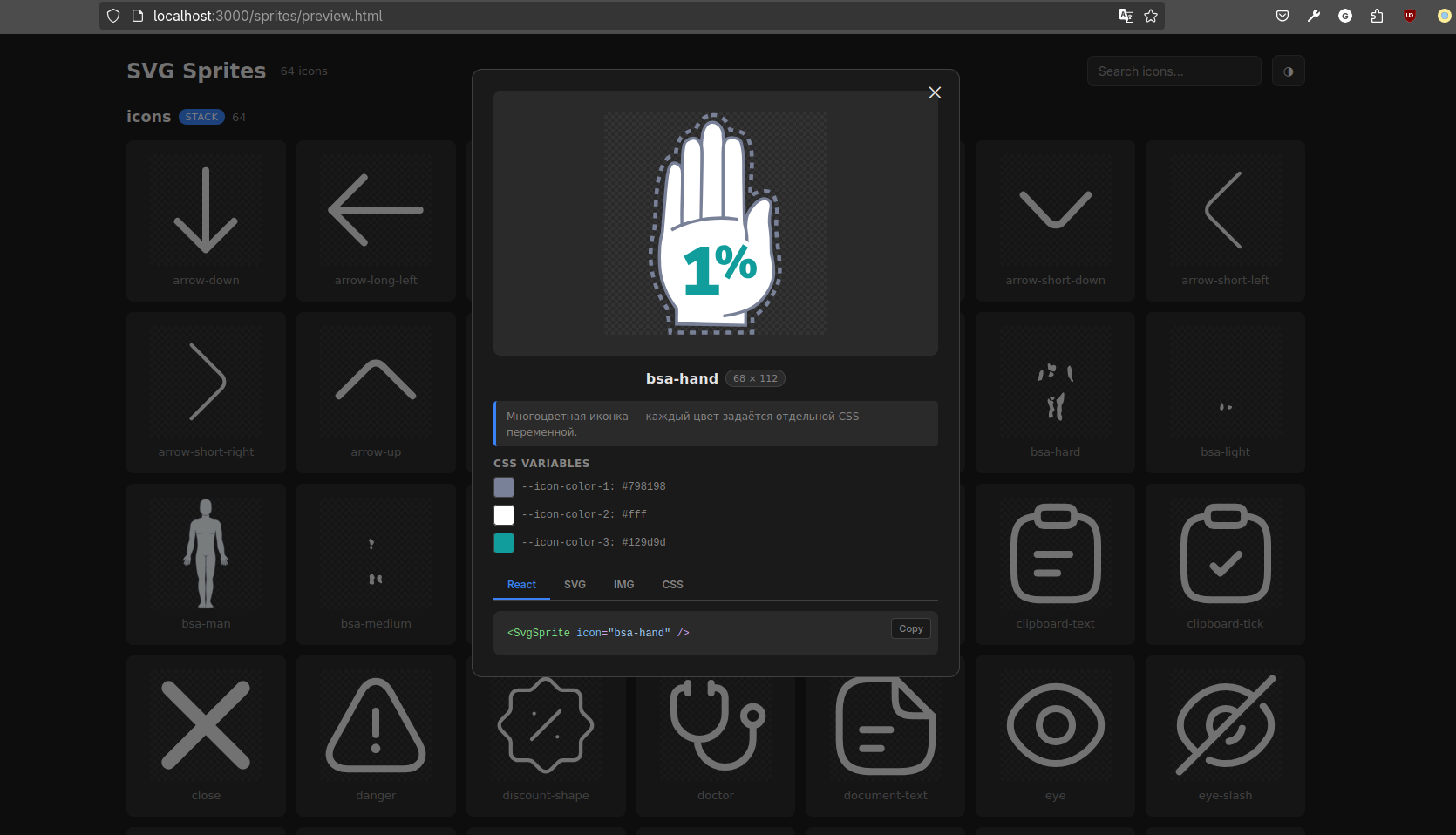
`SpriteViewer` renders all project sprites in one place and shows which icons are included in each set and how they look.
2026-04-22 16:54:35 +03:00
2026-07-11 23:20:39 +03:00
For each icon, you can see the generated CSS variables and their fallback colors. Change the values directly in the Viewer and see the result immediately.
2026-04-22 16:54:35 +03:00
2026-07-11 23:20:39 +03:00
It also provides ready-to-use integration examples for:
2026-07-11 07:00:59 +03:00
2026-07-11 23:20:39 +03:00
- React;
- `<svg><use>` ;
- `<img>` ;
- CSS.
2026-07-11 07:00:59 +03:00
2026-07-11 23:50:39 +03:00
2026-07-11 07:00:59 +03:00
2026-07-11 23:20:39 +03:00
The Viewer is added only to an internal debug page and does not become part of the generated icon components.
2026-07-11 07:00:59 +03:00
2026-07-13 20:07:42 +03:00
## React and Next.js
2026-07-11 07:00:59 +03:00
2026-07-13 20:07:42 +03:00
The package generates typed React components and supports Vite, Webpack 5, Next.js App Router, and Pages Router with Turbopack or Webpack.
2026-07-11 07:00:59 +03:00
2026-07-11 23:20:39 +03:00
## Clean Git history
2026-04-22 16:54:35 +03:00
2026-07-11 23:20:39 +03:00
The generator creates a local `.gitignore` that excludes generated files and keeps them from cluttering project history, pull requests, and the codebase.
2026-07-11 07:00:59 +03:00
2026-07-11 23:20:39 +03:00
The repository contains the source SVG files, configuration, and `.gitignore` rule, while sprites, components, and types are regenerated locally and in CI through `prebuild` .
2026-07-11 07:00:59 +03:00
2026-07-11 23:20:39 +03:00
## Only icons in production
2026-07-11 07:00:59 +03:00
2026-07-11 23:20:39 +03:00
`@gromlab/svg-sprites` does its main work during generation and remains in `devDependencies` .
2026-07-11 07:00:59 +03:00
2026-07-11 23:20:39 +03:00
Production components use only local generated code, styles, and the external SVG file. The compiler and CLI are not bundled into the client application, while `SpriteViewer` is imported separately only where a debug page is needed.
2026-07-11 07:00:59 +03:00
2026-07-11 23:20:39 +03:00
## Documentation
2026-07-11 07:00:59 +03:00
2026-07-11 23:20:39 +03:00
This README introduces the project's capabilities and demonstrates the primary use case. For setup, choose the guide for your stack.
2026-07-11 07:00:59 +03:00
2026-07-11 23:20:39 +03:00
### Quick start
2026-07-11 07:00:59 +03:00
2026-07-11 09:26:43 +03:00
- [Next.js App Router ](docs/en/next-app.md )
- [Next.js Pages Router ](docs/en/next-pages.md )
2026-07-11 23:20:39 +03:00
- [React + Vite ](docs/en/react-vite.md )
- [React + Webpack 5 ](docs/en/react-webpack.md )
### Technical resources
- [Technical reference ](docs/en/reference.md )
2026-07-11 09:26:43 +03:00
- [Programmatic API ](docs/en/programmatic-api.md )
2026-07-11 07:00:59 +03:00
2026-07-11 09:26:43 +03:00
## License
2026-04-22 16:54:35 +03:00
MIT
